Use N8N Within GFunnel to Scale Secure AI Automation and Channel Your Success
Table of Contents
- Table of contents
- Why Use N8N Within GFunnel: the modern automation paradox
- The self-driving car metaphor: building LuminAI
- Compliance first: self-hosting and trust
- Infrastructure patterns for scale and reliability
- Developer experience and why custom nodes matter
- Testing AI: evals, benchmarks, and quality gates
- Managing tech debt, observability, and staging
- How GFunnel complements n8n: Lead Connector, Flows AI, and the all-in-one advantage
- Step-by-step: How to Use N8N Within GFunnel in production
- Real numbers and lessons learned
- Use N8N Within GFunnel: practical examples and patterns
- Frequently asked questions
- Conclusion and next steps
Table of contents
- Why Use N8N Within GFunnel: the modern automation paradox
- The self-driving car metaphor: building LuminAI
- Compliance first: self-hosting and trust
- Infrastructure patterns for scale and reliability
- Developer experience and why custom nodes matter
- Testing AI: evals, benchmarks, and quality gates
- Managing tech debt, observability, and staging
- How GFunnel complements n8n: Lead Connector, Flows AI and more
- Step-by-step: How to Use N8N Within GFunnel in production
- Real numbers and lessons learned
- Frequently asked questions
- Conclusion and next steps
Why Use N8N Within GFunnel: the modern automation paradox
Use N8N Within GFunnel becomes a compelling answer to that tension because it lets teams prototype, iterate, and operate automation in a low-code environment while still retaining the ability to self-host and govern the automation stack. You get the best of both worlds: rapid feature delivery and enterprise-grade control.
From my perspective, the most important benefits of combining n8n with GFunnel are:
- Speed of iteration: deploy new automations and AI assistants quickly without full backend development cycles.
- Compliance and control: self-hosted instances let you meet customer constraints on sub-processors and data residency.
- Pluggability: swap LLMs and AI providers without re-architecting core application code.
- Developer-friendly observability: logs, tests, and monitoring that work with your existing tooling.
When I designed our AI wrapper, LuminAI, the principle was simple: let the product feel like a self-driving car. Humans remain in control for edge cases; routine tasks run autonomously, reliably, and explainably. Use N8N Within GFunnel to build that kind of capability on top of an all-in-one CRM, website, and automation platform.
The self-driving car metaphor: building LuminAI
I like metaphors that guide engineering tradeoffs. A self-driving car is not either off or on. It has levels. You start with lane assist and cruise control, then grow the system until it handles more complex conditions. We borrowed that staged thinking and applied it to how our tenant/resident platform gets smarter.
We call our AI layer LuminAI. LuminAI is not a single monolith but a wrapper and orchestration plane that sits between user intent and the services that execute actions. At its simplest it answers user requests like “write a message and schedule it for tomorrow” and then triggers a chain of API calls through our automation layer. At scale, it becomes an agent capable of multi-step operations, reasoning with data, and escalating to a human operator when needed.
Why this matters: an assistant that can do twelve clicks of manual work in a single conversation delivers real product value. It also raises a lot of questions about traceability, vendor lock-in, and testing. Those are precisely the areas where Use N8N Within GFunnel helps: n8n manages flows and connectors; GFunnel provides CRM, website, and campaign context—both together accelerate delivery while preserving governance.
Design principles for an AI layer
- Start small and level-up: ship small automations first and build trust with customers.
- Explicit escalation: always design clear thresholds where a human must review outputs.
- Observability by design: ensure logs, traces, and execution records exist for every automated decision.
- Model-agnostic plumbing: architect flows so you can swap LLMs as vendor preferences or compliance needs change.
Compliance first: self-hosting and trust
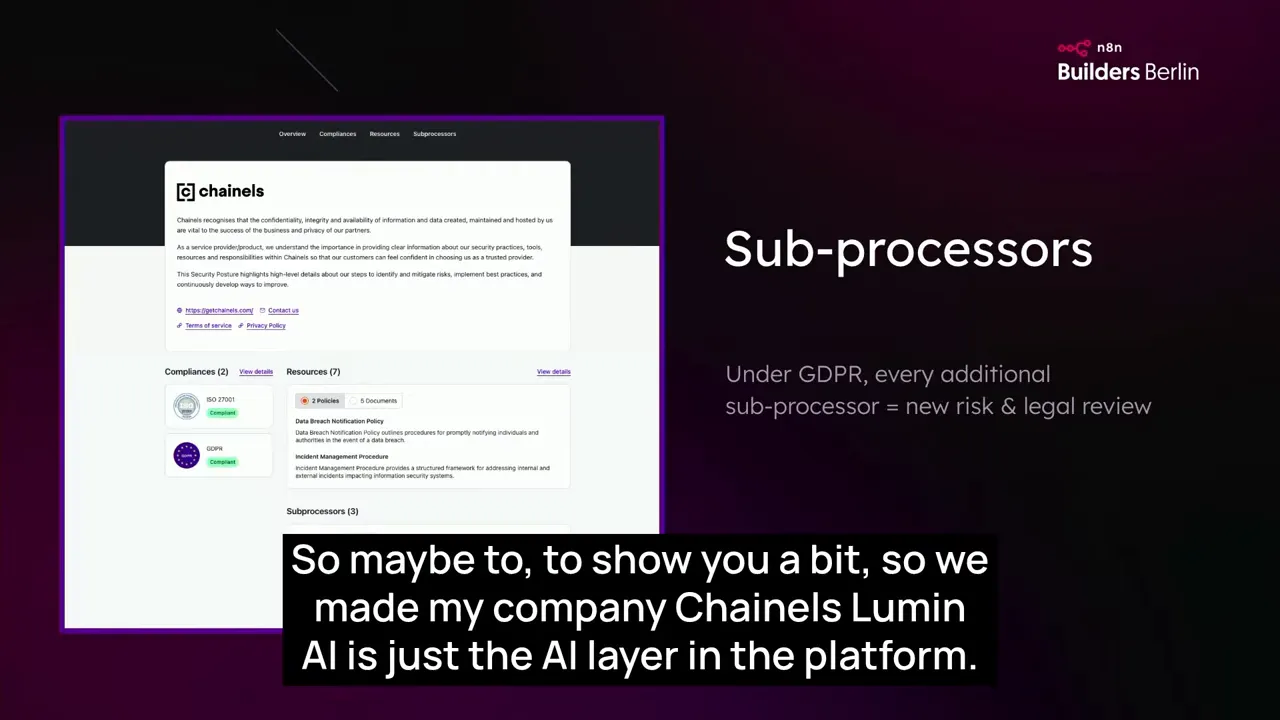
Large customers ask for things that products rarely plan for: can you list your sub-processors, where is data stored, what contracts change when you add a vendor. Those are not legal details to gloss over. They shape which architecture you choose.
For us, the deciding factor to Use N8N Within GFunnel was the ability to self-host n8n Enterprise in our AWS region. That single property unlocked compliance with customers who required a stable sub-processor list and control over data residency. By running n8n in our AWS cluster in Ireland, we avoided adding a new external sub-processor each time we integrated a new model or service.
Practical compliance items to plan for
- Sub-processor tracking: keep a clear inventory and a change process to notify customers when any subprocessors change.
- Data residency and region selection: choose hosting regions that match customer requirements.
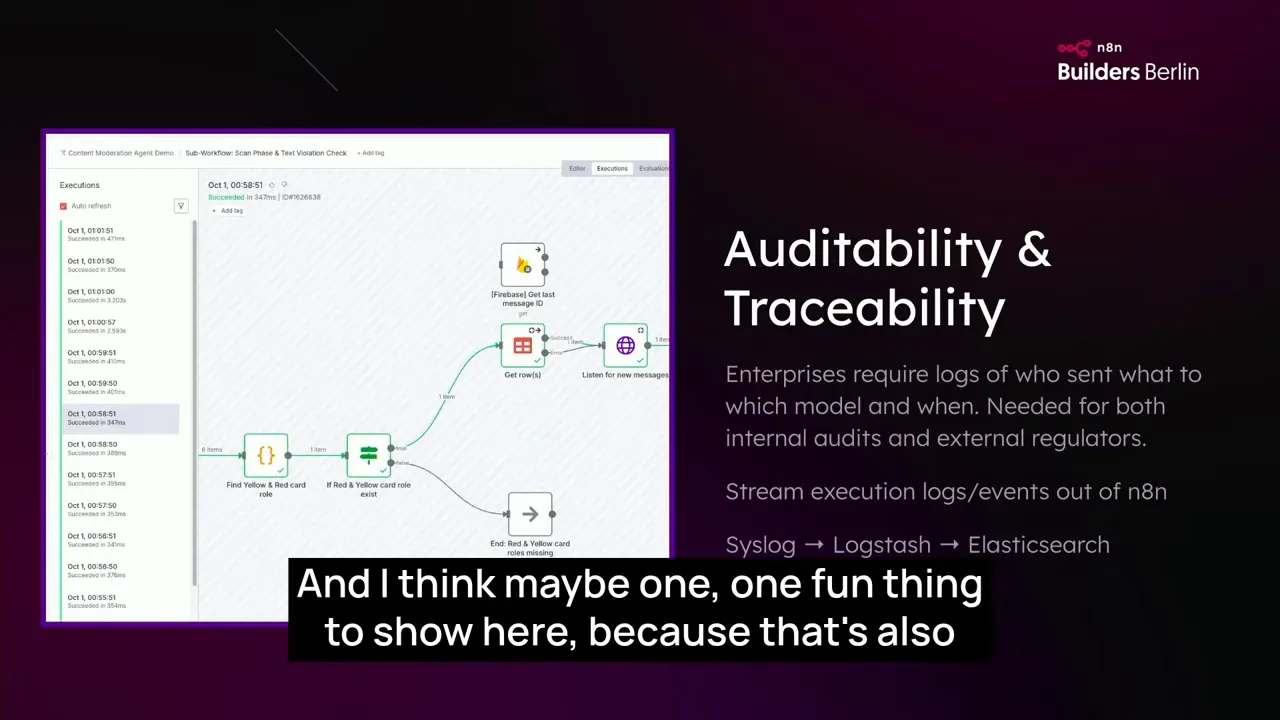
- Traceability: store logs and execution metadata to backtrace automated decisions during audits.
- Legal packaging: ensure your contracts and trust center explain the automation layer in plain language so customers can sign off faster.
For many startups, the pragmatic path is to pilot an AI-driven feature under a clearly labeled beta. This gives customers a moment to evaluate the capability without forcing a full enterprise procurement cycle. It also buys you runway to demonstrate audit trails and controls that satisfy legal and security teams. Use N8N Within GFunnel for these pilots to keep the integration surface small while you validate product-market fit.
Infrastructure patterns for scale and reliability
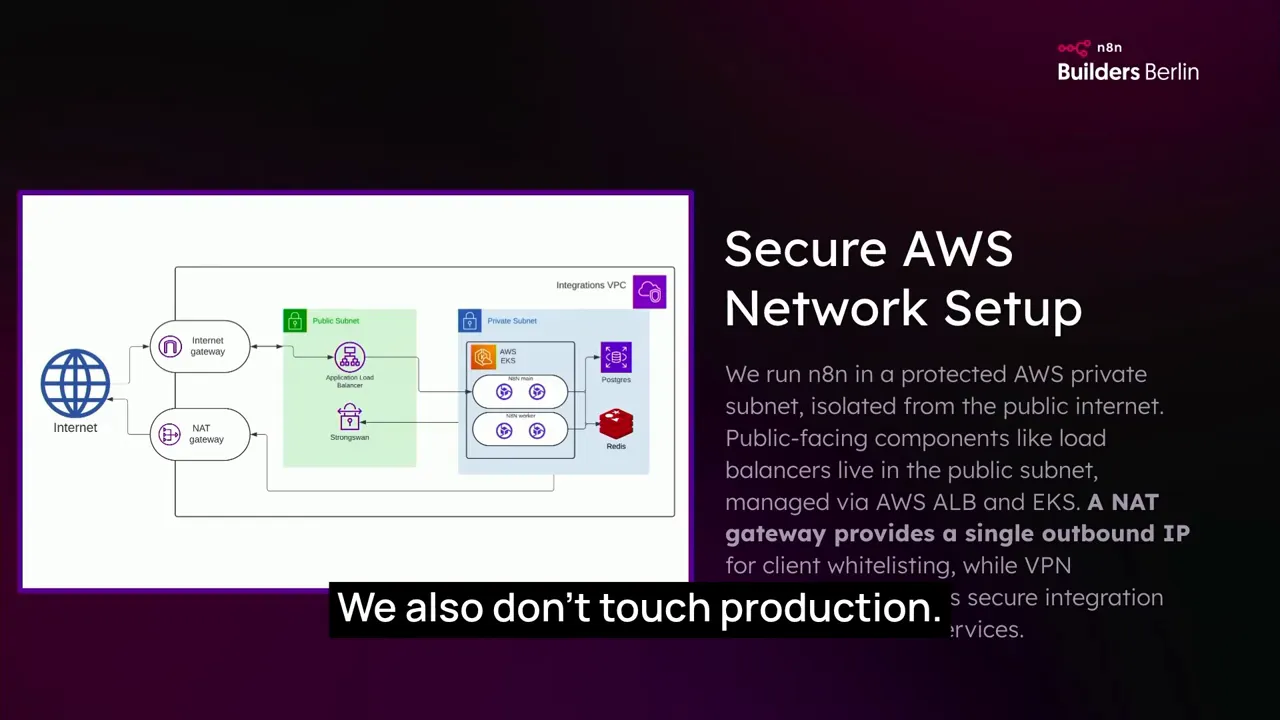
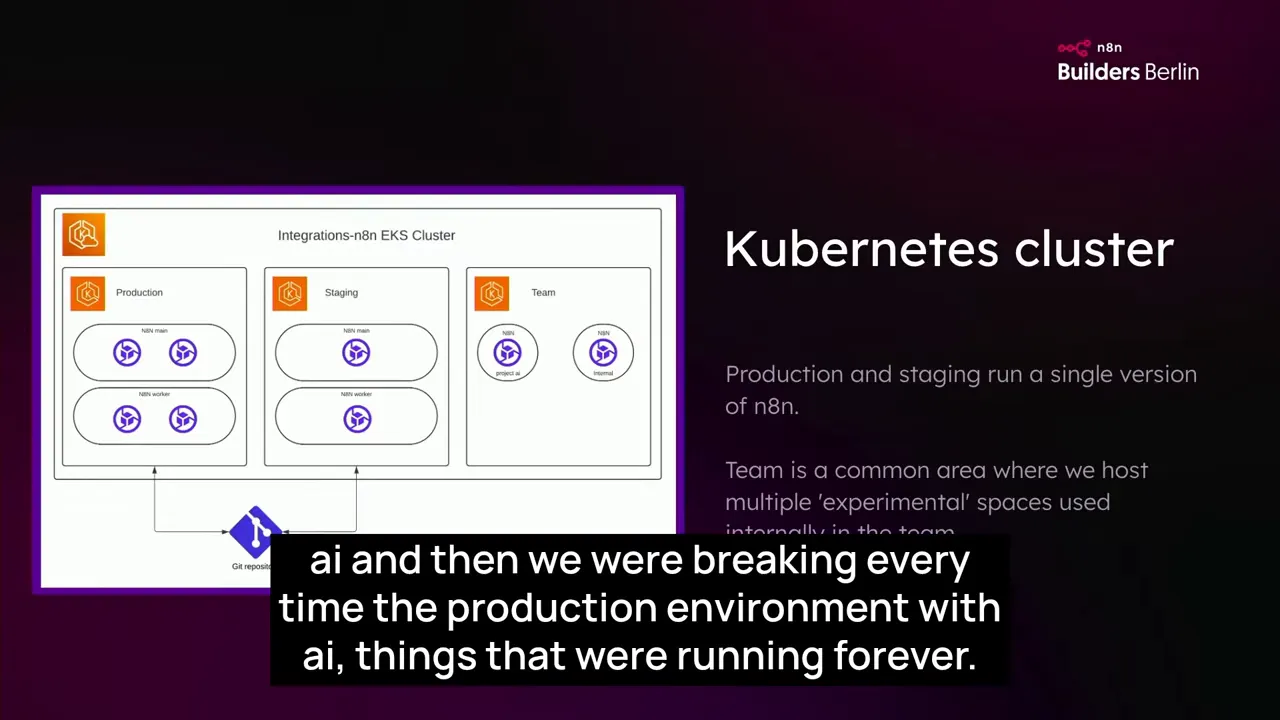
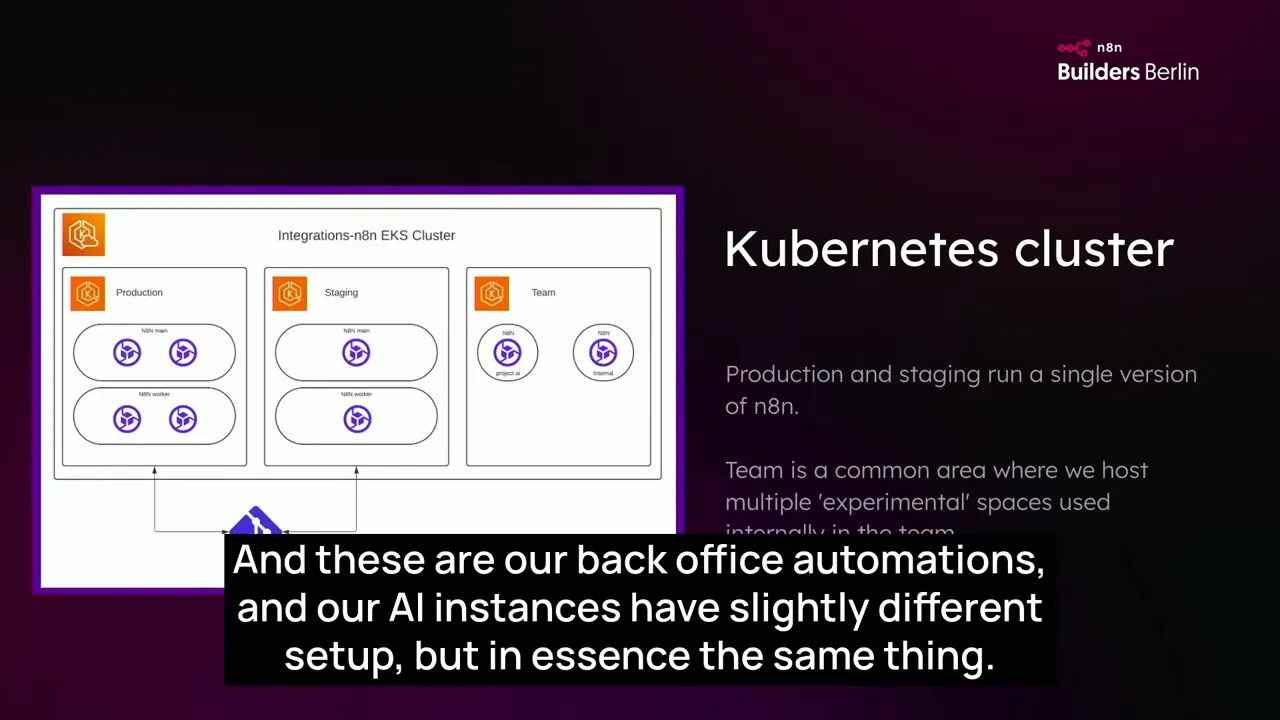
Let me be explicit about what worked for us so your implementation can skip the mistakes we made. We run multiple n8n instances on Kubernetes in AWS. We maintain separate environments for production, staging, and a dedicated AI instance. This lets us avoid incidents where an experimental model or a runaway loop throttled critical overnight processing.
Key infrastructure decisions
- Multiple instances by purpose: baseline production instances for business-critical flows and a separate AI instance for experimental and heavy LLM traffic.
- High availability: run multiple replicas and use a load balancer for high availability in production.
- Quick spin-up: maintain scripted automation so new instances can be provisioned in 15 to 30 minutes.
- Resource sizing: start small and scale; some of our workflows run as scheduled jobs and are not webhook bound, so they are easy to spread across time to smooth peak usage.
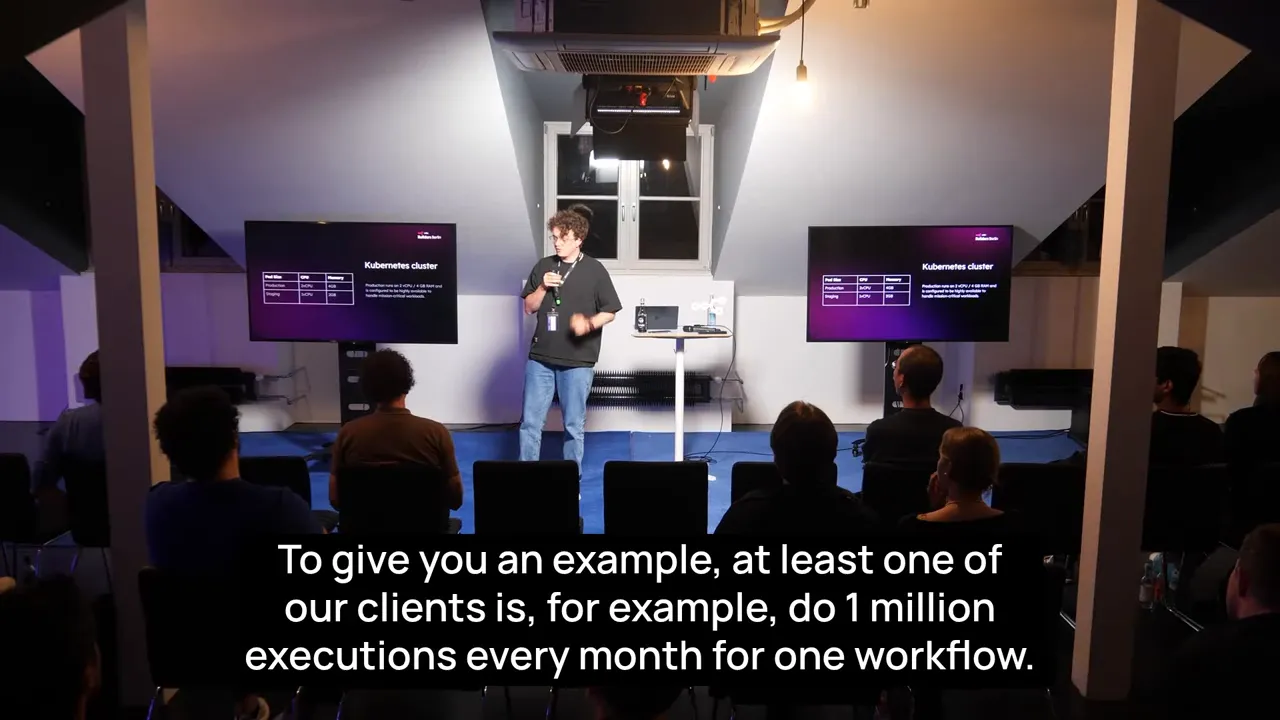
We track execution throughput carefully. Some production workflows can reach a million executions per month for a single client. The AI assistants for our initial 10,000 beta users also push about a million executions per month. Splitting AI workloads away from baseline automations reduces risk to the most critical parts of the platform.
Secrets and credentials at scale
One practical problem every team hits is credential hygiene when managing multiple instances and environments. Copy-pasting keys between staging, demo, and production is fragile and invites incidents. Invest early in secure secrets management that integrates with your Kubernetes cluster. It is an operational tax, but it saves time and worry when you operate at scale.
Developer experience and why custom nodes matter
One of the most underestimated levers for long-term maintainability is the developer experience for automation flows. When you have complex business logic implemented across hundreds of workflows, readability becomes critical. Use N8N Within GFunnel and take the opportunity to design readable flows and build custom nodes for your core API.
Why custom nodes?
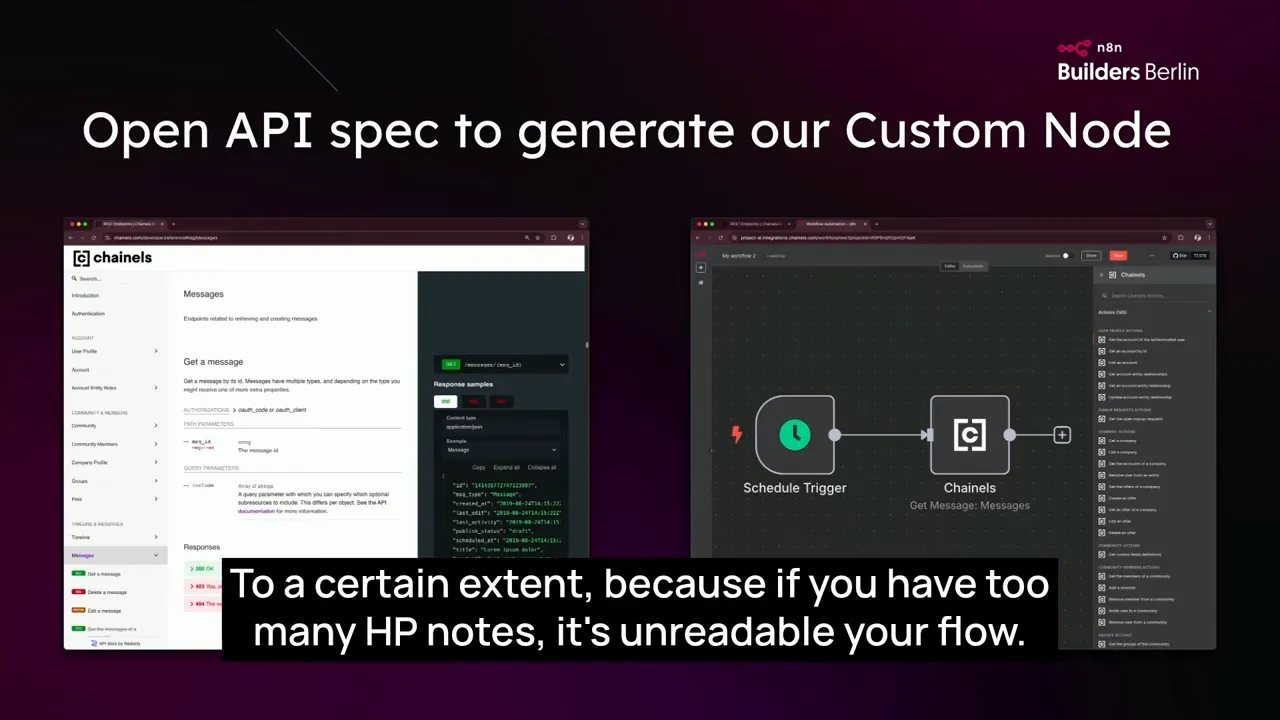
In the early days, teams rely on the HTTP node to call internal APIs. This works, but complex workflows with dozens of HTTP nodes quickly become unreadable. We solved that by generating custom nodes from our API specs. Each Channels API endpoint became a node with documentation embedded and parameter suggestions. That makes flows easier to scan and maintain and reduces errors when editing.
- Custom nodes hide boilerplate and make flows self-documenting.
- They reduce cognitive load for product teams who want to prototype without diving into raw HTTP details.
- They provide a stable abstraction so when backend APIs change, you only update the node implementation instead of dozens of flows.
When you Use N8N Within GFunnel, adopt the same habit: wrap GFunnel APIs, Lead Connector endpoints, or internal services behind nodes that encode business semantics instead of exposing low-level HTTP details to product owners and designers.
Treat flows like code
Our team operates n8n the way we operate traditional codebases. We keep flows in Git, use pull requests for changes, and require code review on any flow that touches production. We run automated tests for important flows and use evals to benchmark LLM-driven nodes. Treating flows as first-class artifacts in your engineering workflow pays dividends for stability and velocity.

Testing AI: evals, benchmarks, and quality gates
Testing is the part people worry about most when introducing AI into production. How do you assert correctness when the models return probabilistic outputs? The practical answer is to combine automated evals, sampling-driven tests, and human-in-the-loop checks.
A practical testing approach
- Create a test suite that includes obvious true cases, obvious false cases, and gray area cases for each task.
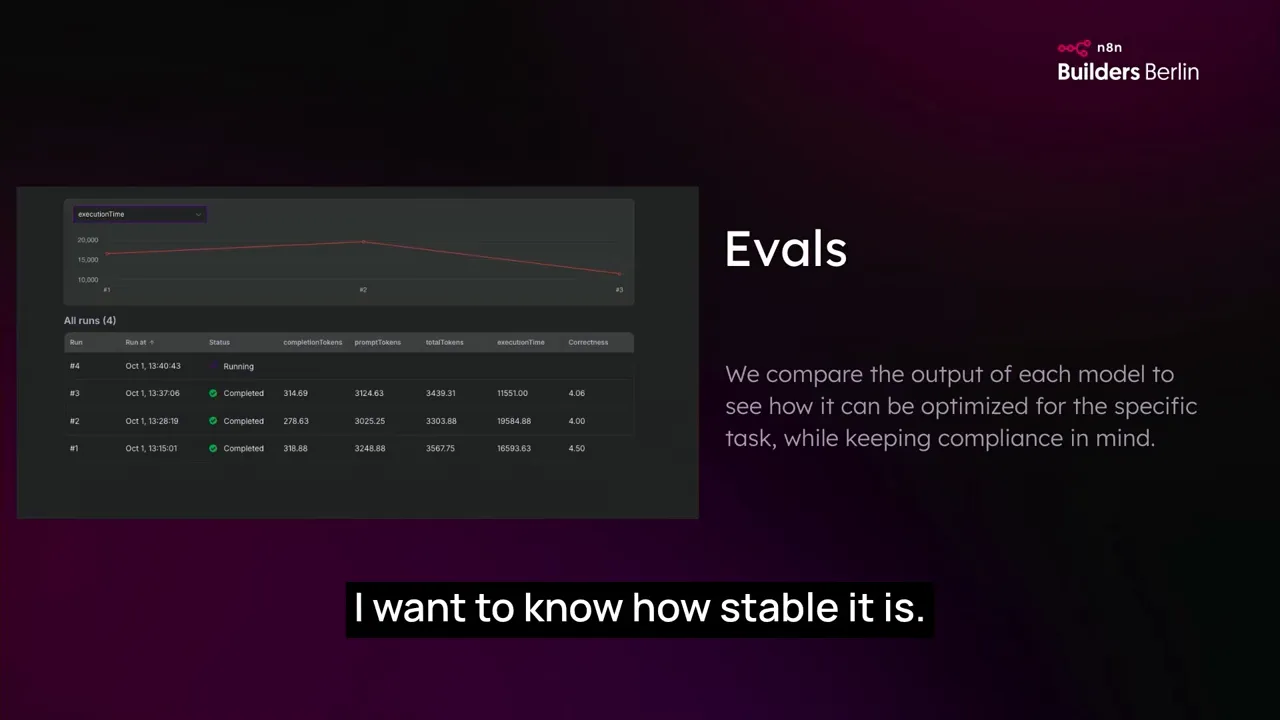
- Use evals to benchmark models on latency, cost, and accuracy. Track tokens burned and seconds per call.
- Flag regressions automatically and run regression tests whenever you upgrade a model or change a prompt.
- For production-critical tasks, require a human in the loop or a confirmation step when confidence is low.
When we added model selection capability, we observed what most teams observe: the same prompt yields different quality across models. The practical move is to run per-model evals and maintain a small catalog of preferred models for specific tasks. For example, some clients prefer Mistral for regional compliance reasons; others rely on OpenAI models. Build a mapping in your flows so the chosen model aligns with client preferences and quality requirements.
Prompt management and per-model tuning
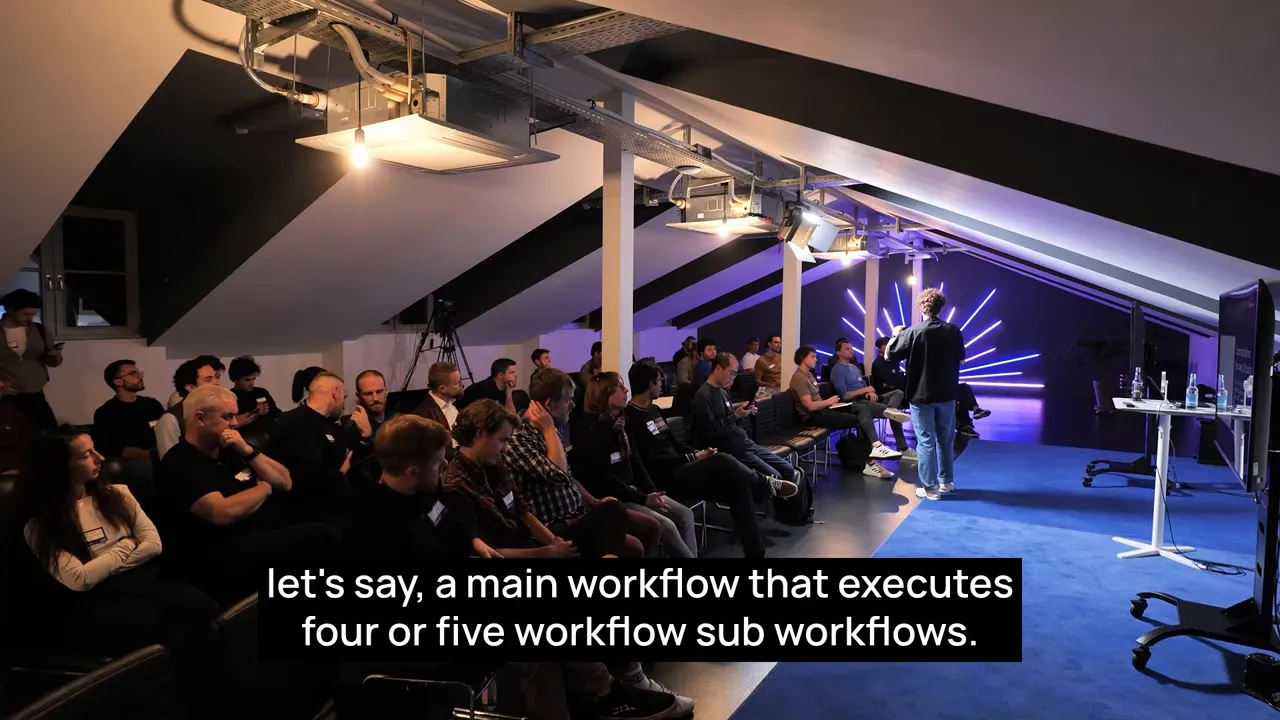
At scale, a single prompt will not suit all models. We keep a repository of prompts and sometimes maintain model-specific variants. Subworkflows are handy: a main workflow orchestrates the business logic while subworkflows encapsulate the model-specific prompt and result normalization. This way, most parts of the flow remain stable and only the LLM layer becomes model-specific when necessary.
Managing tech debt, observability, and staging
Tech debt is inevitable. The key is to budget for it and to create feedback loops that make refactoring manageable. We allocate 10 percent of our time to optimize flows and reduce unnecessary nodes. That effort compounds quickly: simplifying flows reduces execution time, reduces cost, and makes future changes safer.
Observability and logs
Traceability was non-negotiable for our customers. We synchronize n8n execution logs with our Elastic cluster to ensure we can backtrace every automated action. When an automated assistant sends a message or modifies user access, there must be a traceable record accessible to support and legal teams.
- Sync n8n logs to central logging for easy search and audit.
- Record execution metadata, LLM prompt and response, and which model was invoked.
- Alert on failures and unexpected latencies so you can act before customers notice.
Staging and release practices
We avoid hot fixes in production. Staging mirrors production with fewer resources and limited data. For AI features, we run experiments in a separate AI instance. That enables us to run heavy benchmarking and fail noisy experiments without impacting critical overnight jobs. Use N8N Within GFunnel and adopt a similar multi-instance strategy: keep business-critical automation isolated from experimental AI traffic.
How GFunnel complements n8n: Lead Connector, Flows AI, and the all-in-one advantage
GFunnel is designed to be the platform where entrepreneurs build, manage, and grow their businesses. Its suite—Lead Connector, Flows AI, websites, CRM modules, and AI-powered contract features—fits naturally around n8n's automation capabilities. Use N8N Within GFunnel to amplify both the speed of automation and the integrated product experience.
Lead Connector and CRM workflow integration
Lead Connector provides CRM capabilities that are essential for customer-facing automation: contact data, funnels, and real-time analytics. When you Use N8N Within GFunnel, you can trigger automations from Lead Connector events, or push enriched data back into the CRM after an LLM assistant completes a task. That two-way integration lets you build automation that understands context rather than blindly executing tasks.
Example use cases:
- Auto-enrich leads with data extracted from uploaded documents using LLMs then create or update CRM contacts via Lead Connector.
- Trigger onboarding flows in n8n when a new lead converts, combining GFunnel pages with automated email and SMS sequences.
- Sync conversation summaries produced by Flows AI back into the CRM as activity logs.
GFunnel's pages and funnels, combined with n8n automations, let you create conversion paths that are both fast to ship and deeply integrated. Use N8N Within GFunnel to manage the glue between the front-end funnel actions and backend automation reliably.
Flows AI: built-in AI workflows
Flows AI in GFunnel is designed for marketing and sales automation but can be extended with custom automations through n8n. Use N8N Within GFunnel to bridge Flows AI's conversational or lead-nurturing capabilities with backend systems that require multi-step API interactions, e.g., scheduling, contract generation, booking resources, or provisioning access.
AI-powered contract management
Contracts are a common bottleneck. GFunnel's AI-enhanced contract management integrates document generation, signature workflows, and risk assessment. Use N8N Within GFunnel to automate the chain when a customer signs: trigger onboarding flows, provision accounts, notify teams, and generate audit logs. n8n's flexibility makes it easy to connect contract events to complex operational tasks.
Website builders and funnels
GFunnel's drag-and-drop website and funnel builders let you build high-converting pages quickly. When you Use N8N Within GFunnel, you can tie user actions on these pages to sophisticated automation flows: enrich form submissions, call model-based assistants to pre-fill follow-up messages, or route leads to the correct sales team based on predicted intent.
GFunnel's ecosystem and n8n together shrink the time from idea to production. The platform approach means fewer tools stitched together, and n8n provides a governed automation plane for the integration points that remain.
Learn more at https://www.gfunnel.com and see how the Lead Connector and Flows AI integrate with your automations.
Step-by-step: How to Use N8N Within GFunnel in production
Below is a practical blueprint I recommend if you want to adopt this approach. It’s deliberately incremental so you can deliver value fast and reduce risk as you expand.
At every step, use existing GFunnel features like Lead Connector and Flows AI to simplify frontend and funnel logic while letting n8n handle the cross-system orchestration. Use N8N Within GFunnel to maintain clear responsibilities: GFunnel holds customer and funnel context while n8n executes the multi-system work.
Real numbers and lessons learned
Numbers give necessary context:
- We ran LuminAI in beta with 10,000 users while the platform serves about half a million users.
- One client produced roughly 1 million workflow executions per month for a single flow.
- Our AI beta accounted for about 1 million executions per month as well.
- Production n8n instances typically run on small footprints initially—for us that looked like two CPUs and 4 GB memory per instance—but we scale when needed.
Key lessons:
- Invest early in observability. Centralized logs and metadata are indispensable for audits and fast incident response.
- Separate AI traffic from core business automations until you are confident in limits and failure modes.
- Design your flows with composability. Use subworkflows and custom nodes so you can swap models or change prompts without rewriting business logic.
- Keep a deliberate cadence for tech debt reduction. We dedicate 10 percent of dev time to refactor and optimize flows.
Use N8N Within GFunnel: practical examples and patterns
Below are patterns that illustrate typical use cases when combining n8n and GFunnel capabilities in production.
Enriched lead routing
Pattern: When a Lead Connector form converts, call an enrichment LLM to summarize intent and route the lead to the appropriate funnel. The LLM suggests a follow-up message and the flow writes the summary to the GFunnel CRM.
Benefits: faster lead qualification, higher conversion rates, and fewer manual triage steps.
Automated onboarding
Pattern: When a customer signs a contract in GFunnel, trigger an n8n flow to provision access, create accounts, add permissions, and send a personalized welcome sequence generated by Flows AI.
Benefits: consistent onboarding, measurable time to value, and full audit trail of provisioning.
Contract analysis and risk scoring
Pattern: Upload a contract to GFunnel; an n8n workflow sends it to a model for clause extraction and risk scoring, then returns a summarized risk report to the CRM and notifies a legal reviewer if the risk exceeds a threshold.
Benefits: reduced legal review time and proactive risk mitigation.
Watch how these capabilities tie together: put Lead Connector and Flows AI on the front door, then Use N8N Within GFunnel to automate the orchestration behind the scenes.
Frequently asked questions
What does it mean to Use N8N Within GFunnel?
Use N8N Within GFunnel means running n8n automations that integrate with GFunnel features—Lead Connector, Flows AI, pages, funnels, and CRM—to orchestrate multi-system workflows while leveraging GFunnel's user and funnel context. This approach combines GFunnel's product surface with n8n's automation plane so you can prototype quickly and operate with governance.
Do I need n8n Enterprise or can I use the community edition?
For enterprise deployments that require strict compliance and self-hosting, n8n Enterprise is recommended because it supports self-hosted installations and features tailored to governance. For early prototyping, the community edition can be useful, but check sub-processor and data residency requirements before moving to production.
How do you test AI-driven automations?
Combine automated evals with curated test cases including true, false, and gray examples. Benchmark models on latency and token usage. Use human-in-the-loop checks for critical actions and require explicit confirmations when confidence is low. Maintain an eval-driven scoreboard to compare models.
How do I avoid vendor lock-in with LLMs?
Abstract LLM calls in subworkflows or nodes so the rest of your flow consumes normalized outputs. Maintain a small catalog of preferred models per task and design flows so you can swap the model layer without changing business logic. Use self-hosted n8n and per-model mapping to honor customer preferences.
Can GFunnel host the full automation stack?
GFunnel provides excellent built-in automation tools, but for complex cross-system orchestration and heavy LLM workloads, combining GFunnel with n8n provides greater flexibility and governance. Use N8N Within GFunnel to let GFunnel manage customer context and funnels while n8n executes complex, auditable automations.
Conclusion and next steps
Use N8N Within GFunnel to build a pragmatic, governed, and fast automation strategy. Whether you are automating tenant onboarding, lead nurturing, or contract workflows, combining GFunnel's all-in-one product surface with n8n's automation plane allows teams to ship features quickly while maintaining control and auditability. Treat your flows like code, invest in logs and tests, isolate experimental AI traffic, and always include clear escalation paths to human reviewers.
If you are ready to explore this approach, start with a focused pilot: pick a task that delivers measurable user value, build a prototype with GFunnel pages and Lead Connector events, and orchestrate the backend with n8n. Monitor execution metrics and run evals so you can choose the right models and scales. For more about GFunnel and its tools, visit https://www.gfunnel.com and consider creating an account at https://www.gfunnel.com/create-account to test Lead Connector and Flows AI in your own projects.
Use N8N Within GFunnel to channel your success: rapid iteration, enterprise control, and AI that actually produces measurable outcomes. Start small, instrument everything, and iterate toward a self-driving experience that delights users and satisfies compliance teams.