Use N8N Within GFunnel: Production-Ready Environments, Governance, and Practical Steps
Table of Contents
- Table of contents
- Introduction: Why this matters if you want to Use N8N Within GFunnel
- Why environments matter
- How most teams start and why that breaks
- Three environment models you will encounter
- Moving to enterprise: Git integration, pull requests, and version control
- Branching models and working with many branches
- Rules, processes, and training
- Testing strategies: unit, sub workflows, and end-to-end
- Handling webhooks and single entry points
- Other architectural approaches
- Mapping n8n environments into GFunnel architecture
- Step by step: How to Use N8N Within GFunnel in your organization
- Costs, trade-offs, and decision criteria
- Case study: enriching a HubSpot deal with Gen AI
- Practical tips and gotchas
- How GFunnel accelerates the adoption of safe automations
- Resources and links
- What is the recommended environment model when you want to Use N8N Within GFunnel?
- How do you handle webhook driven integrations when using n8n across multiple environments?
- Do I need n8n enterprise to Use N8N Within GFunnel effectively?
- How can GFunnel tools like Lead Connector and Flows AI work with n8n?
- What are the biggest mistakes teams make when they start to Use N8N Within GFunnel?
- Conclusion: Start scrappy, get governance, and scale intentionally
Table of contents
- Why environments matter
- How most teams start and why that breaks
- Strategies for moving to enterprise setups and Git integration
- Branching models, one-to-one instances, and the trade-offs
- Rules, governance, and training for safe deployment
- Testing, webhooks, and realistic approaches
- How to Use N8N Within GFunnel in real projects
- Step by step guide to implement environments inside GFunnel
- Costs, hidden trade-offs, and decision criteria
- Case study: enriching HubSpot deals with Gen AI
- FAQs
- Conclusion and next steps
Introduction: Why this matters if you want to Use N8N Within GFunnel
Why environments matter
Environments are the scaffolding that allow teams to move from experimentation to stable operation. Good environments let you test, iterate, and roll out changes with confidence. Without environments, development and production are tangled and fragile. When I first built automations, everything was inside one instance. It was fast. It was fun. Then production broke.
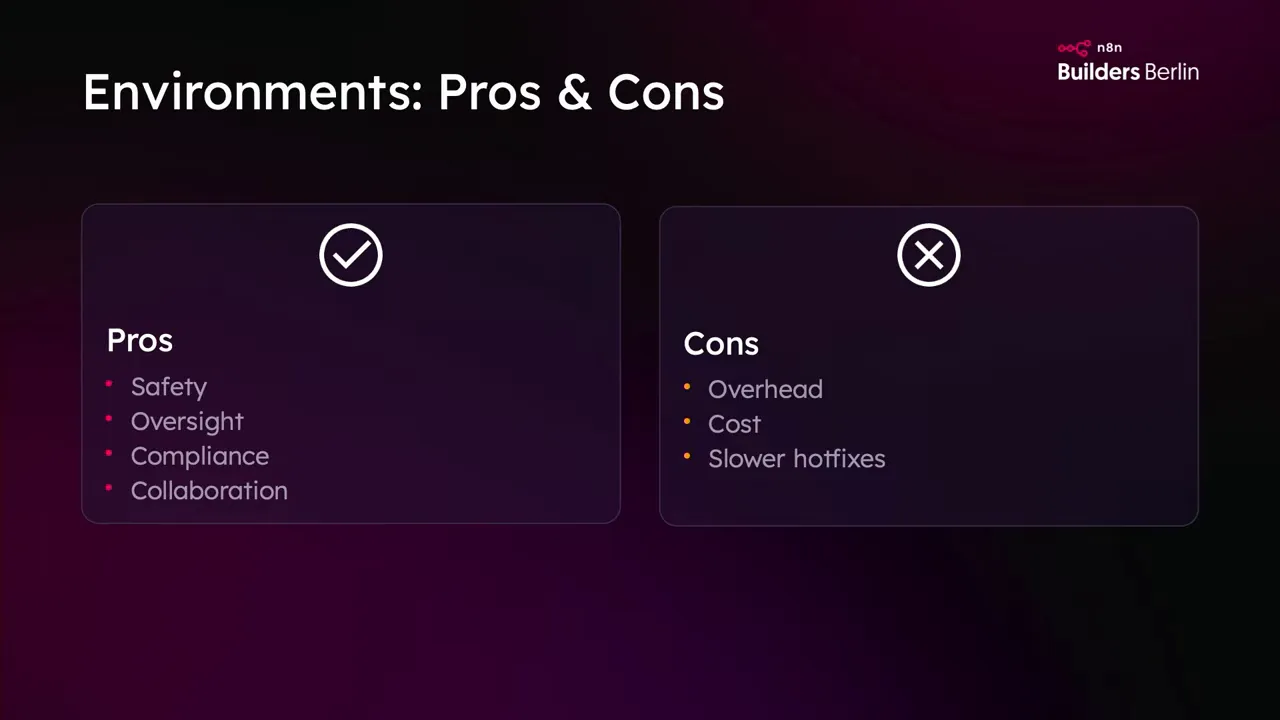
Here are the critical reasons environments matter if you intend to Use N8N Within GFunnel:
- Separation of risk: Development mistakes do not propagate to production.
- Data governance and privacy: Business critical data can be limited to production only.
- Access control: Not every user should be able to change production workflows.
- Monitoring and dedicated resources: Production needs more observability and scale.
- Change management and review: Pull requests and reviews prevent accidental changes.
If you plan to Use N8N Within GFunnel, building these boundaries early can save you hours of firefighting, and dollars in duplicated fixes and outages.
How most teams start and why that breaks
The honest truth is that almost everyone starts badly. The most common evolution I have seen goes like this:
- Beginner setup: one instance that holds everything, from POCs to production.
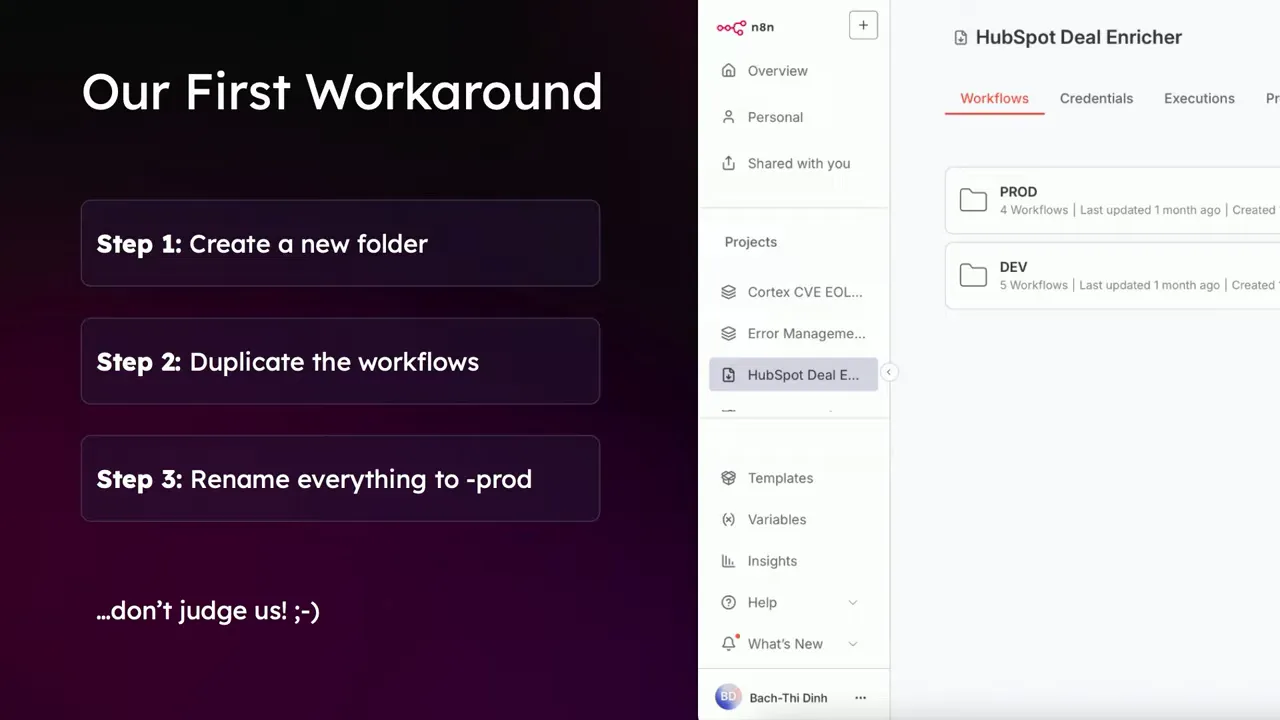
- Quick fix: developers copy workflows into "prod" folders or duplicate workflows with new credentials.
- Hot-fix culture: when production breaks, changes happen directly in production.
- Version sprawl: development lags behind production, credential drift appears, and backups are rare.
Why does this pattern happen? Because speed beats process in the early days. Teams want results. That is not wrong. The problem appears when hot-fix culture becomes the norm and you lose control. Backups vanish, versioning is undone, and the next change introduces new regressions.
The most dangerous moment is when teams start patching production directly. It feels faster but it increases risk and slows the team down over time. If you want to Use N8N Within GFunnel in a robust way, you should plan for separation before your automations become business critical.
Three environment models you will encounter
In the n8n enterprise world there are three main environment patterns that teams adopt. Each has trade-offs. You will need to pick the one that matches your company size, maturity, and cultural needs before you Use N8N Within GFunnel.
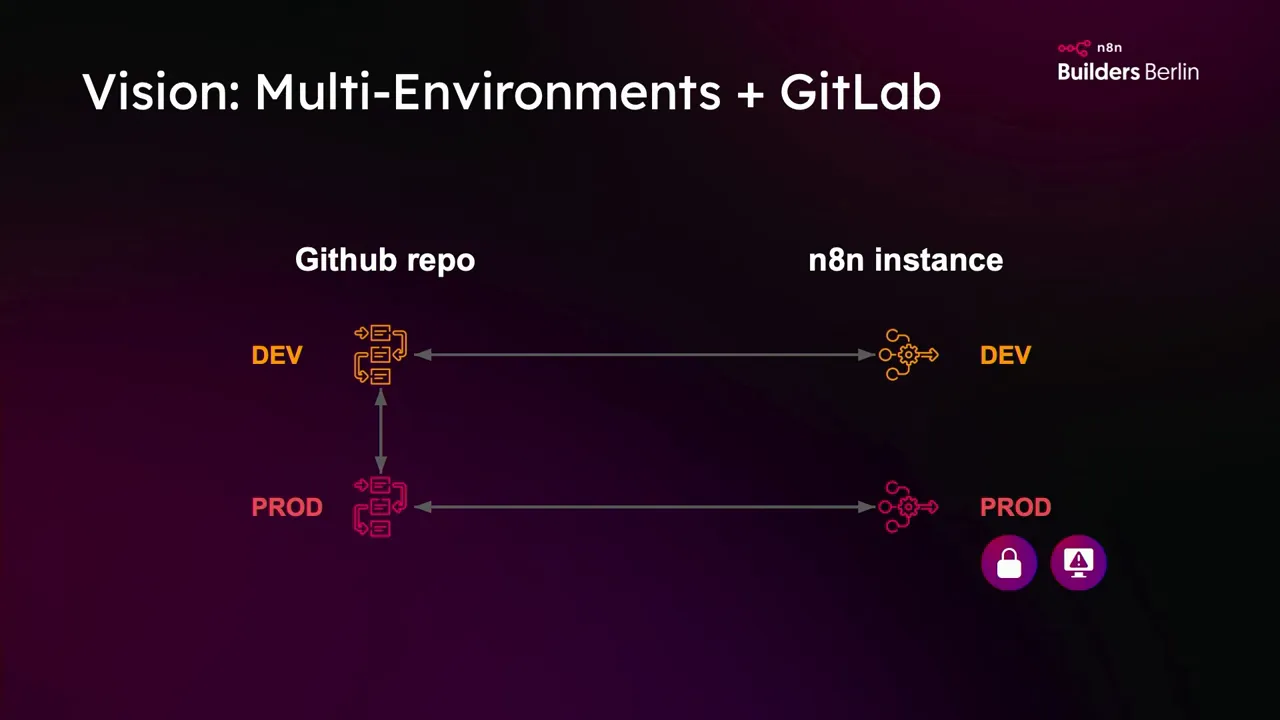
1. Multiple instances and multiple repositories
In this model you have a dedicated n8n instance for each environment such as development and production. Each instance is linked to a separate Git repository. Code moves to production only through pull requests. Production is protected from ad hoc edits.
Benefits:
- Strong separation of concerns and credentials
- Clear review and pull request workflow
- Ability to allocate monitoring and infrastructure to production only
Trade-offs: operational cost for multiple instances and slower hot fixes.
2. Multiple instances with a single repository
Here you run multiple n8n instances but they all backup to the same repository. The instances are largely mirrors, and code can be pushed from development and pulled to production. This is less about version separation and more about instance separation.
Benefits:
- Useful for testing new versions of n8n or package installations on dev before production
- Clean separation of runtime environments without fully duplicating version control
Trade-offs: development and production may stay in sync unintentionally. If not enforced by process, changes can slip through.
3. One-to-one instance and branch
This is the simplest endorsed pattern in enterprise: one instance mapped to one branch. The branch holds the history. If you want to Use N8N Within GFunnel while keeping a simple backup and restore story, this model can work as a reliable backup strategy.
Benefits: straightforward, minimal complexity, consistent backups.
Trade-offs: less collaboration features and no branch merging in the n8n workflow layer yet. You still need process to ensure code flows properly.
Moving to enterprise: Git integration, pull requests, and version control
Once you outgrow the single-instance pattern, the easiest way to introduce discipline is Git. Link your production n8n instance to a repository and require that code arrives in production only via pull requests. This is where the magic of traceability appears. If you want to Use N8N Within GFunnel reliably, Git is not optional.
Key practicalities I learned the hard way:
- n8n requires SSH for repository connections in certain enterprise setups. If your team prefers HTTPS you will need to adjust your environment or create an SSH gateway.
- Allow time for IT to open outbound IPs and firewall rules to permit SSH from n8n instances. We once spent three days with IT because our Git server required specific IP whitelisting.
- Enforce protections on the production branch using your Git provider. Require reviews, status checks, and CI where possible.
Integrating Git gives you version history, a review process, and the ability to revert changes quickly. Those are priceless for teams that plan to Use N8N Within GFunnel as business critical infrastructure.
Branching models and working with many branches
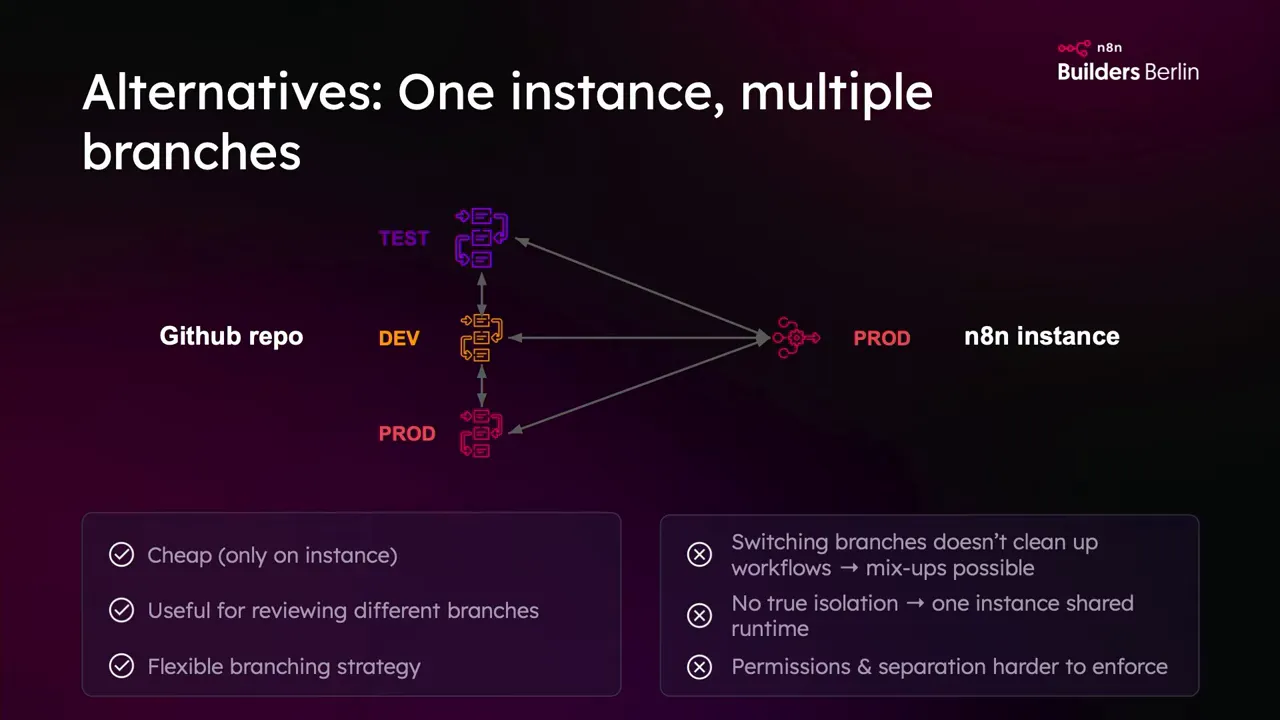
n8n enterprise allows you to have many branches on a single instance. At first this sounds odd. Why would anyone want dozens of branches in a low code environment? The answer is collaboration. Branches let multiple authors work in parallel, experiment, and then propose changes back to a mainline via pull requests.
But there are limits. Workflows in n8n cannot be merged at the component level the same way code can. That means you need solid processes in place. Here is how I recommend teams work to Use N8N Within GFunnel while keeping branching sane:
- Keep branch lifetimes short. Merge frequently.
- Use naming conventions for branches tied to tickets or features.
- Make small, incremental changes so conflicts are easier to resolve.
- Adopt sub workflows to reduce duplication and simplify testing.
Branches are powerful but not a substitute for good governance. If you want to Use N8N Within GFunnel in a team, marry branching with a rule set that prevents ad hoc changes directly in production.
Rules, processes, and training
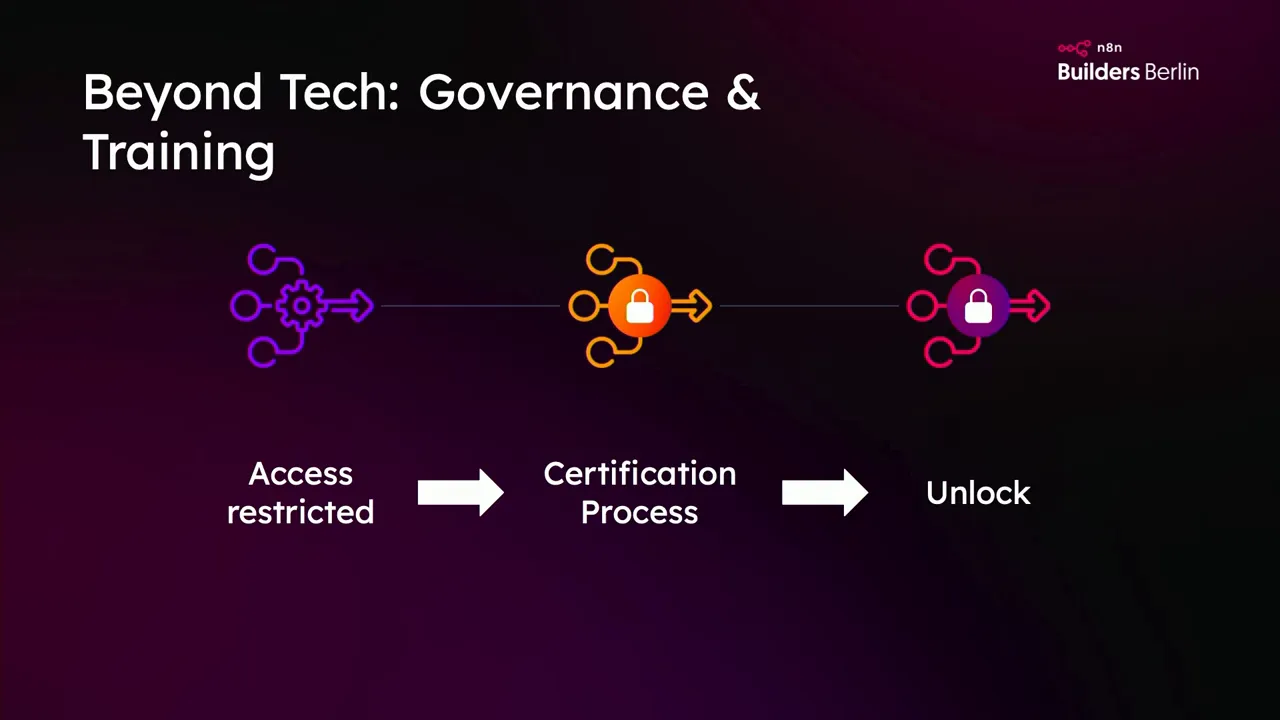
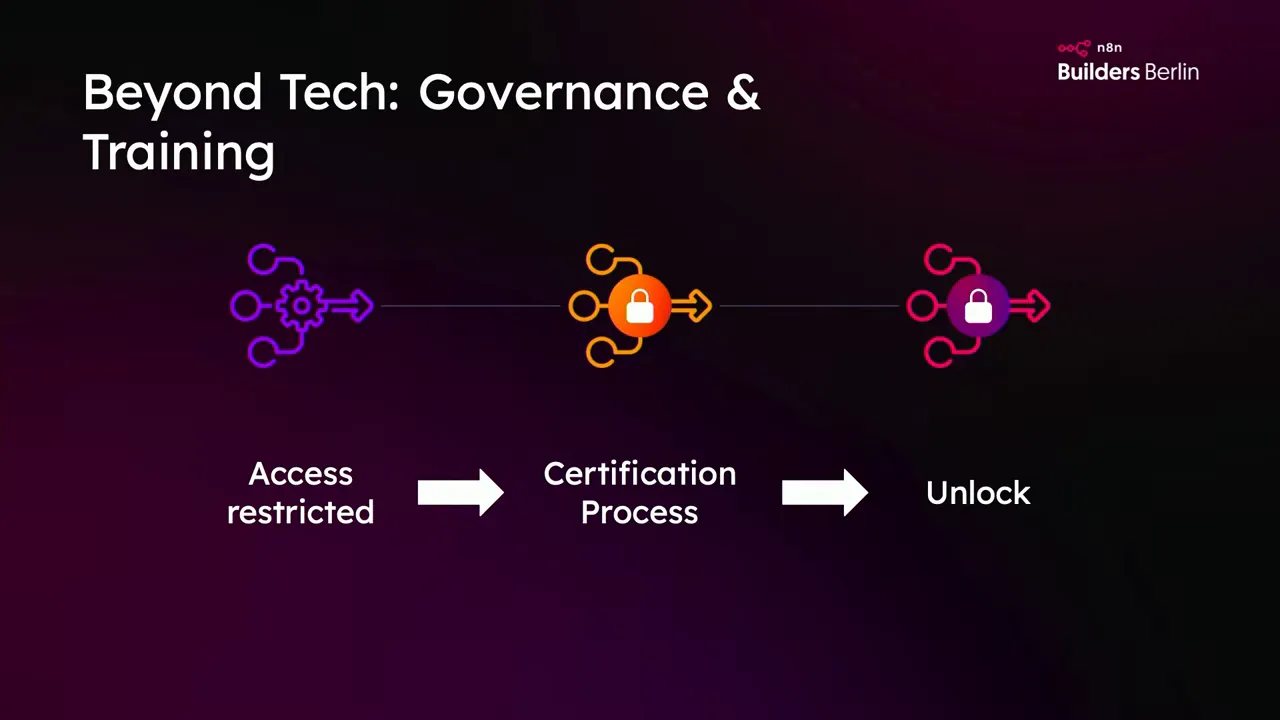
Technical features are useless without governance. We built a three-level environment model inside our organization: playground, test, and production. Access to test and production is restricted by certification. Only trained team members get access, and the training covers both tool usage and data compliance.
When you want to Use N8N Within GFunnel, think beyond the click. Ask these governance questions:
- Who is allowed to change production workflows?
- What training is required to access test and production?
- How do we handle sensitive data when testing locally?
- Which integrations are allowed in non production environments?
- How do we audit changes and incidents?
Training was a crucial lever for us. We introduced a basic n8n training and a data compliance training. The compliance module forced engineers to think about whether it is appropriate to move intranet data into third party tools or to store personal data in test environments. If you plan to Use N8N Within GFunnel and process business data, make training a requirement, not an option.
Testing strategies: unit, sub workflows, and end-to-end
One of the gaps in many low code platforms is robust testing support. n8n did not ship with a full testing framework for small steps for quite some time. The pragmatic approach we adopted relies on sub workflows and targeted tests to give us confidence.
Testing layers we use:
1. Unit style tests with sub workflows
Break down complex flows into smaller sub workflows. Each sub workflow can be tested independently with mock inputs. This method allows you to exercise logic and outputs without running the entire end-to-end process.
2. Integration tests for API calls
Where possible, use sandbox or staging endpoints for external services. If you must test against live services like Slack or HubSpot, create dedicated test apps or channels to avoid polluting production streams.
3. End-to-end smoke tests
Automate end-to-end sanity checks that run on deployment to confirm the main flows still function. These do not need to run on every commit but should execute after merges to main branches.
If you want to Use N8N Within GFunnel, plan your testing strategy before you scale. Mocking, sub workflows, and replicated channels for webhook-driven systems remove a lot of friction.
Handling webhooks and single entry points
Webhooks are notoriously tricky in multi environment setups. Many external services present only a single webhook URL per app which makes routing events to dev or test environments difficult. Here are pragmatic options we used and recommended to clients when they wanted to Use N8N Within GFunnel:
- Create separate app instances for each environment where the external tool allows it. For Slack we created multiple Slack apps and channels per environment and wired them accordingly.
- Use a parent router workflow. Have a single public webhook endpoint that receives events and then routes to environment specific sub workflows based on a switch or header.
- Spin up separate test tenant accounts for services that offer them. A dedicated HubSpot test tenant made it straightforward to test with real data without risking production records.
The router approach is especially useful when you cannot create separate webhook URLs. You can receive the event in a protected central workflow and then selectively forward a copy to your test environment for replay or to trigger additional artifacts. This is a practical pattern if you want to Use N8N Within GFunnel while keeping costs low.
Other architectural approaches
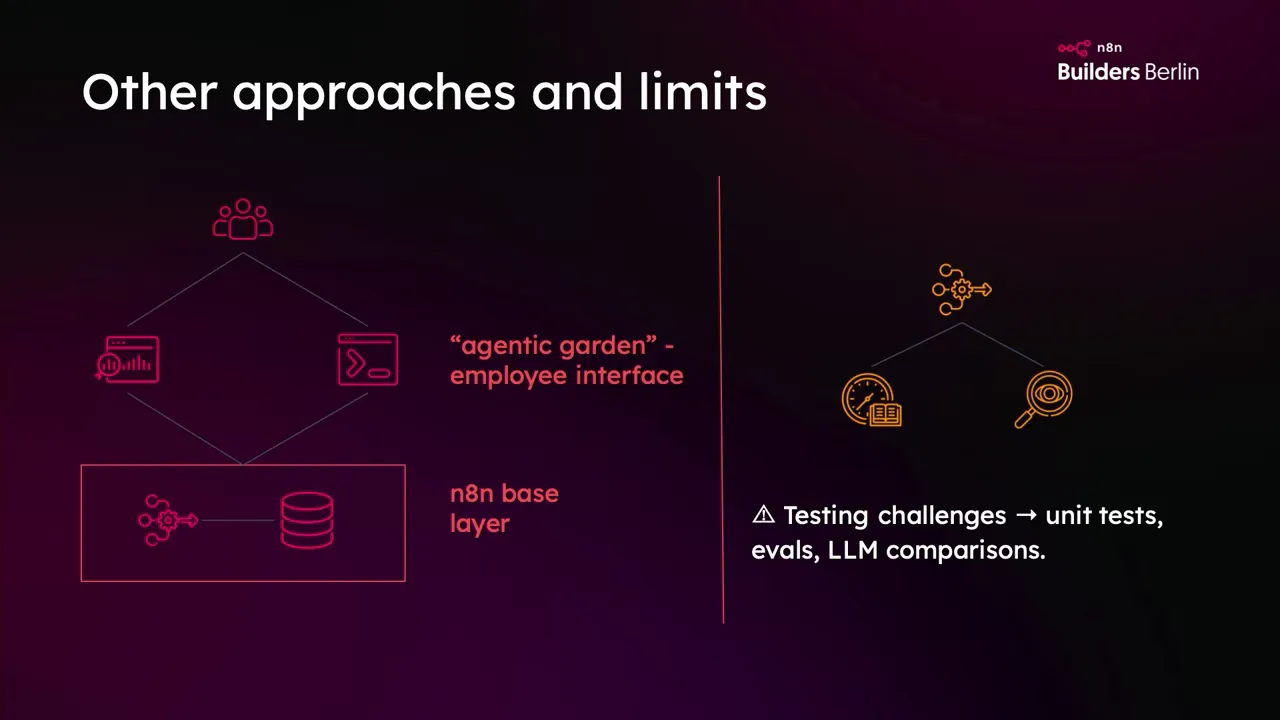
Not all teams want their users to see or interact with n8n directly. One client built an "agentic garden" interface on top of n8n that their employees used. n8n ran purely as the process engine behind a proprietary UI. For them, environments were invisible to end users and purely a deployment concern for the platform engineers.
Two lessons from that model if you want to Use N8N Within GFunnel:
- Hide complexity behind a managed interface to scale adoption among non technical users.
- Ensure your hidden engine has the same governance and testing you would apply to visible tools. Users will still rely on the outputs and expect consistent behavior.
Mapping n8n environments into GFunnel architecture
GFunnel is an all in one ecosystem for entrepreneurs and creators. If you plan to Use N8N Within GFunnel, think of n8n as the automation engine inside a broader stack that includes Lead Connector, Flows AI, CRM, and website builders. The question is how to map the environment patterns we described into the GFunnel way of building businesses.
Here is an integrated approach I recommend to teams that want to Use N8N Within GFunnel and enjoy the combination of no code, AI, and strong governance.
Environment mapping
- Playground inside GFunnel: allow entrepreneurs and power users to prototype flows connected to Lead Connector sandbox data and demo web forms. This is where creativity happens without business risk.
- Test tied to a sandbox CRM and a temporary Flows AI configuration: run tests against test tenants for third party services such as HubSpot or Slack.
- Production inside GFunnel: the production n8n instance communicates with live GFunnel CRM and external systems and is protected by Git and approval processes.
By aligning your GFunnel objects such as forms, pages, and CRM instances to the environment layers, you reduce accidental data bleed and create clearer ownership.
Lead Connector and n8n integration
Lead Connector handles your leads and customer data. If you want to Use N8N Within GFunnel, use n8n to enrich, route, and process leads that arrive in Lead Connector. For example, a workflow can:
- Receive a new lead from a GFunnel web form.
- Run enrichment via external APIs using n8n and Flows AI to determine lead intent.
- Update Lead Connector CRM records and trigger automated follow up sequences.
This pattern centralizes the heavy logic in n8n while keeping the lead surface and marketing assets in GFunnel. You get the best of both platforms and can enforce environment separation for testing and production.
Flows AI and automated decisioning with n8n
Flows AI provides AI powered features. If you want to Use N8N Within GFunnel you can integrate Flows AI outputs into n8n workflows to apply logic such as lead scoring, content personalization, and contract generation. Make sure AI outputs are validated in test environments before moving to production.
Example:
- Flows AI analyzes a lead message and returns a predicted intent.
- n8n routes the lead to a sales rep if intent exceeds a threshold.
- Lead Connector CRM receives the assignment and a contract flow is prepared using AI driven contract templates.
This combination reduces manual work and bridges marketing and sales while keeping control over each environment.
Step by step: How to Use N8N Within GFunnel in your organization
Below is a practical checklist to move from single instance prototype to a production-grade environment inside GFunnel.
Phase 1: Prototype and agreement
- Create a playground GFunnel account with a Lead Connector demo CRM.
- Prototype a small n8n workflow that enriches a lead and updates the CRM.
- Document the scope, data fields, and success criteria for the automation.
- Decide the environment model you plan to adopt when scaling. If you plan to Use N8N Within GFunnel, choose between multiple instances or branch mapping now.
Phase 2: Testing and training
- Set up a test n8n instance and a test Lead Connector CRM or sandbox.
- Build unit style tests using sub workflows in n8n to validate logic.
- Run integration tests to external APIs using sandbox credentials.
- Implement basic training for users who will access test and production. Make this certification required to get access.
Phase 3: Git and deployment
- Link your n8n production instance to a Git repository over SSH. Confirm IP whitelisting and firewall rules with IT.
- Create protected branches and require pull request reviews for production merges.
- Define a release process and rollback plans. Keep each release small.
Phase 4: Observability and operations
- Monitor workflow health in production and track error trends.
- Allocate dedicated infrastructure for production to handle peak loads.
- Define incident response and runbooks for common failures.
Phase 5: Continuous improvement
- Collect retrospective feedback and improve the training content.
- Refine test coverage and automate smoke tests when possible.
- Scale up by adding environments or replicating the model across more GFunnel projects.
If you follow these steps you can safely and reliably Use N8N Within GFunnel to automate business critical processes without taking unnecessary risks.
Watch how GFunnel transforms businesses in this deep dive and see how the automation engine works behind the scenes.
Costs, trade-offs, and decision criteria
Using environments introduces cost. Multiple instances mean infrastructure or licensing expenses. Pull request workflows mean slower hot fixes. All of these are trade-offs against safety, oversight, and predictable collaboration.
When deciding whether to Use N8N Within GFunnel in a certain architecture, ask yourself three questions:
- How critical is the automation to my business? The more critical, the stronger the environment separation should be.
- How many teams and users will touch these workflows? More teams require stricter governance and clearer training.
- What is our tolerance for slower fixes versus availability risk? If downtime is costly, favor rigor and review processes.
There is no single perfect answer. The goal is to find a setup that aligns with your company culture and maturity. For many startups and small businesses starting with GFunnel, a simple one to one mapping and robust backups are sufficient. For enterprises or product teams who rely on automation in customer workflows, invest in dedicated production instances, Git integrations, and enforced training.
Case study: enriching a HubSpot deal with Gen AI
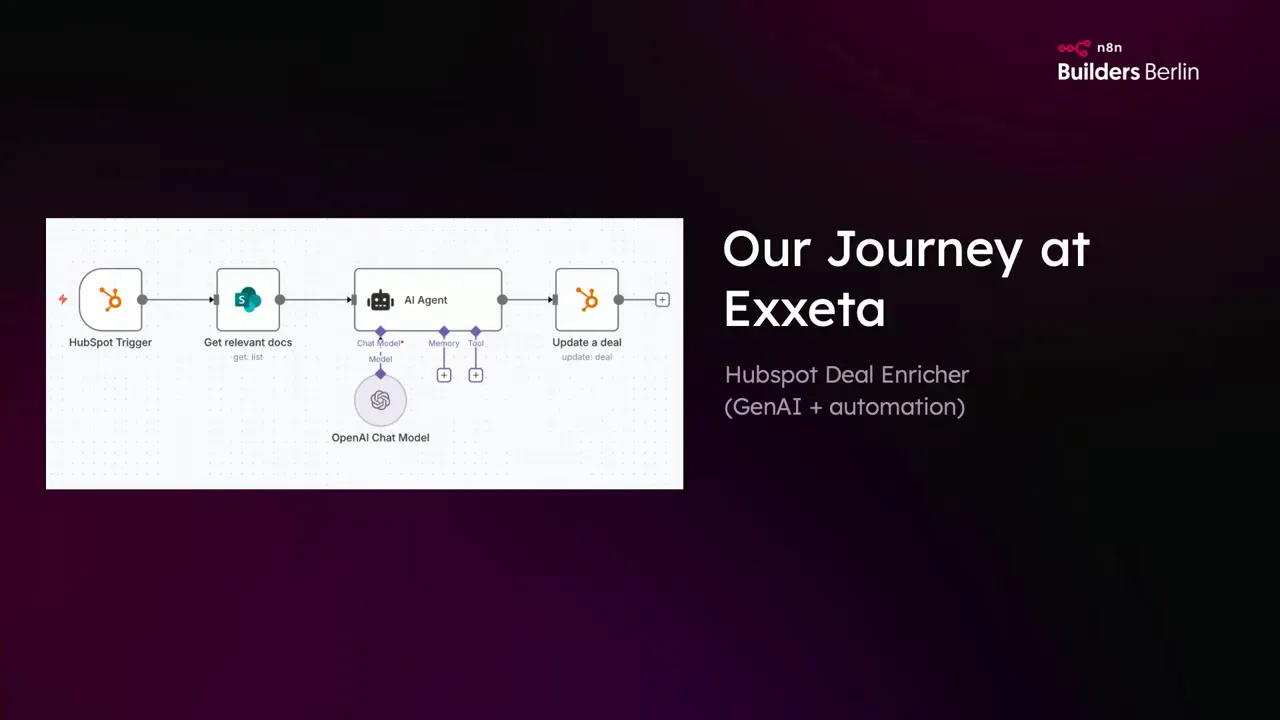
One real project I led was a two week proof of concept that enriched HubSpot deals using data from SharePoint and Gen AI. The flow was straightforward:
- Trigger on a new HubSpot deal.
- Fetch supporting documents from SharePoint about the deal.
- Send the documents to a Gen AI agent to generate a summary and recommendations.
- Push the summarized data back into the HubSpot deal.
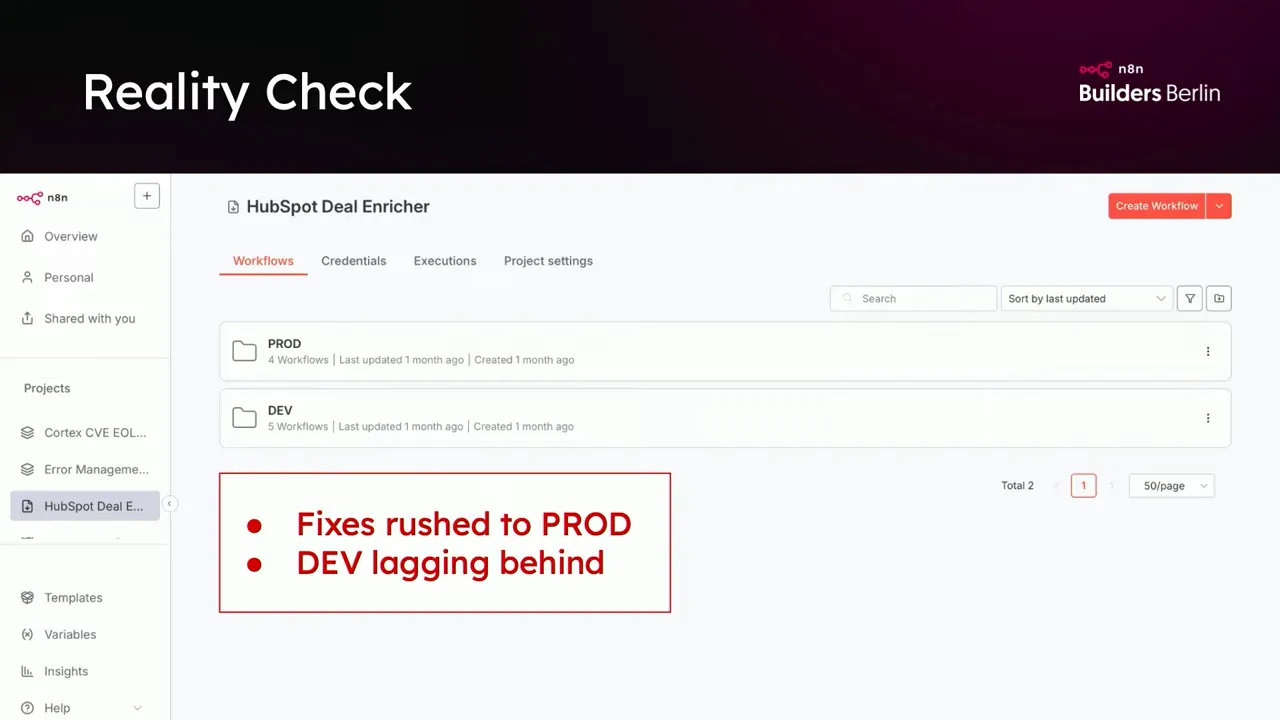
The POC was successful and fast. The challenge came when we asked, how do we run this in production? We had started with a copy paste prod folder inside our dev instance. Within a week that approach broke down. Developers were hotfixing production and development was falling behind. We moved to an enterprise model with a separate production instance and Git linked to enforce reviews.
Lessons from that case study for teams that want to Use N8N Within GFunnel:
- Early wins do not replace process. The faster you add simple governance the safer you will be.
- Test using sub workflows so you can validate Gen AI steps independently of the full end-to-end flow.
- Keep credentials and access strictly separated between test and prod to avoid accidental data leaks.
Practical tips and gotchas
- If your Git provider requires SSH, make sure your n8n instance has a static outbound IP and that IT has time to white list it. We once spent three days setting this up.
- If you rely on webhook driven integrations and the external service supports only one webhook, create a routing workflow in n8n to forward events to the appropriate environment. Or create multiple app instances in the external tool if allowed.
- Sub workflows are not just for reusability. Use them for testability. Each sub workflow can be unit tested with mock inputs and expected outputs.
- Train people. Restrict access to test and production to certified users only. A small amount of upfront training reduces a lot of risk.
- Decide the environment model early but be ready to adjust as you learn. Everyone starts messy and that is okay.
How GFunnel accelerates the adoption of safe automations
GFunnel is built for entrepreneurs who want an integrated platform. If your goal is to Use N8N Within GFunnel, you get a powerful combination. Lead Connector stores leads and customer data. Flows AI provides fast AI driven insights. n8n automates the logic that connects them. The website builders and CRM keep your customer experience simple and consistent.
Practical benefits of combining GFunnel with n8n:
- Consolidated tech stack. Less time managing multiple tools.
- Faster prototyping inside GFunnel with the ability to operationalize using n8n when ready.
- Monetization and community built in. You can earn by sharing templates and workflows across the GFunnel community.
If you are curious, learn more at https://www.gfunnel.com and consider opening a demo account at https://www.gfunnel.com/create-account to start experimenting safely.
Resources and links
- GFunnel homepage: https://www.gfunnel.com
- GFunnel create account: https://www.gfunnel.com/create-account
- GFunnel CRM overview: https://www.gfunnel.com/crm
- GFunnel automation resources: https://www.gfunnel.com/automation-home
- GFunnel affiliate program: https://www.gfunnel.com/affiliate-home
What is the recommended environment model when you want to Use N8N Within GFunnel?
Choose the model that matches your maturity. For teams starting out, one instance mapped to a branch with reliable backups can be sufficient. For teams with multiple engineers or business critical automations, run separate n8n instances for production and development and link each to its own Git repository. Enforce pull requests and code reviews for production merges.
How do you handle webhook driven integrations when using n8n across multiple environments?
There are three practical strategies. Create separate apps or channels in the external system per environment. Use a router workflow in n8n that receives events and forwards them to environment specific sub workflows. Or adopt separate tenants for services that offer them, such as a sandbox HubSpot account. Each has trade offs in cost and complexity.
Do I need n8n enterprise to Use N8N Within GFunnel effectively?
n8n enterprise provides advanced environment features, Git integration conveniences, and improved governance. You can replicate some of the behavior in community editions by backing up to Git repositories and using manual processes, but enterprise reduces operational friction and adds protections that are valuable when automations become business critical.
How can GFunnel tools like Lead Connector and Flows AI work with n8n?
Use Lead Connector as your CRM and event source, Flows AI for content and decisioning, and n8n as the orchestration engine. A typical pattern is for GFunnel to collect leads, n8n to fetch additional data and apply business rules, and GFunnel to manage follow up sequences. This pattern centralizes logic and reduces duplication while enabling strong environment separation.
What are the biggest mistakes teams make when they start to Use N8N Within GFunnel?
The most common mistakes are: keeping everything in one instance, allowing direct production edits, skipping testing for AI driven steps, and not training users. These mistakes create a hot fix culture and increase risk. Introduce basic governance early and make training mandatory to avoid them.
Conclusion: Start scrappy, get governance, and scale intentionally
Everyone starts messy and that is okay. The important part is to learn and put in guard rails before the automations become critical. If you want to Use N8N Within GFunnel, do not treat environments as only a technical problem. It is an organizational question about trust, training, and how your teams operate. Pick an environment model that fits your maturity, enforce rules where needed, and use sub workflows for testability. Over time you will benefit from safer releases, fewer firefights, and predictable automations.
GFunnel brings together the tools entrepreneurs need to build, automate, and grow. If you are ready to channel your success and Use N8N Within GFunnel, start a free trial at https://www.gfunnel.com or create a demo account at https://www.gfunnel.com/create-account and begin prototyping with a clear plan for environments. Build fast, but govern smarter.
Thank you for reading. I hope these lessons from real world mistakes and real world fixes help you design an automation approach that scales. Start scrappy, learn fast, and protect production. Use N8N Within GFunnel to connect your team, automate your leads, and power your next stage of growth.