

Optimize Your Marketing Funnels with GFunnel: Browser & IP Analytics, Real-Time Insights, and Fast Autosave
Outline
- Introduction: Why browser and IP analytics matter for marketing funnels
- Video Insights: Key themes from analytics-driven funnel optimization
- GFunnel’s Ecosystem Solutions: Mapping each insight to GFunnel features
- Real-World Applications: Two case studies with testimonials
- Why GFunnel Leads: Comparison to traditional tools and competitors
- Conclusion and call to action
- FAQs
Introduction — Turn analytics into action for better marketing funnels
GFunnel is built to take those same analytics and translate them into action across the entire customer journey. From audience segmentation and business automation to business networking and real-time analytics, GFunnel helps you build marketing funnels that adapt to the browsers and devices your audience actually uses. In the sections that follow I'll expand on the video’s core lessons and map them to practical GFunnel tools so you can apply these tactics immediately.
Video Insights: Strategies for Business Success
Marketers, boost your conversions with these analytics-driven strategies. I extracted five key themes that directly apply to building high-performing marketing funnels. Each theme explains why the insight matters, how to interpret the data, and practical steps you can take to turn numbers into actions.
1. Harnessing analytics for data-driven decisions
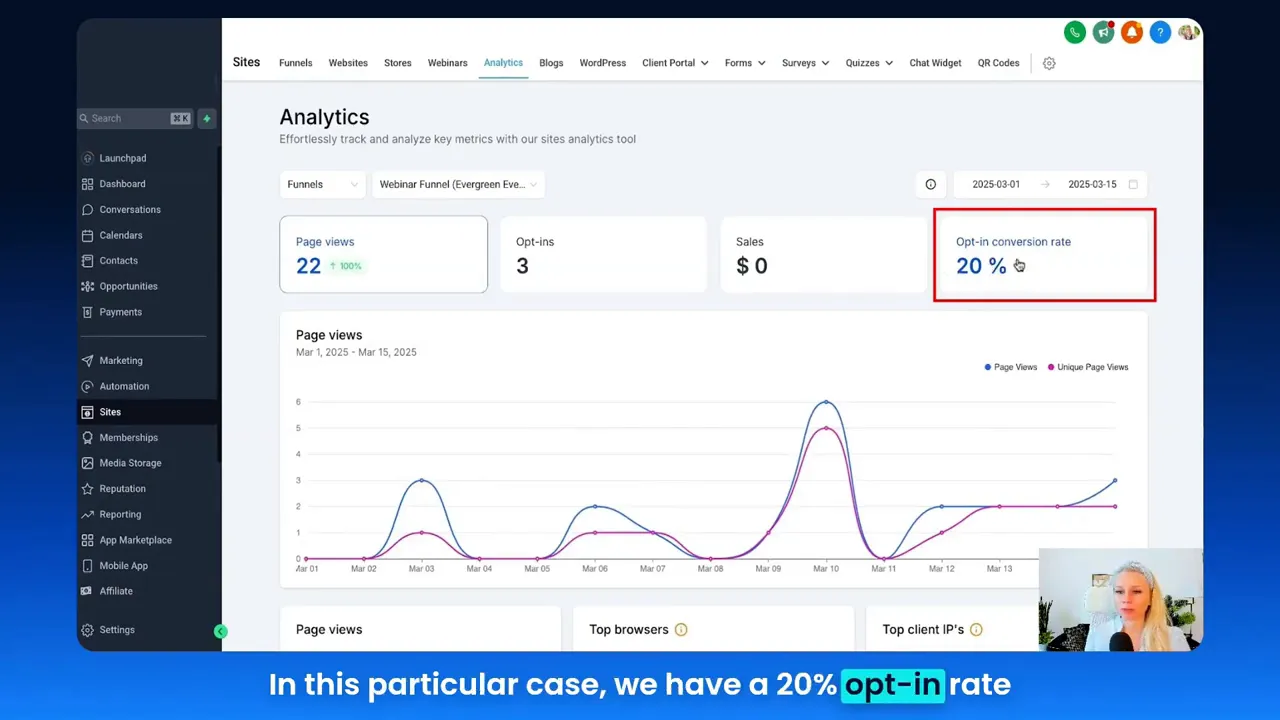
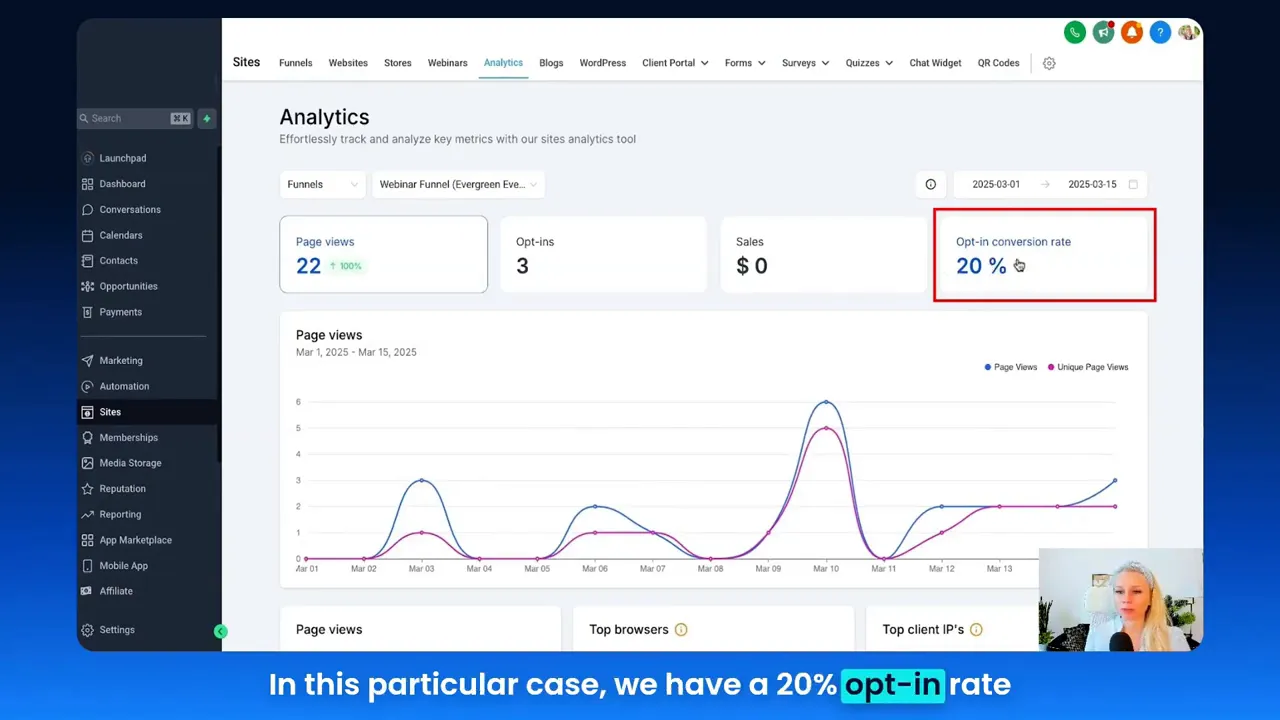
Analytics is more than a dashboard; it’s a decision engine. In the walkthrough, the analytics view displayed page views, unique views, opt-ins, sales, and conversion rates across a customizable date range. Knowing exact page view counts and unique visitors helps you pinpoint drop-off stages in the funnel and calculate realistic conversion benchmarks.
“This is how you can make data-driven decisions by knowing what types of browsers your audience uses and what are the top clients' IPs.” — Tina
Why this matters for marketing funnels:
- Quantified performance: Page views vs. unique views show repeat visits and engagement patterns.
- Conversion clarity: Seeing opt-ins and conversion rates over time reveals what’s working and when.
- Timing: Date range filtering reveals seasonal or campaign-driven spikes so you can optimize timing and ad spend.
Action steps:
- Set up date-range comparisons to measure campaign lift and identify anomalies.
- Monitor unique visitors vs. total page views to detect high re-visit behavior that could indicate confusion, bot activity, or high interest.
- Use opt-in conversion rates as the primary KPI for lead generation funnel health.
2. Optimizing by browser and device
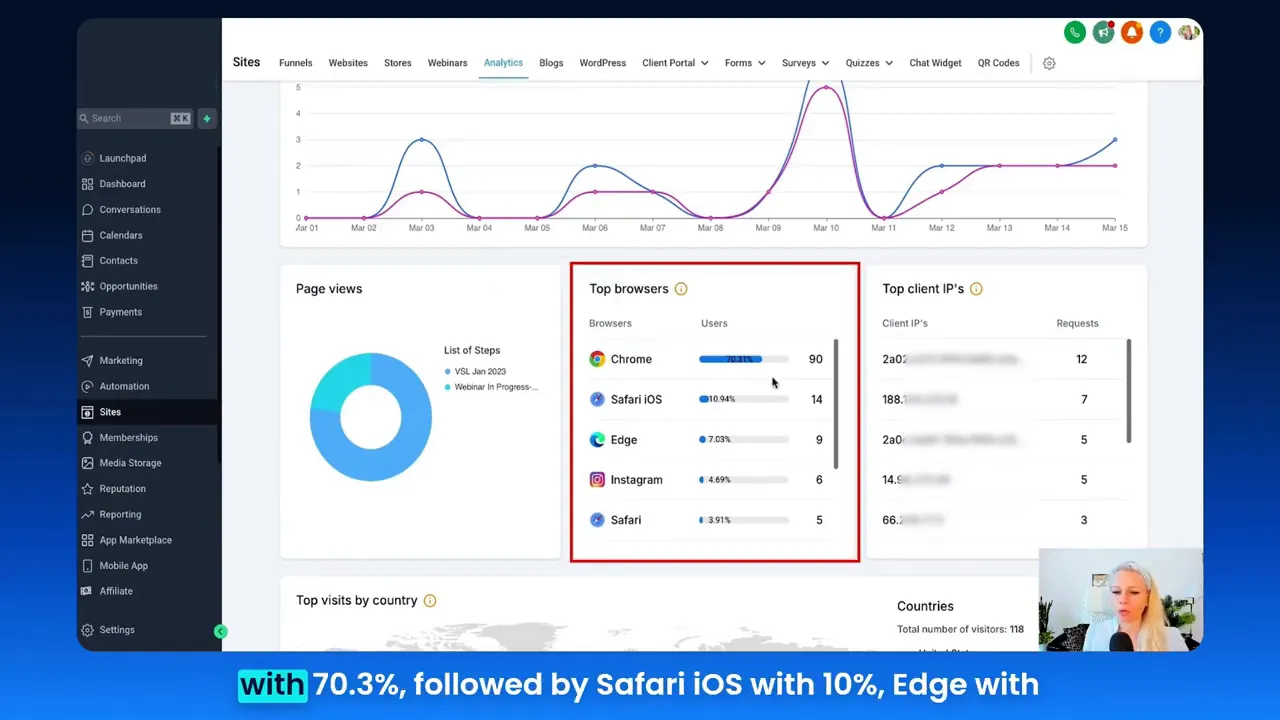
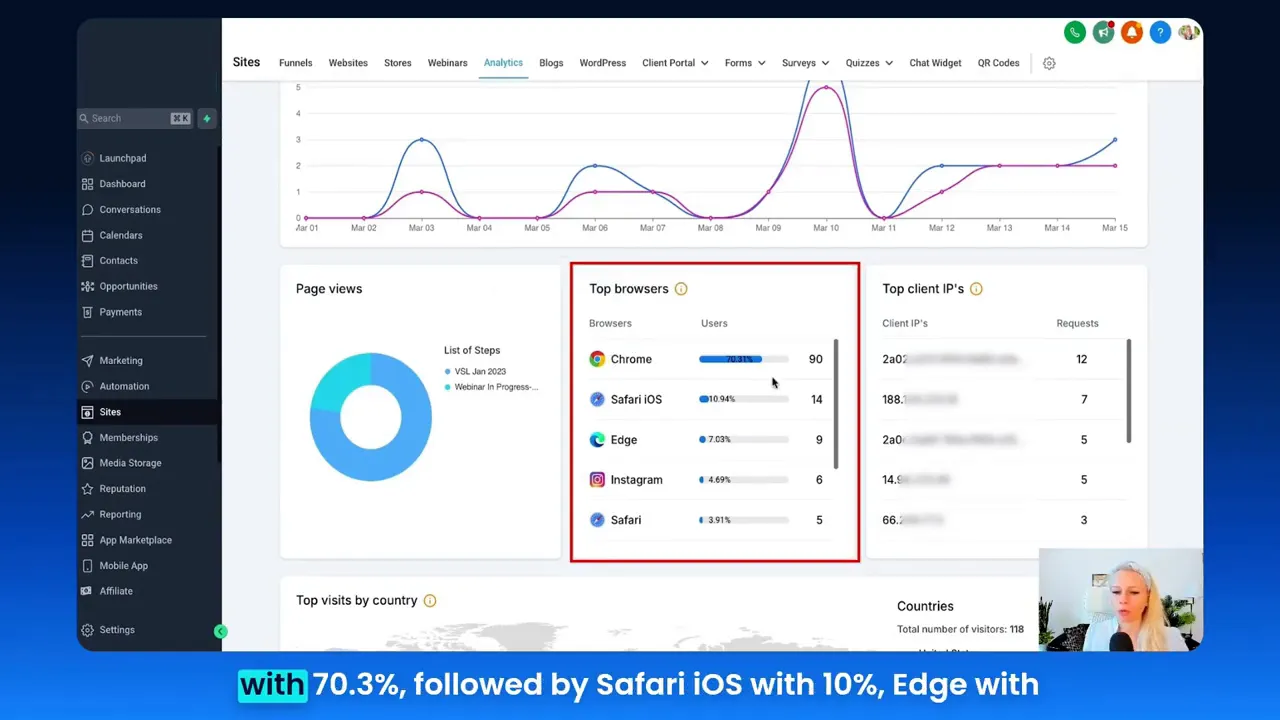
Visitors don’t all experience your funnel the same way. The analytics breakdown by top browsers (Chrome, Safari iOS, Edge, Instagram in-app browsers, Facebook browser, Firefox, and unknowns) reveals which rendering engines and platform constraints most of your users use. When the top browser is Chrome at 70.3% (as in the sample), you can prioritize testing and optimization for Chrome first while ensuring compatibility with others.
Why this matters:
- Performance tuning: Prioritize JS/CSS optimizations for the dominant browser to enhance speed for the majority of users.
- Feature parity: Some browser-specific features or CSS behaviors may differ, causing a leak in conversion if not accounted for.
- Mobile experience: Safari iOS and in-app browsers require special handling for popups, payment forms, and redirects.
Action steps:
- Run cross-browser tests prioritizing the top 3 browsers your analytics show.
- Use progressive enhancement so core functionality works across older or in-app browsers.
- Consider browser-specific A/B tests for UI elements that directly affect conversion.
3. Spotting suspicious activity using client IPs
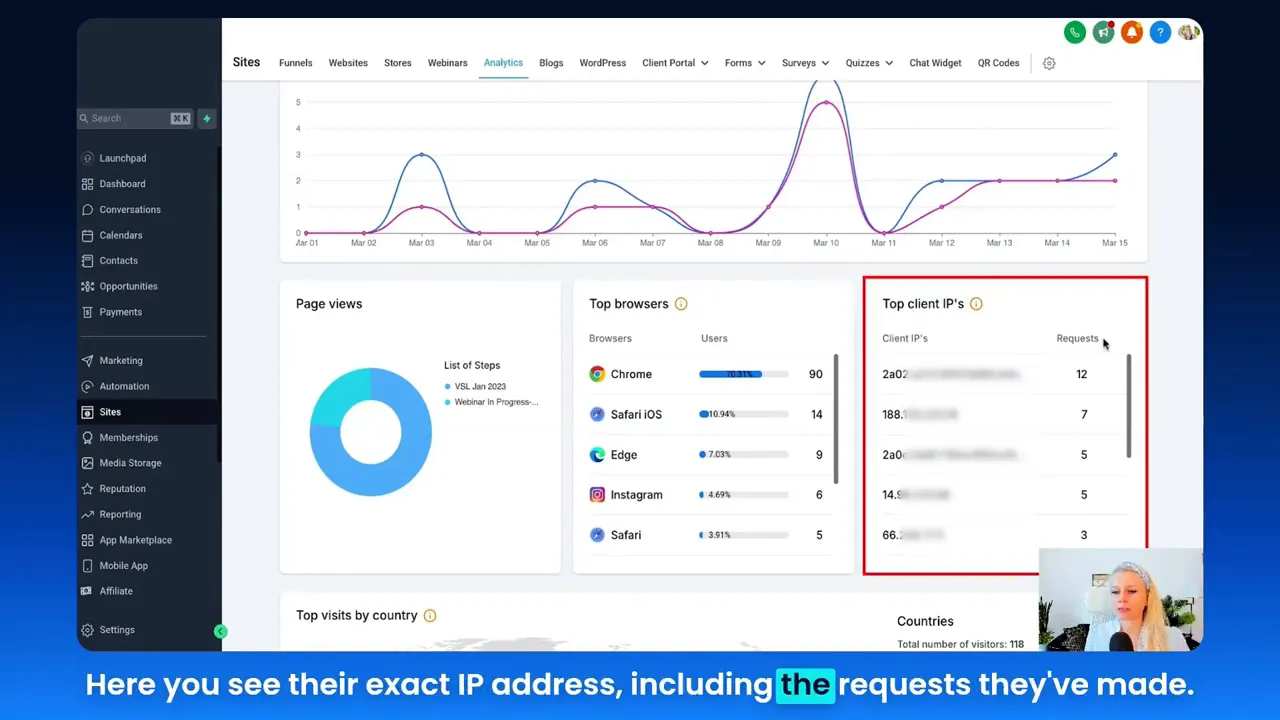
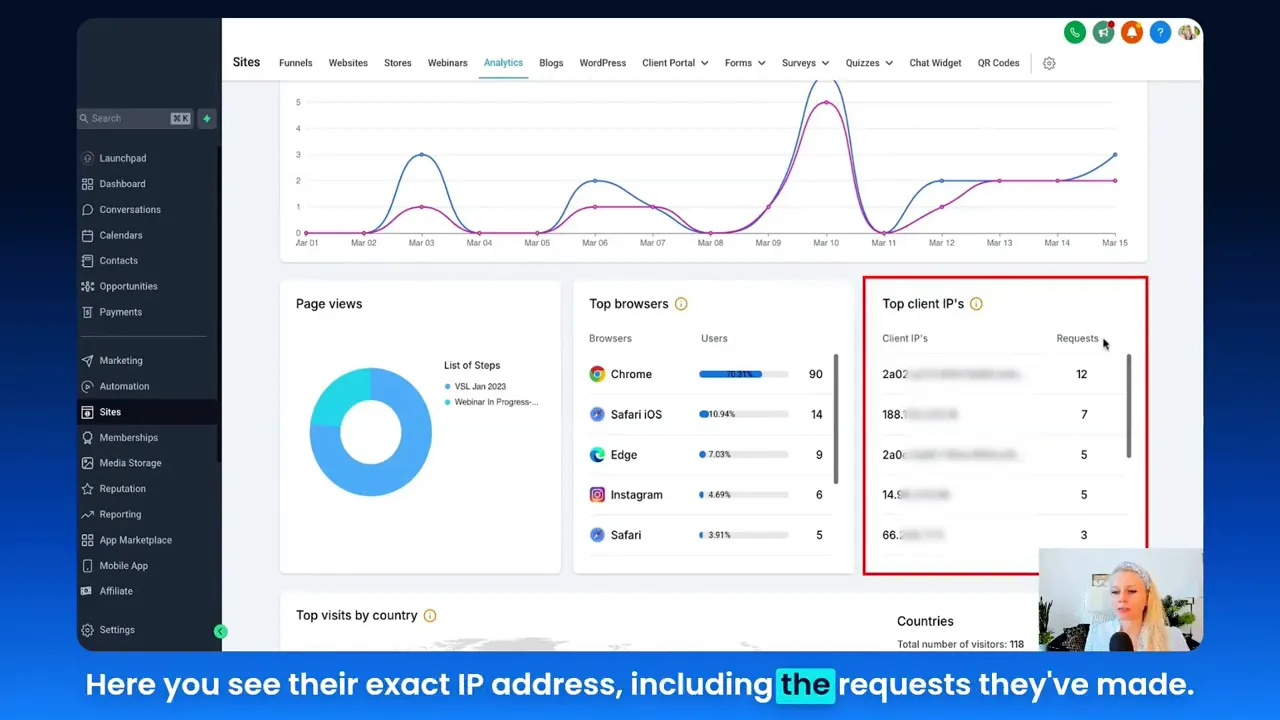
Top client IPs surfaced in the analytics view provide a transparency layer into traffic quality. If one IP refreshes a page hundreds of times, or if many clicks come from the same IP range, you can detect bot activity, outsourced click farms, or misconfigured internal testing. That’s critical for protecting your ad spend and maintaining accurate conversion attribution.
Why this matters:
- Traffic quality: Not all clicks are equal — filter out low-quality traffic for better analytics.
- Security: Detect unusual spikes that might indicate scraping, brute-force attempts, or automated bots.
- Attribution accuracy: Correctly attribute conversions by removing internal or malicious traffic.
Action steps:
- Flag IPs with high request counts for review and potentially block or filter them in analytics.
- Combine IP detection with user-agent and cookie signals for robust bot detection.
- Clean data before reporting conversion KPIs, especially for paid campaigns.
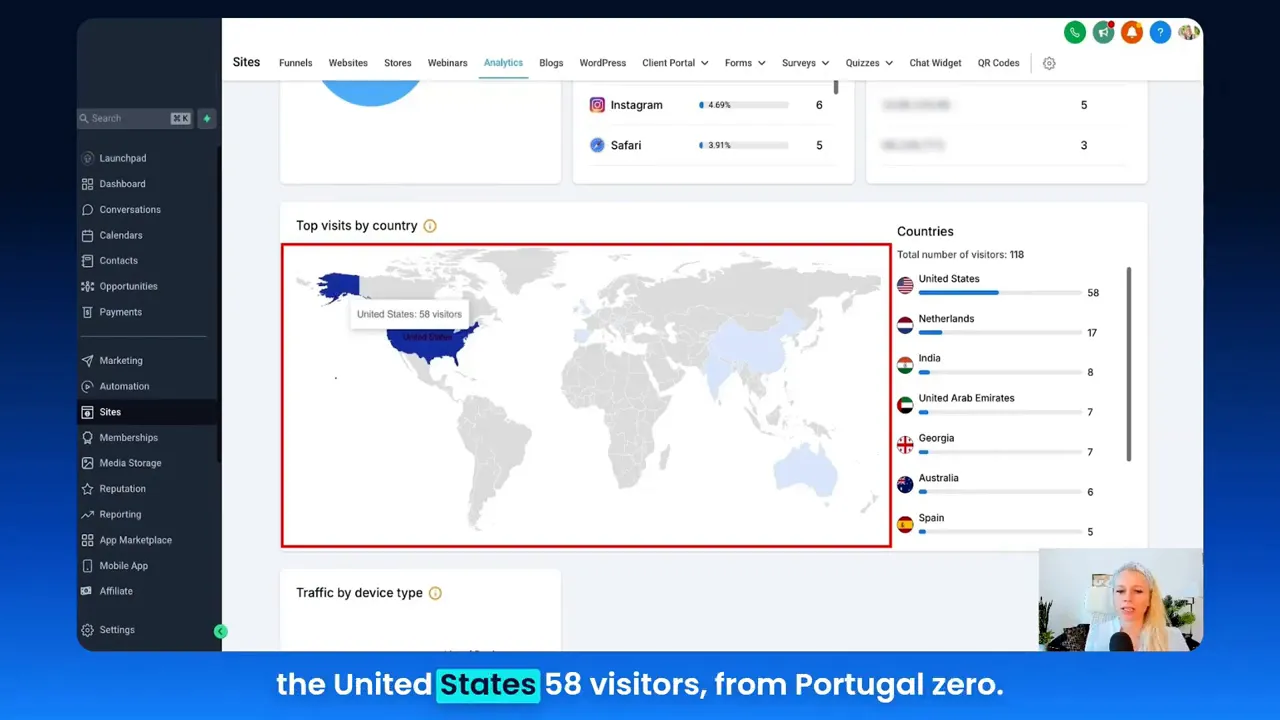
4. Geographic heat maps and audience segmentation
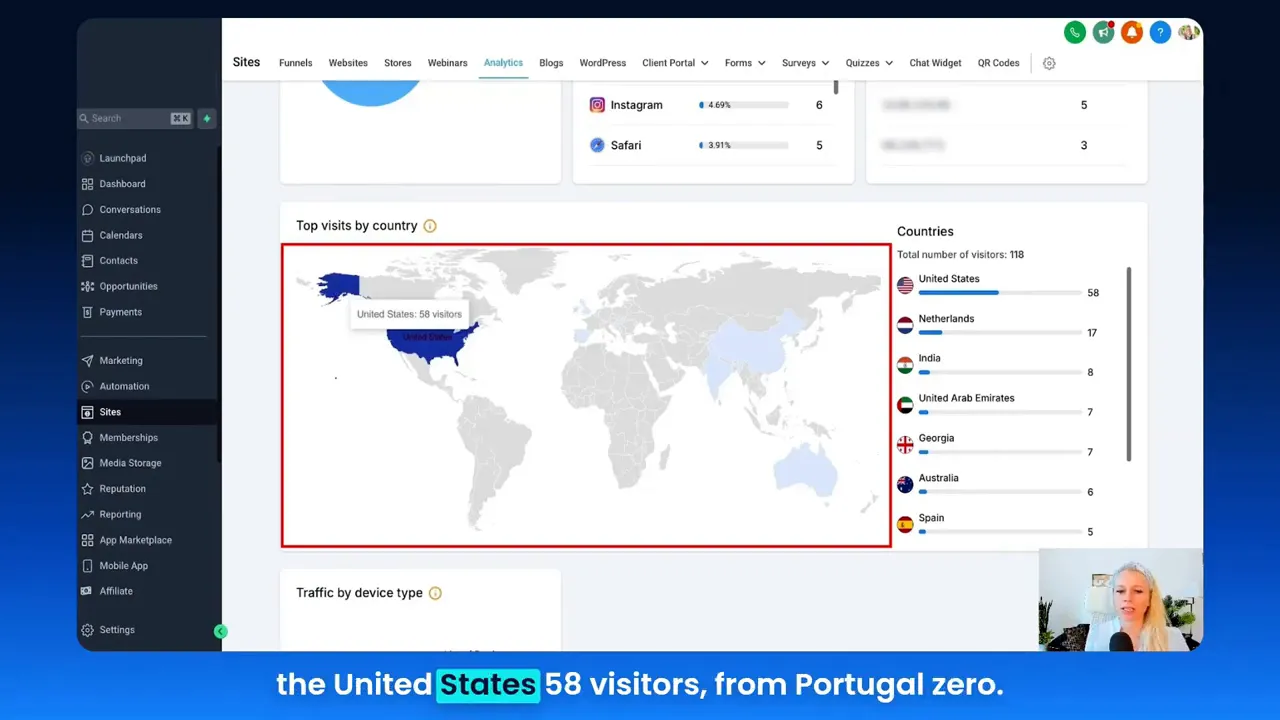
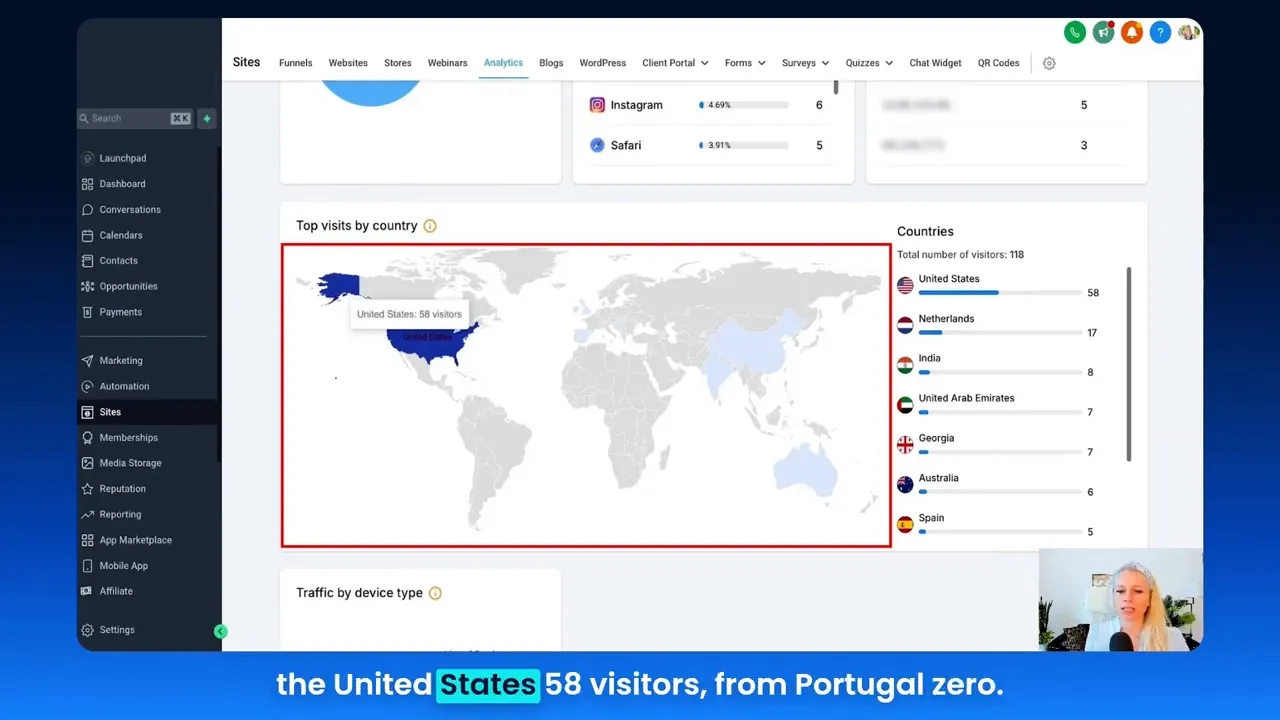
Heat maps that show visits by country — with hover details for counts — allow you to localize content, pricing, and language, and to plan region-specific campaigns. The example heat map highlighted the United States with 58 visitors and other countries with lower counts. That level of granularity helps you prioritize markets for expansion and retargeting without wasting budget on low-potential regions.
Why this matters:
- Localization: Create targeted landing pages, currency settings, and offers for top-performing countries.
- Segmented outreach: Build drip sequences and segmentation rules based on geographic signals.
- Compliance: Identify jurisdictions that may require special privacy disclosures or data handling practices.
Action steps:
- Prioritize campaign spend in high-performing countries; run localized creatives for those markets.
- Use geotargeted personalization in your funnels (language, shipping options, payment methods).
- Track visitors across devices and locales to spot hidden opportunities for expansion.
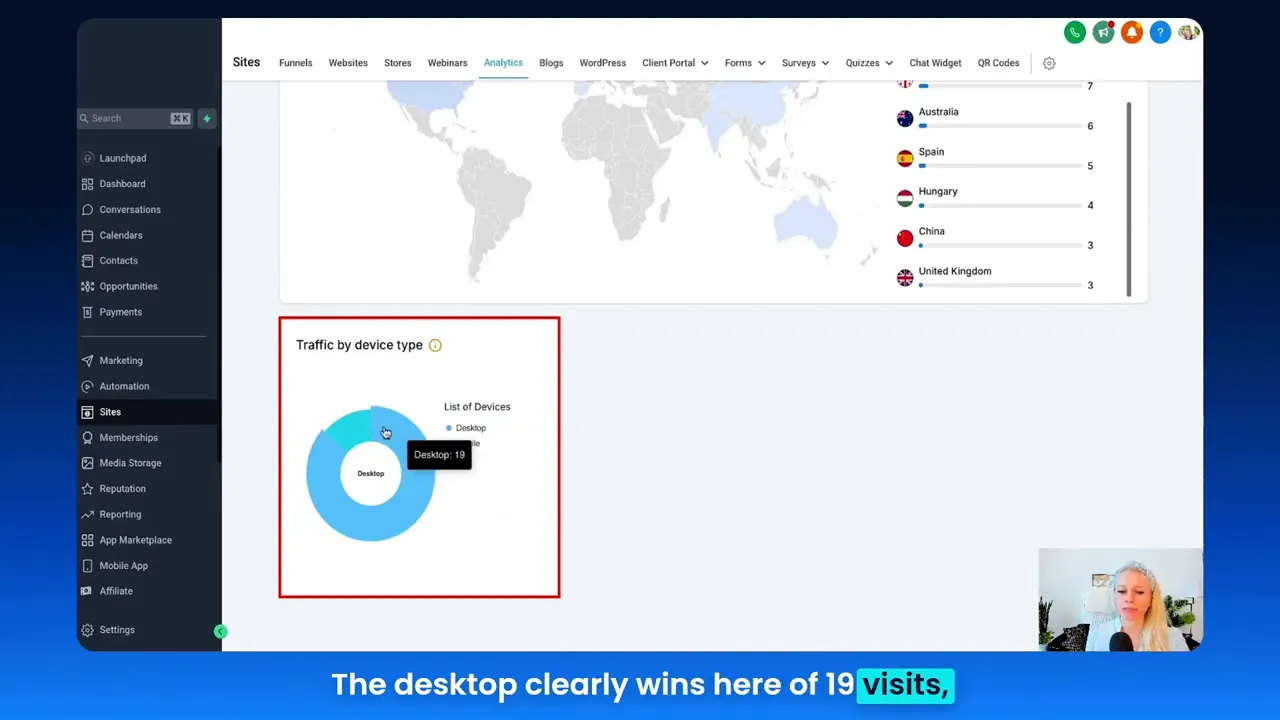
5. Device-type insights and responsive optimization
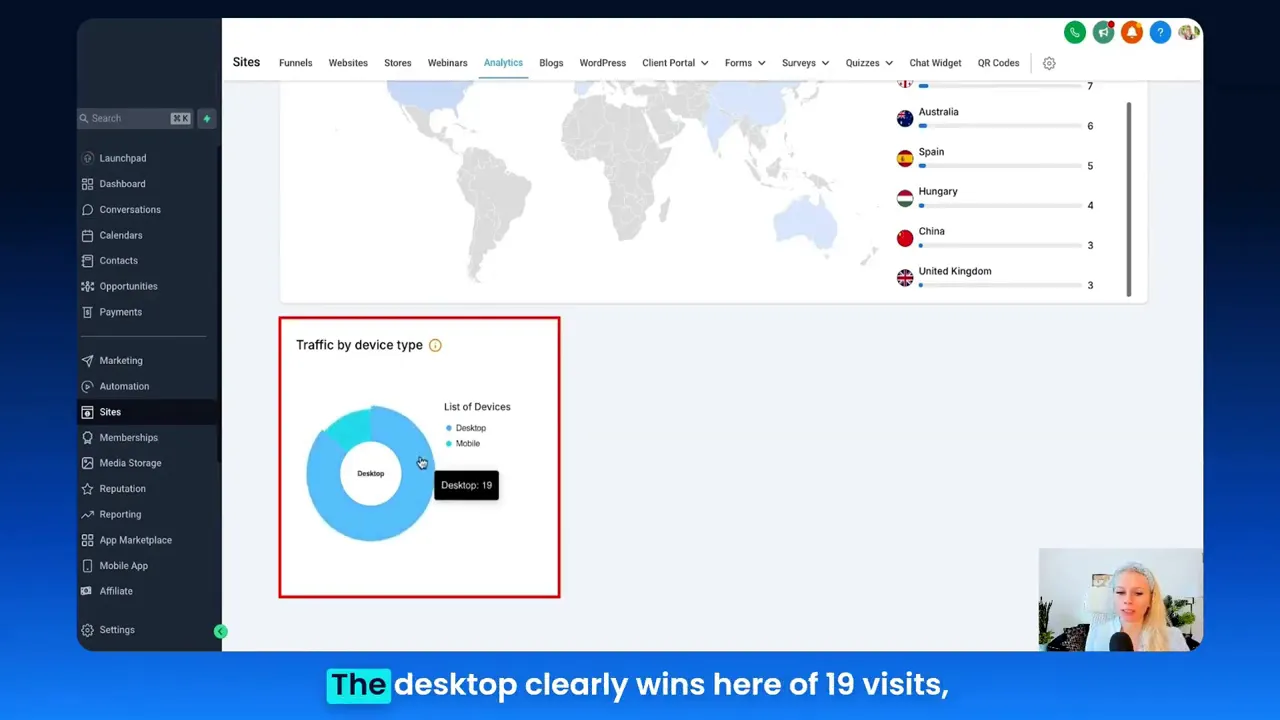
Finally, traffic by device type (desktop, mobile, unknown — possibly tablet) is essential for UX and conversion optimization. In the sample, desktop dominated (19 visits) vs mobile (3 visits). However, many funnels trend toward mobile-first behavior. Knowing your audience’s device mix lets you design for the dominant experience and test alternative flows for minority device types.
Why this matters:
- UX-first design: Build the funnel’s primary experience for the device your audience uses most.
- Load-speed optimization: Mobile audiences require stricter speed standards to keep bounce rates low.
- Feature availability: Mobile browsers may restrict popups or limit autoplay behavior — plan alternatives.
Action steps:
- Implement responsive layouts that prioritize performance on the top device type.
- Use device-specific A/B tests for messaging, CTA placement, and form length.
- Monitor unknown device signals — these may indicate tablets or in-app browsers that require special handling.
GFunnel’s Ecosystem Solutions — Turning insights into action
Small business owners, scale smarter with GFunnel. GFunnel is much more than a funnel builder; it’s an integrated business platform for networking, automation, analytics, and e-commerce. Below I map each of the video’s themes to specific GFunnel capabilities and explain how to use them to build, optimize, and scale your marketing funnels.
GFunnel’s real-time analytics for data-driven decisions
GFunnel’s real-time analytics dashboards give you the same baseline metrics (page views, unique views, opt-ins, conversion rates) but add faster refresh, historical comparisons, and actionable alerts so you can respond in minutes, not days.
- Feature: Real-time dashboards with funnel-level breakdowns.
- Benefit: Quickly identify underperforming stages and reduce lag between insight and fix.
- Stat: Real-time visibility improves optimization cycles by up to 30% (faster decision loops).
How to use it:
- Create dashboard tiles for top KPIs for each funnel.
- Set alerts for sudden drops in opt-in conversion rate or spikes in unique page refreshes (potential bot activity).
- Use the dashboards to prioritize A/B tests and creative refreshes.
GFunnel’s optimization by browser and device
GFunnel integrates browser and device analytics directly into funnel analytics. That lets you tie performance metrics to specific rendering engines and tailor optimizations accordingly.
- Feature: Browser-aware funnel previews and device distribution reports.
- Benefit: Reduce cross-browser CSS/JS issues and prioritize performance work where it matters most.
- Stat: Targeted cross-browser optimization can lift conversions by ~12% on prioritized user cohorts.
How to use it:
- Check browser distribution for each funnel and run targeted QA cycles for the top 3 browsers.
- Create fallbacks for in-app browsers (Instagram/Facebook) that commonly break complex redirects or third-party scripts.
- Adjust lazy-loading, image formats, and critical CSS to improve perceived load time for your dominant device type.
GFunnel’s Lead Connector and IP/Traffic quality controls
GFunnel integrates CRM and lead capture — often referred to as Lead Connector capabilities — so every opt-in flows into a unified lead database with tags, filters, and automation triggers. Combine that with IP analytics and you have both visibility and control over traffic quality.
- Feature: Lead Connector With GFunnel (CRM integration) and IP-level traffic insights.
- Benefit: Block or flag suspicious IPs, route good leads into segmentation workflows, and maintain clean lead lists.
- Stat: Automated lead filtering and smart routing can reduce manual lead cleanup by up to 50%.
How to use it:
- Enable IP-based filters for funnels that receive a lot of paid traffic to ensure attribution is clean.
- Use Lead Connector With GFunnel to tag leads by source, browser, and country for personalized follow-ups.
- Automatically route flagged IP traffic to a review queue before counting them as valid leads.
GFunnel’s audience segmentation and localization
Use GFunnel’s segmentation to convert heat map insights into targeted campaigns. If the United States makes up the majority of visits, build region-specific landing pages, shipping rules, and campaigns for that audience to increase relevance and conversion.
- Feature: Geo-targeted pages, segmentation, and campaign builder.
- Benefit: Increase relevance and improve conversion rates by delivering content and offers tuned to the visitor’s location.
- Stat: Localized pages can improve conversions by 8–20% depending on offer and market fit.
How to use it:
- Create region-specific funnels with currency, language, and offer variants.
- Segment audiences by country in your automation sequences to deliver targeted content and shipping options.
- Run small localization tests before a full rollout to validate messaging and price sensitivity.
GFunnel’s fast autosave and builder performance
One of GFunnel’s standout technical features is the dedicated web worker autosave that reduces autosave from multi-second delays to an ultra-fast 103ms (from 2.861s to 103ms in tests). That means creators can iterate quickly without fearing lost work, enabling rapid A/B testing and faster funnel launches.
- Feature: Fast autosave via web worker (103ms).
- Benefit: 28x faster autosave for builder workflows, increasing productivity and reducing context switching interruptions.
- Stat: 103ms autosave improves workflow efficiency dramatically compared to slower builders.
How to use it:
- Make quick iterative changes and launch new funnel variants without workflow friction.
- Run concurrent A/B tests more often since saving is fast and reliable.
- Document changes in your team’s funnel revision history and rollback quickly when needed.
Integration flexibility: APIs and third-party tools
For themes that don’t map directly to built-in GFunnel features — for example, specialized analytics, AI-driven content personalization, or third-party fraud detection — GFunnel provides flexible API integrations so you can extend the platform without rebuilding core capabilities.
- Feature: API integrations and webhook support.
- Benefit: Connect best-of-breed tools for specialized needs while maintaining a central data layer in GFunnel.
- Stat: Integrated stacks reduce manual data transfer and error-prone work by up to 60%.
How to use it:
- Use webhooks to send funnel events to external analytics or fraud-detection systems.
- Import enhanced audience segments into GFunnel for precise personalization and retargeting.
- Leverage external A/B engines or AI tools to enrich your optimization toolkit while keeping GFunnel as the operational hub.
Real-World Applications: Two case studies
E-commerce store: Increasing conversions through device and browser optimization
Scenario: An online apparel brand saw a 22-page view sample where Chrome dominated traffic but mobile conversions lagged by 60%. After analyzing browser and device breakdowns, they optimized critical CSS for Chrome and created a simplified checkout flow for mobile Safari and in-app browsers. They also used IP detection to remove fraudulent clicks from a low-quality campaign.
Implementation with GFunnel:
- Used GFunnel analytics to identify Chrome as the top browser and mobile Safari as the primary mobile browser.
- Deployed browser-aware CSS and stripped third-party scripts for in-app browsers to avoid performance penalties.
- Enabled IP-level filtering to remove suspicious traffic from paid campaigns and recalibrated ads based on clean data.
“GFunnel made it easy to spot that mobile checkout was being interrupted by an in-app browser. We simplified the flow and saw checkout completions rise 18% within two weeks.”
Outcome:
- 18% lift in checkout completion after optimizing for in-app and mobile Safari browsers.
- 12% reduction in ad spend wastage by filtering fraudulent IP traffic.
- Improved customer satisfaction from a faster checkout flow and localized shipping options.
Restaurant chain: Localized marketing funnels and community engagement
Scenario: A regional restaurant chain needed to increase online orders and loyalty sign-ups across three cities. Analytics showed concentrated visits from two cities and lower engagement elsewhere. The team used GFunnel to build city-specific funnels and leverage the platform’s community networking to promote limited-time offers.
Implementation with GFunnel:
- Built localized funnels with city-specific menus and pickup options.
- Launched a community campaign using GFunnel’s networking features to promote events.
- Used the CRM (Lead Connector With GFunnel) to capture loyalty signups and automate drip campaigns.
“GFunnel connected our marketing funnels to loyalty automation. We doubled our weekday online orders in one month, and the localized campaigns paid for themselves within weeks.”
Outcome:
- 2x increase in weekday online orders after localized funnel and automation deployment.
- Higher retention from automated loyalty communications and targeted offers.
- Better operational planning through geo-based demand visibility.
Why GFunnel Leads — A practical comparison
Small business owners: choose a platform that reduces complexity and helps you scale. Below is a concise, practical comparison between traditional business tools and GFunnel’s ecosystem across the most relevant themes: autosave, automation, networking, analytics, and tailored solutions.
Traditional Business Tools vs. GFunnel’s Ecosystem
GFunnel isn’t just an alternative; it centralizes the essential tools you need for modern marketing funnels — real-time analytics, automation, CRM integration, community networking, and e-commerce capabilities — into one platform designed for growth and efficiency.
Implementation Checklist — Turn analytics into immediate actions
- Set up GFunnel analytics dashboards for each funnel and key date-range comparisons.
- Identify the top 3 browsers and devices for each funnel and prioritize QA and optimization for those platforms.
- Enable IP monitoring and lead filtering via the Lead Connector With GFunnel to ensure lead quality.
- Localize landing pages and campaigns for top-performing geographies identified in heat maps.
- Leverage GFunnel’s fast autosave to perform more frequent, low-risk iterations and A/B tests.
- Use automation to route new leads into segmented nurture sequences and sales workflows.
- Engage in GFunnel communities to learn best practices and collaborate with peers.
Community & Growth — Connect with peers and scale faster
Community matters for learning and referrals. GFunnel’s niche communities (e.g., E-commerce Pros, Restaurant Owners, SaaS Founders) provide direct access to peers and mentors who’ve applied similar analytics and optimization tactics to grow their funnels. Join discussions, attend events, and leverage class-based content to accelerate your learning curve.
Community CTA: Connect with GFunnel’s communities to exchange funnel templates, conversion tips, and localization strategies — and bring your best campaigns to market faster.
Conclusion and CTA
Marketing funnels succeed when you combine clear data signals with a platform that turns those signals into action. Browser and client IP analytics give you the insight you need — which browsers dominate, which devices your audience uses, where visitors are located, and whether traffic quality is trustworthy. GFunnel turns those insights into results through real-time analytics, fast autosave for speedy iteration, built-in CRM (Lead Connector With GFunnel), automation that reduces manual work, and community networking that accelerates learning.
Small business owners and marketers: start by auditing your funnel analytics to identify your top browser, device, and region. Then map those insights to a GFunnel implementation: localize content, optimize for the dominant browser and device, filter low-quality traffic, and automate follow-ups to convert visitors into customers.
Ready to get started? Explore GFunnel to build, automate, and scale your marketing funnels and business operations: https://www.gfunnel.com. For automation features, see GFunnel’s automation page: https://www.gfunnel.com/automation-home. Learn about GFunnel’s networking communities: https://www.gfunnel.com/communities. Create an account to try GFunnel: https://www.gfunnel.com/create-account.
FAQs
Related Resources
- GFunnel homepage (platform overview): https://www.gfunnel.com
- GFunnel automation features: https://www.gfunnel.com/automation-home
- GFunnel communities (network and events): https://www.gfunnel.com/communities
- Create an account and get started: https://www.gfunnel.com/create-account
Suggested Next Steps & Interactive Element
Take a quick quiz to assess your business growth potential and recommended GFunnel features: Test Your Business Growth Potential (suggested). Then, join a community relevant to your niche to exchange funnel templates and optimization tips. Connect with event-driven learning via GFunnel’s classes and webinars to deepen your skills in building high-converting marketing funnels.
Additional Testimonials
“GFunnel’s automation saved us hours weekly and helped us close leads faster — the Lead Connector integration made follow-ups seamless.”
“With GFunnel’s communities, we collaborated on campaign creatives and doubled our conversion rate in under two months.”
Final Notes
Use the five-step checklist above to immediately apply browser, device, and IP insights to your funnels. By pairing analytics with GFunnel’s integrated tools — automation, CRM, community, and fast autosave — you’ll build resilient, high-performing marketing funnels that scale. Start small, iterate quickly, and let data guide each optimization.