

Marketing funnels that scale: How GFunnel’s all-in-one business platform turns data, automation, and community into predictable growth
What smart businesses do differently with marketing funnels
Successful small businesses, e-commerce entrepreneurs, and marketers treat marketing funnels as decision engines rather than static pages. A funnel should do three things well: capture attention, capture intent, and capture data that informs the next action. That means combining conversion-focused pages with an integrated CRM, automation to follow up consistently, and dashboards that make performance transparent to you and your clients.
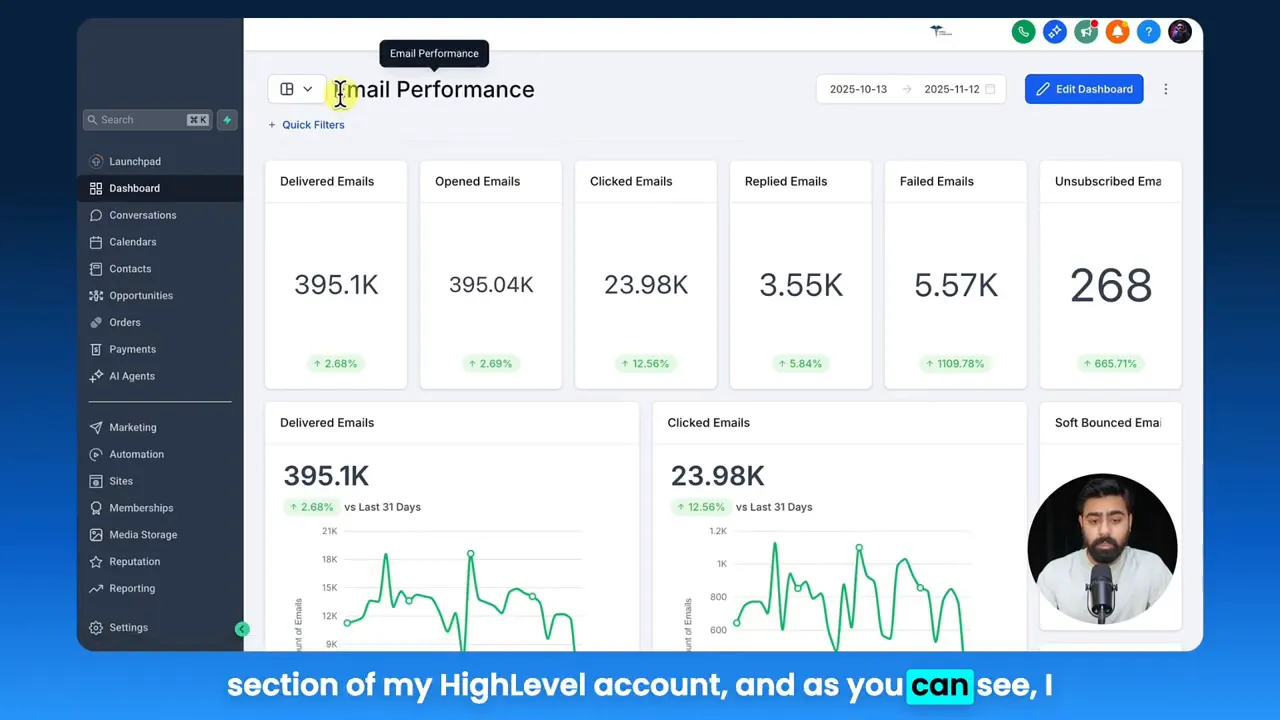
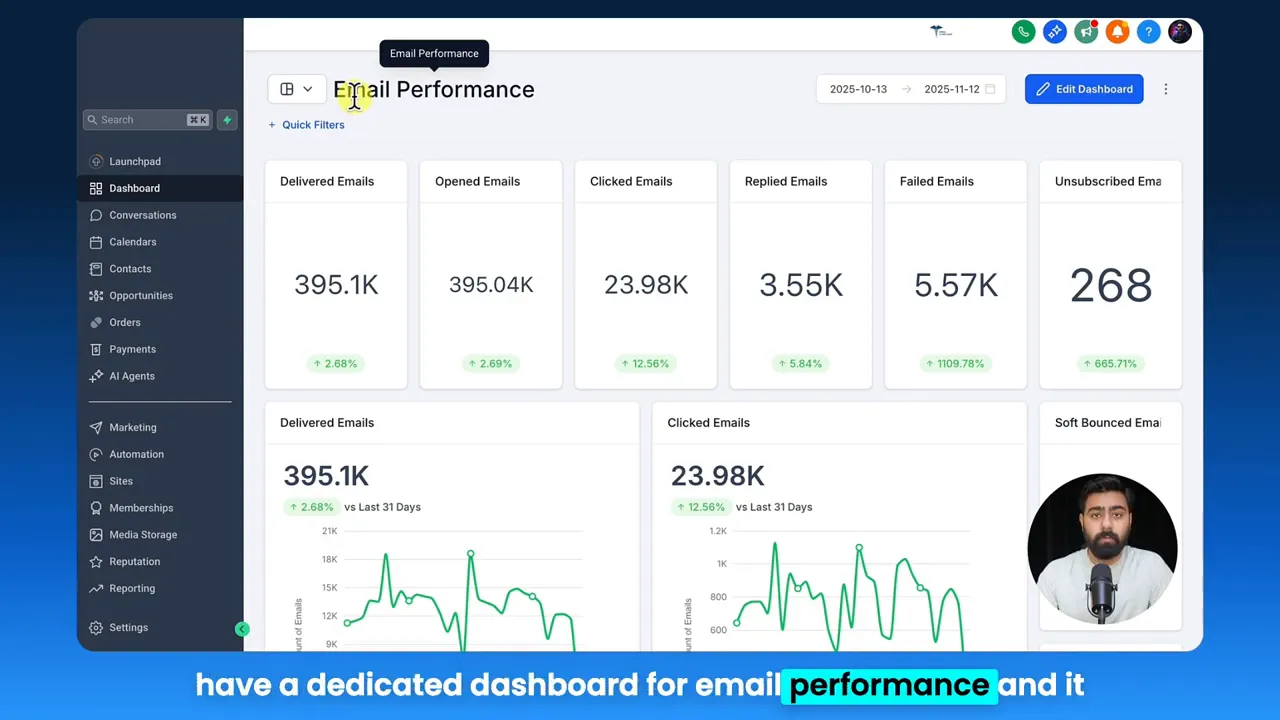
One of the clearest ways to remove guesswork from your marketing funnels is by building dashboards and custom reports that answer the exact questions you and your stakeholders care about. Dashboards surface the most important metrics—deliverability, click-through rate, replies, conversions—while scheduled custom reports let you automate sharing so clients and teams always have the context they need. As one platform puts it, “these dashboards and custom reports not only help you to be transparent about your performance with your clients, but they also help you as a business to make key decisions based on the data provided.”
Key themes for scaling with funnels and data
From the strategies implied by expert guidance, here are the themes every growth-minded business should prioritize when building marketing funnels:
- Data transparency and dashboards: Real-time analytics that make performance obvious and actionable.
- Automated reporting and client communication: Scheduled reports remove follow-ups and build trust through proactive updates.
- Automation and task reduction: Workflows that cut manual tasks so teams focus on strategy and high-impact activities.
- Community and networking: Access to niche peers, mentors, and resources that accelerate learning and opportunities.
- Speed and reliability in the platform: Fast autosave and responsive tools that keep the creative flow intact and reduce churn.
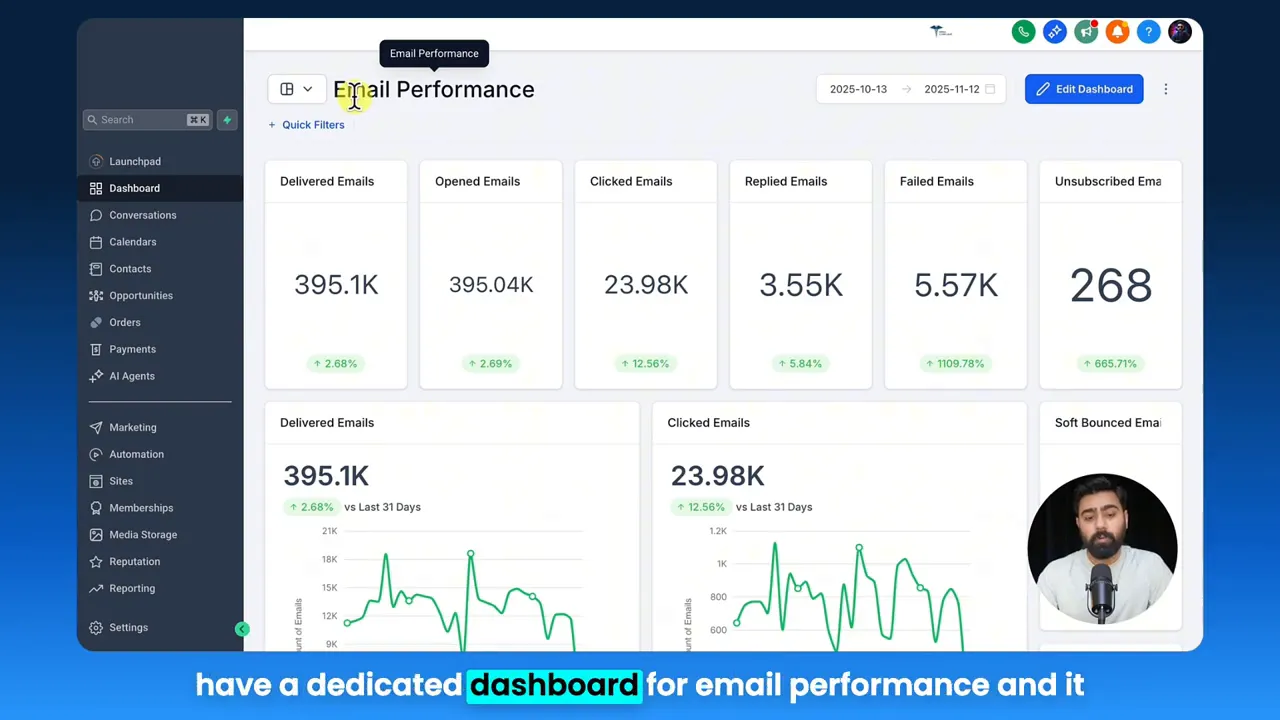
HighLevel: these dashboards and custom reports not only help you to be transparent about your performance with your clients but also help you as a business to make key decisions based on the data provided.
Each of these themes maps directly to how you should design your marketing funnels and overall business operations. Below, we break down the strategies and then show how GFunnel implements them end to end.
Strategies for business success using dashboards and custom reports
Marketers, boost your conversions with these strategies that make marketing funnels actionable and accountable.
1. Make metrics visible and decision-ready
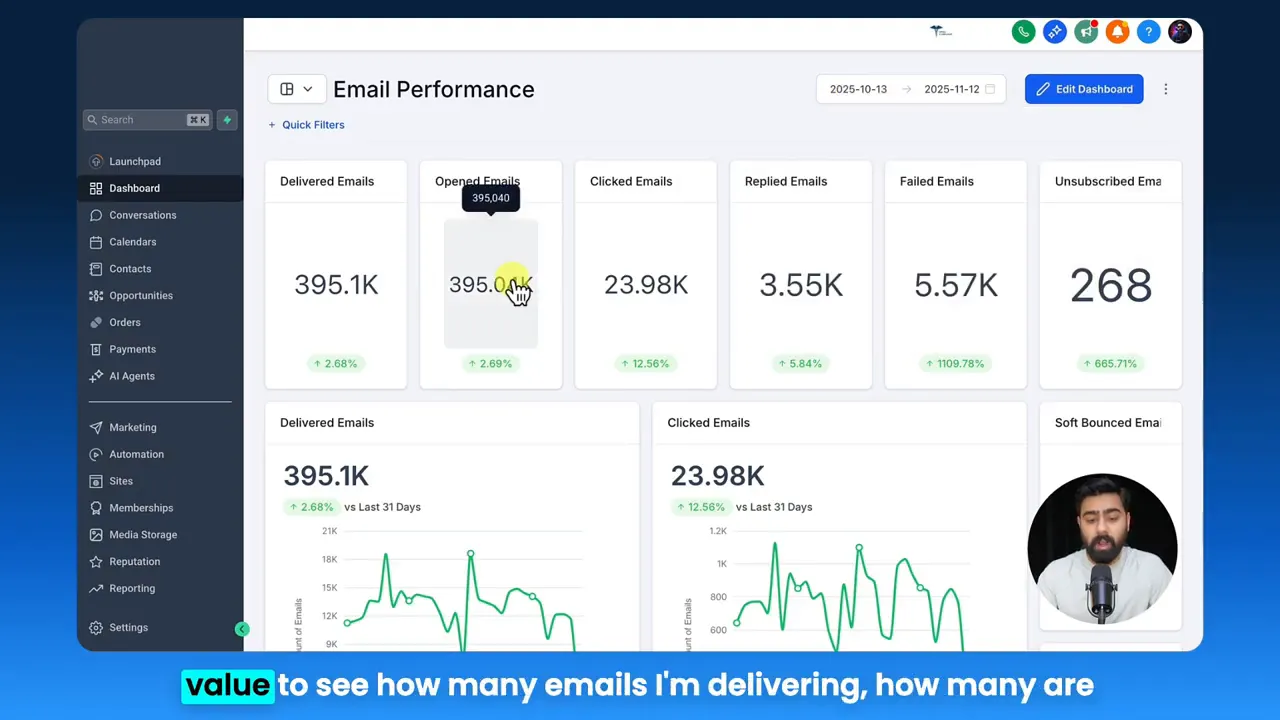
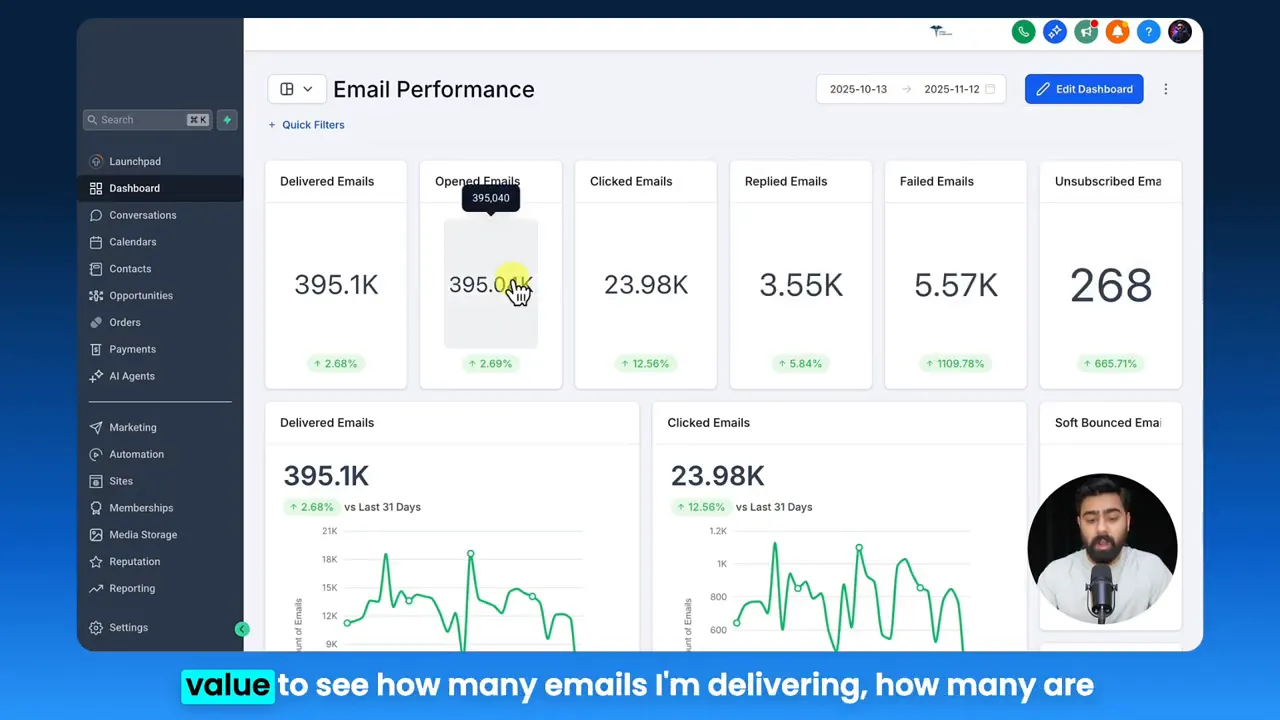
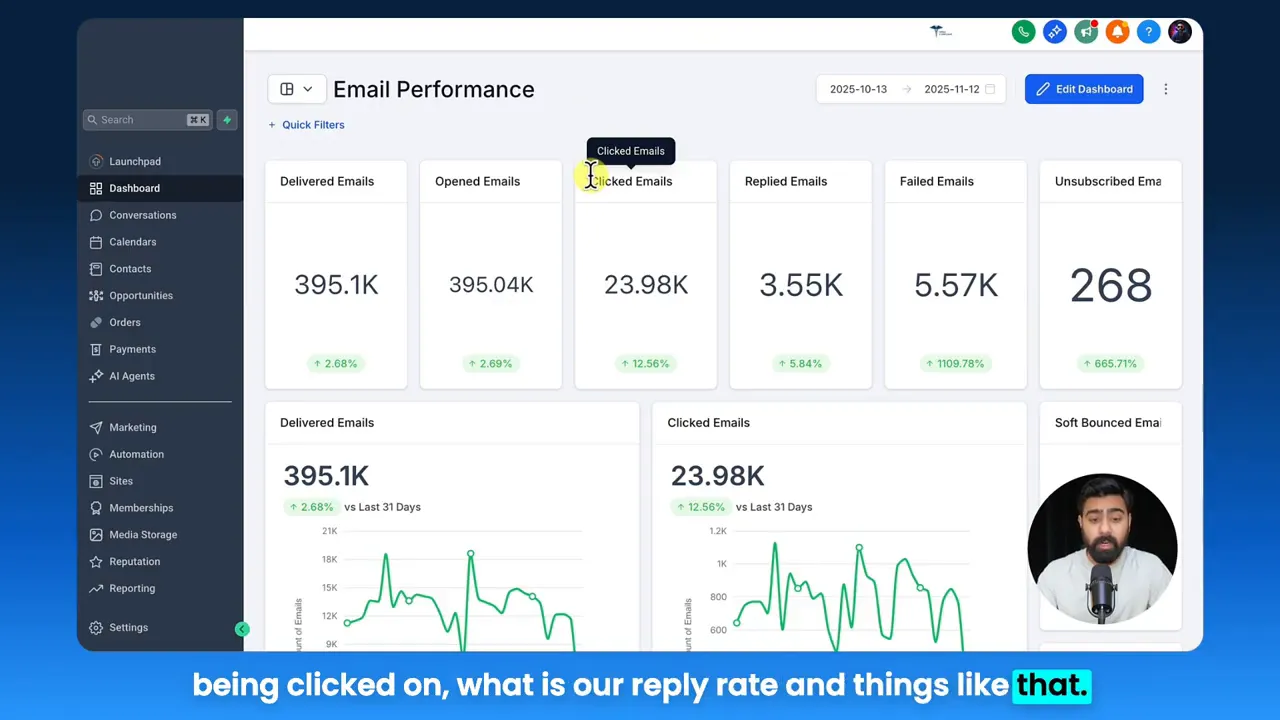
Dashboards reduce the cognitive load of data analysis. When email deliverability, click rates, reply rates, and conversions are visible in a single view, teams can detect trends and anomalies fast. Apply date range filters to focus on campaign windows and compare cohorts. Instead of guessing what worked, you can point to numbers and iterate.
Stat to remember: teams that centralize analytics see faster optimization cycles and higher conversion rates because they spend less time gathering and more time testing hypotheses.
2. Automate reporting to create transparency
Clients and stakeholders want clarity without friction. Scheduling custom reports to drop into inboxes on a cadence you set changes the conversation from defensive to consultative. When reports are proactive, trust builds, and conversations shift toward next steps instead of “what happened?”
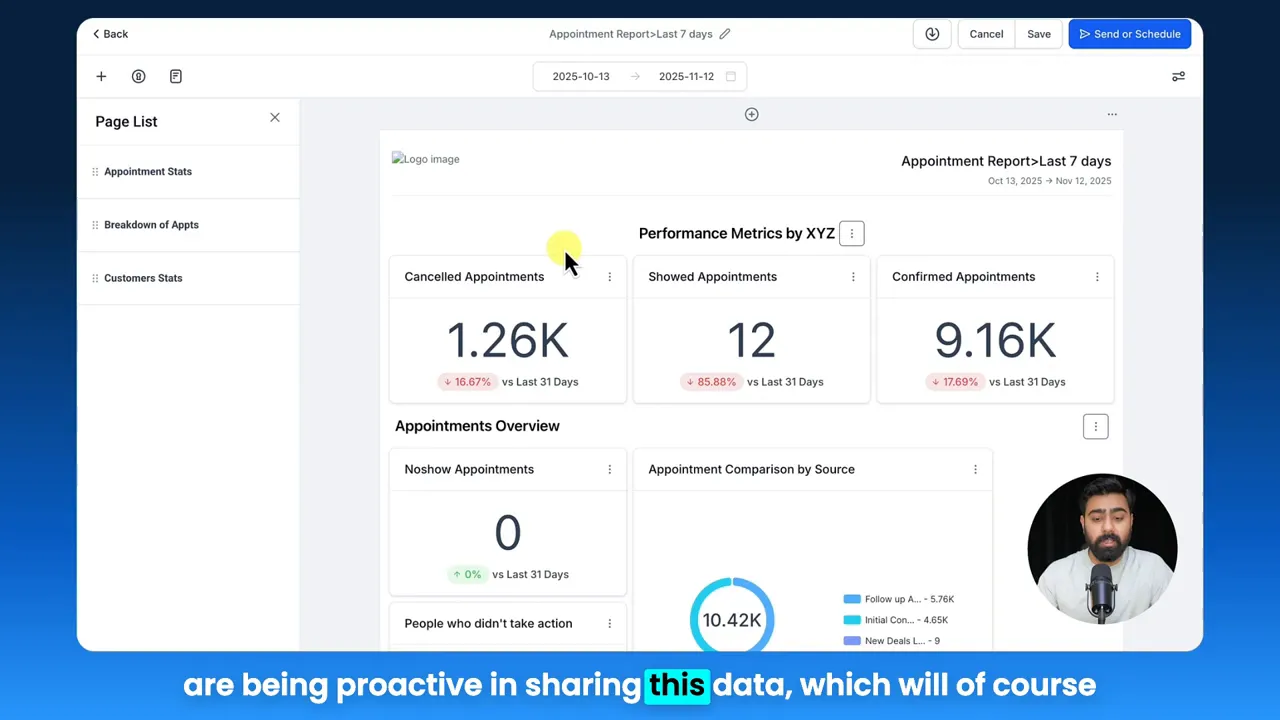
HighLevel: set up custom reports and then schedule them in a frequency you want so that your clients don't have to follow up or ask for updates.
Action tip: standardize weekly snapshot reports for campaign health and monthly performance deep dives for strategy alignment.
3. Use automation to halve repetitive work
Business automation is not just about cutting time. It’s about consistent experience: lead nurturing, appointment reminders, payment follow-ups, and segmentation rules executed reliably. Automations support marketing funnels by maintaining momentum—when a lead enters a funnel stage, the next communication happens on time and tailored to the behavior that triggered it.
Stat to remember: automation can reduce manual work by approximately 50 percent for routine follow-ups and admin tasks.
4. Build funnels that feed your CRM and community
High-performing funnels don’t live in isolation. Each funnel should feed your CRM so you know which audiences convert and why. They should also feed community efforts by capturing member intent—who attended a webinar, who opened onboarding emails, who made a first purchase—so networking and support can be targeted.
GFunnel’s ecosystem solutions for building effective marketing funnels
Small business owners, scale smarter with GFunnel—this section maps each theme above to specific GFunnel features so you can turn strategy into execution using a single platform.
GFunnel’s real-time analytics dashboard for Data Transparency
GFunnel offers real-time analytics that make it easy to monitor funnel and campaign health. Instead of toggling between multiple tools, your analytics live next to your funnel builder and CRM so you always know how many emails are being delivered, how many are clicked, and what the reply rate is.
- Feature highlight: Live dashboards with date range filters and cohort views.
- Impact stat: Real-time analytics accelerate decision-making and reduce optimization cycles by up to 30 percent.
- CTA: Explore GFunnel’s real-time analytics on the GFunnel homepage (https://www.gfunnel.com).
GFunnel’s automation features for Business automation
GFunnel’s automation tooling covers email sequences, SMS follow-ups, appointment reminders, and action-based workflows that keep leads moving through your marketing funnels. With drag-and-drop workflow editors, automations are visible and editable, and they integrate directly with the CRM.
- Feature highlight: Drag-and-drop workflow automation and built-in triggers.
- Impact stat: Typical users report a 50 percent reduction in manual follow-up time.
- CTA: See automation features at GFunnel’s automation hub (https://www.gfunnel.com/automation-home).
GFunnel’s funnel builder for creating marketing funnels
Design landing pages, sales pages, and conversion paths using GFunnel’s funnel builder. The builder combines visual editing with flexible integrations to payments, forms, and CRM capture points so every funnel stage captures the right data and triggers the right automation.
- Feature highlight: Drag-and-drop funnel builder with A/B testing.
- Impact stat: Well-structured funnels can increase lead-to-sale conversion by 20 percent or more when combined with automation.
- CTA: Learn how to build marketing funnels with GFunnel at the funnel center (https://www.gfunnel.com/funnel-home).
GFunnel’s CRM and Lead Connector for lead management
Every funnel should feed a CRM. GFunnel includes CRM functionality often labeled Lead Connector features to track leads, statuses, conversations, and revenue attribution. With contact-level histories and activity timelines, your team knows exactly what to say at the right time.
- Feature highlight: Built-in CRM with pipeline views and contact enrichment.
- Impact stat: Integrated CRM and funnels can lift qualified lead follow-through by 25 percent.
- CTA: Use GFunnel’s CRM (Lead Connector) features to capture and convert leads more effectively (https://www.gfunnel.com/crm).
GFunnel’s niche communities for Business networking
GFunnel is more than software: it’s a community. Tap into niche groups—e-commerce pros, SaaS founders, restaurant owners—to exchange tactics, join accountability cohorts, and find mentors. Networking accelerates growth by connecting you with people who have solved the exact problems you’re facing.
- Feature highlight: Niche communities and group discussions.
- Impact stat: Businesses that network within niche communities launch faster and solve product-market problems more efficiently.
- CTA: Join GFunnel communities and start collaborating (https://www.gfunnel.com/communities).
GFunnel’s fast autosave and editor experience for speed and reliability
One of the friction points when building marketing funnels is losing work or experiencing delays when editing. GFunnel’s editor includes a dedicated web worker for autosave that reduces save time from multi-second delays to an industry-leading 103 milliseconds—a 28x improvement. That means less context switching and fewer lost ideas.
- Feature highlight: Fast autosave via web worker, 103ms.
- Impact stat: Faster autosave reduces editing interruptions and increases productivity in funnel creation and page design.
- CTA: Experience the fast autosave when you create an account (https://www.gfunnel.com/create-account).
API integrations and flexibility for expanding use cases
If your needs change, GFunnel’s APIs and integrations make it simple to plug in external tools. Whether you need advanced inventory syncs for e-commerce or loyalty integrations for restaurants, the platform scales with your business without forcing you into fragmented tools.
- Feature highlight: API integrations and extensible webhooks.
- Impact stat: Flexible platforms reduce tool sprawl and lower integration costs over time.
- CTA: Learn more about integrations and technical specs on GFunnel’s feature descriptions (https://www.gfunnel.com).
Real-world applications: two case studies using GFunnel
Small business owners, scale smarter with GFunnel’s marketing funnels and automation. Below are two realistic case studies showing how an e-commerce store and a restaurant chain can adopt dashboards, custom reports, and automation to achieve measurable growth.
Case study 1: E-commerce store—From cart abandonment to repeat buyers
Background: A mid-sized e-commerce store selling specialty home goods was struggling with cart abandonment and inconsistent email follow-up. The store relied on a mix of a page builder, a separate CRM, and a third-party analytics tool. Reporting was manual and delayed.
Solution with GFunnel:
- Built a multi-step marketing funnel with GFunnel’s funnel builder to capture leads using an exit-intent coupon.
- Connected the funnel directly to GFunnel’s CRM so all leads flow into a unified contact record and pipeline.
- Created automated sequences: abandoned cart reminders, post-purchase nurturing, and VIP re-engagement workflows.
- Used GFunnel’s real-time dashboard to monitor email deliverability and click performance and scheduled weekly reports to stakeholders.
Results:
- Abandoned cart recovery increased by 18 percent within six weeks.
- Repeat purchase rate grew by 12 percent after deploying segmented post-purchase funnels.
- Manual reporting time shrank by 60 percent because automated reports replaced ad hoc exports.
“GFunnel’s automation saved our team hours each week and helped us focus on product and creative testing.” — E-commerce Director
Long-tail keyword in context: build marketing funnels with GFunnel to recover more carts and automate customer lifecycle emails for sustained revenue growth.
Case study 2: Local restaurant group—From reservations to loyalty
Background: A three-location restaurant chain needed to streamline online ordering, capture customer data across locations, and use insights to create loyalty offers and promotional funnels. Previously, each location used different tools with fragmented customer records.
Solution with GFunnel:
- Set up GFunnel’s restaurant ecosystem to centralize online ordering and Call Net Capture for customer data.
- Built marketing funnels to convert first-time online orderers into loyalty members with a welcome automation and targeted offer sequences.
- Used GFunnel’s dashboards to monitor campaign performance by location and scheduled custom monthly reports for the owner-operators.
Results:
- New loyalty sign-ups grew 3x in the first quarter.
- Promotional campaigns converted at 10 percent higher rates due to targeted segmentation and consistent follow-up.
- Operational overhead was reduced by streamlining orders and customer data into one CRM.
“GFunnel’s communities and automation doubled our local promotions’ ROI and helped us retain customers after their first visit.” — Restaurant Owner
Long-tail keyword in context: best business platform for entrepreneurs managing restaurants that need online ordering, loyalty, and data-driven promotions.
Why GFunnel leads (and how it beats traditional tool stacks)
GFunnel competes by removing tool friction. Instead of stitching multiple vendors together, GFunnel provides an integrated funnel builder, CRM, automation, analytics, and community networking in a single environment. That reduces costs, accelerates time-to-deploy, and improves data fidelity across every marketing funnel.
Traditional Business Tools vs. GFunnel’s Ecosystem
Caption: Traditional Business Tools vs. GFunnel’s Ecosystem
Competitive advantages in practice:
- All-in-one coverage: Funnels, CRM, automation, analytics, and networking are on one platform.
- Cost efficiency: Fewer subscriptions, lower integration overhead, and predictable pricing.
- Faster iteration: Real-time analytics and fast autosave let teams test more quickly.
Small business owners, scale smarter with GFunnel versus the alternative of multiple point solutions that cost more and deliver less.
Practical recommendations for implementing GFunnel and better marketing funnels
Follow this simple playbook to get immediate impact from GFunnel’s ecosystem:
- Define your conversion events across the funnel: lead magnet opt-in, appointment booked, purchase, loyalty sign-up.
- Map a funnel for each conversion event and connect it to GFunnel’s CRM so every action creates a retrievable contact history.
- Build automations for follow-up sequences and triggers that react to user behavior.
- Create dashboards that reflect the most important KPIs for each funnel and schedule automated reports for stakeholders.
- Participate in GFunnel’s communities to accelerate learning and find collaborators for campaigns and split tests.
Stat for motivation: businesses that combine automation with real-time analytics and networking tend to convert leads into customers more reliably and scale faster than those using disconnected tools.
Connect and scale: CTAs and community
Community Call: Connect with E-commerce Pros and other niche groups on GFunnel to get peer feedback, co-marketing opportunities, and implementation support. Visit GFunnel’s communities (https://www.gfunnel.com/communities) and join discussions in your specialty.
Interactive next step: Test Your Business Growth Potential with a short GFunnel quiz to identify priorities for funnels, automation, and analytics (suggested landing: create-account page, https://www.gfunnel.com/create-account).
Related content to explore:
- Scale Restaurants with GFunnel (restaurant ecosystem and Call Net Capture) — see GFunnel’s homepage for features (https://www.gfunnel.com).
- Build marketing funnels with GFunnel — start at the funnel center (https://www.gfunnel.com/funnel-home).
- Automate business operations with GFunnel — explore automation features (https://www.gfunnel.com/automation-home).
Conclusion
Marketing funnels are more than conversion tools; when combined with an integrated CRM, proactive reporting, automation, and community, they become the central nervous system of a growth-oriented business. GFunnel’s approach consolidates these capabilities into a single business platform so you can build marketing funnels that deliver measurable outcomes, reduce manual work, and create stronger client and customer relationships.
For entrepreneurs and marketers focused on scalable growth, the choice is simple: move from fragmented tools to an ecosystem that supports funnels, analytics, automation, and networking together. When dashboards tell the story and scheduled reports deliver it automatically, every stakeholder gains clarity and alignment.
Ready to scale smarter? Create an account and begin building marketing funnels with integrated analytics, automation, and community support on GFunnel (https://www.gfunnel.com/create-account).
Frequently asked questions
How does GFunnel support real-time analytics and dashboards?
GFunnel consolidates funnel, CRM, and campaign data into real-time dashboards that let you monitor deliverability, clicks, replies, and conversions. Date-range filters and cohort views make performance comparisons easy and actionable.
What makes GFunnel more than a funnel builder?
GFunnel is an all-in-one business platform that combines a drag-and-drop funnel builder, CRM (Lead Connector features), automation workflows, real-time analytics, niche communities for networking, and e-commerce tools for payments and order capture.
Can GFunnel automate reporting to clients or stakeholders?
Yes. GFunnel allows you to build custom reports and schedule them at your chosen frequency so clients and stakeholders receive proactive updates without manual exports or follow-ups.
How much faster is GFunnel’s autosave, and why does it matter?
GFunnel’s autosave via a dedicated web worker saves changes in about 103 milliseconds, which is roughly 28 times faster than many legacy editors. Faster autosave reduces interruptions and lost work, improving productivity when designing funnels and pages.
Is GFunnel suitable for restaurants and e-commerce businesses?
Absolutely. GFunnel offers specialized features like Call Net Capture for restaurants and integrated e-commerce payment processing. The platform centralizes orders, customer data, and campaign funnels to improve retention and lifetime value.
Final thoughts
Marketing funnels, when built within an integrated environment like GFunnel, become powerful engines for growth. They capture leads, trigger actions, and supply the dashboards that help you make the right decisions. Combine those funnels with automation and community, and you get a repeatable system that scales with your ambitions. Take the next step: explore GFunnel’s features, try the funnel builder, join a community, and automate the reports that keep your business moving forward.