Making n8n AI Agents Reliable (Human-in-the-Loop Demo) — Use N8N Within GFunnel for Reliable AI Workflows
Table of Contents
- Contents
- The case for human-in-the-loop: predictability, brand safety, and iterative control
- Meet GoToHuman: a focused human-in-the-loop suite
- How GoToHuman integrates with n8n — and how you can Use N8N Within GFunnel
- Walkthrough of the demo: step-by-step (ideation ? review ? image ? prompt edit ? video)
- How GFunnel users should think about human review in automation
- Best practices checklist: deploying production-ready human-in-the-loop flows
- Real-world considerations and tips from building a community node
- Frequently Asked Questions (FAQ)
- Where to start: a practical onboarding checklist
- Further reading and resources
- Conclusion: automation with a conscience — use humans where it matters
Contents
- Introduction: Why human oversight is essential
- The case for a human in the loop
- Meet GoToHuman: What it does and why it matters
- How GoToHuman integrates with n8n — and how you can Use N8N Within GFunnel
- Walkthrough of the demo marketing workflow (image + short video)
- How GFunnel users should think about human review in automation
- Best practices checklist for production-grade human-in-the-loop automation
- FAQs
- Conclusion and next steps
The case for human-in-the-loop: predictability, brand safety, and iterative control
AI today launches incredible capabilities for automation and content generation. But when you move from impressive demos to production-grade systems, the math changes: a model that’s 95% accurate still fails 1 out of 20 times; a model that’s 98% accurate might still produce outputs that violate tone, brand, legal, or ethical constraints in subtle ways. That’s where human oversight is not a step backwards — it’s a practical safety-net that enables automation to scale.
Use N8N Within GFunnel to coordinate where and how humans act: route content for review, gather edits, and push approved output into downstream publishing systems. Human approval is not about stopping automation; it’s about making it reliable. Use N8N Within GFunnel to ensure your agents don’t keep re-running blindly and to provide clear, auditable checkpoints.
From our conversation with Till, a few core advantages emerged:
- Reliability and predictability: Adding an expert reviewer eliminates most catastrophic errors that happen when a model hallucinates or misinterprets intent.
- Control over voice and brand: Humans can adjust tone, correct facts, and align messaging with business goals in ways that remain hard to guarantee with pure automation.
- Auditability and history: Storing versions, reviewer comments, and the exact model prompts used makes processes auditable and interpretable.
- Scalability with governance: Instead of halting automation, human reviews act as guardrails so teams can automate more, faster, and with confidence.
Use N8N Within GFunnel to coordinate these pieces — n8n makes it easy to plug in different AI models, GoToHuman or other human-review tools, and your publishing targets, while GFunnel gives you the business layer (CRM, landing pages, funnels, contract mgmt) that needs to be synchronized with these outputs.
Meet GoToHuman: a focused human-in-the-loop suite
Till Simon built GoToHuman because he kept running into the same pattern: teams trying to push full automation and getting stuck in the last 10–20% of reliability. GoToHuman treats AI outputs as drafts and builds structured review templates, inboxes, and workflow integrations around them. The platform intentionally supports dynamic review templates—things like lists of checkboxes, image grids, markdown editors, JSON editors, and even video previews—so your reviewers see precisely what they need and can act quickly.
Use N8N Within GFunnel and GoToHuman together and you get powerful benefits: n8n orchestrates what the AI agents produce, GoToHuman provides the human approval UX, and GFunnel captures the business metadata (leads, campaign IDs, landing pages, and CRM objects) for downstream analytics and funnel updates.
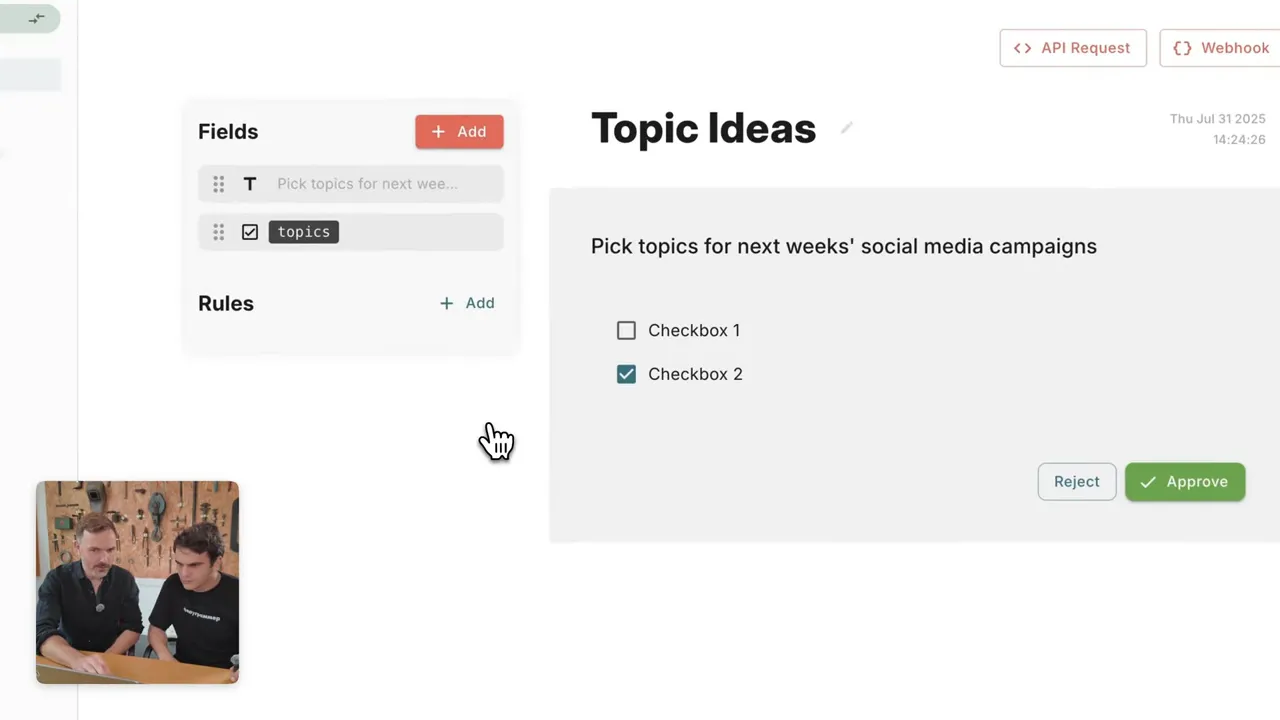
Till explained how the review templates are configured: you can define static fields in the template or populate field options dynamically from the workflow run itself. This matters because many real-world reviews require contextual lists—product images, variant options, or campaign choices—that change per run. GoToHuman supports webhook-based send-and-wait behavior, which means it can pause a workflow for hours or days while waiting for a human decision.
Setups like these are critical for marketing and customer-facing workflows. Imagine an AI that drafts social posts, generates images, or creates a short video snippet. With GoToHuman you can present a concise package to a reviewer: a tagline, a set of image choices, and a five-second video preview. The reviewer can check the items, edit text or prompts inline, and approve a version for publishing. Everything is cached and stored so links don’t expire and reviewers don’t need direct access to your AI provider credentials.
Use N8N Within GFunnel and you can close the loop: when a piece is approved, n8n can push it to a GFunnel landing page, schedule it in a content calendar, or attach it to a Lead Connector campaign. The result is a single source of truth for both content and business outcomes.
How GoToHuman integrates with n8n — and how you can Use N8N Within GFunnel
During our demo, Till walked through the community node he built for n8n and how he got it verified and discoverable on n8n Cloud. For integrators and solo founders, this is huge: you can ship your node as code, version using Git, and leverage n8n’s open-source references to accelerate development. Till emphasized that building the community node took days, not weeks, thanks to n8n’s open-source node examples and declarative/programmatic options.
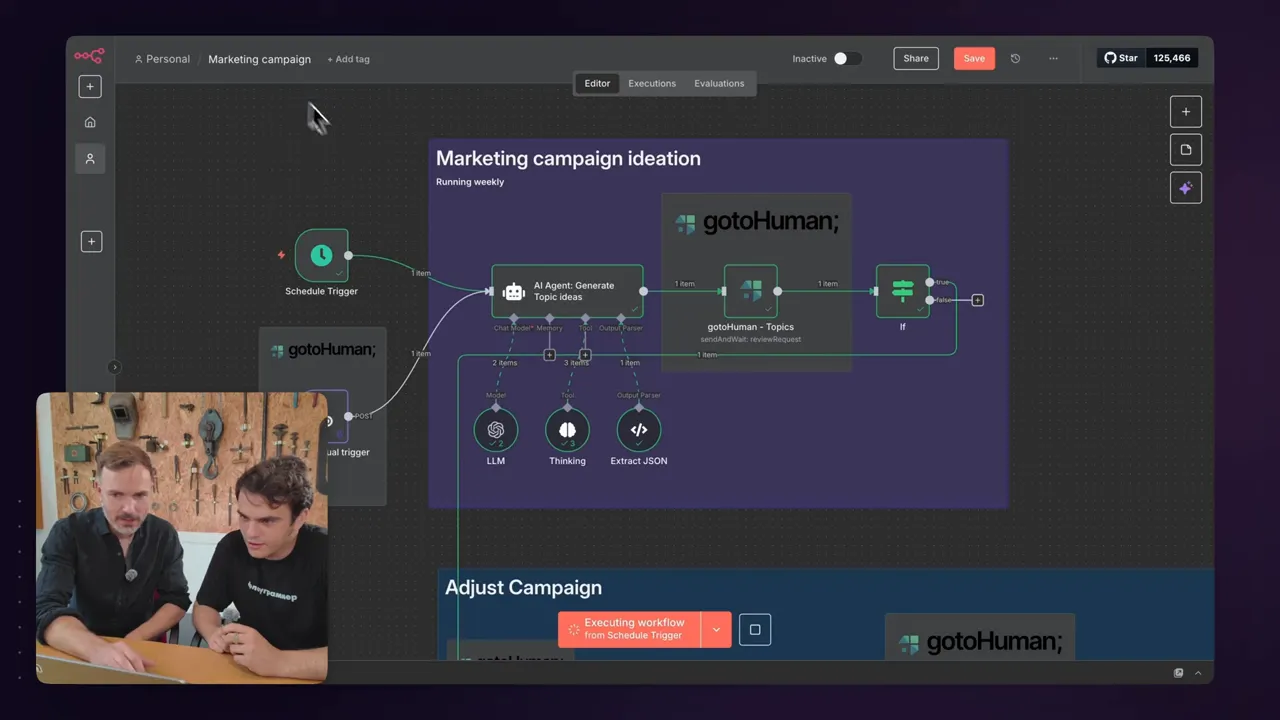
Use N8N Within GFunnel by using n8n as the orchestration layer between your AI agents, GoToHuman review steps, and GFunnel business systems. Here’s a typical architecture to follow:
- AI agent in n8n generates content (text, images, videos) and stores output URLs.
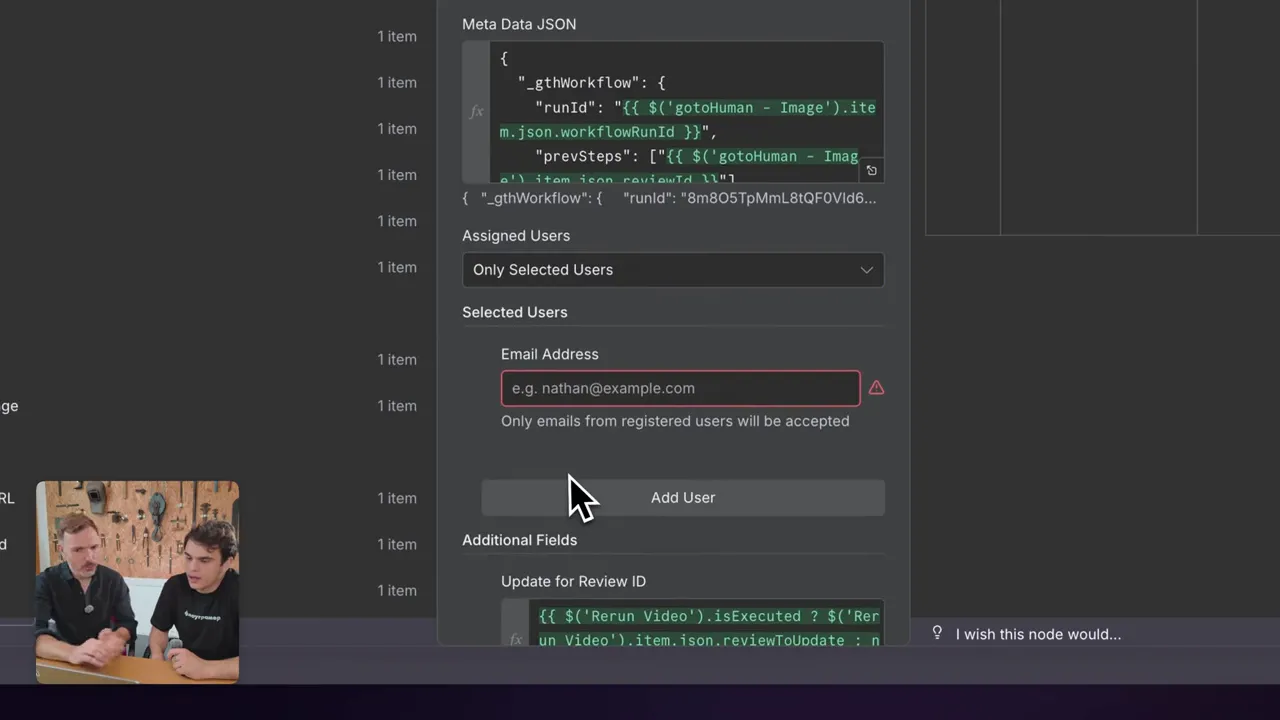
- n8n triggers GoToHuman review via the community node, passing structured metadata and references to images/videos.
- GoToHuman pauses the workflow until a human reviewer acts; the reviewer edits prompts or text in-line or selects pre-generated variants.
- Upon approval, GoToHuman notifies n8n via webhook with the finalized content or review metadata.
- n8n pushes the approved content to GFunnel systems: publish to a landing page, update a Lead Connector campaign, record metrics in CRM, or push a contract for electronic signature.
Use N8N Within GFunnel is a straightforward way to express this pattern: n8n orchestrates, GoToHuman reviews, GFunnel captures business outcomes. This architecture unlocks both speed and control—automation runs without human latency where possible, but humans step in where reliability matters.
The integration specifics that were useful to note:
- Dynamic fields: GoToHuman allows you to pass arrays of objects (for instance, image URLs with labels). n8n can generate that structure easily before calling the node.
- Send-and-wait behavior: n8n workflows can pause until GoToHuman returns a review decision; this supports real-world delays.
- CDN and signed links: GoToHuman caches generated images and videos on its CDN and issues unguessable signed links to reviewers, protecting credentials and preventing link expiry.
- Versioning and edit history: reviewers can edit prompts or text inline; previous versions are stored, preserving the audit trail.
From a GFunnel perspective, integrating this pattern means your marketing and sales teams operate from the same funnel. When a campaign piece is approved, GFunnel’s Lead Connector can automatically tag leads with campaign metadata, update audience segments, and trigger workflows in Flows AI for follow-up. Use N8N Within GFunnel to map approved creative to Lead Connector campaigns and ensure analytics are tied to conversions.
Walkthrough of the demo: step-by-step (ideation ? review ? image ? prompt edit ? video)
Let’s walk through the exact demo we built during the interview. I’ll recreate the sequence and explain why each step matters. Use this as a template you can replicate.
1) Ideation (agentic step in n8n)
The workflow begins with an ideation step: an n8n agent prompts a model to generate a list of topical ideas based on seasonality. Because models don’t automatically know the current date and context, the date is supplied as input. The agent returns multiple topic suggestions and passes those as options into GoToHuman. This is the first human-in-the-loop gate.
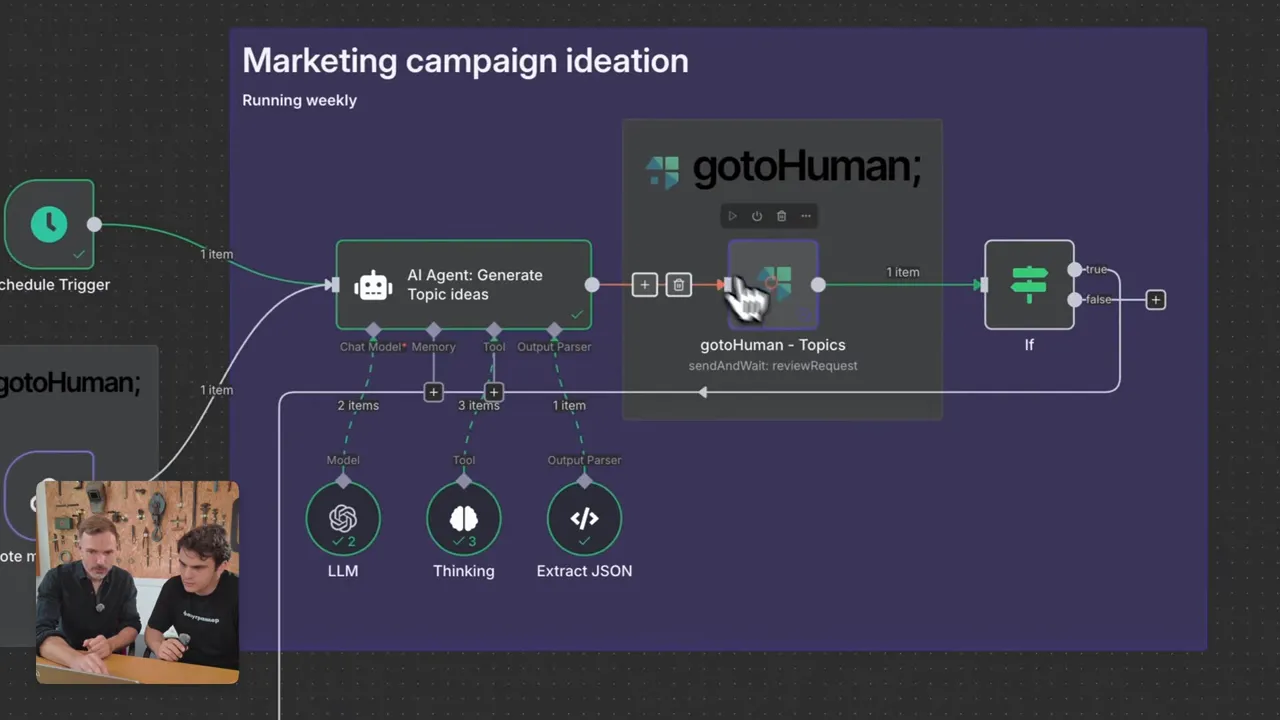
Why this matters: humans often know nuance about brand campaigns and local events that models may miss. Let the model produce drafts; let humans select.
2) GoToHuman review: pick a topic and refine
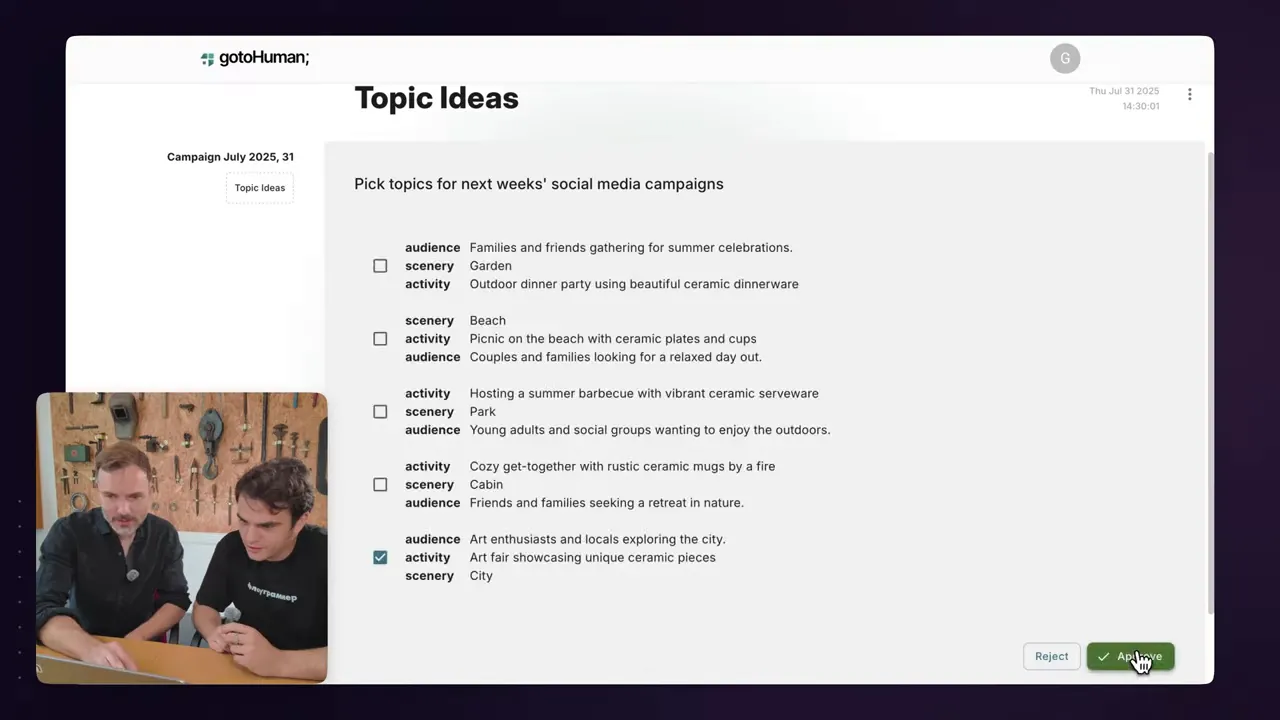
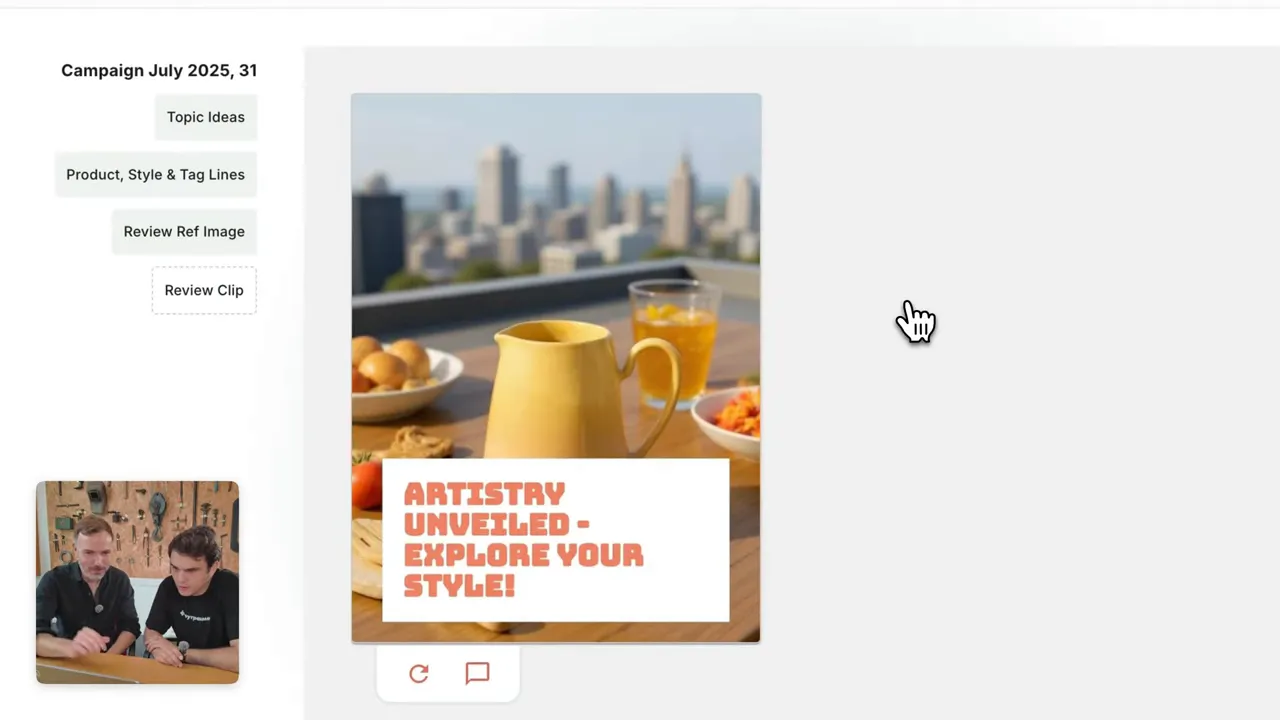
GoToHuman receives the list and displays it as dynamic checkboxes. The reviewer picks a topic and can edit associated data (audience, tone, or even the campaign name). The workflow resumes with the chosen topic.
Use N8N Within GFunnel to ensure the chosen topic is tied back to your GFunnel campaign metadata (campaign name, landing page slug, Lead Connector pipeline ID). That way you can trace traffic and leads generated by this creative back to the right campaign and landing page.
3) Tagline generation and retry
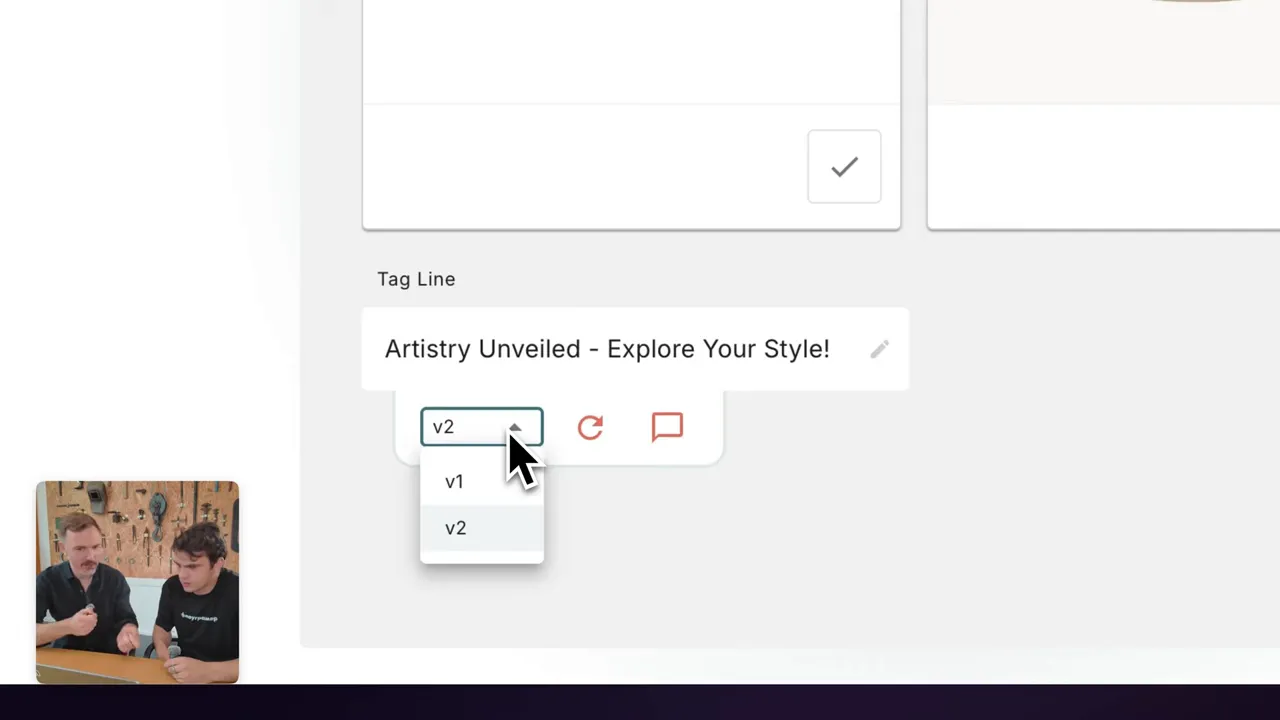
The next agent produces taglines. In the GoToHuman review template, taglines are shown and the reviewer can click 'retry' to get alternatives. n8n uses a switch node to route the selected option back into the agent without duplicating the agent node multiple times—this keeps workflows clean and maintainable.
Use N8N Within GFunnel by mapping the selected tagline to the GFunnel page headline or ad copy field. When approved, the headline can populate the landing page or be used in a Lead Connector message sequence.
4) Image generation and inline prompt editing
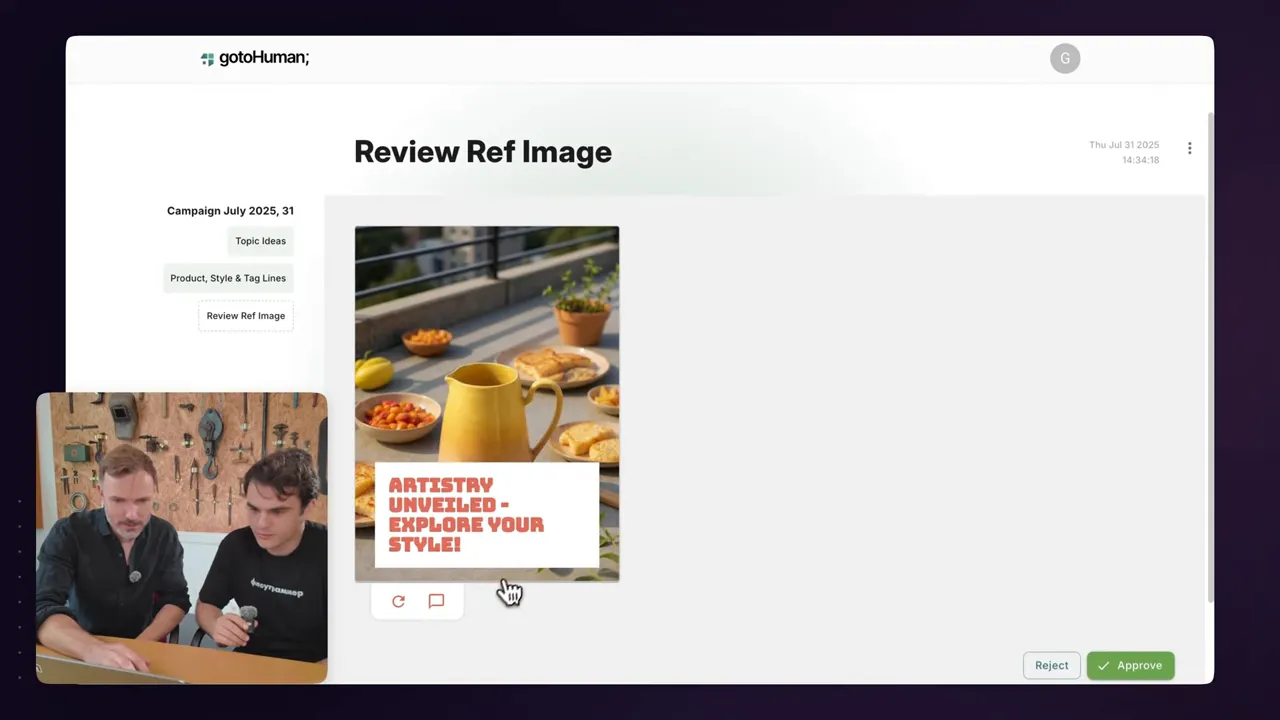
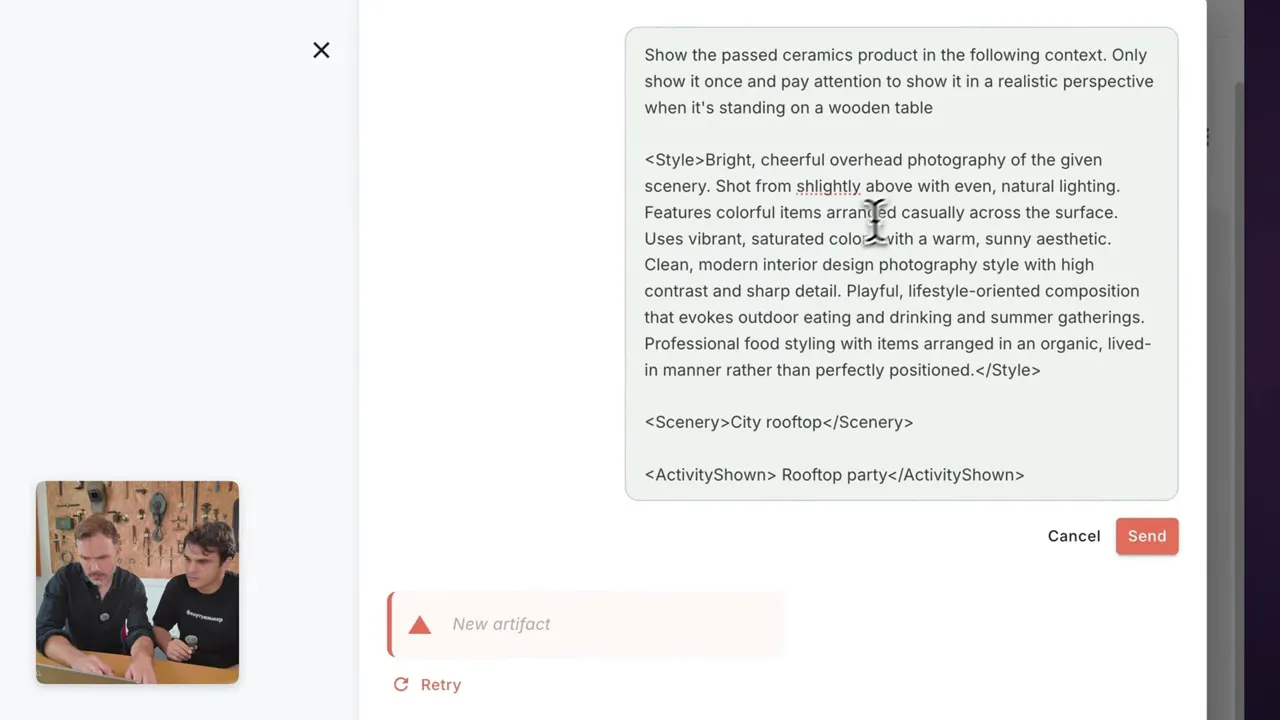
An image generator (File AI with a particular model) produces a reference image based on the product and tagline. The image grid component in GoToHuman also supports video thumbnails; everything is cached on GoToHuman’s CDN. When a review finds a small issue—like the product sitting on the floor instead of a table—the reviewer edits the prompt inline by adding “wooden table” and “city rooftop with a blurred outline,” and then retries.
Why that’s powerful: the same developer who built the workflow maintains the control over how prompts are structured, while reviewers can make tactical edits without needing access to the AI provider or to the infrastructure keys. Use N8N Within GFunnel to reflect any prompt-level changes back into your funnel metadata—for example, track which prompt variants produced the highest conversion rate.
5) Video generation and preview
The workflow can optionally generate a short video clip (in the demo it was ~5 seconds). Video adds motion and improves engagement. GoToHuman's interface plays a short preview inside the review template, allowing reviewers to approve or request edits before any publishing step.
Note: these are asynchronous processes that can take time (tens of seconds to minutes). GoToHuman’s send-and-wait behavior and n8n’s async orchestration support realistic delays without blocking other systems.
6) Final approval and downstream actions
After approval, the final media and copy are returned to n8n. This is the moment you connect to GFunnel: Push the approved creative to a landing page, create a social post, update a Lead Connector campaign, or trigger a Flows AI follow-up sequence. Use N8N Within GFunnel to populate campaign fields so your CRM and marketing stacks are synchronized.
Use N8N Within GFunnel ensures that human approvals aren't just separate checkpoints—they become the canonical triggers for your business funnel. For instance, when a creative is approved, GFunnel can schedule an email sequence, spin up a temporary landing page, or post the creative to social platforms via scheduled flows.
How GFunnel users should think about human review in automation
If you’re using GFunnel’s suite—Lead Connector, Flows AI, the website builder, and contract management—think of human-in-the-loop as a governance layer that sits between creative production and business execution. Use N8N Within GFunnel to map approved outputs into business objects and to ensure continuity of data across your funnel.
Some practical examples:
- Lead nurturing: An approved campaign variant automatically creates or updates a Lead Connector campaign and triggers a Flows AI follow-up journey for new leads.
- Landing page personalization: Use the approved tagline and image to autoset headline variants on GFunnel landing pages to run A/B tests without manual handoffs.
- Contract and offer management: When a promotional offer is approved, generate an AI-assisted contract draft, have it reviewed via GoToHuman, then send it to the customer through GFunnel’s contract management flow.
- Analytics alignment: Tag leads in Lead Connector with campaign metadata so the marketing and sales teams can evaluate which AI-generated variants actually drove conversions.
Use N8N Within GFunnel to guarantee that human review is not a siloed step; it’s an integral signal that triggers business actions and data updates. By centralizing these events in the same orchestration and funnel platform, you reduce manual errors and shorten the time from idea to measurable action.
Best practices checklist: deploying production-ready human-in-the-loop flows
Deploying human-in-the-loop correctly means thinking across people, processes, and technology. Here’s a checklist that emerged from our demo, my experience at n8n, and conversations with Till.
Design & scope
- Define which steps truly need human oversight (brand-sensitive copy, legal claims, customer response templates). Use N8N Within GFunnel to codify this in your workflow logic.
- Decide on the level of human intervention: approval-only, edit-and-approve, or co-creation with live prompt editing.
- Document acceptance criteria for reviewers: tone-of-voice, factual checks, prohibited content, and call-to-action accuracy.
UX & reviewer experience
- Build concise review templates: show only what’s necessary (preview image, proposed headline, CTA, and meta data).
- Leverage dynamic fields: pass product image arrays or campaign metadata directly to the review template so reviewers can make informed choices quickly.
- Enable inline edits on prompts and text so reviewers can tweak without needing backend access—this is a core GoToHuman capability.
Technical & infrastructure
- Use signed CDN links for images and videos to protect AI provider credentials and prevent link expiry. GoToHuman caches media and issues unguessable links.
- Use send-and-wait nodes: your orchestration engine (n8n) should support long-lived pauses and resume when the webhook triggers back.
- Track versions: store both the prompt and the model’s output for each iteration to allow rollbacks and A/B comparison.
Operational & governance
- Assign review pools or specific reviewers depending on content type (legal, marketing, support).
- Set SLA expectations for reviewers to prevent stalled pipelines. Use GFunnel notifications or Flows AI messages to nudge reviewers if needed.
- Audit logs: keep reviewer comments, timestamps, and model parameters for compliance and continuous improvement.
Use N8N Within GFunnel to operationalize these best practices: orchestrate the checks, notify the right reviewers, and connect approvals to business outcomes in Lead Connector and the GFunnel page builder.
Real-world considerations and tips from building a community node
Till’s experience building the GoToHuman node taught a few practical lessons that you can apply whether you’re shipping a community node for n8n or just integrating third-party review tools:
- Look at existing community nodes as references. n8n’s open-source nature makes it easy to learn by example.
- Choose the right level of complexity: declarative nodes are quicker to build, programmatic nodes offer more control.
- Expect to iterate. GoToHuman evolved over multiple rewrites as the product matured and use cases expanded.
Use N8N Within GFunnel and community integrations to reduce development time by leveraging tested patterns. The mission is the same: give users the means to build the last mile of automation on their own terms.
Frequently Asked Questions (FAQ)
What is human-in-the-loop and why should I add it?
Human-in-the-loop is the process of inserting a human reviewer into an automated workflow at strategic checkpoints. It’s essential for brand safety, legal compliance, tone control, and improving model accuracy for production workloads. Use N8N Within GFunnel to define and automate these checkpoints across your funnel and campaigns.
How does GoToHuman work with n8n?
GoToHuman provides a review API and an n8n community node that supports dynamic templates, image/video previews, and send-and-wait behavior. n8n triggers GoToHuman with structured metadata; GoToHuman pauses the workflow until a reviewer acts and then returns the review output to n8n via webhook.
Can I Use N8N Within GFunnel to automate post-approval actions?
Yes. Approved outputs can trigger GFunnel actions like creating or updating Lead Connector campaigns, building landing pages, scheduling posts, and starting Flows AI sequences. Use N8N Within GFunnel to bind approvals to business objects and track conversions.
Do reviewers need access to my AI accounts (OpenAI, etc)?
No. GoToHuman caches generated media and serves reviewers signed, unguessable links, so reviewers don’t need access to your provider keys. This reduces security risk and keeps credential scope narrow.
How much does it cost and is there a free tier?
GoToHuman offers a free tier with limited reviews so you can try it out. For higher usage there's a pro plan. GFunnel also offers free account options to get started. Visit https://www.gfunnel.com to learn more and create an account. Use N8N Within GFunnel to test workflows end-to-end on free tiers before scaling.
How does this pattern scale for small teams?
Small teams benefit the most: automation ups productivity while the human review step ensures brand safety. Use N8N Within GFunnel to tie approvals to Lead Connector tags and Flows AI follow-ups so a single person can manage many campaigns without losing control.
Where to start: a practical onboarding checklist
Ready to build your first human-in-the-loop workflow? Here’s a step-by-step starter plan:
- Create accounts: n8n (or self-hosted), GoToHuman, and GFunnel (https://www.gfunnel.com). Use trial tiers to prototype without cost.
- Map your process: identify which steps need review and who should review them (marketing, legal, customer support).
- Prototype in n8n: build an ideation agent that outputs text and image URLs, then connect a GoToHuman node to send the review.
- Design review templates: focus on essentials—tagline, image grid, and accept/reject options. Keep templates short for speed.
- Integrate GFunnel: map approved items into Lead Connector campaigns, landing pages, or Flows AI sequences.
- Measure and iterate: track conversion and review SLAs. Use the model parameters and reviewer feedback to refine prompts and automation thresholds.
Use N8N Within GFunnel as a repeatable pattern across campaigns. The combination brings the power of agentic automation with the governance and marketing features GFunnel provides.
Further reading and resources
To learn more and start building:
- Sign up for GFunnel: https://www.gfunnel.com — create an account and explore Lead Connector and Flows AI.
- Explore n8n: https://n8n.io — learn how to orchestrate agents, add webhooks, and create nodes.
- Review the GoToHuman docs and consider the community node for n8n to jumpstart integrations.

Conclusion: automation with a conscience — use humans where it matters
Automation is powerful, but it gets powerful at scale only when paired with human judgment at the right places. Use N8N Within GFunnel to bring together the orchestration power of n8n, the reviewer-first UX of GoToHuman, and the business platform capabilities of GFunnel. This is how teams can move faster without sacrificing control, brand safety, or customer trust.
If you’re building a content pipeline, a customer response flow, or any automation that touches customers, start by instrumenting a human-in-the-loop checkpoint. Use N8N Within GFunnel to connect your creative pipeline to your CRM and funnel so approvals become triggers for business progress. Start small, measure the impact, and iterate.
Want to get started now? Visit https://www.gfunnel.com to create a free account, explore Lead Connector and Flows AI, and test Use N8N Within GFunnel patterns in your own funnels. Happy building — and happy reviewing.