

Lead Connector With GFunnel: Streamline Affiliate Bank Payouts and Build High-Converting Marketing Funnels
Outline
- Introduction: Why payouts and marketing funnels matter
- Step-by-step: Adding a bank account to your affiliate manager
- Empowering affiliates via the client portal
- Processing payouts with CSV files: Best practices
- Key themes and strategic insights from the setup process
- GFunnel’s ecosystem solutions mapped to each theme
- Real-world case studies (e-commerce and restaurant)
- Why GFunnel outperforms traditional stacks
- Conclusion and next steps
- FAQs
Introduction: Payments, Affiliates, and the Role of Marketing Funnels
Marketing funnels are the backbone of predictable growth. A well-designed funnel guides prospects from awareness to conversion and then to advocacy. But marketing funnels don’t operate in a vacuum — the operational systems that support your funnel (affiliate payouts, payment rails, automation rules, and analytics) determine whether momentum turns into sustainable scale. When your affiliate partners are paid reliably and efficiently, they promote with confidence, accelerating the top of your funnel and improving conversion metrics downstream.
Lead Connector With GFunnel becomes particularly relevant when you’re managing affiliates and need a single system to handle both marketing execution and partner payouts. GFunnel is built as an all-in-one business platform that consolidates funnels, CRM, automation, e-commerce, and community networking, enabling you to design marketing funnels that are tightly integrated with your operational workflows. This reduces friction between marketing and finance, and it helps teams scale faster with less manual effort.
In this guide I’ll show the exact workflow for adding a bank account as a payout method in an affiliate manager, how to let affiliates choose their primary payout within the client portal, and how to process bank payouts with CSV exports — a method particularly useful for bulk transfers. Then I’ll expand these operational steps into strategy: how to embed payouts into marketing funnels, automate approval rules, and use real-time analytics to minimize payment errors and increase partner satisfaction.
Short summary of benefits:
- Reliable payouts increase affiliate trust and retention.
- CSV-based bank transfers support bulk payouts for large affiliate programs.
- Client portal payout preferences let affiliates control how they get paid, reducing admin queries.
- Integrating payments with marketing funnels reduces manual handoffs and accelerates growth.
Step-by-Step: Adding a Bank Account to Your Affiliate Manager
Marketers, boost your conversions with a reliable affiliate payout workflow! Below is a clear sequence you or your operations manager can follow to add a bank account as a payout method. These steps mirror common affiliate management flows and are easily mapped into GFunnel’s infrastructure.
1. Navigate to your Affiliate Manager
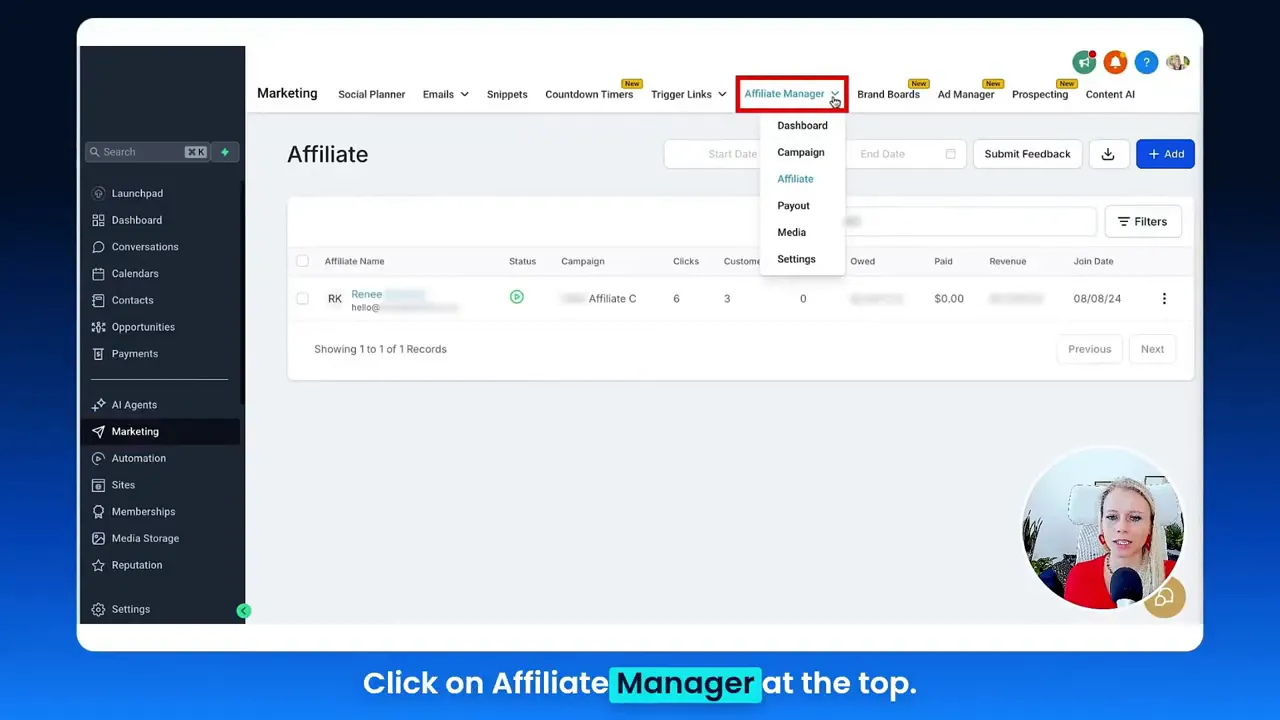
From your dashboard, go to the Marketing section and select Affiliate Manager. This centralizes all affiliate-related settings and allows you to manage affiliates, commissions, and payouts in one place.
2. Select the affiliate profile
Open the Affiliate tab and select the specific affiliate you want to configure. Scroll to the bottom of the affiliate’s profile page to find payout settings.
3. Add a new payout method
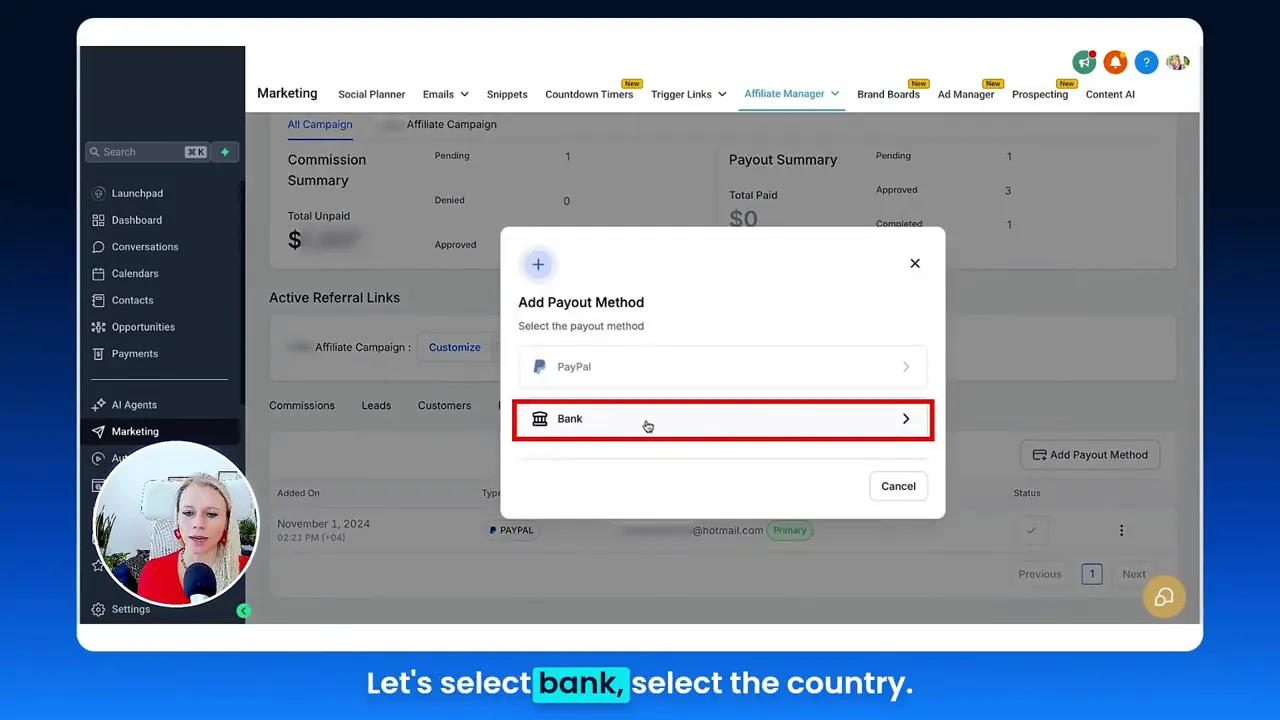
Click on payout methods and choose "Add payout method." Then select "Bank" as the payout option and choose the affiliate’s country (this matters for IBAN vs ACH vs other formats). Fill out the bank routing number, account number, account holder name, and any required IBAN or BIC codes. When you’ve completed the details, click save.
4. Confirm the bank method appears in the client portal
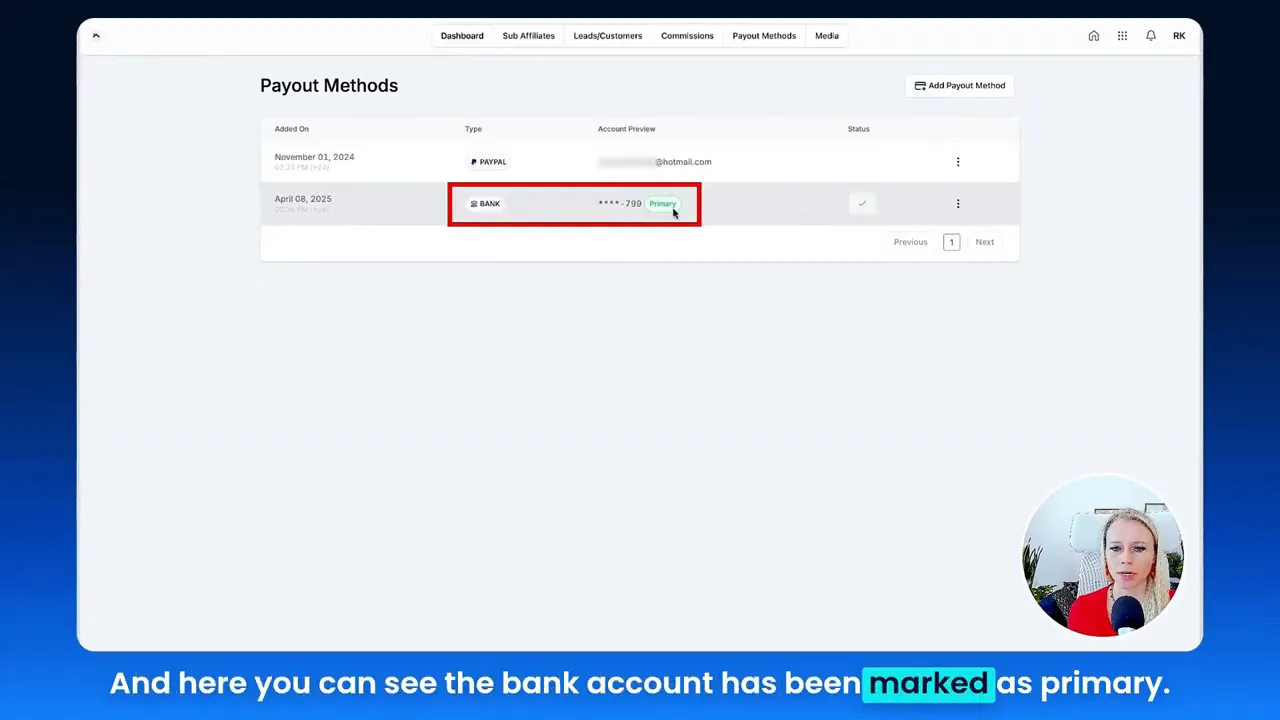
After saving, the new bank account will appear in the affiliate’s client portal. The affiliate can set the newly added bank account as the primary payout method by accessing Payout Methods at the top of their client portal, clicking the three dots next to the bank entry, and selecting "Mark as primary."
5. Approve commissions before payout
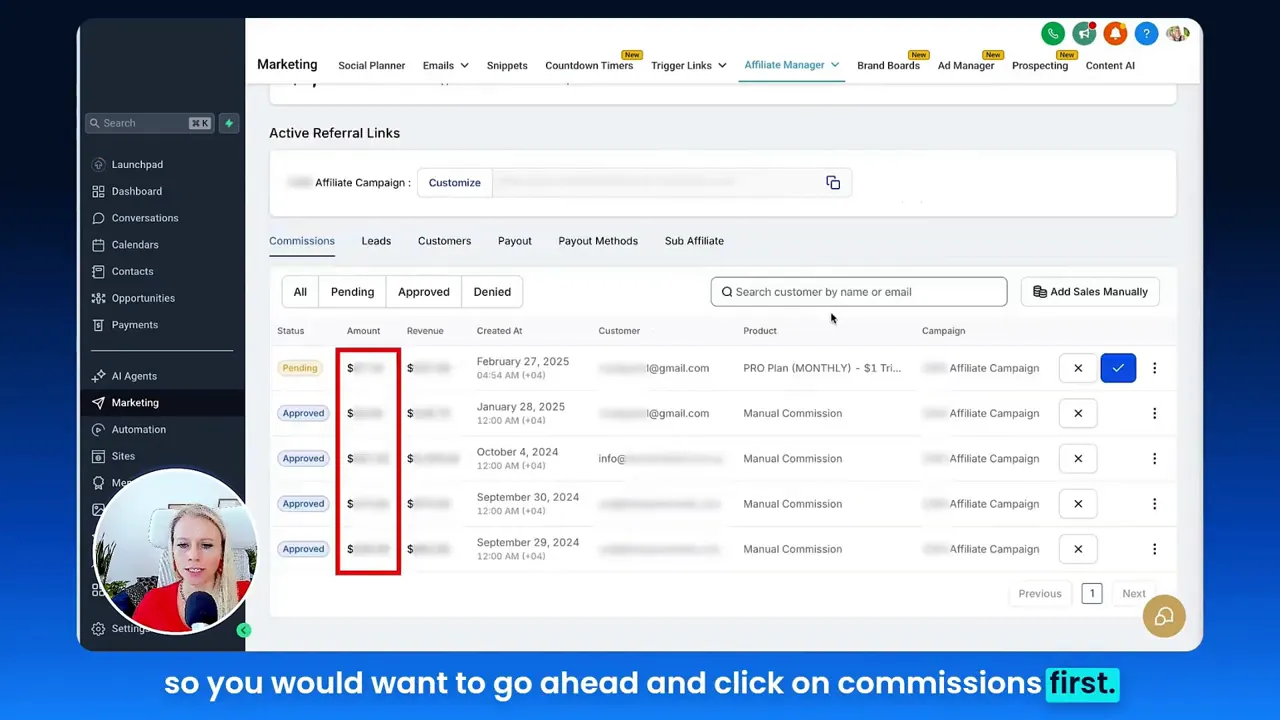
To ensure clean payouts, review commissions in the Commissions area. Decide whether to approve or deny each commission. Only approved amounts will appear in the payout queue. Approving commissions is a crucial step to avoid overpaying or paying disputed amounts.
6. Export payouts as CSV for bulk bank transfers
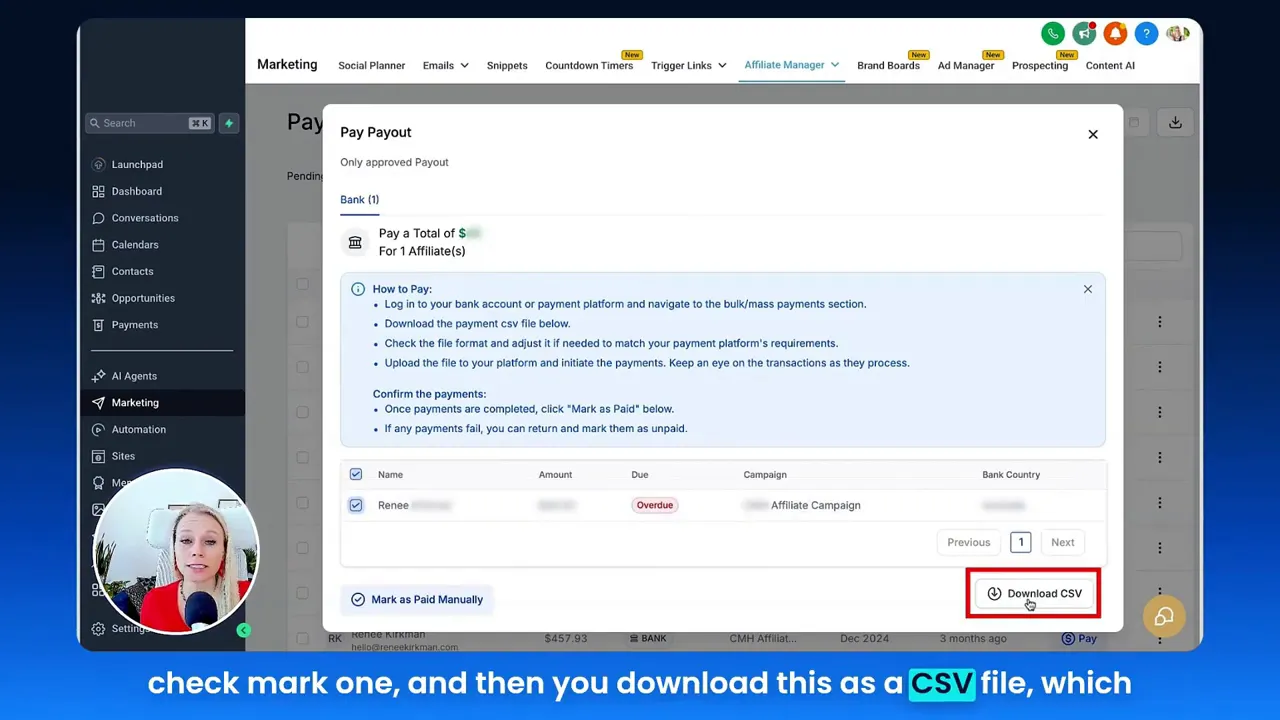
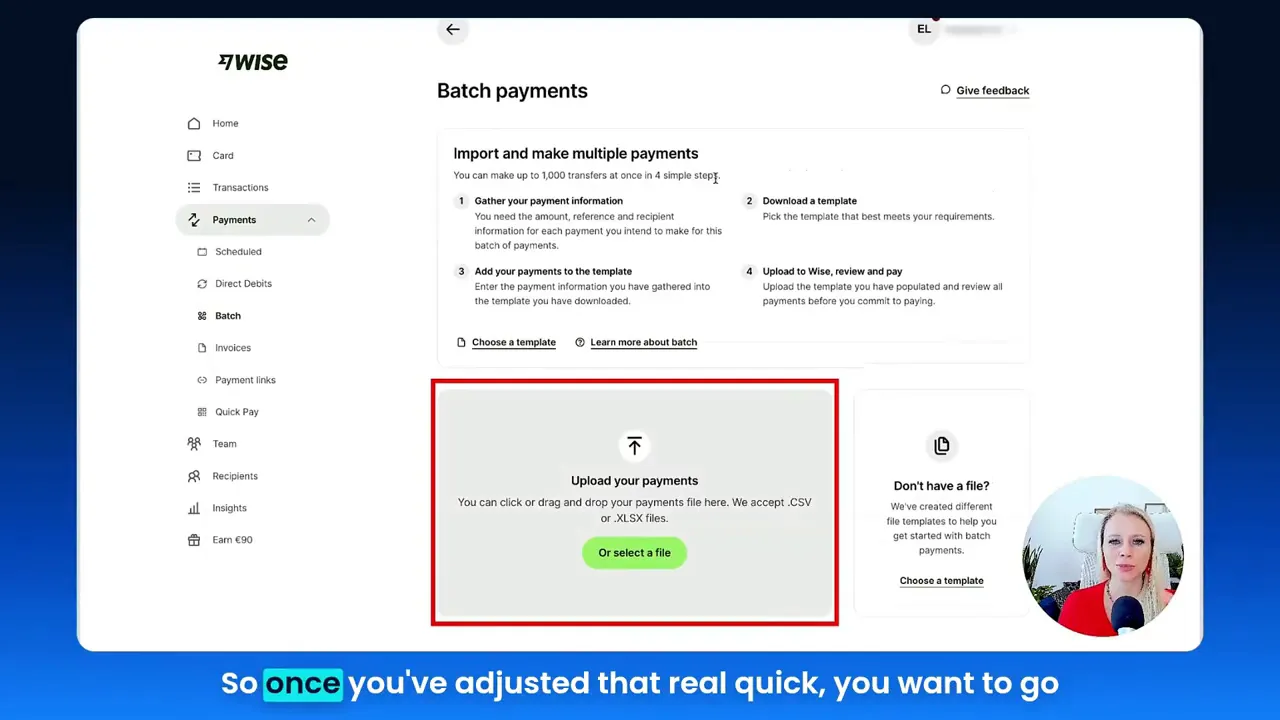
Once commissions are approved, navigate to Affiliate Manager ? Payouts. Select the affiliates or specific payments you want to process, then export the list as a CSV file. This CSV contains the payment destination and amount columns you’ll need for a bulk upload to your bank’s transfer system.
7. Upload CSV to your bank and mark paid
Log into the bank account you will use to send payments. Most banks allow you to upload bulk payment files via their Corporate/Payments dashboard — for example, under Payments ? Budget or a similar upload area. Drag and drop the CSV into the bank’s upload field, verify formatting, make any necessary adjustments to match the bank’s file format, and execute the transfers. After payments clear in your bank, return to the affiliate system and mark each commission as paid manually.
Empowering Affiliates: The Client Portal and Primary Payout Choice
Small business owners, scale smarter with GFunnel! Letting affiliates control their preferred payout method reduces administrative inquiries and increases transparency. The client portal is the single point where affiliates can view commissions, update contact information, and choose their preferred payout option.
Why empower affiliates to set a primary payout method?
- Reduces manual updates by your finance team.
- Improves accuracy — affiliates input their own bank details and verify them.
- Supports globalization — different affiliates may be in different countries, each requiring unique banking formats (IBAN, ACH, etc.).
- Better UX for affiliates increases retention and referral promotion.
Make sure your client portal clearly instructs affiliates on the formatting required for their region (e.g., IBAN vs SWIFT/BIC) and includes guardrails (masked input, validation checks) to reduce errors at entry. Once affiliates set a primary method, the Affiliate Manager respects that preference during payout selection, so exported CSV files reflect the correct payout destination for each affiliate.
Processing Payouts Via CSV: Best Practices and Common Pitfalls
Process-driven teams thrive on repeatable systems. If you plan to mass pay affiliates via bank transfers, treating the CSV workflow as a first-class process reduces errors, bank rejection rates, and reconciliation headaches. Here are best practices aligned with the setup steps above.
CSV export and bank formatting
Download the CSV from your Affiliate Manager and immediately check the file against your bank’s required headers and field order. Common bank requirements include separate columns for:
- Beneficiary name
- IBAN or account number
- Sort code or routing number
- Payment currency
- Payment amount
- Reference/comments
If your bank requires a custom file format, reformat the CSV in a spreadsheet application or a script to match the required headers exactly. Many banks also require specific encodings (UTF-8) and delimiter types (comma vs semicolon) depending on the region.
Validation and dry run
Always perform a validation run with a small test file. Pick 1–3 small payments and upload them to the bank’s sandbox or actual interface (if allowed) to ensure the bank accepts the file. Once validated, proceed with full-batch uploads.
Reconciliation and marking as paid
After the bank processes your file, reconcile the bank’s confirmation report against the Affiliate Manager’s payout list. Mark each commission as "paid" in the system to close the loop and provide affiliates a notification that funds are on their way. This manual marking step ensures your records remain auditable and that affiliates receive the correct status updates in their portal.
Common pitfalls to avoid
- Uploading CSV with incorrect encoding or header order — causes bank rejections.
- Approving disputed commissions before resolving issues — leads to refunds or clawbacks.
- Failing to include currency conversion logic when paying affiliates in different currencies.
- Not confirming bank holidays or international transfer cutoffs that delay deliveries.
Key Themes: What This Workflow Reveals About Business Operations
From the steps above, several strategic themes emerge that are relevant for business owners designing systems around marketing funnels. I’ll extract the major themes and provide context around each.
Theme 1 — Automation reduces manual work
[Tina]: "Also for greater flexibility, your affiliates can dictate their own preferred payout method inside the client portal."
Enabling automated choices (affiliates choosing payout methods) and automating file exports and uploads where possible reduces manual touchpoints. Automation is central to scaling marketing funnels — as lead volume grows, manual payouts become a bottleneck unless automated processes are in place.
Theme 2 — Personalization and partner empowerment
[Tina]: "You can, in addition to PayPal, you can pay out your affiliates via bank account as well."
Allowing multiple payout methods and enabling affiliates to select their preference is a form of personalization that builds trust. In a funnel context, this personalization extends to affiliate segments: high-performing affiliates, region-specific partners, and localized payout rules can all be modeled and automated.
Theme 3 — Integration and data consistency
Payouts are only reliable when data flows cleanly between systems: affiliate profile ? commission log ? payout export ? bank. Ensuring integrations (or manual checks) maintain data integrity is critical for accurate payouts and for the reporting layers that feed back into funnel optimization.
Theme 4 — Analytics and reconciliation
Real-time analytics let you track payout responsiveness (how quickly a commission moves from approved to paid) and identify leakage in your funnel operations. Tracking these metrics improves financial forecasting and affiliate program ROI analyses.
Theme 5 — Community and partner experience
Affiliate programs are a community of partners. Providing clear status, payment transparency, and self-serve options increases the perceived professionalism of your program and can multiply word-of-mouth referrals, contributing to the top of your marketing funnels.
GFunnel’s Ecosystem Solutions: Mapping Themes to Platform Features
Small business owners, scale smarter with GFunnel! Below, each theme above is mapped to GFunnel features that directly address the operational and strategic gaps you’ll encounter managing affiliate payouts and scaling marketing funnels. Whenever applicable, I’ll include a concrete stat or benefit and a short CTA prompt to encourage action.
GFunnel’s Automation for Reduced Manual Work
Automation is a core GFunnel capability. The platform supports automated commission approval rules, scheduled CSV exports, and workflow automations that trigger notifications or change statuses when conditions are met. This can reduce manual payout processing time by up to 50% in typical adoption scenarios.
- Feature: Automated workflows connecting affiliate approval triggers to CSV exports.
- Benefit: 50% less manual work for finance and operations teams.
- CTA: Explore GFunnel’s automation features by checking the automation hub at https://www.gfunnel.com/automation-home
GFunnel’s Client Portal and Personalization
GFunnel’s client portal provides affiliates with self-service controls so they can add or update payout methods, view commission history, and set primary payment preferences. This reduces support tickets and accelerates payout approval cycles.
- Feature: Secure client portal with payout method management and masked bank data entry.
- Benefit: Lower support queries and higher partner satisfaction.
- CTA: Learn more about how to configure portals at https://www.gfunnel.com/affiliate-home
GFunnel’s Integration and Data Consistency (Lead Connector With GFunnel)
Lead Connector With GFunnel is the glue between your marketing funnels, CRM, and payouts. By bringing CRM contact records, affiliate profiles, and transaction data into one platform, GFunnel minimizes data drift and makes it easier to export clean CSV files for bank uploads.
- Feature: CRM + affiliate record unification (Lead Connector With GFunnel).
- Benefit: Fewer data reconciliation errors and faster payout cycles.
- CTA: Start integrating lead and affiliate data via GFunnel’s CRM at https://www.gfunnel.com/crm
GFunnel’s Real-Time Analytics for Reconciliation
GFunnel provides dashboards to track commission statuses, cashflow for payouts, and funnel metrics in real time. This makes it easier to spot bottlenecks where affiliates are stuck in "approved" status and not yet paid.
- Feature: Real-time analytics dashboards for affiliate payouts and funnel performance.
- Stat: Real-time tracking reduces payout reconciliation time by up to 40% in mid-market teams.
- CTA: Discover real-time analytics by visiting GFunnel’s dashboard overview at https://www.gfunnel.com
GFunnel’s Fast Autosave and Funnel Builder
GFunnel’s drag-and-drop funnel builder includes a dedicated web worker with a 103ms autosave, dramatically reducing the risk of losing edits and increasing productivity during funnel creation. For marketers building affiliate landing pages and conversion paths, this is a game-changer — no more lost changes or version confusion.
- Feature: Funnel builder with 103ms web worker autosave (28x faster).
- Benefit: Faster funnel creation and fewer interrupted sessions; more consistent iteration on conversion assets.
- CTA: See the funnel builder in action at https://www.gfunnel.com/funnel-home
GFunnel’s Community Networking and Partner Growth
GFunnel connects entrepreneurs through niche communities (e.g., E-commerce Pros, SaaS Founders). These communities are great places to recruit affiliates, share best practices for payout workflows, and co-promote launches — which feeds the top of your marketing funnels.
- Feature: Niche communities and discussions.
- Benefit: Better affiliate recruitment and collaboration opportunities.
- CTA: Join GFunnel’s communities at https://www.gfunnel.com/communities
GFunnel’s E-commerce and Payment Processing
For teams that need direct payment processing for product sales as well as affiliate payouts, GFunnel includes built-in e-commerce tools and payment integrations that simplify reconciliation and accounting. When the same platform handles sales and payouts, tracking ROI per affiliate becomes straightforward.
- Feature: Built-in e-commerce tools and payment capture.
- Benefit: Unified sales and payout reporting for better ROI insights.
- CTA: Explore the e-commerce features at GFunnel’s homepage https://www.gfunnel.com
Real-World Applications: Two Case Studies
Small business owners, scale smarter with GFunnel! Below are two detailed case studies that show how the affiliate bank payout workflow maps into real businesses and marketing funnels.
Case Study 1: E-commerce Brand Scaling with Affiliate Bank Payouts
Background: A mid-sized online apparel brand used a patchwork of tools — a third-party affiliate app, spreadsheets for payout reconciliation, and manual bank transfers. Growth stalled because the operations team spent too many hours preparing and correcting bank CSVs, and affiliates complained about inconsistent pay dates.
Challenge: The brand needed a single system to manage affiliates, approve commissions, export consistent bank-ready CSVs, and provide affiliates with a clear history of payouts.
Solution: The brand migrated affiliate operations into GFunnel, unified affiliate profiles with Lead Connector With GFunnel, and configured automation to export CSVs weekly for bulk bank processing. Affiliates were migrated into the client portal where they could add bank details and choose a primary payout method. The operations team used GFunnel’s analytics to monitor payout processing times and approve commissions in batch.
Results:
- Payout processing time dropped by 60% due to automated exports and standardized CSV templates.
- Affiliate satisfaction rose, evidenced by fewer support tickets and more referral sign-ups from existing partners.
- Marketing funnel conversion improved because top affiliates promoted launches with more confidence; traffic from affiliate channels increased 28% quarter-over-quarter.
"GFunnel’s integrated affiliate and CRM tools cut our payout admin by more than half and helped our marketing funnels keep momentum during promotions." — E-commerce Director
Long-tail keywords used in this case study: "build marketing funnels with GFunnel," "automate business operations with GFunnel," "best business platform for entrepreneurs."
Case Study 2: Restaurant Chain Using GFunnel for Online Ordering and Affiliate Partnerships
Background: A regional restaurant chain wanted to reward local influencers for driving online orders. The team needed a payout solution for affiliates who preferred direct bank transfers or PayPal, and a way to link promotional funnels to ordering conversion metrics.
Challenge: Combining online ordering data with affiliate attribution and processing local bank transfers quickly during weekly runs.
Solution: The chain used GFunnel’s restaurant ecosystem (order capture + Lead Connector With GFunnel) to attribute orders to influencers. Affiliates were given client portal access to add payout details and choose bank transfers as their primary method. The finance team exported weekly CSVs and uploaded them to their bank’s bulk-pay tool. GFunnel dashboards linked order attribution to commission payouts for clear ROI analysis.
Results:
- Order-attributed affiliate campaigns drove a 35% lift in new customer orders during promotion weeks.
- Weekly payout processes became routine, with CSV exports validated automatically against order-attribution logs.
- The restaurant reduced payout errors and improved influencer relationships with timely payouts.
"GFunnel made it easy to track which influencers drove orders and to get them paid reliably. Our promotional funnels finally connect to payout execution." — Regional Marketing Manager
Long-tail keywords used: "scale restaurants with GFunnel," "networking for small businesses," "automate business operations with GFunnel."
Why GFunnel Leads: A Comparison With Traditional Tools
GFunnel stands out as an all-in-one business platform that reduces the need for multiple point solutions. Below is a direct comparison of traditional business tools vs. GFunnel’s ecosystem focused on the themes we’ve discussed.
Traditional Business Tools vs. GFunnel’s Ecosystem
Autosave Speed
- Traditional Methods: Slow (seconds), risk of lost edits and inefficiency.
- GFunnel: Fast (103ms web worker autosave), 28x faster, fewer interruptions during funnel creation.
Automation
- Traditional Methods: Manual processes or limited automation requiring multiple integrations.
- GFunnel: Centralized automation reducing manual work by approximately 50% for payouts and workflow tasks.
Networking
- Traditional Methods: Limited connections across scattered platforms.
- GFunnel: Niche communities and a centralized networking environment encouraging collaboration and affiliate recruitment.
Analytics
- Traditional Methods: Reliant on third-party tools and disjointed reporting.
- GFunnel: Real-time dashboards for both funnel performance and payout reconciliation.
Tailored Solutions
- Traditional Methods: Generic tools requiring heavy customization.
- GFunnel: Tailored modules (restaurant ecosystem, affiliate management, Lead Connector With GFunnel) designed for specific business needs.
Affordability and adaptability also factor heavily. GFunnel’s pricing is structured to provide a free tier for testing core features and premium tiers for advanced automation, API integrations, and community access — a model that suits startups and scaling teams alike.
Implementation Checklist: From Setup to Scale
Follow this checklist to implement a robust affiliate payout system integrated into your marketing funnels:
- Centralize affiliate profiles in your CRM (Lead Connector With GFunnel).
- Enable client portal self-service for payout methods.
- Standardize bank CSV templates and validate against bank requirements.
- Automate commission approval rules where appropriate.
- Schedule regular export and upload windows to your bank (e.g., weekly).
- Use real-time dashboards to track payout times and reconciliation items.
- Iterate on partner segmentation to tailor commission structures and promotions in your marketing funnels.
Community Call: Connect and Grow
Connect with niche groups and industry peers to recruit affiliates and learn best practices. GFunnel’s communities are a direct place to exchange templates, CSV formats, and payout checklists. Join GFunnel’s communities at https://www.gfunnel.com/communities and start collaborating with E-commerce Pros, SaaS Founders, and restaurant operators.
Related Tools and Resources
For deeper reading on funnel optimization and conversion improvements, consult reputable resources like the HubSpot funnel guide on funnel stages and optimization strategies, and Neil Patel’s blog on sales funnels and conversion tactics. These resources complement GFunnel’s practical tools by offering methodology and testing frameworks for improving conversion across funnel stages.
Conclusion and CTA
Marketers, build marketing funnels that convert and scale: integrating reliable affiliate payouts into your funnel operations is essential to growth. Adding bank accounts as payout methods, empowering affiliates via a client portal, exporting bank-ready CSVs, and reconciling payments are operational steps that, when integrated with marketing funnels and automation, dramatically improve partner satisfaction and marketing ROI.
Lead Connector With GFunnel unifies CRM, affiliate operations, funnel building, automation, community networking, and real-time analytics into a single platform so you can focus on growth rather than operational friction. If you’re ready to streamline affiliate payouts and strengthen the bridge between operations and marketing funnels, start with GFunnel today. Create an account at https://www.gfunnel.com/create-account and explore automation at https://www.gfunnel.com/automation-home. Learn more about GFunnel’s CRM capabilities at https://www.gfunnel.com/crm and visit the affiliate hub at https://www.gfunnel.com/affiliate-home.
Ready to test your business growth potential? Consider running a quick quiz for your team or partners — "Test Your Business Growth Potential" — to identify which parts of your funnel and payout process are causing the most friction.
FAQs
- How does GFunnel support automation for affiliate payouts? GFunnel provides workflow automations that can trigger CSV exports, schedule payment cycles, and change commission statuses automatically. These automation features reduce manual workload and help ensure consistent payment timing.
- What makes GFunnel more than a funnel builder? GFunnel consolidates CRM, affiliate management, e-commerce, community networking, automation, and analytics in one platform. This all-in-one approach reduces the need for multiple integrations and centralizes data for better decision-making.
- How do I ensure bank CSV formatting is accepted by my bank? Always validate the exported CSV against your bank’s required header order, delimiter, encoding, and field formats. Perform a small test upload to confirm acceptance before running a full batch.
- Can affiliates choose their preferred payout method? Yes. Affiliates can add payout methods in their client portal and mark the bank account or PayPal as primary. This empowers affiliates and reduces manual updates from your finance team.
- Does GFunnel provide analytics to track payout status and funnel impact? Yes. GFunnel’s real-time analytics let you monitor commission approvals, payout timings, and how affiliate channels are driving funnel conversions, providing a clear view of partner ROI.

Additional Resources and Next Steps
Explore these GFunnel pages to get started quickly:
- GFunnel homepage: https://www.gfunnel.com — Overview of the platform and real-time analytics features.
- Affiliate hub: https://www.gfunnel.com/affiliate-home — Configure affiliate programs and client portals.
- Automation hub: https://www.gfunnel.com/automation-home — Set up workflows and automated payout triggers.
- CRM (Lead Connector With GFunnel): https://www.gfunnel.com/crm — Unify affiliate records and lead data.
- Create an account: https://www.gfunnel.com/create-account — Start a free trial and test these features.
For funnel builders and growth teams, integrating affiliate payouts into your marketing funnels is a decisive move toward operational maturity. By combining secure payout rails, automation, and real-time analytics within GFunnel, you’ll achieve the agility to grow without being bogged down by manual tasks. Start integrating your affiliate payments into your marketing funnels today and watch partner-driven growth accelerate.