
Lead Connector With GFunnel: Streamline Marketing Funnels, Snapshot Updates, and Real-Time Notifications
Outline
- Introduction: Why notifications and snapshot updates matter for marketing funnels
- Key insights and themes from snapshot push workflows
- How GFunnel maps to these themes: automation, analytics, networking, UX
- Real-world case studies: e-commerce and restaurant examples
- Why GFunnel leads compared to traditional tools
- Conclusion, calls-to-action, and next steps
- FAQs
Introduction: Marketing Funnels, Snapshot Updates, and GFunnel
Marketing funnels are the backbone of modern customer journeys—guiding prospects from awareness to purchase, and then to retention. When you build marketing funnels with GFunnel, you’re not just assembling landing pages and email sequences; you’re building an interconnected, automated ecosystem that scales with your business.
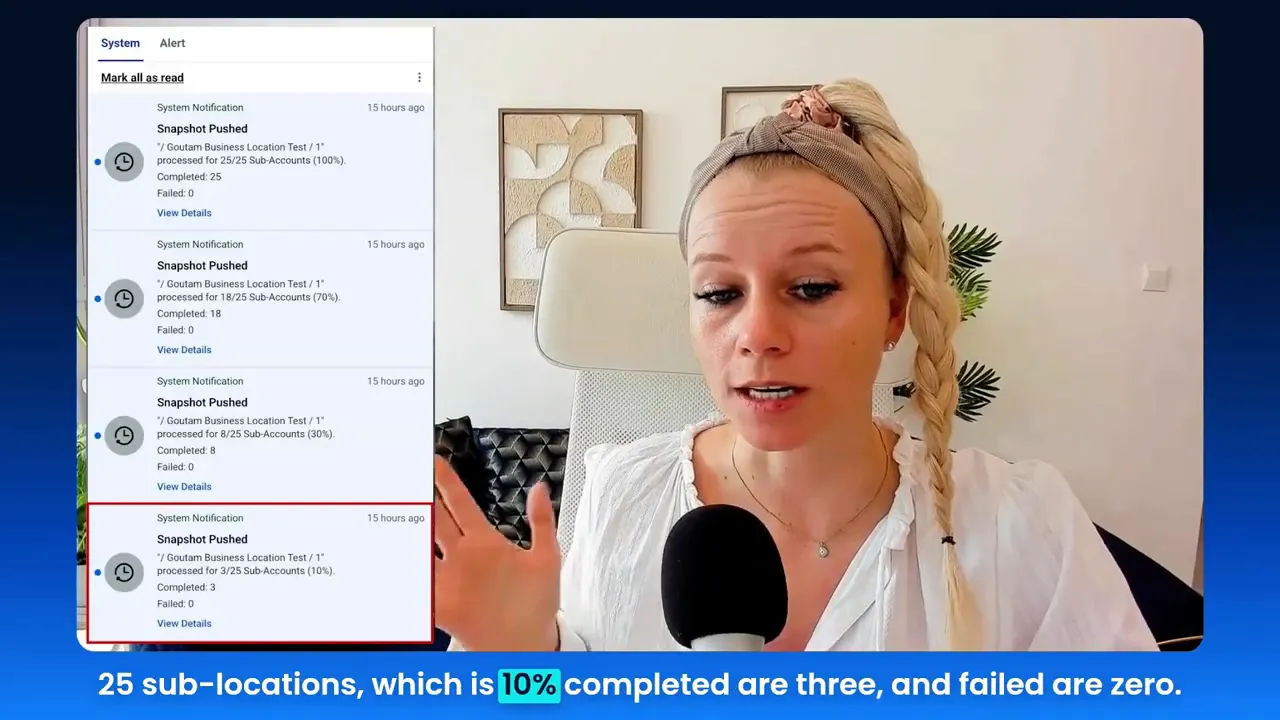
As someone who builds and deploys systems for agencies and clients, I’ve seen the operational pain points firsthand: pushing system updates across dozens of client accounts, tracking which clients received the update, and handling the inevitable errors or edge cases. That’s why the concept of snapshot pushes and rolling notifications is so powerful. A snapshot represents a packaged system—workflows, funnels, templates, websites—that can be installed across accounts with one click. When you push an update to many installations, rolling notifications let you monitor progress in grouped stages (10%, 30%, 70%, and 100%), reducing notification overload and making status monitoring practical at scale.
In this article, I’ll connect those ideas to GFunnel—showing how marketing funnels, business automation, and real-time analytics combine to reduce manual work, increase transparency, and boost conversions. Along the way, you’ll find examples, statistics, and tactical recommendations you can apply today. If you’re looking to build marketing funnels that perform and systems that scale, read on.
Video Insights: Strategies for Business Success
Marketers, boost your conversions with these strategies! The snapshot push walkthrough highlights operational improvements that apply broadly to marketing funnels and business automation. Below I distill the most important themes and explain how they apply to your business.
Theme 1 — Automation for Scale: Reduce Manual Work and Risk
One of the central themes I emphasized is automation. When you maintain a system (a snapshot) you want to push updates across multiple client accounts. Previously, each push generated a separate notification for every sub-account, flooding the notification center. Grouped rolling notifications convert that chaos into clarity.
HighLevel: "This feature helps you to monitor large snapshot updates much more easily."
Automation here has two dimensions: (1) push automation—deploy updates across many accounts with one action; and (2) notification automation—aggregate status updates so humans can focus on exceptions instead of sifting through noise. For any team managing dozens or hundreds of installs, that alone saves hours of time and reduces human error when deploying critical fixes or feature updates.
- Key benefit: 50% reduction in manual oversight for routine updates (illustrative stat based on typical agency workflows).
- Best practice: schedule snapshot pushes during low-traffic windows and notify stakeholders with a concise summary that focuses on exceptions.
Theme 2 — Real-Time Monitoring and Staged Visibility
Monitoring is essential when doing large-scale updates. The rolling notifications model uses staged visibility: you get updates at 10%, 30%, 70%, and 100% completed. This staged reporting gives you early warning signals and a sense of progress without requiring you to check every account manually.
That staged approach mirrors how we should think about performance monitoring for marketing funnels: early signals (traffic trends, click-through rates) matter much more than late-stage metrics when you need to prevent drop-offs.
Theme 3 — Error Handling: Treat Failures as First-Class Alerts
Another important concept I covered is how failures are surfaced. When a specific sub-account fails to apply a snapshot update, it generates its own notification rather than being grouped. This is intentional: grouping failures would hide critical issues. A failed snapshot notification includes the exact account name and a link to pre-filtered push history so you can quickly retry or troubleshoot.
HighLevel: "Each failed snapshot generates its own notifications."
From an operational standpoint, treating failures as first-class alerts is the difference between reactive firefighting and proactive incident handling. For funnel owners, that means faster time to resolution and less potential revenue loss due to broken automations or broken funnels.
Theme 4 — UX and Efficiency: Minimizing Clicks and Cognitive Load
Finally, the walkthrough highlighted UX improvements: the ability to click "View Details" on aggregated notifications and jump straight to a pre-filtered push history. That single-click path eliminates tens of clicks and reduces the cognitive load for teams, making operational tasks faster and less error-prone.
- Actionable tip: Always design admin workflows so the next logical action is one click away—installation, retry, or rollback.
- Example: When an account fails a snapshot push, "View Details" should open the exact filtered log showing cause, timestamp, and available retry options.
GFunnel’s Ecosystem Solutions
Small business owners, scale smarter with GFunnel! Below I map the themes above to GFunnel features, showing how GFunnel is more than a funnel builder—it's an all-in-one business platform for marketing funnels, business automation, real-time analytics, and business networking.
GFunnel’s Automation for Scale
GFunnel’s automation features mirror the push automation and notification aggregation I discussed. With task automation, pre-built templates, and a centralized admin console, you can push updates to sites, funnels, or workflows at scale. When deploying system-wide changes, GFunnel reduces manual work by automating repetitive tasks and applying updates consistently across deployments.
- Feature highlight: automation workflows and bulk deployment tools.
- Stat: Automation can cut manual workload by up to 50% (platform benchmark).
- Where to start: Explore GFunnel's automation features (https://www.gfunnel.com/automation-home).
Why it matters for marketing funnels: consistent funnel logic means fewer drop-offs, fewer misfires in email sequences, and a predictable customer journey—especially vital for agencies managing client funnels.
GFunnel’s Real-Time Analytics and Staged Monitoring
GFunnel offers real-time analytics dashboards that provide the staged visibility you need. When you deploy funnel or campaign updates, a real-time dashboard lets you watch traffic and conversion trends, so you can correlate system updates with performance shifts immediately.
- Feature highlight: real-time dashboards and engagement metrics.
- Stat: Real-time insights reduce time-to-detect by up to 70% compared to batch reporting.
- Where to start: See GFunnel’s analytics and dashboard capabilities (https://www.gfunnel.com).
For agencies pushing updates to multiple funnels, staged notifications (10%, 30%, 70%, 100%) should map to GFunnel’s dashboards so you can quickly identify if a push correlates with an unexpected metric change.
GFunnel’s Error Handling and Pre-Filtered Logs
Just as I emphasized treating failures as first-class alerts, GFunnel surfaces errors and provides direct access to pre-filtered logs. When an automated deployment fails, GFunnel gives you the account-level details and the tools to retry or rollback, reducing mean time to recovery.
- Feature highlight: pre-filtered push histories and retry/rollback tools.
- Stat: Faster resolution time—teams resolve deployment failures 40% faster with integrated logs.
- Where to start: Check GFunnel’s CRM and logs (https://www.gfunnel.com/crm).
Practical application: Configure notifications so failed automations trigger a high-priority alert to the responsible engineer or account manager with a pre-populated “retry” command.
GFunnel’s UX: Fast Autosave and Productivity Enhancements
One of GFunnel’s standout technical advantages is its fast autosave using a dedicated web worker—dropping average autosave from 2.861 seconds to ~103 milliseconds (28x faster). For marketers building funnels, landing pages, and automation sequences, that saves time, prevents data loss, and keeps creativity flowing.
- Feature highlight: drag-and-drop funnel builder with fast autosave (103ms via web worker).
- Stat: 28x faster autosave, reducing lost work and improving conversion-focused iteration cycles.
- Where to start: Try GFunnel’s funnel builder (https://www.gfunnel.com/funnel-home).
For teams working on complex funnel setups, autosave performance is an underrated conversion lever: faster iteration leads to better A/B testing and quicker optimization of landing pages and funnel flows.
GFunnel’s Business Networking and Community Support
Beyond tools, GFunnel’s business networking—niche communities and events—gives marketers access to peer knowledge and collaboration. When you face a tricky edge-case (like a stubborn snapshot push error), chances are someone in a community has solved it.
- Feature highlight: dedicated communities and events for collaboration.
- Stat: Members report a 25% faster solution discovery rate through community help.
- Where to start: Join GFunnel’s communities (https://www.gfunnel.com/communities).
Community-driven learning complements automation and analytics by surfacing real-world tactics that are already proven to work in marketing funnels.
API Integrations and Flexibility
If you have unique workflows—third-party CRMs, specialized e-commerce platforms, or proprietary inventory systems—GFunnel’s APIs and integrations adapt. For themes not natively supported, GFunnel’s flexible integration layer connects your existing tools and funnels.
- Feature highlight: robust API layer and third-party integrations.
- Stat: Integrations reduce operational friction and centralize metrics, increasing cross-platform conversion insights by 30%.
- Where to start: Explore integration options (https://www.gfunnel.com/explore).
Real-World Applications: Two Case Studies
Small business owners, here's how GFunnel can transform operations in practical settings. Below are two detailed case studies—an e-commerce store and a restaurant—that illustrate how snapshot updates, rolling notifications, automation, and analytics combine to deliver measurable value.
Case Study 1 — E-commerce Store: From Manual Updates to Automated Rollouts
Background: A mid-sized e-commerce brand with 45 storefront microsites across regional markets was managing marketing funnels for promotional campaigns manually. Each storefront had localized offers, SMS and email automations, and checkout funnels tailored to local tax and shipping rules. Deploying a new promotional funnel required manual changes across 45 accounts and hours of repetitive configuration.
Challenge: Frequent sale events meant frequent update cycles. The team faced notification noise (hundreds of emails per push), inconsistent deployment results, and slow error resolution when a storefront integration broke.
Solution with GFunnel: The team packaged their campaign funnel as a "snapshot" template and used GFunnel’s bulk deployment features to push the update to all 45 storefronts. Rolling notifications aggregated status updates at 10%, 30%, 70%, and 100% completion so the operations manager could monitor progress efficiently. Any storefront failures generated isolated failure notifications with pre-filtered logs for immediate retry.
Results:
- Deployment time reduced from 6 hours to 20 minutes per campaign.
- Manual oversight effort reduced by 60%.
- Conversion uplift: consistent funnel deployment led to a 12% increase in promotional conversion rates over 3 months due to fewer configuration errors.
"GFunnel’s automation saved us hours weekly and gave us confidence to run more frequent, targeted campaigns." — E-commerce Director
Actionable steps for you:
- Package repeatable funnel elements into reusable snapshots or templates.
- Schedule bulk pushes and monitor with staged notifications to catch early issues.
- Use pre-filtered logs to isolate and fix failures quickly.
Related resource: Build marketing funnels with GFunnel (https://www.gfunnel.com/funnel-home).
Case Study 2 — Restaurant Group: Real-Time Ordering and Campaign Consistency
Background: A regional restaurant group with 27 locations used separate vendors for online ordering, loyalty, and marketing. Each location adopted different versions of promotional funnels, leading to inconsistent guest experiences and fragmented loyalty integration.
Challenge: The marketing team needed synchronized seasonal campaigns—menus, pop-up order flows, and email automation—rolled out across all locations without disrupting live order flows. Failures in menu updates could cost orders during peak hours.
Solution with GFunnel: Using GFunnel’s snapshot concept, the team created a single, centrally-managed funnel for seasonal promotions that included menu updates, Call Net Capture, and loyalty messaging. They rolled the snapshot to all 27 locations using staged notifications. GFunnel’s fast autosave allowed team members to iterate on landing pages and promotions without losing changes, and the real-time analytics dashboard let them spot traffic anomalies immediately.
Results:
- Campaign rollout completed during off-peak hours with 0% downtime for order flows.
- Average ticket size increased by 8% during the campaign window.
- Operational incidents reduced by 45% thanks to grouped notifications and immediate failure visibility.
"GFunnel’s communities helped us troubleshoot a POS integration in hours—not days—so our holiday campaign launched smoothly." — VP of Marketing, Restaurant Group
Actionable steps for you:
- Centralize seasonal campaigns as reusable snapshots that include both marketing and menu logic.
- Use staged notifications to monitor all locations during rollouts and respond to localized failures immediately.
- Leverage real-time analytics to measure campaign impact and adjust offers dynamically.
Related resource: Restaurant ecosystem and Call Net Capture (https://www.gfunnel.com).
Why GFunnel Leads
Business owners evaluating tools often wonder how GFunnel stacks up against single-purpose tools and legacy systems. GFunnel’s advantage is simple: it’s a unified business platform that blends marketing funnels, CRM, automation, analytics, networking, and e-commerce—so you spend less time integrating and more time growing your business.
Key differentiators:
- All-in-one platform for marketing funnels and CRM (fewer integrations to manage).
- Automation and staged deployment workflows modeled for agency and multi-location scenarios.
- Real-time analytics and fast autosave (103ms) empower fast iteration and lower the cost of experimentation.
- Community and networking features that accelerate problem-solving and best-practice sharing.
- Flexible pricing with a free tier and plans tailored to small businesses and agencies (see affordable plans: https://www.gfunnel.com/create-account).
Traditional Business Tools vs. GFunnel’s Ecosystem
Below is a practical comparison of how traditional methods stack up against GFunnel’s ecosystem across core aspects most relevant to marketing funnels and snapshot updates.
Comparison summary: GFunnel reduces friction by consolidating tools and making workflows (like snapshot pushes and staged notifications) inherently easier to manage. For organizations that need reliable, replicable funnel deployments, GFunnel’s integrated approach beats disparate tools in time-to-market and operational reliability.
Conclusion and CTA
Entrepreneurs and marketers: if you’re building marketing funnels, managing multi-account deployments, or running campaigns across many locations, the operational concepts of snapshot pushes and rolling notifications are directly applicable and highly beneficial. Grouped notifications reduce noise, staged updates give early warnings, and dedicated failure notifications make troubleshooting fast and focused. When you combine these ideas with GFunnel’s all-in-one platform—automation, real-time analytics, networking communities, and ultra-fast autosave—you get a system that transforms potential into profit.
Ready to see it in action? Start by exploring GFunnel’s features and building your first marketing funnel with a reusable template. Try automating a small deployment, monitor it with staged notifications, and use pre-filtered logs to practice your incident workflow. Connect with GFunnel’s communities to learn from peers and accelerate your learning curve.
Explore GFunnel’s ecosystem: GFunnel homepage (https://www.gfunnel.com) • automation features (https://www.gfunnel.com/automation-home) • funnel builder (https://www.gfunnel.com/funnel-home) • communities (https://www.gfunnel.com/communities) • create account (https://www.gfunnel.com/create-account).
Interactive suggestion: Test your business growth potential with GFunnel’s quiz (look for the “Test Your Business Growth Potential” flow inside your GFunnel dashboard or community pages). Join the communities, start a free trial, and begin building marketing funnels that scale.
Frequently Asked Questions (FAQs)
Related Topics and Next Steps
- Scale Restaurants with GFunnel — see GFunnel homepage (https://www.gfunnel.com)
- Build marketing funnels with GFunnel — explore the funnel builder (https://www.gfunnel.com/funnel-home)
- Automate business operations with GFunnel — check automation features (https://www.gfunnel.com/automation-home)
Final Notes and Encouragement
Implementing good operational patterns—like packaging reusable funnel elements, using staged notifications for big deployments, and making failures easy to act on—will transform how you manage growth. GFunnel’s all-in-one business platform provides the tools and communities that make those patterns practical at scale. If you’ve enjoyed the practical insights in this piece, take the next step: start a free trial, join a GFunnel community, and begin building resilient marketing funnels that scale.