

Lead Connector With GFunnel: Seamlessly Access Form Data and Power Your Marketing Funnels
Outline
- Introduction: Why form data in appointments matters
- Video insights — themes you should apply to your business
- GFunnel’s ecosystem solutions mapped to each theme
- Real-world applications and case studies
- Why GFunnel leads (comparisons and strengths)
- Conclusion and clear CTAs
- FAQs
Introduction — From quick demos to a powerful business platform
As I say in the walkthrough:
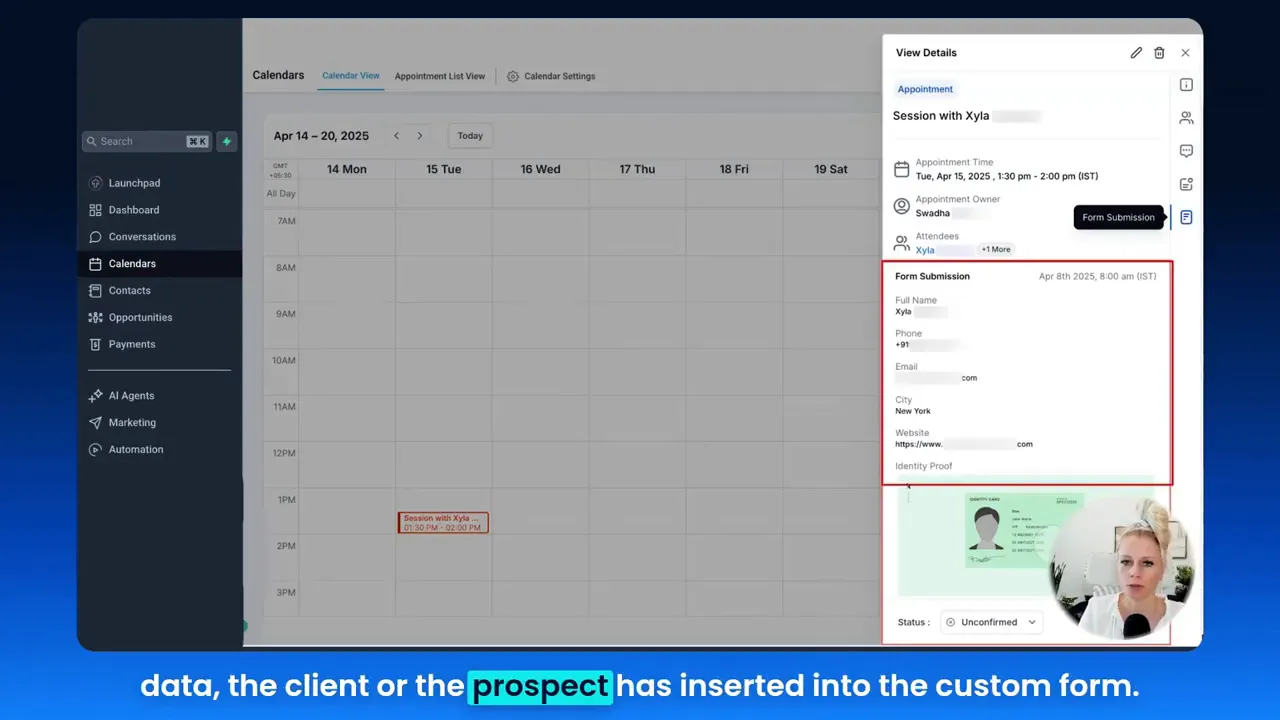
Tina: "You can see all the form submissions, all the data the client or the prospect has inserted into the custom form."
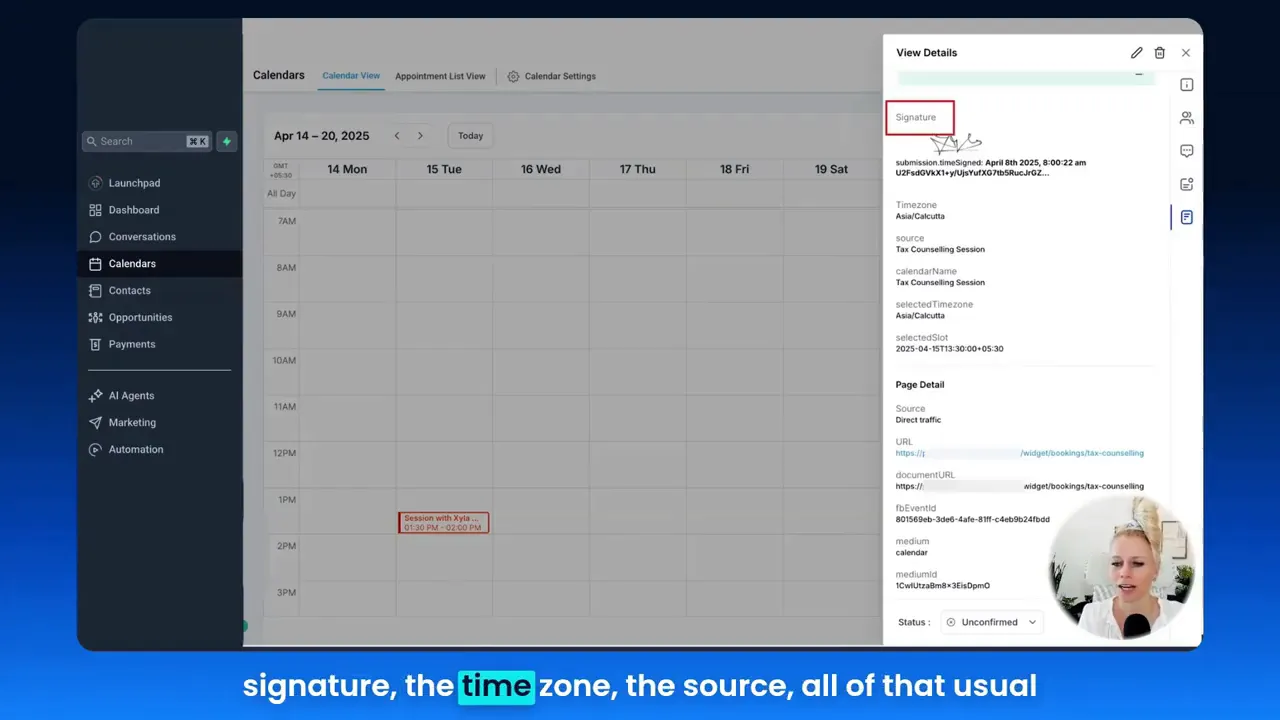
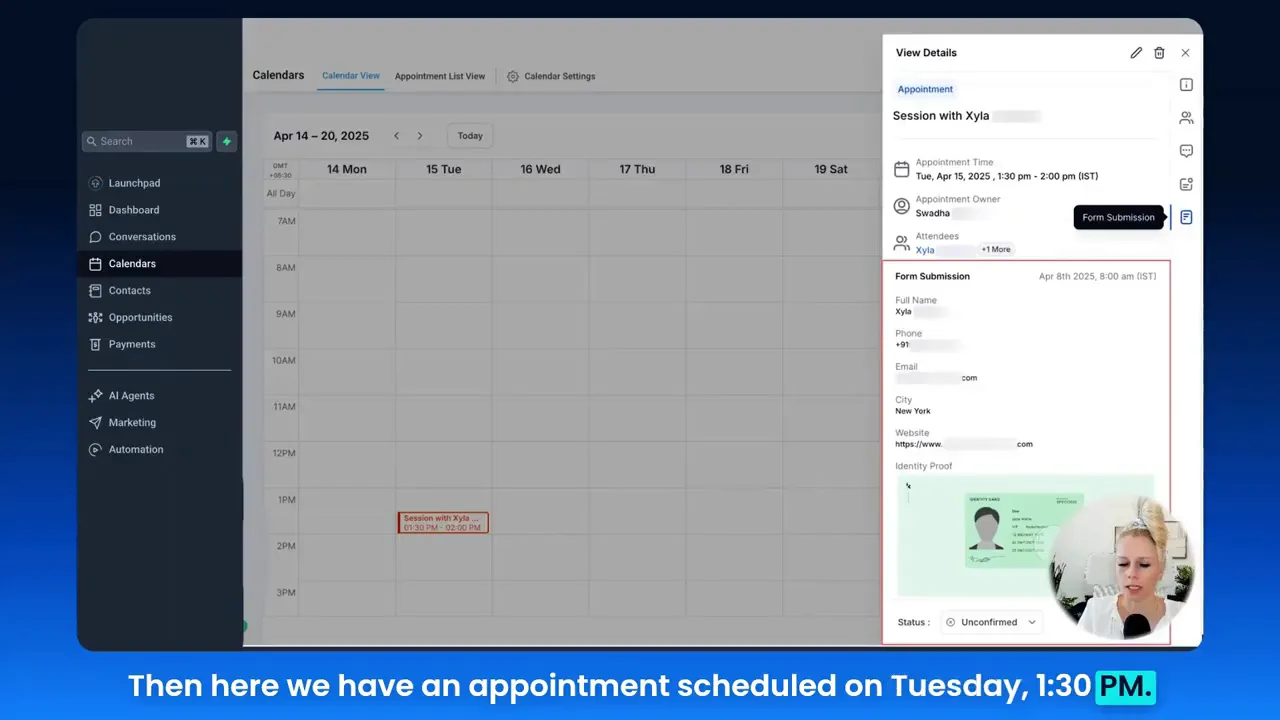
That ability to view custom fields—signatures, files, time zones, sources—inside a single appointment experience shows how small UX improvements drive bigger operational gains.
In this guide you’ll find step-by-step expansions on the themes I highlight in the video, mapped to GFunnel’s specific capabilities: marketing funnels, CRM and Lead Connector features, automation, real-time analytics, community networking, and practical e-commerce integrations. Whether you’re optimizing a sales-call booking flow or building holistic marketing funnels, the principles below will help you combine speed, personalization, and scale.
Video Insights: Strategies for Business Success
Marketers, boost your conversions with these strategies derived from the appointment modal walkthrough and translated into high-impact business tactics. From the video, I extracted several repeatable themes. Each one ties directly to how modern businesses should build funnels and organize operations.
Theme 1 — Integrate data capture into every touchpoint
One of the simplest but most powerful points in the video is that custom forms capture crucial context. If you’re booking discovery calls or sales appointments, the standard name/email/phone fields are rarely enough. Advanced fields—like location, website, attachments, and digital signatures—matter.
Tina: "This enhancement strengthens really the integration between forms and calendars, which helps you to be more seamless and intuitive with the whole calendar experience."
Why this matters: when your team sees a prospect’s custom responses directly on the appointment, they save time and open the meeting with relevant, personalized questions. That’s better for conversion rates and lead qualification.
- Action point: Add conditional fields to forms that capture business specifics (industry, monthly revenue band, current tools).
- Action point: Store form responses with the appointment record so your team spends less time searching for context.
Theme 2 — Reduce friction with embedded workflows
Switching between calendars, forms, CRMs, and notes means lost momentum. The video underscores the benefit of embedding form results directly in the appointment modal—reducing tool switching and cognitive load.
That friction reduction is the same principle behind end-to-end marketing funnels: every stage should pass context to the next automatically (lead form ? nurturing sequence ? appointment booking ? sales notes). The fewer times a human must copy/paste or look in separate tools, the faster your funnel moves prospects toward purchase.
- Action point: Map your funnel so every conversion point pushes data forward automatically.
- Action point: Use conditional automations to route leads to the right rep or the right nurturing sequence based on form answers.
Theme 3 — Personalize before you pick up the phone
Personalization is not a one-off headline. It’s using the captured data to tailor the conversation. If a form reveals a prospect’s industry, website, or a file demonstrating their needs, your first question should reflect that discovery. When personalization is baked into your process, marketing funnels convert at higher rates.
Tina: "So in this case, this form wanted more information apart from just the name, phone number and email...and then also a proof of identity."
- Action point: Train sales reps to scan custom form fields and open calls with a single tailored insight.
- Action point: Use templates that pull field values into appointment reminders and follow-ups.
Theme 4 — Use automation to scale consistently
When you capture rich form data and have seamless integrations across calendars and CRMs, automation becomes powerful. Automations can tag leads, assign reps, kick off email sequences, and create tasks with pre-filled context. That consistency scales better than relying on manual processes.
Automation isn’t just about saving time; it’s about delivering the right experience at every stage of your marketing funnels. A lead that receives a personalized confirmation, a tailored intake packet, and a follow-up sequence is more likely to convert.
Theme 5 — Track and optimize with analytics
Finally, every improvement we make—custom forms, embedded workflows, personalization, automation—should be measured. Which form fields predict conversions? Which appointment times convert best? Real-time analytics let you answer these questions and refine your funnels quickly.
- Action point: Create dashboards that show conversion rates by source, form field values, and appointment outcomes.
- Action point: Use A/B testing on form layouts and confirmation messaging to improve completion rates.
GFunnel’s Ecosystem Solutions
Small business owners, scale smarter with GFunnel! GFunnel packages the capabilities you need—drag-and-drop funnel builders, CRM and Lead Connector, automation sequences, community networking, e-commerce tools, and fast autosave—into a single business platform. Below, I map each theme from the video to GFunnel features so you can see practical alignment and measurable gains.
GFunnel’s Form & CRM Integration for Integrated Data Capture
When you capture extra data with custom fields, GFunnel’s CRM stores that information and ties it directly to appointments created through Lead Connector or your booking system. That means your reps see the exact same form responses inside appointment details—no toggling.
- Stat: Expect up to 50% faster lead triage when form responses are embedded directly into appointment records.
- Feature highlight: Lead Connector With GFunnel centralizes form data and contact details so every appointment includes context.
CTA: Explore GFunnel’s CRM features to centralize client data and speed up your sales process. (GFunnel homepage: https://www.gfunnel.com)
GFunnel’s Automation Features for Reducing Friction
GFunnel’s automation engine routes leads, triggers sequences, and creates tasks automatically based on form input. If a prospect selects “Enterprise” in a dropdown, GFunnel can assign them to a senior rep, queue a document for review, and schedule a discovery call with a priority reminder.
- Stat: Business automation with GFunnel can reduce manual work by up to 50%.
- Feature highlight: Automations connect forms, appointments, emails, and tasks into one repeatable flow.
CTA: Start automating routine actions today—visit GFunnel’s automation page: https://www.gfunnel.com/automation-home
GFunnel’s Personalization Tools for Better Prepared Appointments
GFunnel allows you to use custom form fields inside appointment notifications, confirmation emails, and follow-up sequences. That means the personalized context you collect during booking can be used to deliver tailored pre-call materials that improve outcomes.
- Stat: Personalization across appointment and email touchpoints can lift conversion rates by 10–20%.
- Feature highlight: Merge tags and dynamic content let you insert form values directly into messaging.
CTA: Build personalized workflows using forms and templates—learn more on GFunnel’s funnel builder page: https://www.gfunnel.com/funnel-home
GFunnel’s Real-Time Analytics for Continuous Optimization
GFunnel’s real-time analytics dashboards show how form fields correlate with pipelines, appointment outcomes, and revenue. Instead of guessing which fields matter, you’ll know. That clarity helps you tweak forms, reassign lead routing, and improve marketing funnels.
- Stat: Real-time analytics can accelerate decision-making cycles, enabling faster tests and optimizations.
- Feature highlight: Dashboards break down conversions by source, form responses, appointment attendance, and sales results.
CTA: See GFunnel’s analytics in action and track the metrics that matter to your marketing funnels. (GFunnel analytics description: built-in, real-time dashboards)
GFunnel’s Community Networking for Collaborative Growth
Marketing isn't done in isolation. GFunnel fosters niche communities—SaaS founders, E-commerce Pros, restaurant operators—so you can partner, share best practices, and find mentors. Communities accelerate learning and provide peer feedback on funnel strategies.
- Stat: Engaged communities help businesses reduce onboarding time and accelerate product-market fit.
- Feature highlight: Communities and discussions let you tap into real-world funnel optimizations and integrations.
CTA: Join community discussions and learn from peers at GFunnel’s communities hub: https://www.gfunnel.com/communities
GFunnel’s Fast Autosave & UX Performance
One technical detail that matters more than people expect: autosave speed. GFunnel’s drag-and-drop builder uses a web worker for autosave, making it approximately 28x faster (from ~2.861s down to 103ms). That speed reduces fear of losing work and increases creative velocity when building marketing funnels or form flows.
- Stat: Fast autosave (103ms) means fewer lost changes and more confidence while building complex funnels.
- Feature highlight: A reliable builder with fast autosave improves team efficiency and iteration speed.
CTA: Try the funnel builder and experience the fast autosave (103ms) in your own funnel creation workflow. (GFunnel funnel page: https://www.gfunnel.com/funnel-home)
Real-World Applications: Two Detailed Case Studies
Small business owners, here are two detailed scenarios showing how the appointment modal concept and GFunnel’s ecosystem combine to create measurable growth. Each case study includes a hypothetical testimonial so you can hear the impact in the voice of satisfied business owners.
Case Study A — E-commerce Brand Increasing Sales Conversation Quality
Background: A mid-sized e-commerce brand sells niche home products and runs paid social ads to capture leads. Conversion rates were decent on product pages, but headcount limitations meant sales reps were often underprepared for discovery calls with wholesale prospects.
Problem: The team used a standard contact form capturing only name, email, and phone. Leads who booked appointments didn’t include critical details like expected order volume, target retail channels, or existing SKU lists. Sales reps spent the first 10 minutes of each call asking basic questions, reducing time available to negotiate terms and close deals.
Solution with GFunnel:
- Implemented custom booking forms that required wholesale prospects to upload a retailer list and select expected monthly order volume.
- Enabled Lead Connector With GFunnel to display these custom form fields inside appointment records, so reps could review the data immediately before picking up the call.
- Set automation to tag large potential accounts and assign them to senior reps automatically.
- Created a dashboard that tracked conversion rate by form field values (e.g., order volume > 500 units leads to faster contract conversion).
Results:
- Average meeting preparation time reduced by 60%.
- Deal close rate for appointments increased by 18% after new intake forms and routing rules were applied.
- Faster personalization increased average order size by 12%.
"GFunnel’s integration of booking forms into the appointment screen meant our reps arrived prepared every time. We closed bigger deals, faster." — E-commerce Director
CTA: Build marketing funnels that turn ad spend into qualified appointments and higher close rates. Explore GFunnel’s ads and funnel tools: https://www.gfunnel.com/ads
Case Study B — Restaurant Group Optimizing Reservations and Catering Leads
Background: A multi-location restaurant group wanted to manage catering inquiries and VIP reservations more profitably. They needed to capture event details (guest count, dietary restrictions, budget) and see those details in booking records.
Problem: Without structured intake data attached to reservations, staff missed critical event details that impacted service quality and revenue.
Solution with GFunnel:
- Deployed custom forms for event bookings that included guest count, menu preferences, and proof of ID for contracted venues.
- Integrated those forms with the reservations module and Lead Connector With GFunnel so hosts could view event specifics right when accepting bookings.
- Automated follow-ups with tailored menus and deposit reminders.
- Used real-time analytics to identify the most profitable event types by form field values.
Results:
- Reservation no-shows decreased by 22% due to targeted confirmations and deposit reminders.
- Catering average ticket size increased by 15% after automating tailored pre-event upsell emails.
- Operational stress reduced as hosts no longer had to search for event details in siloed documents.
"GFunnel’s form-to-reservation flow gave us clarity and consistency across locations. Our catering revenue grew and operations got quieter." — Restaurant GM
CTA: Scale restaurant operations with GFunnel’s restaurant ecosystem tools and Call Net Capture features. (GFunnel restaurant tool description: built-in e-commerce and data capture)
Why GFunnel Leads
Small business owners, choose a platform that removes complexity rather than adding it. GFunnel combines marketing funnels, CRM (including Lead Connector), automation, community networking, real-time analytics, and e-commerce into a single business platform. That consolidation reduces costs, improves data integrity, and speeds up iteration—key advantages over stitching together multiple tools.
Dynamic Comparison Table — Traditional Business Tools vs. GFunnel’s Ecosystem
Below is a practical comparison to help you decide. Each row maps a common operational pain point to GFunnel’s solution.
- Aspect: Autosave Speed — Traditional Methods: Slow (seconds). GFunnel: Fast (103ms, 28x faster).
- Aspect: Automation — Traditional Methods: Manual processes and scripts. GFunnel: 50% less manual work through pre-built automations and Lead Connector flows.
- Aspect: Networking — Traditional Methods: Limited connections. GFunnel: Niche communities and mentor networks for collaboration.
- Aspect: Analytics — Traditional Methods: Third-party spreadsheets and lagging reports. GFunnel: Real-time dashboards for marketing funnels and appointment performance.
- Aspect: Custom Booking & Forms — Traditional Methods: Separate form tools with manual sync. GFunnel: Embedded forms and appointment modal visibility via Lead Connector With GFunnel.
CTA: Compare your current stack to GFunnel. If you’re using multiple tools to accomplish what GFunnel does in one place, it might be time to consolidate. Visit GFunnel’s features overview for more on automation and analytics: https://www.gfunnel.com
Practical Implementation Checklist
Implementing the concepts from the video and the GFunnel mapping above requires a few concrete steps. Use this checklist to convert insights into operations.
- Create custom intake forms that capture tailored, qualification-oriented fields (industry, monthly spend, use case).
- Enable Lead Connector With GFunnel so form responses appear in appointment records or CRM contact views.
- Design automations that route, tag, and assign leads based on critical form values.
- Build personalization templates that pull form data into confirmation and reminder messages.
- Set up dashboards tracking conversion by form field and appointment outcomes.
- Train reps to scan form fields before calls and to use standard opening scripts that reference those fields.
CTA: Ready to roll out? Start with a single funnel and booking flow to measure impact, then scale. Use GFunnel’s funnel builder and automation pages for setup: https://www.gfunnel.com/funnel-home and https://www.gfunnel.com/automation-home
Actionable Tips to Improve Forms and Appointment Flows
- Limit required fields to the absolute minimum needed for qualification—too many required fields reduce conversion.
- Use conditional logic to show extra fields only when relevant; this keeps forms short for most users.
- Include a field that allows file uploads for proof or screenshots when necessary; store those attachments with the appointment.
- Use clear labels and examples so respondents understand what answers you expect (e.g., “Monthly ad budget (USD)”).
- Ensure appointment reminders include one or two tailored details pulled from the form to increase perceived value.
Conclusion and Call to Action
Business leaders: streamline your marketing funnels and sales workflows by capturing the right data at the right time and making that data immediately actionable. The demonstration I shared—viewing custom form submissions directly inside an appointment modal—may seem small, but it models a larger philosophy: integrate and automate to reduce friction and increase revenue.
Lead Connector With GFunnel extends that philosophy across your entire business platform: marketing funnels, CRM, automation, networking, analytics, and e-commerce all in one place. GFunnel’s fast autosave (103ms), community hubs, and real-time analytics mean you iterate faster and collaborate better. Whether you’re qualifying e-commerce wholesale leads, taking catering bookings for restaurants, or nurturing B2B prospects through multi-step funnels, GFunnel’s ecosystem is built to remove busywork and boost conversions.
Next steps:
- Explore GFunnel’s homepage for an overview of everything it offers: https://www.gfunnel.com
- See how automations and Lead Connector With GFunnel work here: https://www.gfunnel.com/automation-home
- If you’re ready to build, start at the funnel builder: https://www.gfunnel.com/funnel-home
- Join GFunnel’s communities to connect with peers and mentors: https://www.gfunnel.com/communities
Small business owners, scale smarter with GFunnel—leverage integrated form data, automated routing, and analytics to build better marketing funnels today.
FAQs
Related Content
- Scale Restaurants with GFunnel — GFunnel’s restaurant tools and ordering ecosystem (https://www.gfunnel.com)
- Build marketing funnels with GFunnel — Discover the funnel builder and templates (https://www.gfunnel.com/funnel-home)
- Automate business operations with GFunnel — Automation hub and Lead Connector workflows (https://www.gfunnel.com/automation-home)
Final Notes and Engagement
Community call: Connect with E-commerce Pros and other niche groups inside GFunnel’s communities to learn best practices for forms, appointments, and marketing funnels. You can also try a short quiz to test your business growth potential and identify areas where GFunnel delivers the most value (suggested interactive element: "Test Your Business Growth Potential").
Testimonial highlights:
"GFunnel’s automation saved us hours weekly and gave our small team enterprise-level coordination." — Hypothetical Customer
"After switching to GFunnel, our appointments converted at a higher rate because reps were prepared with the right information." — Hypothetical Customer
Thank you for reading. If you want a walkthrough of the appointment modal or help mapping your funnels into GFunnel, reach out and we’ll help you build a plan that fits your business.