

Lead Connector With GFunnel: Mastering Marketing Funnels, CRM Lists, and Faster Action
Why List Views and Smart Lists Matter for Marketing Funnels and the Lead Connector With GFunnel
Marketing funnels depend on clarity. If you cannot quickly sort and segment contacts, opportunities, or tasks, funnel optimization stalls. The Lead Connector With GFunnel philosophy centers on making CRM data visual, customizable, and action-oriented so your marketing funnels convert better and your team acts faster.
Think of two common problems business owners face:
- Data is scattered across multiple screens and tools, making segmentation slow and error prone.
- It takes too long to find which leads are ready to convert, so timely outreach is lost.
Smart list and list view capabilities fix both problems. By letting you sort, filter, and customize records across contacts, companies, opportunities, custom objects, and tasks all in one place, you can build targeted segments for marketing funnels, automate follow-ups, and track outcomes with real-time analytics.
Using these features through the Lead Connector With GFunnel framework unlocks efficiencies like:
- Faster lead qualification for improved lead generation
- Cleaner data driving higher quality personalization in marketing funnels
- Reduced manual work with business automation and task-driven workflows
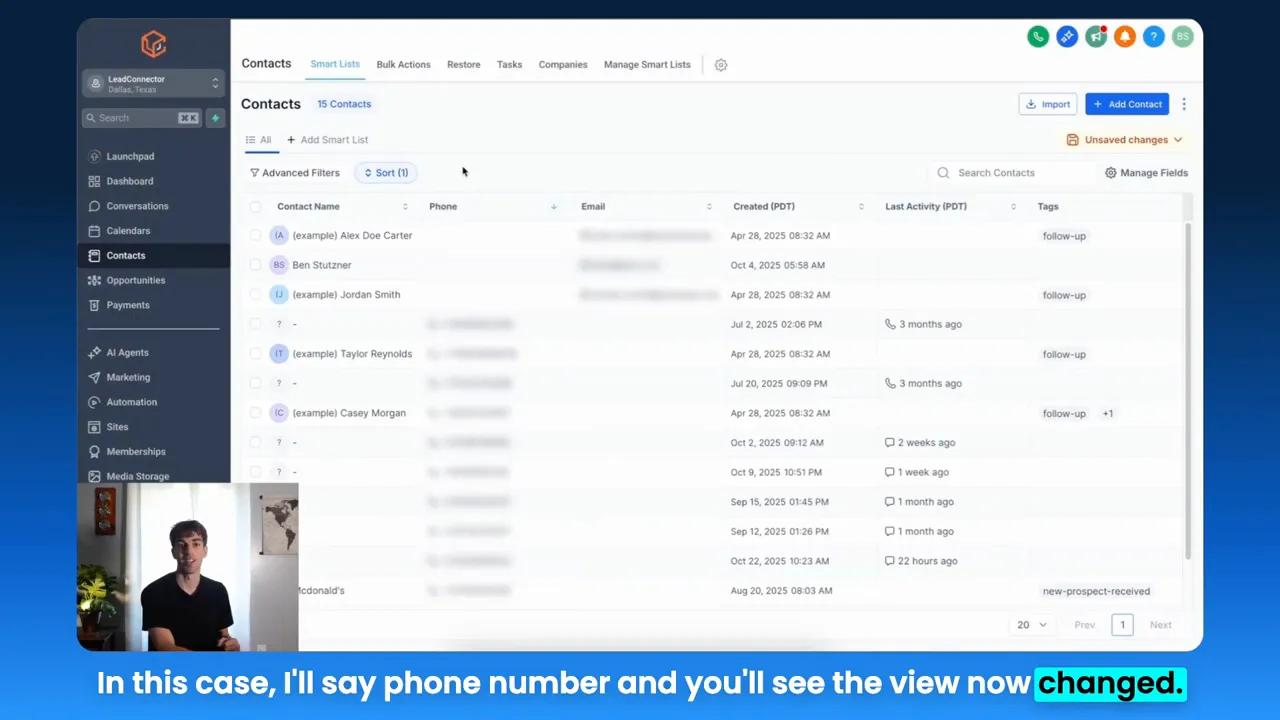
Image above: sorting a contacts table by phone number to quickly surface specific records for follow-up.
Core Themes: What to Prioritize When Building Funnels and Managing CRM Data
From hands-on list tools to broader platform strategy, the transcript and practical experience highlight a set of repeatable themes. Treat these as pillars when implementing marketing funnels and using the Lead Connector With GFunnel approach:
- Data organization and visibility
- Actionable customization and filtering
- Automation and task integration
- Cross-object views and pipeline flexibility
- Speed and performance for rapid iteration
Each theme aligns to a tangible benefit within a business platform and matches features GFunnel delivers: CRM tools, business automation, communities for business networking, real-time analytics, and the fast autosave experience that makes editing and building reliable.
Harnessing Data Organization and Visibility for Funnels
When you can view contact, company, and opportunity data in a single list-based interface, you shorten the gap between insight and action. Lists let you quickly identify top leads, unresponsive contacts, customers ripe for upsell, and tasks overdue for completion. The Lead Connector With GFunnel approach emphasizes this visibility so your marketing funnels can be proactive rather than reactive.
That idea is foundational. With clean lists, you can:
- Segment audiences for targeted campaigns in marketing funnels
- Prioritize outreach based on opportunity stage or company information
- Export or sync only the most relevant records into automation sequences
Making Filtering and Custom Views Actionable
Lists should not be passive. Manageable fields and sorting let you tailor views to specific objectives: a follow-up list for cold leads, a high-intent opportunity list for sales reps, or a recurring task list for operations. This customization is what turns lists into operational tools that feed your marketing funnels.
Use filters to build segments that feed automated email sequences and ad audiences. When your list view maps directly to funnel stages, you reduce friction and improve conversion consistency.
Automation and Tasks: Turning Lists into Workflows
Tasks paired with lists accelerate the handoff from marketing to sales to fulfillment. A list-driven workflow might tag contacts, create tasks for reps, trigger automation in your marketing funnels, and update opportunities—all without manual intervention. The Lead Connector With GFunnel strategy builds automation that reduces manual work and keeps your funnel stages flowing smoothly.
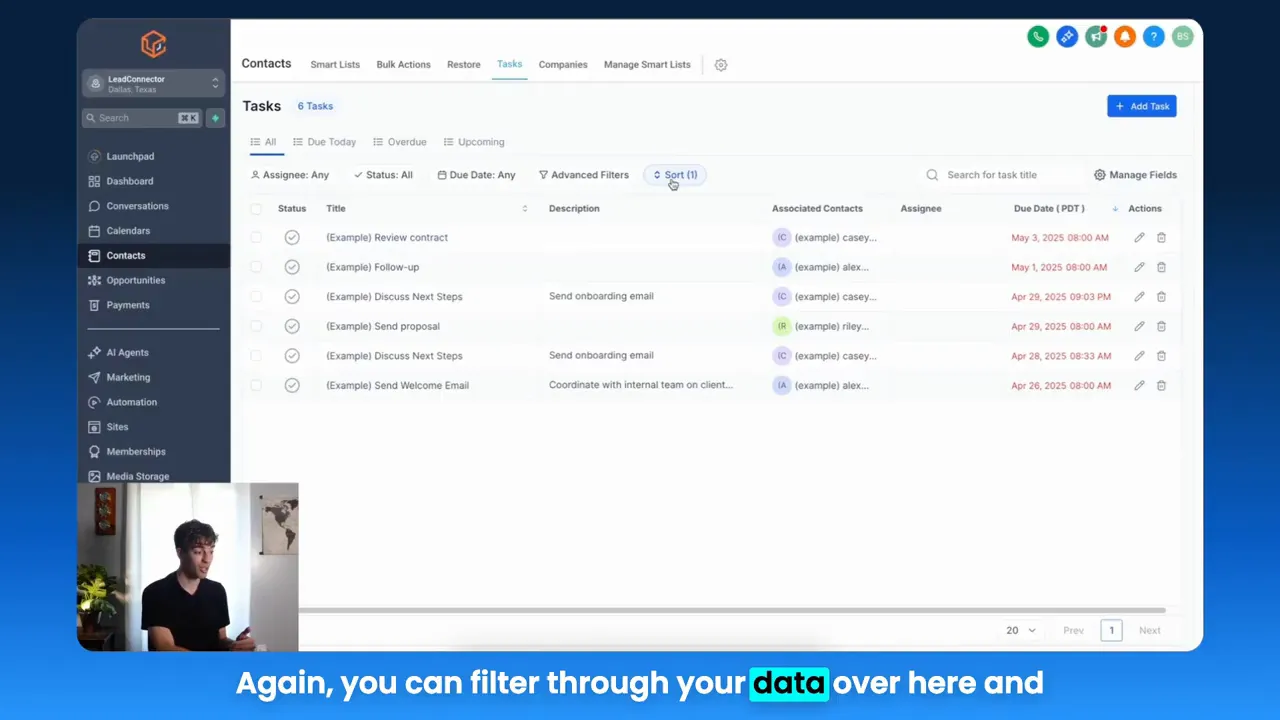
Image above: task list view where tasks are displayed and filtered, making it easier to manage daily follow-ups and automation triggers.
Flexible Pipeline and Opportunity Views
Opportunities sometimes live in pipeline cards and sometimes in list rows. The best systems let you switch between both so you can visually manage stages or process batch actions in list mode. The Lead Connector With GFunnel approach recommends using both views: pipeline view for stage management and list view for bulk actions and reporting.
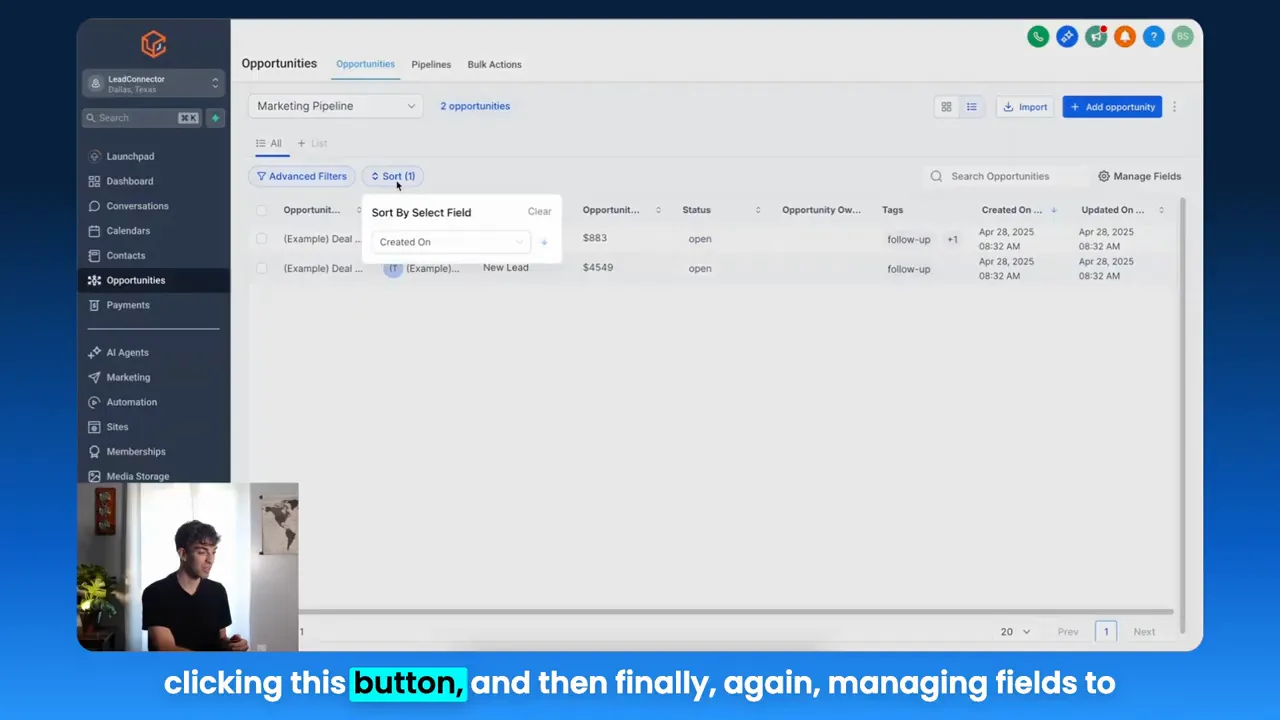
Image above: opportunities displayed as a list rather than pipeline to enable quick sorting and field management.
Performance and Speed: Why Fast Autosave Matters
Speed is an underrated conversion lever. When form builders, funnels, and CRM editors save quickly, teams test and iterate more often. GFunnel uses a dedicated web worker that delivers autosave latency of about 103ms — roughly 28 times faster than slower alternatives operating in multiple seconds. That performance boost means less risk, fewer lost edits, and faster funnel launches.
In practice, fast autosave supports more frequent funnel experiments, rapid copy adjustments, and secure collaborative edits. When your funnel builder, CRM, and automation tools keep up with your pacing, your team spends more time improving metrics and less time recovering lost work.
GFunnel’s Ecosystem Solutions Mapped to Each Theme
Marketers, boost your conversions with these mapped solutions. Below, each theme is paired with GFunnel features that directly solve common CRM and funnel pain points. Use these pairings to design better marketing funnels and operational workflows using the Lead Connector With GFunnel model.
GFunnel’s CRM for Data Organization and Visibility
GFunnel’s CRM centralizes contacts, companies, opportunities, custom objects, and tasks into unified lists. This centralization makes it easy to sort and customize columns so every team member sees what they need.
- Stat: Organizing records into tailored list views can cut time spent searching by up to 40 percent.
- Feature highlight: Manage fields and apply filters across objects to create repeatable segments for funnels.
Use GFunnel’s CRM (https://www.gfunnel.com/crm) to build segments directly for your marketing funnels. When paired with automation, those segments become the entry points for lead nurturing and conversion sequences.
GFunnel’s Automation Features for Reducing Manual Work
GFunnel automations let you create task-based workflows initiated by list filters, opportunity stage changes, or custom object updates. Automations reduce manual tasks and create reliable handoffs between marketing and sales.
- Stat: Business automation can reduce manual work by up to 50 percent when properly implemented.
- Feature highlight: Trigger sequences based on segmented lists that feed your marketing funnels automatically.
Explore GFunnel’s automation tools (https://www.gfunnel.com/automation-home) to create sequences that run when contacts match a smart list or when opportunities move between stages. This is the backbone of the Lead Connector With GFunnel method: lists feed automations that feed conversions.
GFunnel’s Real-Time Analytics for Measuring Funnel Performance
Real-time analytics turns list activity into insights. If your lists show which contacts opened emails or which opportunities stalled, dashboards help you act quickly and refine campaigns.
- Stat: Real-time analytics increases decision speed and helps spot funnel drop-offs earlier, improving optimization rates by up to 20 percent.
- Feature highlight: Live dashboards show activity by segment, opportunity stage, and conversion event so you can iterate your marketing funnels with data.
GFunnel's analytics dashboards are especially powerful when fed by smart lists. Use list-based filters to drive reports and A/B tests and watch your marketing funnels become more effective at each stage.
GFunnel’s Networking and Communities for Business Growth
Marketing funnels do not exist in a vacuum. Networking and niche communities help you promote launches, gather feedback, and partner for cross-promotions. GFunnel’s communities (https://www.gfunnel.com/communities) connect entrepreneurs and marketers across industries, enabling smarter growth strategies.
- Stat: Community-driven promotions can create a 15 to 30 percent uplift in early funnel conversions through social proof and referral networks.
- Feature highlight: Niche groups and collaboration tools speed learning and unlock co-marketing opportunities for your funnels.
Use community insights to refine messaging, test funnel variations in small cohorts, and scale those variations into larger campaigns with real-time analytics backing your decisions.
GFunnel’s Funnel Builder and Fast Autosave for Rapid Iteration
A drag-and-drop funnel builder with a fast autosave reduces the risk of lost work and supports more fearless testing. GFunnel’s web worker autosave operates at about 103ms, making edits feel instantaneous and reliable.
- Stat: Faster editing cycles and autosave support 28 times quicker save times compared to slower builders that average several seconds.
- Feature highlight: Rapid autosave enables team collaboration and fast iteration on landing pages, forms, and funnel flows without losing edits.
Build marketing funnels with GFunnel’s funnel home (https://www.gfunnel.com/funnel-home), then connect those funnels to your CRM segments and automations. The Lead Connector With GFunnel loop is: lists feed funnels, funnels feed automations, automations drive conversions, analytics measure results, and communities amplify awareness.
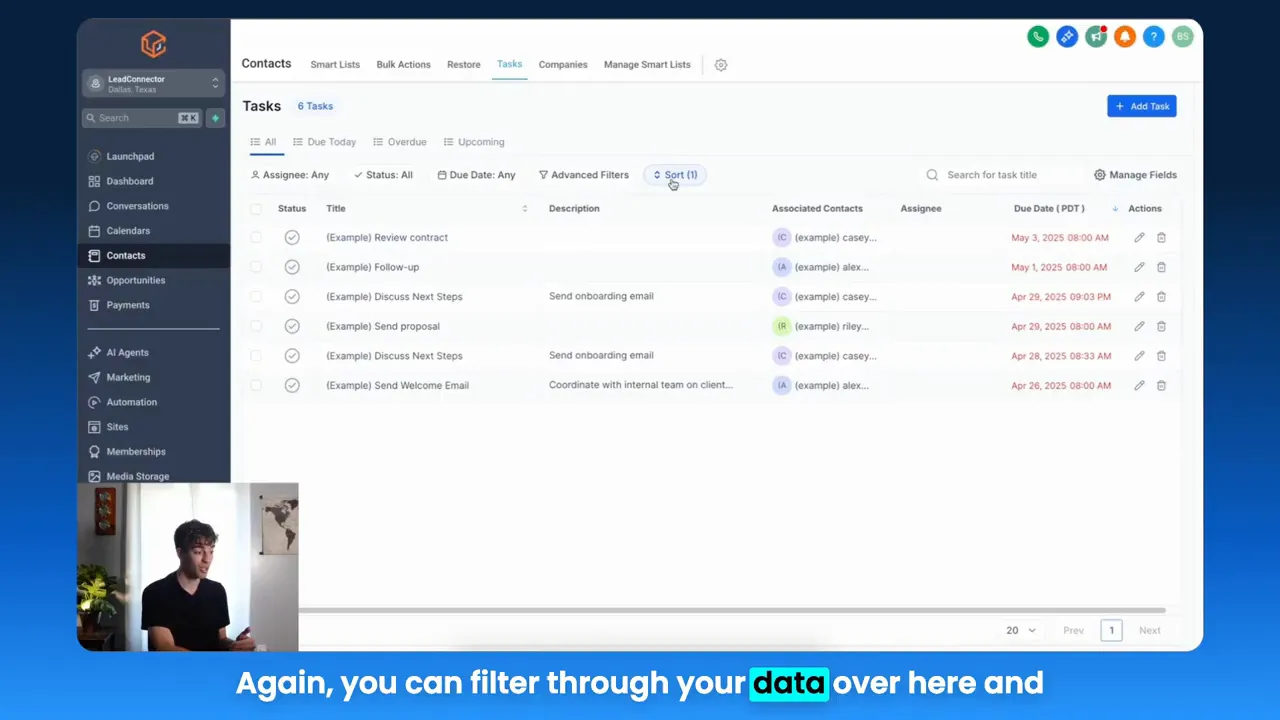
Image above: the manage fields modal where you select which columns are visible in a list view for better context and actionability.
Practical Workflow: From Smart List to Funnel Conversion
Small business owners, here is a repeatable workflow that turns list views into funnel-driven revenue. This is the Lead Connector With GFunnel workflow you can implement today:
- Create smart lists by filtering contacts, companies, or custom objects based on attributes that predict conversion intent.
- Customize columns and save the view so sales and marketing see consistent signals.
- Trigger automations from list membership to enroll contacts into email sequences and task creation for sales outreach.
- Direct traffic to funnel landing pages that are connected to the CRM and mapped to specific segments.
- Measure funnel performance with real-time analytics and iterate quickly, using the fast autosave-enabled funnel builder for rapid changes.
At each step link back to communities and networking: recruit ambassadors to promote offers, run group tests, and collect social proof to increase funnel conversion rates.
Real-World Applications: Case Studies Using the Lead Connector With GFunnel Approach
Small business owners, scale smarter with GFunnel. Here are two detailed case studies that show how the Lead Connector With GFunnel system turns lists into measurable growth.
Case Study 1: E-commerce Store — From Cart Abandoners to Repeat Buyers
Challenge: An e-commerce store had strong traffic but low cart recovery and an unclear way to prioritize post-purchase upsell opportunities. Their data lived across multiple places, and the team wasted time manually exporting lists to run campaigns.
Solution using Lead Connector With GFunnel:
- Step 1: Create a smart list that filters contacts with cart abandonment events, purchase dates in the last 30 days, and no repeat purchase status.
- Step 2: Build a funnel landing page targeted to cart abandoners with a limited-time discount and social proof pulled from community testimonials.
- Step 3: Trigger an automation sequence when contacts enter the cart abandonment list: send an email series, create a follow-up task for high-value carts, and add a retargeting audience for ads.
- Step 4: Use GFunnel’s real-time analytics to monitor conversion lift and iterate content on the landing page using fast autosave for safe rapid edits.
Results:
- Cart recovery improved by 18 percent within the first month.
- Repeat purchase rate increased by 12 percent when upsell sequences were connected to specific product purchases.
- Time spent by the team on list exports dropped by 60 percent due to automated smart lists and integrated automations.
Long-tail keyword examples integrated: build marketing funnels with GFunnel, best business platform for entrepreneurs, automate business operations with GFunnel.
Case Study 2: Local Restaurant — Reservations, Online Ordering, and Loyalty
Challenge: A restaurant wanted to improve repeat visits, collect customer preferences, and connect online ordering with loyalty offers. They needed to manage reservations and orders in one system and nurture guests into repeat patrons.
Solution using Lead Connector With GFunnel:
- Step 1: Use GFunnel’s CRM to capture dine-in and online order customer data into smart lists sorted by visit frequency and order value.
- Step 2: Build segmented marketing funnels: one for first-time diners offering a welcome discount, another for lapsed customers offering a time-sensitive incentive, and a VIP funnel for high-spend customers.
- Step 3: Trigger automations that create tasks for reservation confirmations, send order receipts, and add guests to loyalty campaigns based on list membership.
- Step 4: Leverage real-time analytics to track which campaigns drive reservations and which funnel steps cause drop-offs, adjusting offers quickly with fast autosave-enabled pages.
Results:
- Reservation confirmations rose 25 percent due to automated reminders and simpler communication.
- Loyalty program enrollments increased by 30 percent after integrating online ordering data into segmented funnels.
- Operational time spent reconciling orders and loyalty data dropped significantly, freeing managers to focus on guest experience.
Long-tail keyword examples integrated: scale restaurants with GFunnel, networking for small businesses, automate business operations with GFunnel.
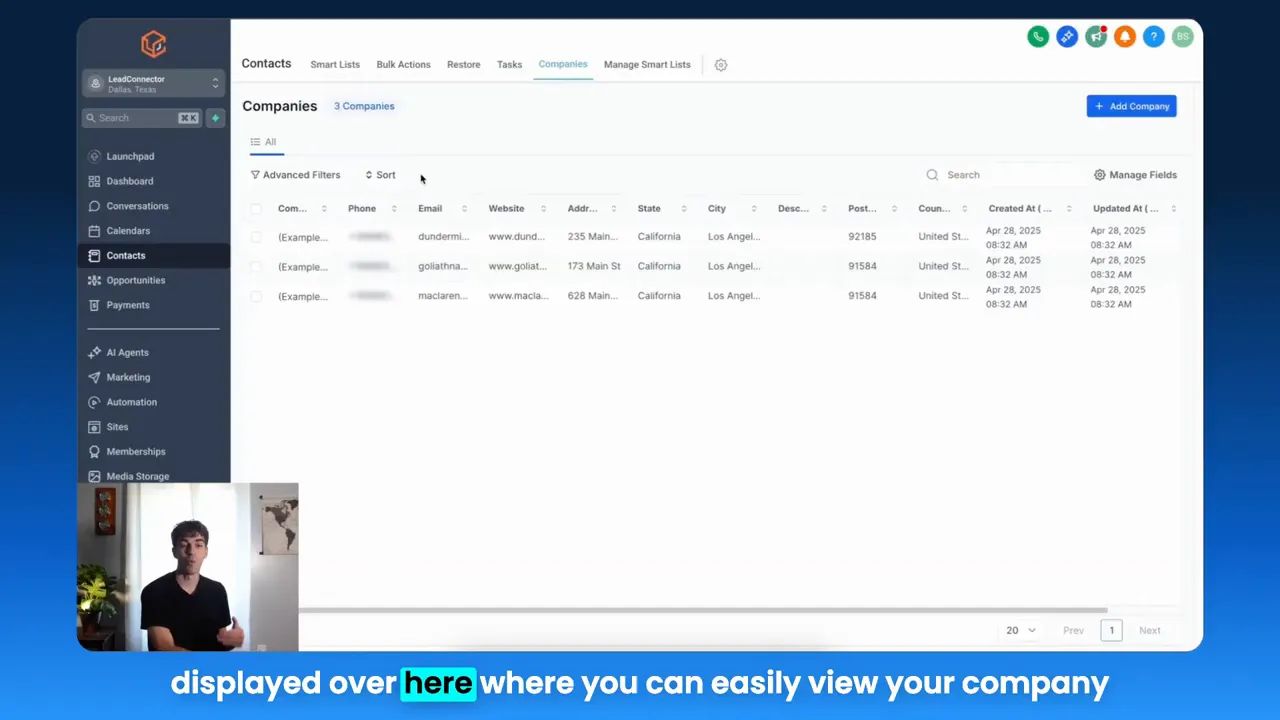
Image above: companies view where you can quickly sort and inspect company details to tailor B2B marketing funnels and outreach.
Why GFunnel Leads: Comparing Traditional Tools to an All-in-One Ecosystem
Small business owners, scale smarter with GFunnel. Here’s why GFunnel’s all-in-one approach typically outperforms piecemeal tools:
- Unified data reduces integration friction and sync errors
- Built-in automation and funnels lower the cost of operations and speed time-to-value
- Communities provide marketing channels and peer mentorship that accelerate growth
- Fast autosave and responsive funnel building reduce lost work and encourage experimentation
Traditional Business Tools vs. GFunnel’s Ecosystem
Pricing and affordability are also differentiators. GFunnel aims to provide accessible tiers so entrepreneurs can start with a free or low-cost plan before scaling into premium capabilities like API access and advanced automations. To understand pricing and pick the best plan for your needs, start at GFunnel’s create account page (https://www.gfunnel.com/create-account) and review available options on the platform.
Execution Checklist: Implement Lead Connector With GFunnel in 30 Days
Small business owners and marketers, here is a 30-day roadmap to implement the Lead Connector With GFunnel workflow and start seeing measurable impact on your marketing funnels.
- Day 1-3: Audit your current data sources and consolidate primary contact lists into GFunnel’s CRM (https://www.gfunnel.com/crm).
- Day 4-7: Create smart lists for top segments—cart abandoners, high intent leads, VIP customers, lapsed customers.
- Day 8-12: Build targeted landing pages and funnel flows using GFunnel’s funnel builder (https://www.gfunnel.com/funnel-home). Enable autosave and test edits.
- Day 13-18: Set up automations that trigger from list membership and opportunity changes (https://www.gfunnel.com/automation-home).
- Day 19-22: Connect real-time analytics to monitor funnel steps and identify drop-offs.
- Day 23-26: Join or post in niche communities to validate messaging and recruit early testers (https://www.gfunnel.com/communities).
- Day 27-30: Run the first optimization cycle, measure improvements, and expand winning funnels to other segments.
Stat: Teams that follow an integrated 30-day rollout see faster adoption and can cut operational overhead in half during the initial month of automation deployment.
Practical Tips and Best Practices
Here are actionable tips to get the most from the Lead Connector With GFunnel approach:
- Always save custom list views and name them clearly for team access.
- Use consistent field naming across contacts, companies, and opportunities to simplify filters and automations.
- Test funnel variations in small cohorts pulled from smart lists before scaling paid traffic.
- Leverage community feedback to refine offers and landing pages rapidly.
- Monitor analytics daily during initial launches to catch and fix drop-offs quickly.
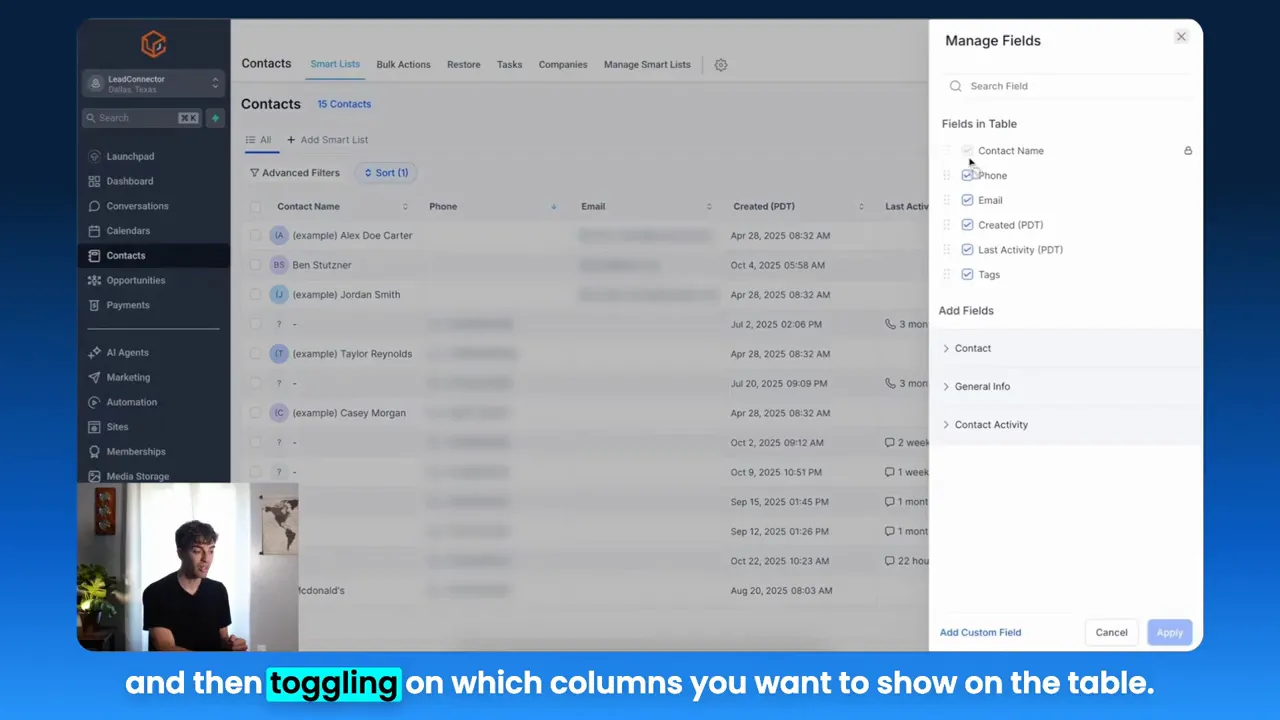
Image above: the sort menu to choose fields like phone number for quick sorting and prioritization.
Integrations, API, and Flexibility
GFunnel offers integrations and API access to connect with payment processors, ad platforms, and external CRMs. If a theme from your business requires tools not natively available, the Lead Connector With GFunnel strategy adapts: use API connectors to pull data into list views, or push funnel conversions into external systems for unified reporting.
Flexibility equals longevity. Build your funnels with portable assets where possible so you can adapt to new channels without rebuilding core segmentation and automation logic.
Community Call: Grow Faster with GFunnel’s Networks
Connect with fellow entrepreneurs through GFunnel’s communities to exchange funnels, share custom automation blueprints, and partner on launches. Community-driven growth often accelerates funnel adoption and provides social proof that can be reused in landing pages and email copy.
Join GFunnel’s communities here: https://www.gfunnel.com/communities
Interactive Element and Continued Learning
Test Your Business Growth Potential with GFunnel by taking a short quiz designed to map your current funnel maturity and recommend next steps. Use the results to prioritize automation, audience development, or better analytics. (Link available inside your GFunnel account.)
Related Content
- Scale Restaurants with GFunnel: Explore restaurant-specific features and integrations (https://www.gfunnel.com)
- Build Marketing Funnels with GFunnel: Get started with funnel templates and the fast autosave editor (https://www.gfunnel.com/funnel-home)
- Automation Features and Best Practices: Set up automations that reduce manual work (https://www.gfunnel.com/automation-home)
Why the Lead Connector With GFunnel Approach Works
Lead Connector With GFunnel is not a single tool; it is a mindset and a systems-level approach that ties list-driven CRM visibility directly into marketing funnels, automation, analytics, and community-driven growth. The integration of these capabilities reduces manual tasks, improves personalization, shortens time-to-action, and increases conversion velocity.
Compare common pain points against the GFunnel solution and you see why many businesses consolidate platforms into an all-in-one ecosystem:
- Fewer integrations to maintain
- Cleaner data with single-source truth
- Faster funnel iteration thanks to fast autosave and live analytics
- Community support for idea validation and partner marketing
GFunnel’s focus on fast autosave (103ms) and comprehensive tools for funnels, CRM, automation, and community networking bridges the gap between strategy and execution. When your team can move quickly, you test more, learn more, and grow faster.
Call to Action
Small business owners, scale smarter with GFunnel. Start building your Lead Connector With GFunnel system today by creating an account (https://www.gfunnel.com/create-account). Explore GFunnel’s CRM (https://www.gfunnel.com/crm), automation features (https://www.gfunnel.com/automation-home), and funnel builder (https://www.gfunnel.com/funnel-home) to see how listing, filtering, automations, and analytics can transform your marketing funnels into reliable revenue engines.
Join GFunnel’s communities (https://www.gfunnel.com/communities) to collaborate with peers and accelerate your funnel success.
How does GFunnel support data organization and list visibility for marketing funnels?
GFunnel centralizes contacts, companies, opportunities, custom objects, and tasks into customizable list views so you can sort, filter, and display only the columns you need. These smart lists feed your marketing funnels directly, enabling targeted segments to trigger automations and funnel enrollments.
What makes GFunnel more than a funnel builder?
GFunnel is an all-in-one business platform that includes funnels, CRM, automation, real-time analytics, communities for networking, and e-commerce tools. It combines these features into workflows so your funnels are supported by data, automation, and community-driven marketing, not just page builders.
How does fast autosave impact funnel creation and editing?
Fast autosave reduces the risk of lost changes and encourages rapid testing. GFunnel’s autosave runs at approximately 103ms via a dedicated web worker, enabling frequent edits and safe collaborative work, which accelerates funnel iteration and launch cadence.
Can I automate workflows from smart lists in GFunnel?
Yes. Smart lists can trigger automations for email sequences, task creation, opportunity updates, and ad audience syncing. This reduces manual work and ensures consistent follow-up across the funnel lifecycle.
How do communities in GFunnel help funnel performance?
Communities provide channels for testing messaging, recruiting ambassadors, and building social proof. Feedback from niche groups can improve landing page copy, offer design, and audience targeting, which in turn boosts conversion rates for your marketing funnels.
Final Thoughts and Next Steps
Implementing the Lead Connector With GFunnel approach means prioritizing list visibility, actionable filters, automation, rapid funnel iteration, and community-driven growth. The steps are clear: centralize data in lists, map lists to targeted funnels, automate follow-ups, measure with real-time analytics, and amplify with community networks.
To begin, set up your GFunnel account (https://www.gfunnel.com/create-account), explore the CRM and list features (https://www.gfunnel.com/crm), and try the funnel builder (https://www.gfunnel.com/funnel-home) with fast autosave enabled. Join communities for feedback and scale winning funnels with automation and analytics.
If you are ready to convert your lists into predictable growth, try the Lead Connector With GFunnel strategy now. The platform is designed to help businesses of all sizes build, automate, and measure effective marketing funnels while reducing manual tasks and increasing conversion velocity.
For more detailed tutorials and resources, review GFunnel’s automation and community pages, and start building an integrated system that turns data into action and visitors into customers.