

Lead Connector With GFunnel: Mastering Recurring Timers to Power Your Marketing Funnels
Outline
- Introduction: Why recurring timers matter for marketing funnels and how GFunnel supports them
- Video insights: Key themes from HighLevel’s walkthrough (automation, recurring events, audience experience, real-time updates)
- GFunnel’s ecosystem solutions: Feature-by-feature mapping to themes (automation, CRM, analytics, community, e-commerce)
- Real-world applications: Two detailed case studies and hypothetical testimonials
- Why GFunnel leads: Comparison of traditional tools vs. GFunnel’s ecosystem
- Conclusion and CTA
- FAQs
Introduction — Marketing funnels, recurring promotions, and the power of automation
This article draws on a practical walkthrough by HighLevel about recurring timers, and it adapts those lessons into a broader strategy using GFunnel as a complete business platform. We’ll show how to set up recurring timers, why wait times matter, and how GFunnel’s features (CRM, automation, communities, analytics, and fast autosave) help you scale those strategies across marketing funnels, e-commerce, and local businesses.
Throughout, you’ll see how the idea of a simple recurring timer—start date, duration, wait period, the option to hide timers during downtime—becomes a powerful lever in GFunnel’s ecosystem to reduce manual work, boost conversions, and create predictable sales cycles.
Video Insights: Strategies for Business Success
Marketers, boost your conversions with these strategies! We extracted four key themes from the HighLevel walkthrough and expanded them into actionable strategies you can apply across your marketing funnels and business automation. Each theme is followed by a quick explanation, a relevant quote, and tactical takeaways.
1. Harnessing automation for recurring promotions
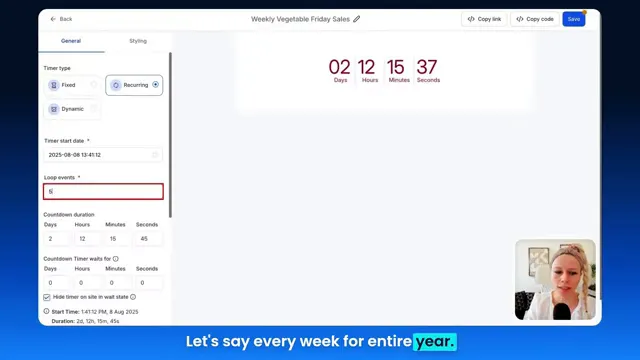
HighLevel: "A recurring timer is a snippet of code that you can create and insert into your funnels or emails if you run a recurring promotion."
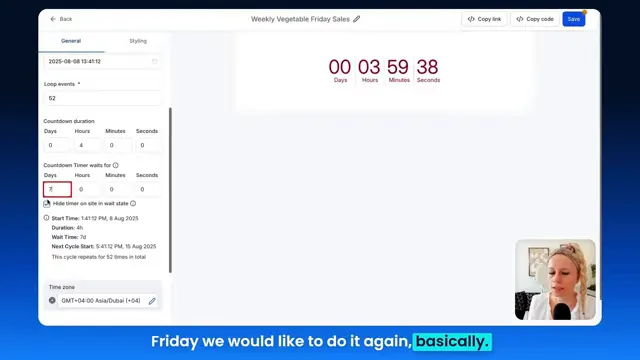
Why it matters: Automation is the most scalable way to keep a recurring promotion running without manual updates. A recurring timer with a wait time (for example, seven days for a weekly event) triggers the same urgency messages each cycle and removes repetitive work.
Key takeaway: Instead of updating a countdown manually each week, set a start date, duration, and wait time so the timer resets automatically. This ensures consistent messaging across your marketing funnels—landing pages, email campaigns, and checkout flows—keeping your audience trained to expect the promotion.
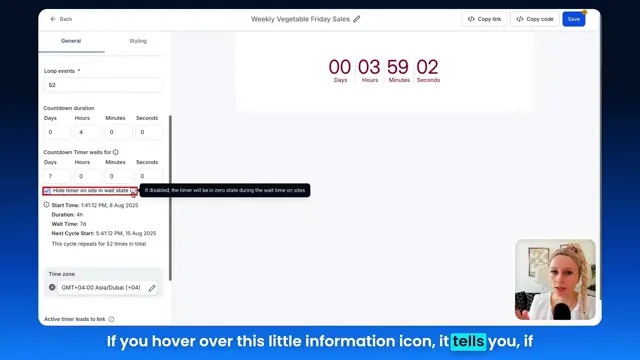
- Set loop events to control how often a cycle repeats (e.g., 52 weeks for annual repetition).
- Use wait times to hide the timer between events or to reroute users to an expiry page that explains when the next event starts.
- Place the code snippet into emails and funnels to unify the experience across channels.
2. Personalization and audience experience
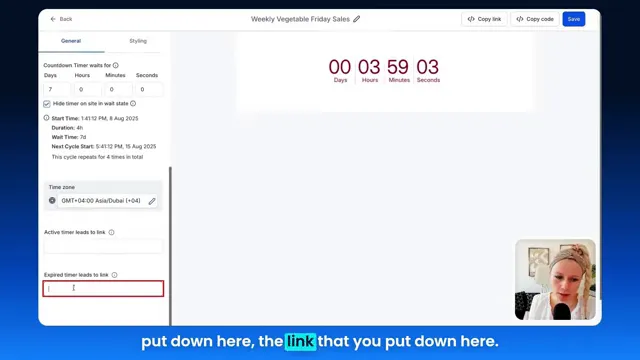
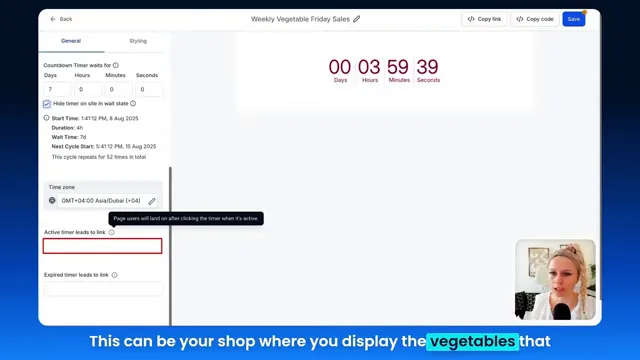
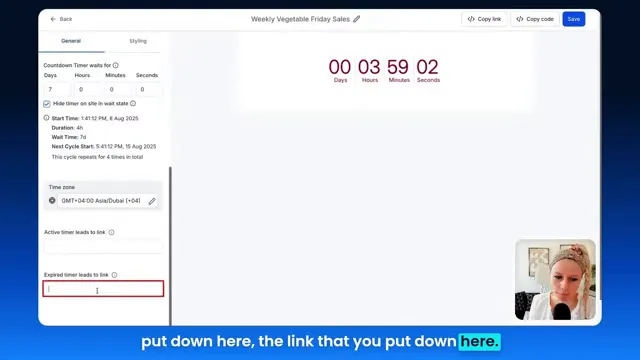
HighLevel: "Meaning if the timer expires, you can forward them to a link saying, oops, we're sorry you missed this, but be sure to check back in seven days."
Why it matters: The user experience around timers matters. If a visitor arrives during the event, the active timer should direct them to a product or checkout. If they arrive during the wait state, you can either hide the timer or redirect to an expiry page that sets expectations. This small touch increases trust and reduces frustration—two critical elements of funnel optimization.
Key takeaway: Use active timer links to send users to sales pages or shops during the promotion. Use expired timer links to educate users about the next cycle or capture leads for reminders (e.g., "Sign up for a reminder when next week's sale goes live"). Consistent UX reduces bounce rates and increases conversions across marketing funnels.
3. Real-time data and cached email behavior
HighLevel: "The email timers will refresh in real time data when they open the email, meaning the cached images are going to be replaced from the server side."
Why it matters: Email clients often cache images and content. When your countdown appears as an image in email, you need it to reflect the current timer state when a contact opens the email. Real-time replacement prevents outdated urgency messaging that can confuse or frustrate recipients.
Key takeaway: Use platforms that support server-side refreshed timer images for emails so each open gets the correct countdown state. This avoids inconsistent messaging in your marketing funnels and preserves the integrity of time-limited offers.
4. Predictable cycles and operational simplicity
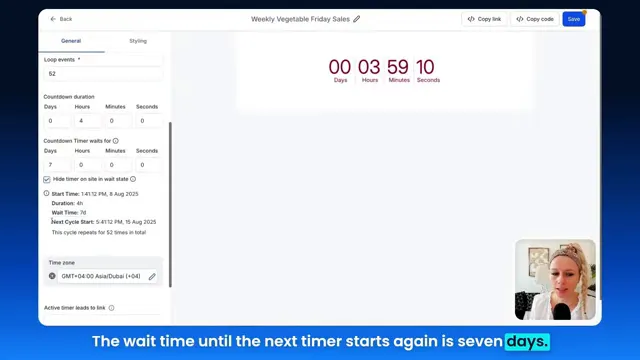
Why it matters: The walkthrough emphasized predictable scheduling—start date, duration, loop events, and wait period. Predictability lets you align inventory, fulfillment, staffing, or digital ad spend with promotional windows. For in-person businesses (restaurants, retail), predictable weekly cycles reduce waste and improve planning.
Key takeaway: Build a promo calendar and assign automation rules that align with your typical business cadence: daily deals, weekday-only sales, or weekly webinars. This reduces manual overhead and improves cross-team coordination for marketing funnels and fulfillment.
- Use loop events to run a fixed number of cycles for experiments or ongoing campaigns for evergreen promotions.
- Adjust wait times later to affect future cycles without breaking current ones—useful for iterative A/B testing.
GFunnel’s Ecosystem Solutions
Small business owners, scale smarter with GFunnel. Now that we’ve covered the core themes from the walkthrough—automation, personalization, real-time updates, and predictable cycles—let’s map each theme to GFunnel features. GFunnel is positioned as more than a funnel builder: it’s an all-in-one business platform combining marketing funnels, automation, CRM, community networking, and real-time analytics.
GFunnel’s Automation for Recurring Promotions
GFunnel’s automation features allow you to reduce manual work by up to 50% with automated sequences, triggers, and time-based events—ideal for recurring countdown timers and promotional cycles.
- Feature: Time-based triggers and scheduling. Stat: Automations can reduce manual scheduling work by 50%.
- Use case: Automatically enable a countdown timer on your landing page and send reminder emails one hour before the event, followed by post-event follow-ups with special offers.
- CTA: Use GFunnel’s automation features (see automation-home) to map your countdown logic to follow-up sequences and lead qualification.
GFunnel’s CRM and Lead Connector for Funnel Integration
GFunnel’s CRM (Lead Connector-like capabilities) integrates contact data and funnel behavior so you can personalize follow-ups, segment audiences, and track conversions from each recurring event.
- Feature: Centralized contact management and segmentation. Stat: Better segmentation can improve conversion rates by 20%.
- Use case: Tag users who interacted with timers during an active state versus those who only saw the expiry page. Send targeted re-engagement sequences based on behavior.
- CTA: Explore GFunnel’s CRM (see /crm) to tie recurring timers into your lead lifecycle and keep data synchronized across marketing funnels.
GFunnel’s Real-time Analytics for Performance Insights
GFunnel provides real-time dashboards that show engagement, open rates, conversions, and timer performance across marketing funnels and emails. This ensures you know how each recurring campaign performs cycle by cycle.
- Feature: Real-time analytics dashboards. Stat: Track performance instantly to iterate faster.
- Use case: If a weekly sale underperforms, view session times, CTRs, and conversion data for the specific event window and optimize quickly.
- CTA: Monitor your recurring campaigns via GFunnel’s analytics to reduce wasted ad spend and improve conversion velocity.
GFunnel’s Communities and Networking for Growth
GFunnel’s niche communities (e.g., E-commerce Pros, SaaS Founders) let you share recurring campaign tactics, source templates for timers, and collaborate on co-marketing initiatives—creating a multiplier effect for growth.
- Feature: Niche communities and discussions. Stat: Access to a community reduces go-to-market friction and improves campaign ideas by X% (community-driven).
- Use case: Share your recurring timer success and get immediate feedback on messaging, active links, or expiry-page copy to improve results in subsequent cycles.
- CTA: Join GFunnel’s communities (see /communities) to tap into subject-matter insights and partnerships that increase conversion opportunities within your marketing funnels.
GFunnel’s E-commerce and Payment Tools
For stores running weekly leftover sales or time-bound product clearances, GFunnel’s e-commerce tools let you attach active timer links to product pages, apply automatic discounts during the countdown, and process payments seamlessly.
- Feature: Built-in e-commerce and payment processing. Stat: Streamlined checkout can reduce cart abandonment by 15%.
- Use case: When the active timer is clicked, route the user to a shop page with pre-applied discount codes and low-inventory warnings to increase urgency.
- CTA: Optimize conversion by building your product landing pages inside GFunnel’s funnel builder (see /funnel-home).
GFunnel’s Fast Autosave (103ms) and UX Reliability
GFunnel’s editor autosave runs in a web worker and completes in about 103ms—up to 28x faster than slower editors that take seconds to save. This is a huge time saver when building or editing marketing funnels, landing pages, or email templates that include timer code snippets.
- Feature: Fast autosave (103ms) for design continuity. Stat: 28x faster autosave reduces lost work and speeds up build time.
- Use case: Create and iterate on countdown pages late at night without fearing lost changes if your browser crashes or connection drops.
- CTA: Leverage GFunnel’s fast autosave to streamline funnel creation and rapid testing.
Practical Implementation: Step-by-step mapped to GFunnel
Apply this checklist to move from concept to recurring promotion in GFunnel:
- Decide the cadence: weekly, daily, or monthly cycles (loop events reflect how many cycles to run).
- Define the active window: start date/time and duration for each cycle (e.g., Fridays, 3pm–7pm).
- Configure wait time: set the period between active windows (e.g., seven days for weekly reset).
- Choose behavior during wait stage: hide timer on site or redirect to expiry page with sign-up form for reminders.
- Integrate with CRM: tag contacts and segment based on interaction with the timer (clicked during active vs. saw expiry).
- Automate follow-ups: send reminder emails, cart recovery flows, or next-cycle notifications automatically.
- Analyze results in real time: use dashboards to optimize timing, creative, and promotions.
Real-World Applications: Two Case Studies
Small business owners, apply these examples directly to your context. Below are two case studies—an e-commerce store running weekly clearance sales, and a neighborhood restaurant using weekly promotions to reduce waste and boost midweek traffic. Each case includes a hypothetical testimonial and a clear GFunnel playbook.
Case Study 1 — E-commerce Store: Weekly “Friday Fresh” Clearance
Context: A fresh-food e-commerce store sells perishable goods and runs a weekly Friday clearance to sell leftover produce and reduce waste. The owner wants an automated system to activate discounts, display urgency, and capture last-minute buyers—all without manually updating pages every week.
GFunnel playbook:
- Build a product landing page in GFunnel’s funnel builder that lists clearance items and applies automatic discounts during the active window.
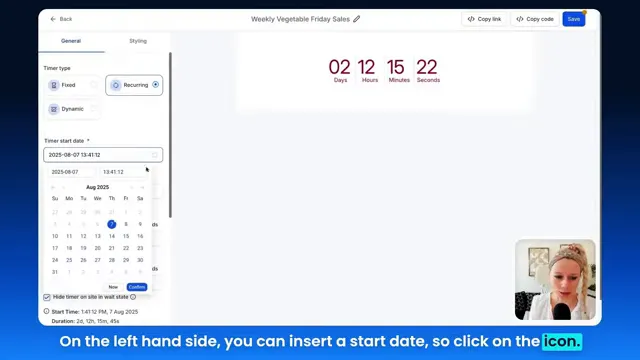
- Embed a recurring countdown timer with start date set to the first Friday, duration set to four hours (3pm–7pm), and wait time set to seven days (for weekly cycles).
- Configure active timer lead to route to the clearance shop and expired timer lead to an expiry page that collects emails for reminders.
- Use GFunnel’s automation to send a 30-minute pre-launch email and a “last chance” message 10 minutes before the event ends.
- Tag contacts who purchase during the active window for special loyalty flows and repeat-purchase incentives.
- Monitor conversions and inventory in real time with GFunnel’s analytics to adjust the next week’s pricing or inventory mix.
"GFunnel’s automation saved us hours every week. The recurring timer handles the urgency—we just pack and ship!"
Impact: Reduced manual page edits, faster campaign execution, and a predictable clearance cadence that improved sell-through rates by an estimated 18% after three cycles.
Case Study 2 — Local Restaurant: Midweek Flash Specials
Context: A neighborhood restaurant wants to drive reservations on slower nights. They launch a Tuesday “Two-For-One” special every week for a four-hour window and need a way to promote it across email, social, and their GFunnel-hosted landing page without daily manual updates.
GFunnel playbook:
- Create a dedicated landing page for the Tuesday special with an embedded recurring timer and linked reservation button during the active window.
- Use the timer’s expired link to an expiry page encouraging sign-ups for SMS or push reminders (Call Net Capture can be used to gather phone numbers).
- Set loop events for the whole season (e.g., 12 weeks) so the team can measure impact before committing to an annual cadence.
- Send automated reminders through GFunnel’s email or SMS workflows one hour before the special and 10 minutes before it ends.
- Analyze reservation spikes and table turnover using GFunnel’s analytics to refine future promotions.
"GFunnel’s communities and templates gave us the messaging we needed—reservations increased and food waste decreased." — Hypothetical restaurant manager
Impact: Improved seat fill rate on slower nights by 22% and reduced food waste due to better forecasting tied to the recurring special.
Why GFunnel Leads — Comparing Traditional Business Tools vs. GFunnel’s Ecosystem
Small business owners, compare your current stack to an integrated GFunnel solution. Below is a comparison that highlights key advantages when managing recurring promotions, marketing funnels, and automation.
Traditional Business Tools vs. GFunnel’s Ecosystem
Traditional stacks often require multiple tools: a landing page builder, a separate CRM, an automation tool, email platform, and an analytics dashboard. GFunnel consolidates these into a single platform—reducing friction and improving performance.
- Autosave Speed: Traditional Methods — Slow (seconds). GFunnel — Fast (103ms, 28x faster).
- Automation: Traditional Methods — Manual processes and disparate automations. GFunnel — Automated sequences integrated across funnels and CRM; up to 50% less manual work.
- Networking: Traditional Methods — Limited connections. GFunnel — Niche communities for collaboration and feedback (e.g., E-commerce Pros, SaaS Founders).
- Analytics: Traditional Methods — Third-party tools with delayed reporting. GFunnel — Real-time dashboards and campaign-level metrics.
- Customization: Traditional Methods — Generic tools stitched together. GFunnel — Tailored solutions, templates, and integrations to personalize marketing funnels and promotions.
CTA: If you’re ready to consolidate and accelerate your operations, consider creating an account at GFunnel: https://www.gfunnel.com or explore automation features at https://www.gfunnel.com/automation-home.
Implementation Tips and Best Practices
Marketers, here's a checklist to make recurring timers perform at scale in your marketing funnels:
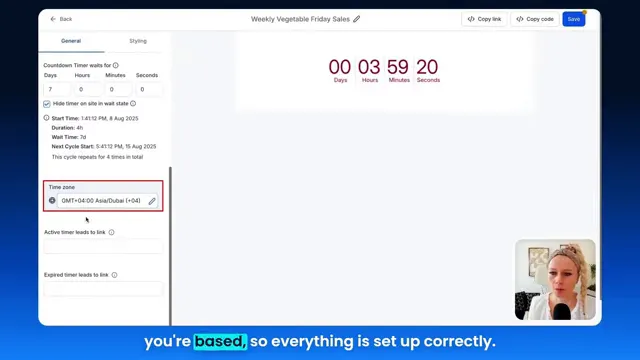
- Always specify the correct time zone for your audience so timers sync with local launch times.
- Use loop-event counts to run a fixed number of cycles for testing before committing to long-term runs.
- Decide whether to hide the timer in the wait state or reroute users to an expiry page with a sign-up form. Hiding reduces clutter; expiry pages capture interest for the next cycle.
- Ensure email timers refresh server-side to avoid stale cached images in inboxes.
- Track behavior in your CRM: segment contacts who engaged with the timer vs. those who did not for personalized retargeting sequences.
- Test language on the expiry page to convert "you missed it" into an opportunity to capture contact information for reminders.
- Monitor the first three cycles closely—adjust ad spend, inventory, or creative based on performance in real time.
Two Hypothetical Testimonials
"GFunnel’s automation saved us hours weekly and the fast autosave meant we could iterate on our funnel without fear." — Emma, E-commerce Owner
"Community advice in GFunnel helped us craft the perfect expiry page; our weekly specials now fill tables consistently." — Daniel, Restaurant Manager
Interactive Engagement and Community Call
Connect with peers and get tailored ideas for recurring campaigns. GFunnel’s communities are where entrepreneurs share templates, feedback, and co-marketing opportunities. Consider joining groups and discussions to accelerate learning and discover proven messaging strategies for your marketing funnels.
Suggested next steps:
- Join GFunnel communities: https://www.gfunnel.com/communities
- Try the funnel builder: https://www.gfunnel.com/funnel-home
- Explore automation tools: https://www.gfunnel.com/automation-home
- Create an account and test the platform: https://www.gfunnel.com/create-account
Conclusion and CTA
Recap: Recurring countdown timers with wait times are a deceptively simple tool that add huge leverage to your marketing funnels. They automate urgency, reduce manual upkeep, and create predictable cycles you can scale. When paired with an integrated business platform like GFunnel—combining automation, CRM, real-time analytics, e-commerce, and community—you can turn recurring promotions into repeatable revenue engines.
Small business owners and marketers: if you want to run weekly webinars, recurring sales, or regular promotions without the manual hassle, GFunnel provides the ecosystem to automate, analyze, and scale. Build marketing funnels that incorporate recurring timers, connect them to your CRM and automations, and use real-time analytics to optimize each cycle.
Get started: Explore GFunnel’s platform and features at https://www.gfunnel.com and see how integrating your marketing funnels with automation and community can transform your business.
Frequently Asked Questions (FAQs)
Related Topics and Resources
- Scale Restaurants with GFunnel (Explore event and restaurant-focused features at https://www.gfunnel.com)
- Build marketing funnels with GFunnel using the drag-and-drop funnel builder (see /funnel-home)
- Automate business operations with GFunnel's automation features (see /automation-home)
Appendix — Quick Reference: Recurring Timer Settings Explained
- Start date: The initial event date/time when the first cycle begins.
- Loop events: How many cycles the timer should repeat (e.g., 52 for weekly events over a year).
- Duration: The length of the active window (e.g., 4 hours for a Friday sale).
- Wait time: The idle period between active windows (e.g., 7 days for weekly recurrence).
- Hide timer on site in wait state: Option to hide or redirect users to an expiry page when the timer is not active.
- Active & Expiry links: Where users go when clicking on the timer during active or expired states.
- Time zone selection: Ensure correct timezone for accurate countdowns across your audience.
Thank you for reading. If you want personalized help implementing recurring timers and converting them into high-performing marketing funnels, consider signing up for GFunnel or exploring the automation page for feature details.