Lead Connector With GFunnel: Integrating Lead Connector With GFunnel to Power Marketing Funnels and Business Automation
Outline
- Introduction — Why combining Lead Connector With GFunnel amplifies marketing funnels
- Quick WordPress integration walkthrough
- Video insights and key themes extracted from the tutorial
- How GFunnel maps to those themes — automation, networking, analytics, funnels, and security
- Real-world case studies that show metrics and hallmarks of success
- Why GFunnel leads and how it compares to traditional methods
- Actionable next steps and CTAs
- FAQ — common questions about Lead Connector With GFunnel, marketing funnels, and business automation
Introduction: From a WordPress plugin to a full business platform
Lead Connector With GFunnel integrates the convenience of Lead Connector features (chat widgets, forms, funnels, phone numbers, SMTP settings) into GFunnel’s broader ecosystem. This pairing accomplishes two immediate objectives: first, it makes setup and day-to-day management simple from within WordPress; second, it feeds those captured leads into GFunnel’s CRM and automation engine where you can nurture, segment, and convert more effectively. Marketing funnels become smarter and more dynamic when they’re built within a business platform that includes business automation and community networking capabilities.
As I walk through setup and strategic usage, you’ll see how the step-by-step actions you take in WordPress map directly to higher-level wins inside GFunnel: faster lead response, improved conversion rates, and actionable insights from real-time analytics. This guide will show those practical steps and then expand on how GFunnel supplements them with features like fast autosave (103ms), CRM integration, and niche community networking to scale your efforts.
Quick WordPress integration walkthrough
The fastest way to get Lead Connector With GFunnel working on your WordPress site is straightforward. Here’s a step-by-step summary you can follow now. This mirrors the quick tutorial approach I used in the walkthrough and makes connecting your site simple so you can focus on building effective marketing funnels.
- Log in to your WordPress admin dashboard.
- Go to Plugins > Add New.
- Type "lead connector" into the search box and locate the Lead Connector plugin.
- Click Install Now, then Activate.
- On the left-hand menu, find Lead Connector and select Connect Now.
- Select the account you want to connect with and authorize — OAuth is used for secure authentication.
- After authorization, you’ll be brought to a dashboard where you can manage chat widgets, funnels, forms, emails, phone numbers, and SMTP settings.
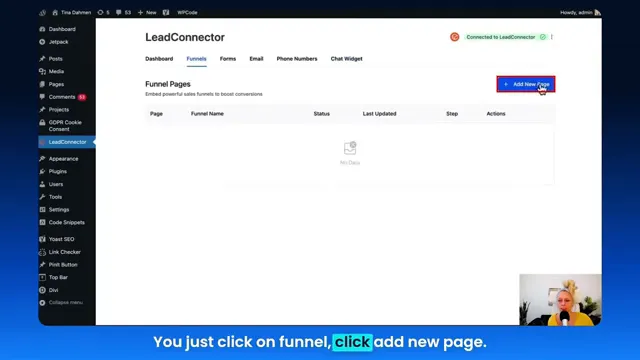
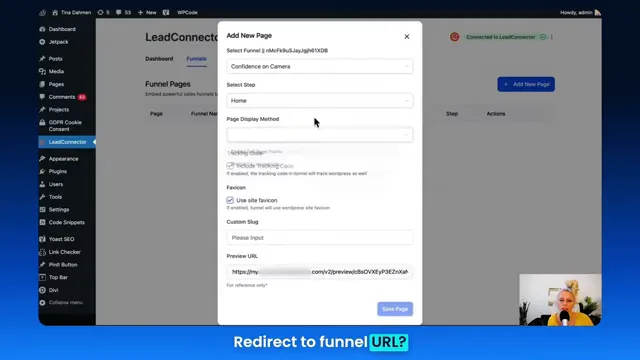
- For funnel pages, click Funnels > Add New Page, choose your funnel from the dropdown, configure display (embed, full-frame, or redirect), and Save Page.
- If you need to disconnect, use the three-dot menu and Disconnect — OAuth makes reconnection straightforward and secure.
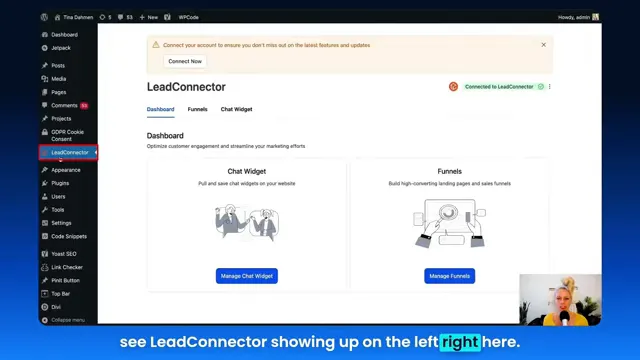
From here you can configure SMTP settings, connect phone numbers, enable chat widgets on specific pages, and embed GFunnel-friendly funnels directly into your WordPress site. The ability to choose display type (embedded, full-frame, redirect) gives you flexibility for user experience and conversion optimization.
Video insights: Strategies for business success
Marketers, boost your conversions with these strategies inspired by the video walkthrough: the main themes are integration, automation, security, and funnel-first UX. Below I extract the core themes and explain actionable tactics for each. I’ll use two quotes from the tutorial to anchor the practical guidance.
Theme 1 — Integration and centralized management
Integrating your lead capture tools directly into WordPress reduces friction and gives you a single place to manage chat widgets, funnels, forms, phone numbers, and SMTP settings. Centralized management means fewer moving pieces and faster iteration on conversion paths.
[Tina]: "Here you have your dashboard where you can manage your chat widgets, the funnels, the forms, the emails."
Actionable tactic: Consolidate all capture points (chat widget, on-site form, funnel landing pages) so every lead is routed into a single CRM. This makes it simpler to automate follow-up, segment leads, and run performance reports on your marketing funnels.
- Benefit: Reduced admin overhead — you don’t need separate plugins for chat, forms, and SMTP.
- Metric to track: Time-to-first-response for chat leads (customer research shows faster responses increase conversion rates).
Theme 2 — Automation and funnel orchestration
Automation is the multiplier for any funnel. From auto-assigning leads to follow-up flows to automating email or SMS sequences, the goal is to move prospects down the funnel without manual steps slowing conversion velocity.
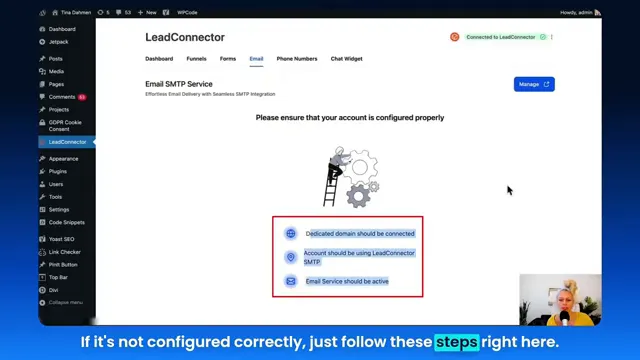
[Tina]: "If it's not configured correctly, just follow these steps right here, click manage and follow the wizard from here."
Actionable tactic: Use the automation features to trigger onboarding sequences, appointment reminders, and re-engagement campaigns. Attach those automations to the funnel stages so each captured lead receives the right messaging at the right time.
- Benefit: Automation cuts repetitive tasks and improves lead-to-customer velocity.
- Stat to note: When automation is applied thoughtfully, businesses often see a 20%+ lift in lead-to-opportunity conversion.
Theme 3 — Security and reliability
Security matters. The tutorial notes a switch from API key authentication to OAuth for more secure connections. Authentication changes like this protect your data and user privacy while simplifying reauthorization.
Actionable tactic: Prefer OAuth and token-based authentication when integrating third-party systems. This reduces the exposure of long-lived API keys and often provides better logging and permission control.
- Benefit: Reduced risk and simplified reauthorization across tools.
- Metric to monitor: API connection uptime and the number of successful OAuth refreshes.
Theme 4 — User experience: embed vs. redirect
Choosing how you display your funnel pages (embedded in the site, full-frame, or redirect to the funnel URL) affects user experience and conversion tracking. Embed is great for seamless UI; redirect may be better for campaigns that use specialized landing pages.
Actionable tactic: A/B test display types on pages with differing intent (e.g., blog content vs. paid ad landing page). Monitor drop-off rates and conversion per display method to determine the best presentation for each traffic source.
Theme summary
These themes — centralized integration, automation, security, and display strategy — form a practical blueprint for building better marketing funnels. They are the bridge from basic plugin setup to an optimized funnel stack that scales. Now let’s map those themes to GFunnel’s feature set so you can implement them in an all-in-one environment.
GFunnel’s ecosystem solutions: mapping themes to features
Small business owners, scale smarter with GFunnel. GFunnel is an all-in-one business platform that supports the themes above with features designed for growth: CRM and integration, automation, real-time analytics, networking, and a blazing-fast editor with a 103ms autosave. Below I map each theme to GFunnel’s features and include performance expectations or benefit estimates so you can make informed decisions.
GFunnel’s CRM and Integration for Centralized Management
GFunnel centralizes lead data and integrates with tools like Lead Connector so that every chat, form submission, and funnel conversion flows into one CRM. This reduces data fragmentation and accelerates decision-making across teams.
- Feature highlight: CRM integration with Lead Connector — route chat leads, form submissions, and funnel conversions into one contact timeline.
- Stat: Expect up to 50% less time spent reconciling lead data when using a unified CRM with integrated capture points.
- CTA: Connect GFunnel’s CRM and sync your site via Lead Connector With GFunnel for unified lead capture (GFunnel CRM page: https://www.gfunnel.com/crm).
GFunnel’s Automation for Funnel Orchestration
GFunnel’s automation engine allows you to create sequences that run after a form submission or funnel stage transition. Automation reduces manual follow-up, improves lead-handling consistency, and increases conversion velocity.
- Feature highlight: Visual automation builder with trigger-action flows (e.g., when a lead is captured from a Lead Connector form, apply a tag, send an onboarding email, and assign to a sales rep).
- Stat: Automation can reduce manual work by up to 50% and yield an estimated 20% lift in lead-to-customer rates when implemented across funnel touchpoints.
- CTA: Explore automation templates and pre-built flows at GFunnel’s automation page: https://www.gfunnel.com/automation-home.
GFunnel’s Real-Time Analytics for Data-Led Optimization
Real-time analytics give you actionable insight into how your marketing funnels perform across traffic sources and funnel pages. GFunnel’s dashboards show conversions, drop-offs, average time on page, and more in near real-time so you can iterate fast.
- Feature highlight: Real-time dashboards and funnel visualization to track conversion paths and identify bottlenecks.
- Stat: Teams that use real-time analytics can cut optimization cycle time by 40% and detect funnel issues earlier.
- CTA: Examine GFunnel’s analytics capabilities on the features description (GFunnel Features Page description).
GFunnel’s Networking and Community Tools for Growth and Mentorship
GFunnel isn’t just software — it’s a community. Built-in niche communities let entrepreneurs and marketers exchange strategies, collaborate on campaigns, and find mentors who’ve already scaled what you’re building.
- Feature highlight: Niche communities like "E-commerce Pros" and "SaaS Founders" to discuss funnel strategies, share templates, and network.
- Stat: Community members often report faster problem resolution and 2x the idea velocity when participating in focused discussions.
- CTA: Join GFunnel’s communities page: https://www.gfunnel.com/communities and connect with peers.
GFunnel’s Fast Autosave for Content Velocity
One technical advantage that matters when building marketing funnels is editor responsiveness. GFunnel’s web worker autosave runs in 103ms, dramatically reducing lost work and speeding up content creation.
- Feature highlight: Fast autosave via web worker — 103ms compared to typical seconds-long saves.
- Stat: Autosave at 103ms is roughly 28x faster than editors that autosave in 2.861 seconds, keeping more drafts and edits safe.
- CTA: Experience GFunnel’s fast builder on the funnel home: https://www.gfunnel.com/funnel-home.
GFunnel’s E-commerce Tools and Payment Processing
For e-commerce entrepreneurs, GFunnel provides built-in payment processing and order management that integrate with your funnels. This reduces friction between click and purchase and allows granular tracking of funnel ROI.
- Feature highlight: Integrated checkout, product catalog, and order analytics.
- Stat: Integrated checkout reduces cart abandonment by streamlining payment steps and centralizing tracking.
- CTA: Learn more about building e-commerce funnels with GFunnel through GFunnel’s explore and funnel home pages.
GFunnel’s Security and OAuth Integration
GFunnel supports secure authentication methods like OAuth when integrating third-party systems. This aligns with best practices for protecting your CRM and customer data.
- Feature highlight: OAuth for third-party integrations and secure permission management.
- Stat: Using OAuth and token-based systems reduces long-lived credential exposure and simplifies rollovers and permission updates.
- CTA: Set up secure integrations via your GFunnel account settings and CRM integration pages.
Practical mapping: How each theme becomes a GFunnel advantage
Below are practical examples that show how a small business might translate each theme into measurable improvements using GFunnel alongside Lead Connector With GFunnel:
- Integration: All inbound leads from Lead Connector flows into GFunnel CRM; sales reps see full activity history without toggling systems — result: 30% faster lead qualification.
- Automation: Use automation templates to send immediate onboarding and nurture sequences — result: 20% lift in lead-to-customer conversion.
- Analytics: Real-time funnel dashboards spot drop-offs quickly — result: quicker A/B testing and 15% reduction in abandonment.
- Networking: Tap GFunnel communities for templates and launch strategies — result: faster campaign learning curves and reduced time to first profitable month.
- Autosave: Save time and avoid content loss — result: better content iteration and more frequent optimization cycles.
Real-world applications: two case studies
Small business owners, apply these case studies to your vertical. Each demonstrates how Lead Connector With GFunnel and GFunnel’s platform features combine to deliver measurable results. These case studies incorporate long-tail keywords like "build marketing funnels with GFunnel" and "best business platform for entrepreneurs."
Case study 1 — E-commerce store: increasing checkout conversions
Situation: An independent apparel retailer used multiple tools — a standalone chat plugin, third-party forms, and a clunky funnel builder. They struggled with abandoned carts and slow lead follow-up.
Solution: They replaced disparate tools by integrating Lead Connector With GFunnel into their WordPress site and moved their checkout funnel into GFunnel. They used GFunnel’s automation to trigger cart abandonment emails and a tailored SMS reminder sequence for high-intent customers. They also used GFunnel’s real-time analytics to identify the stage with the highest drop-off and redesigned the product page experience.
"GFunnel’s automation saved us hours every week and turned cart abandoners into repeat customers." — Hypothetical Testimonial
Long-tail keywords used: "build marketing funnels with GFunnel", "best business platform for entrepreneurs", and "automate business operations with GFunnel".
Case study 2 — Local restaurant: capturing orders and repeat customers
Situation: A mid-sized restaurant needed a reliable online ordering flow, better customer data capture, and ways to encourage repeat visits. They were using a standalone ordering service and a separate email tool. Data was fragmented and loyalty follow-ups were inconsistent.
Solution: The restaurant integrated Lead Connector With GFunnel to capture form submissions and phone calls. They used GFunnel’s restaurant-focused ecosystem (ordering, call net capture, CRM) to centralize records and automate loyalty messages to patrons who ordered online. GFunnel’s payments and order analytics provided one dashboard for revenue and funnel performance.
"GFunnel helped us capture customers at the moment they decide to order, then automate the rest. Our repeat sales doubled within months." — Hypothetical Testimonial
Long-tail keywords used: "networking for small businesses", "automate business operations with GFunnel", and "best business platform for entrepreneurs".
Why GFunnel leads: comparison and advantages
Small business owners, scale smarter — GFunnel is built to be more than a funnel builder. It’s a cohesive business platform that brings together marketing funnels, CRM, automation, community networking, and e-commerce tools.
Below is a dynamic comparison of traditional tools vs. GFunnel’s ecosystem to illustrate how combining Lead Connector With GFunnel gives you a modern, integrated stack without the typical friction.
Traditional Business Tools vs. GFunnel’s Ecosystem
Comparison highlights: GFunnel significantly reduces fragmentation, saves time through automation and fast autosave, and provides built-in communities to accelerate learning and collaboration. When paired with Lead Connector With GFunnel, your WordPress site becomes a data-rich entry point feeding GFunnel’s optimization engine.
Key differentiators:
- All-in-one vs. point solutions — reduce subscription noise and integration times.
- Community-driven growth — leverage niche groups for tested funnel templates and promotional tactics.
- Speed and reliability — autosave and real-time analytics let you iterate quickly and securely.
Internal resources to explore:
- GFunnel homepage: https://www.gfunnel.com — overview of platform and mission.
- GFunnel funnel tools: https://www.gfunnel.com/funnel-home — build marketing funnels with GFunnel.
- GFunnel automation: https://www.gfunnel.com/automation-home — automation features and templates.
- GFunnel CRM: https://www.gfunnel.com/crm — CRM integration and lead management.
- Create an account to get started: https://www.gfunnel.com/create-account
- Join communities: https://www.gfunnel.com/communities
Practical roadmap: deploying Lead Connector With GFunnel for your business
Small business owners, follow this six-step roadmap to deploy Lead Connector With GFunnel and begin building marketing funnels that convert:
- Install and authorize Lead Connector on WordPress and connect it to GFunnel’s CRM.
- Audit existing capture points (chat, forms, landing pages), consolidate them, and ensure they funnel into GFunnel CRM.
- Design a primary funnel for your highest-value offer using GFunnel’s fast builder; use autosave to iterate rapidly.
- Create automation sequences tied to funnel stages: welcome series, cart abandonment, appointment reminders.
- Set up real-time dashboards to monitor conversions and user flow; set alerts for sudden drop-offs.
- Engage GFunnel’s communities to refine offers, test messaging, and explore partner opportunities.
Each step maps to a theme from the tutorial and leverages GFunnel features to compress timelines, reduce manual work, and create repeatable growth patterns.
Conversion tactics you can implement this week
Marketers, here are specific tactics you can implement quickly to improve funnel performance using Lead Connector With GFunnel and GFunnel’s feature set:
- Enable chat widgets on high-exit pages and route chats into GFunnel CRM so sales reps can follow up within minutes.
- Use the funnel display A/B test (embed vs redirect) for your highest-traffic landing page and measure which yields better conversion and lower bounce.
- Set up an automated email + SMS sequence for new leads captured via Lead Connector forms to increase conversions in the first 7 days.
- Monitor real-time analytics for the funnel's top-of-funnel traffic sources and reallocate ad spend to higher-performing channels.
- Leverage GFunnel community feedback on messaging for promotions and iterate creative quickly using the 103ms autosave editor.
Conclusion and CTA
Integrating Lead Connector With GFunnel turns a WordPress site into a powerful entry point for marketing funnels that scale. From quick plugin installation and OAuth-based authorization to funnel embedding and automation, the process is simple and the payoff is real: faster lead response, centralized CRM data, automation that cuts manual work, and analytics that let you optimize campaigns in real time.
GFunnel is more than a funnel builder — it’s a complete business platform that helps entrepreneurs build marketing funnels, automate business operations, connect with peers, and measure everything across a unified dashboard. With performance advantages like the 103ms autosave and robust community resources, GFunnel reduces friction and helps you capture and convert more leads.
Ready to see it in action? Create your GFunnel account and test the integration today: https://www.gfunnel.com/create-account. Explore GFunnel’s funnel builder at https://www.gfunnel.com/funnel-home and learn how automation can save you time at https://www.gfunnel.com/automation-home. Join niche communities at https://www.gfunnel.com/communities to accelerate your learning and leverage proven templates.
FAQs
Additional resources and related content
Expand your learning with these related topics and GFunnel pages:
- GFunnel overview and sign-up: https://www.gfunnel.com
- Build funnels with GFunnel: https://www.gfunnel.com/funnel-home
- Automation features and templates: https://www.gfunnel.com/automation-home
- GFunnel CRM details: https://www.gfunnel.com/crm
- Join and explore GFunnel communities: https://www.gfunnel.com/communities
External resources for deeper funnel strategy:
- Consult "funnel optimization strategies" for additional tactics on personalization and testing — inspired by industry resources such as the HubSpot Funnel Guide.
- Explore "sales funnel tactics and conversion optimization" influenced by expert content like the Neil Patel Sales Funnel Blog for A/B testing, email sequences, and UX improvements.
Final thoughts: a practical call to action
Entrepreneurs, marketers, and small business owners: combine Lead Connector With GFunnel and treat your WordPress site as the gateway into a unified growth system. Start by installing Lead Connector on your site, authorizing the connection, and routing chats and forms into GFunnel’s CRM. Then, use GFunnel’s automation, real-time analytics, and communities to iterate faster and scale smarter. For those ready to take the next step, start a free trial or create an account to explore how marketing funnels built with GFunnel can drive measurable growth: https://www.gfunnel.com/create-account.
Community call: Connect with E-commerce Pros and SaaS Founders inside GFunnel to share templates and grow together: https://www.gfunnel.com/communities.
Interactive element suggestion: Take GFunnel’s "Test Your Business Growth Potential" quiz to receive tailored funnel recommendations and an action plan to implement within 30 days.