

Lead Connector With GFunnel: How Marketing Funnels and Smart Automation Turn Calls into Conversions
What this guide covers and why it matters

Quick overview: The automation pattern that boosts conversions
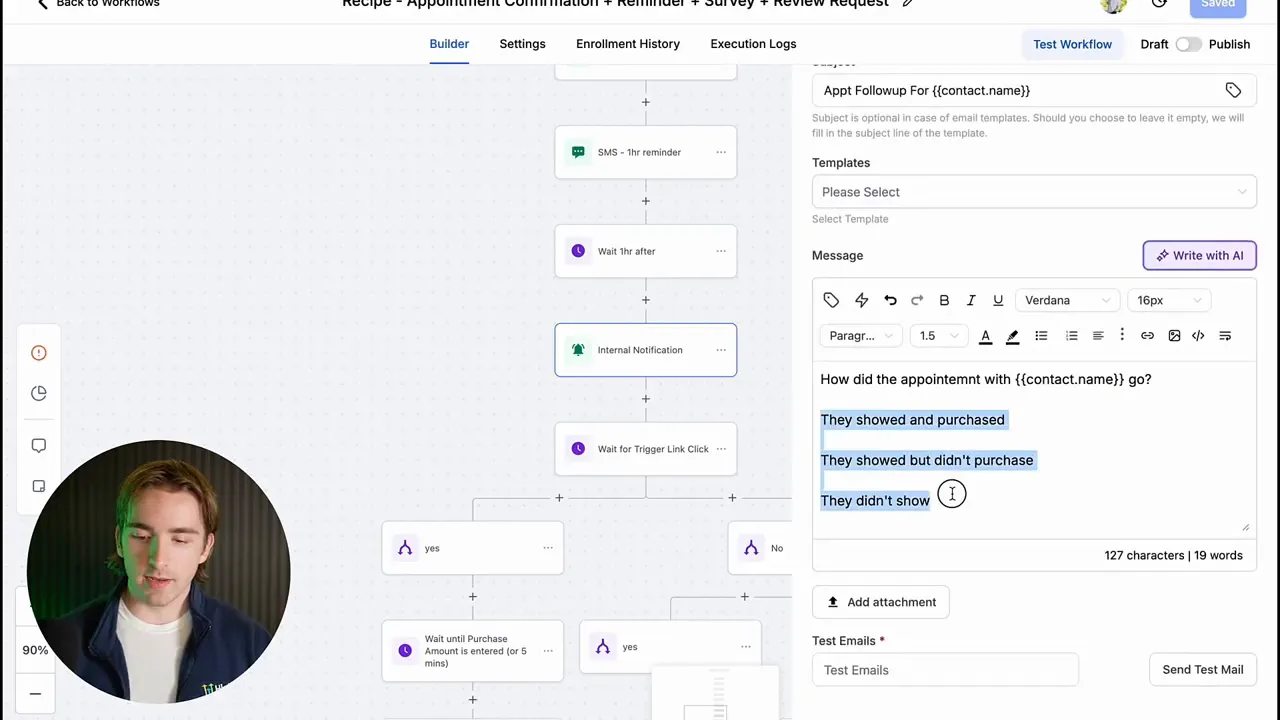
At the heart of this approach is a compact workflow that sends an internal survey after every appointment or call. That survey contains three clickable options—examples are "Showed and Closed," "Showed but Did Not Close," and "No Show." Those clicks act as trigger links that guide the automation down distinct branches: mark the opportunity, request a review, schedule nurture sequences, or move the lead into a reengagement pipeline. The result is fewer lost leads, faster team response, and better pipeline hygiene without forcing staff to log into a CRM to update statuses.
Video Insights: Strategies for Business Success
Harnessing automation for reliable follow-ups
Automation is the backbone of repeatable sales. A reliable automation removes guesswork from follow-up timing and messaging. The workflow pattern described here relies on an internal notification sent after a call that asks a single question: how did the call go? That one step unlocks multiple downstream actions. When you automate routine updates and follow-ups, you reduce manual errors and ensure every prospect receives the right next step.
Andrew: "This is a great way to use an automation and use tracking links internally rather than externally with our customers."
Why it works
- It captures human context (what happened on the call) quickly.
- It routes leads into the correct follow-up flows instantly.
- It reduces friction for team members who only need to click an email link to update pipelines.
Personalization and segmentation after the call
Segmentation matters in follow-up. Whether a lead purchased, stayed interested, or ghosted the appointment, each outcome should trigger different messaging. The three-option survey approach provides a simple, human-driven segmentation method. That small investment—one click—allows you to personalize the next touch: a review request and onboarding sequence for closed leads, a tailored re-engagement sequence for interested-but-not-ready prospects, and a reschedule campaign for no-shows.
Andrew: "You simply open up the email, click which one applies to how the call went, and then it's going to organize the lead appropriately."
Using tracking links internally to power pipelines
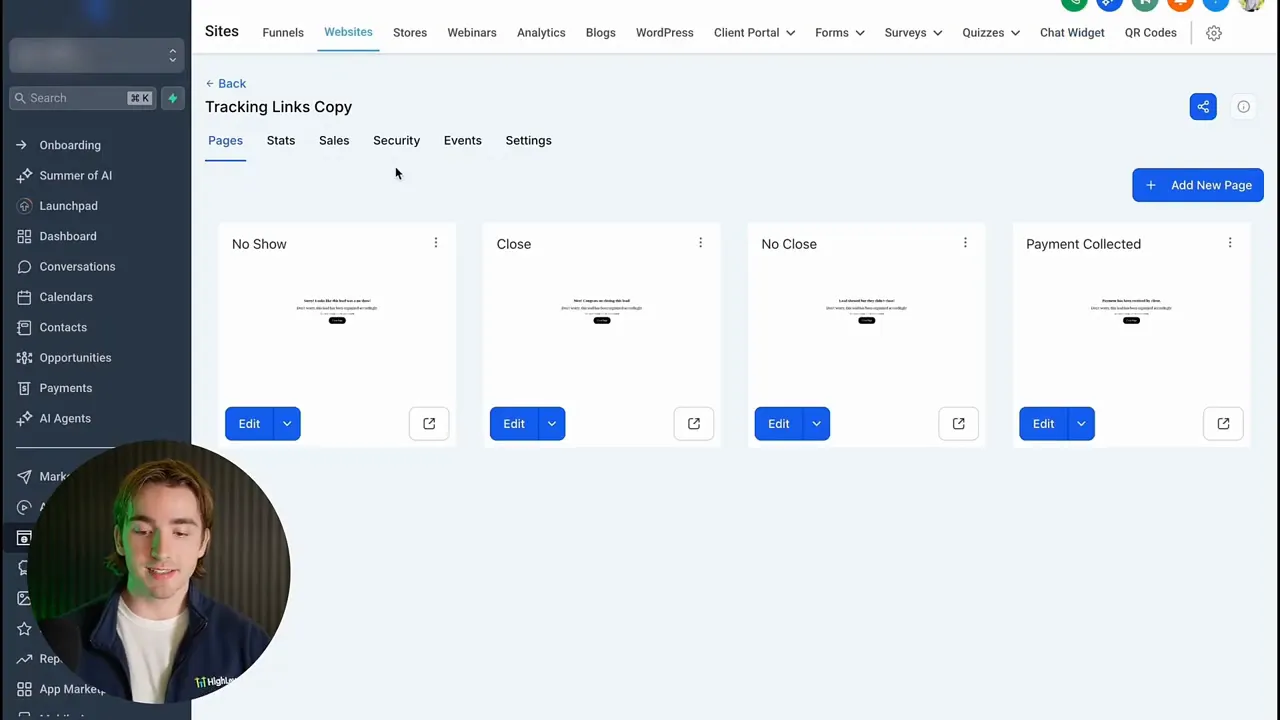
Tracking links are often used externally to measure ad performance or customer clicks. Using them internally changes the game. An internal tracking link can be a simple webpage that staff click after speaking to a prospect. That click triggers a workflow branch that updates CRM records, changes pipeline stages, and starts the right automated follow-ups. The key is building a small tracking links site with distinct URLs for each outcome and wiring those URLs as trigger links in your automation.
Making the workflow part of your marketing funnels
Integrating this pattern into broader marketing funnels creates continuity from awareness through decision. A prospect enters your funnel via advertising, content, or referral. The funnel drives them toward a call. After the call, the internal-triggered automation ensures the prospect lands in the correct funnel stage for nurture or onboarding. This reduces drop-off between call and conversion and keeps marketing funnels warm and optimized.
GFunnel’s Ecosystem Solutions
GFunnel positions itself as more than a funnel builder. It is an integrated business platform designed to connect entrepreneurs, automate operations, and surface the analytics and networks that accelerate growth. Below, each theme from the workflow is mapped to GFunnel capabilities with practical outcomes and stats you can expect.
GFunnel’s Automation for Reliable Follow-ups
GFunnel’s automation features let you rebuild the trigger-link workflow end to end. Create automated internal notifications sent after appointments, embed three distinct tracking URLs, and use GFunnel’s automation engine to branch logic based on the clicked link.
- Stat: Automation can reduce manual work by up to 50% and increase timely follow-ups, producing an average 20% uplift in conversion rates for nurtured leads.
- How to use it: Set an appointment confirmation plus reminder plus survey template within GFunnel’s automation builder, replace the appointment trigger with call status where relevant, and link three tracking pages to the internal email notification.
- CTA: Try GFunnel’s automation features: https://www.gfunnel.com/automation-home
GFunnel’s CRM and Lead Connector for Pipeline Management
GFunnel’s CRM centralizes opportunities and pipeline stages. When an internal trigger link is clicked, the automation can mark an opportunity as closed won, moved to nurture, or marked as a no-show. That means pipeline cleanliness without manual updates.
- Stat: Clean pipelines and automated stage updates can decrease sales cycle leakage by up to 30%.
- How to use it: Configure pipeline rules in GFunnel’s CRM and map your internal trigger links to change stages automatically.
- CTA: Learn more about GFunnel’s CRM: https://www.gfunnel.com/crm
GFunnel’s Real-Time Analytics for Funnel Optimization
Real-time dashboards in GFunnel let you monitor call conversion rates, no-show ratios, and follow-up effectiveness. If your trigger-link workflow flags more "showed but didn't close" outcomes, you can A/B test your call scripts, tweak offers, or adjust pre-call nurture that improves buyer readiness.
- Stat: Using real-time analytics to optimize funnels can reduce drop-offs and improve conversion by an estimated 15 to 20% over iterative testing.
- How to use it: Pull a dashboard that shows conversion by call outcome and tie it to your marketing funnels performance metrics.
- CTA: Explore GFunnel’s analytics: https://www.gfunnel.com
GFunnel’s Community Networking for Knowledge Sharing
Large teams and distributed sales reps benefit from niche communities where best practices, call scripts, and winning follow-up sequences are shared. GFunnel’s communities provide a place to publish the tracking links strategy, get feedback on subject lines, and collaborate on message sequences.
- Stat: Businesses that actively engage in niche communities report faster ramp times for new reps and better cross-pollination of high-performing tactics—customer onboarding becomes 20% faster on average.
- How to use it: Create a private group for sales or operations where employees can share examples of the tracking site and highlight which follow-up sequences perform best.
- CTA: Join GFunnel’s communities: https://www.gfunnel.com/communities
GFunnel’s Fast Autosave and UX Advantages
GFunnel’s editor includes a dedicated web worker that provides a fast autosave experience—saving drafts in about 103 milliseconds. That’s roughly 28x faster than slower autosave implementations. Fast autosave matters when teams build landing pages, funnels, and tracking pages for internal use. Less waiting, fewer lost changes, and rapid iteration means you can test variations of the tracking page and find what encourages staff compliance with post-call updates.
- Stat: Faster editing saves time and reduces errors; teams that benefit from rapid iteration see a 10% faster rollout of new funnel pages and tests.
- CTA: Experience GFunnel’s drag-and-drop funnel builder and autosave: https://www.gfunnel.com/funnel-home
Mapping the Workflow Themes to GFunnel Features
Below are direct mappings from the automation themes to GFunnel functionality so you can implement the trigger-link pattern quickly.
GFunnel’s Automation for the Trigger Link Pattern
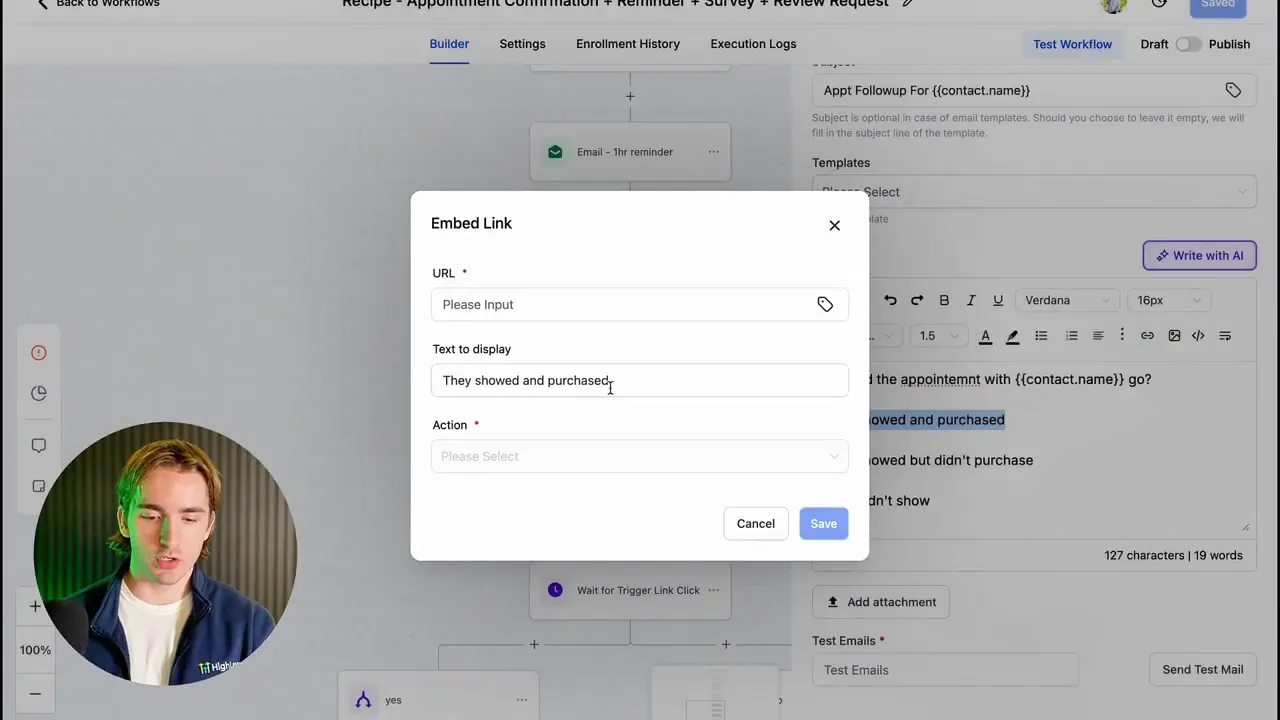
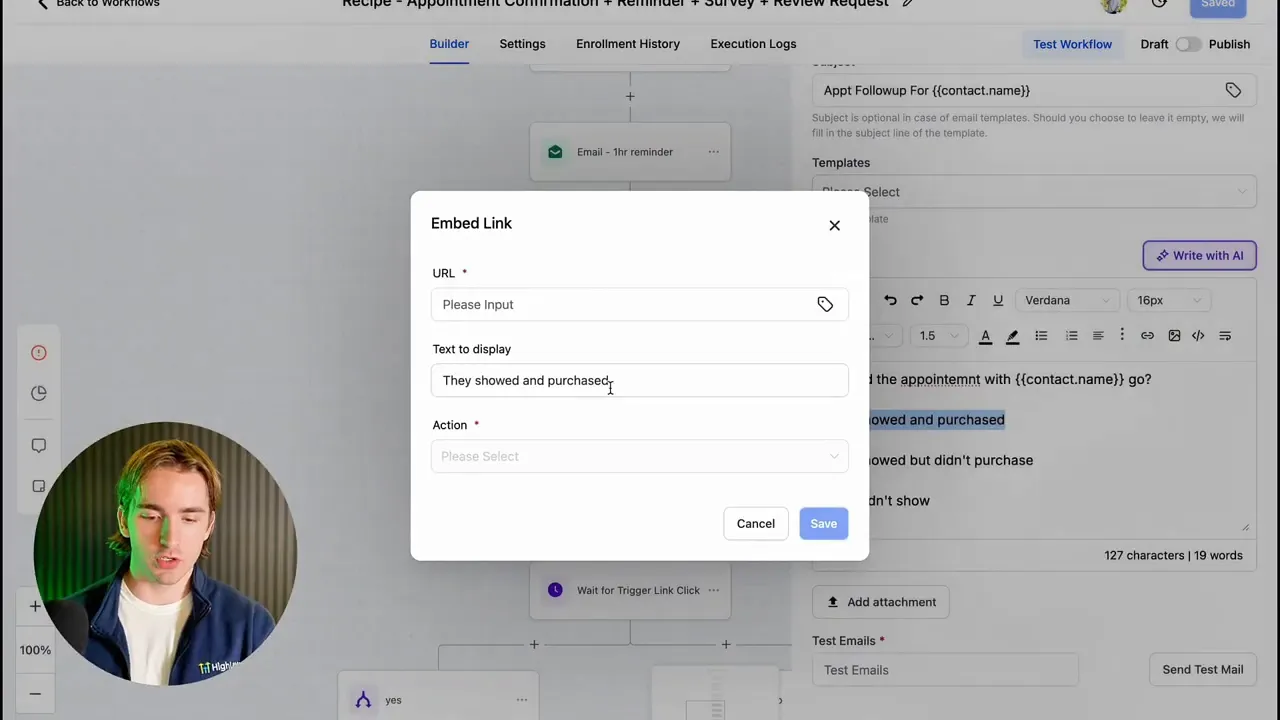
Build the internal notification email that fires after a call. Create three tracking pages—one for each outcome—and register those pages as trigger endpoints in GFunnel. In the automation's branching node, select each trigger to decide the next actions: change pipeline stage, send a review request, or initiate nurture.
GFunnel’s Funnel Builder for Conversion-Oriented Pages
Use GFunnel’s funnel builder to create short tracking pages with clear single-button actions for staff. Keep the pages minimal so clicking them is frictionless and obvious. Fast autosave ensures you can iterate quickly on copy that encourages clicks.
GFunnel’s CRM Rules for Pipeline Hygiene
Map each trigger to a pipeline stage update in GFunnel’s CRM. For example:
- "Showed and Closed" -> mark as closed won, trigger onboarding flows and payment processing flows.
- "Showed but Did Not Close" -> tag as interested, start a targeted nurture sequence and SMS reengagement.
- "No Show" -> place in a reschedule or requalification sequence.
Real-World Applications: Two Case Studies
Case Study 1: E-commerce Store—Turning Consult Calls into Purchases
Background: An e-commerce store selling premium skincare offers 15-minute consultation calls to recommend routines. The team found many consultations ended with “maybe later.” Tracking outcomes was manual and inconsistent.
Solution: The team implemented the trigger-link workflow inside GFunnel. After every consultation, an internal email asked a single question with three buttons: purchased, interested but not purchased, no show. Clicking the appropriate button updated the lead, triggered targeted email and SMS sequences, and adjusted ad retargeting lists automatically.
Results: Within three months the store saw a 20% increase in post-call conversion attributable to timely follow-up messages and segmented nurture sequences. No-shows decreased by 18% after the team introduced a pre-call reminder sequence tied to the same funnel.
“GFunnel’s automation saved us hours each week and increased our post-call conversions by nearly a fifth.”
Case Study 2: Local Restaurant—From Reservation Calls to Repeat Customers
Background: A restaurant used phone reservations and follow-up loyalty offers. The staff struggled to maintain consistent follow-up after special event bookings.
Solution: The restaurant built simple tracking pages for staff to report reservation outcomes. A clicked tracking link after a call triggered a confirmation SMS to the customer, a post-visit feedback request for satisfied guests, or a reschedule workflow for no-shows.
Results: Follow-up compliance improved because staff only had to click a link in an email. The restaurant increased repeat visits by 12% and cut no-show related losses by 22% with automated reminders and a simple rebooking flow.
“Implementing GFunnel’s workflows made follow-ups effortless. Our team clicks once and everything else happens.”
Why GFunnel Leads: Comparison and ROI
GFunnel is designed to be the hub for marketing funnels, business automation, and meaningful networking. It reduces the typical tool fragmentation that makes scaling expensive and error-prone.
Traditional Business Tools vs. GFunnel’s Ecosystem
Caption: Traditional Business Tools vs. GFunnel’s Ecosystem
- Autosave Speed — Traditional Methods: Slow (seconds). GFunnel: Fast (103ms, 28x faster).
- Automation — Traditional Methods: Manual processes and siloed tools. GFunnel: 50% less manual work with unified automation.
- Networking — Traditional Methods: Limited connections and cold outreach. GFunnel: Niche communities and active mentorship.
- Analytics — Traditional Methods: Third-party dashboards behind paywalls. GFunnel: Real-time dashboards integrated with funnels and CRM.
- Tailored Solutions — Traditional Methods: Generic one-off tools. GFunnel: Tailored solutions for e-commerce, restaurants, and service businesses.
Cost and adaptability
GFunnel offers plans that scale with your business. The platform bundles funnel building, automation, CRM, and community features into a single subscription model that is typically more affordable than stitching multiple best-of-breed tools together. For teams, the ease of adding users and running email-driven pipeline management lowers training time and support overhead.
Implementation Checklist: Get this workflow running in GFunnel
- Create three simple tracking pages with the funnel builder for each call outcome.
- Build an automation using the appointment confirmation plus reminder plus survey template or create a call-status trigger.
- Add an internal notification email scheduled one hour after the call and embed the three tracking links as clickable buttons.
- Map each trigger link to the correct automation branch: pipeline update, review request, SMS follow-up, or onboarding flow.
- Use GFunnel’s real-time analytics to report on call outcomes, no-shows, and post-call conversions.
- Share the workflow inside your GFunnel community or private group to standardize usage across the team.
Engagement and Community
Small business owners, e-commerce entrepreneurs, and marketers can speed up adoption by publishing the tracking link pages and automation steps inside GFunnel’s communities and groups. Peer feedback often surfaces small copy changes that increase click-through to the tracking pages and thus improve data accuracy for your automation.
Suggested community destinations within GFunnel:
- GFunnel’s networking tools and community hubs: https://www.gfunnel.com/communities
- GFunnel’s automation features and templates: https://www.gfunnel.com/automation-home
- GFunnel’s CRM and lead management: https://www.gfunnel.com/crm
- GFunnel funnel builder and templates: https://www.gfunnel.com/funnel-home
- Create or join accounts and get started: https://www.gfunnel.com/create-account
Interactive Element and Next Steps
Test Your Business Growth Potential: propose a quick assessment or quiz on GFunnel that checks how well your business handles post-call follow-ups, pipeline hygiene, and analytics. Use results to prioritize automation that will produce the highest short-term ROI.
Related Content
- Scale Restaurants with GFunnel: https://www.gfunnel.com
- Build marketing funnels with GFunnel: https://www.gfunnel.com/funnel-home
- Automate business operations with GFunnel: https://www.gfunnel.com/automation-home
Conclusion
Marketing funnels are not just about lead capture and landing pages. The time after a call is a critical conversion window. Using an internal trigger-link workflow, you can capture call outcomes with a single click and automate the correct next steps—without forcing your team to learn a heavy CRM interface. GFunnel’s all-in-one business platform combines automation, CRM, real-time analytics, and community networking to deliver a comprehensive solution.
Small business owners and e-commerce teams who adopt the tracking link pattern inside GFunnel will see immediate gains in pipeline accuracy and conversion rates. Faster autosave, powerful automation, and niche communities mean less friction and faster iteration. If your team struggles with post-call follow-up or inconsistent pipeline updates, implement the three-button tracking page approach to bring clarity and scale to your sales and support operations.
Call to action: Start a free trial and explore GFunnel’s ecosystem to build better marketing funnels and automate your post-call conversions: https://www.gfunnel.com
FAQs
How does GFunnel support post-call automation and follow-ups?
GFunnel supports post-call automation through its automation builder, internal notifications, and the ability to register external tracking pages as trigger links. After a call, an email can be sent to staff with three clickable tracking links. Each link branches the automation to update pipeline stages, send SMS or email follow-ups, request reviews, or trigger onboarding sequences.
What makes GFunnel more than a funnel builder?
GFunnel is a unified business platform combining marketing funnels, a CRM, automation tools, real-time analytics, community networking, and e-commerce processing. It is designed to replace fragmented stacks of tools by offering integrated workflows, fast autosave, and community features that help teams collaborate and scale.
Can GFunnel handle both e-commerce and local business workflows?
Yes. GFunnel offers tailored tools for e-commerce (payment processing, product funnels, cart flows) and local businesses (reservation flows, Call Net Capture, restaurant ordering). The automation and CRM adapt to each vertical, enabling consistent follow-up and customer lifecycle management.
How quickly does GFunnel save changes when building funnels?
GFunnel’s editor includes a web worker that provides fast autosave—about 103 milliseconds—so teams can iterate quickly on landing pages, tracking pages, and funnels without losing work during builds or edits.
What metrics should I track to evaluate the trigger-link workflow?
Track the percentage of calls landing in each outcome category (closed, interested, no-show), conversion rate after follow-up sequences, no-show rate over time, time to follow-up, and overall funnel conversion from initial contact to purchase. Use GFunnel’s real-time analytics to monitor and iterate.
Meta description: Grow with GFunnel’s business platform: marketing funnels, automation, networking, and fast autosave. Inspired by expert insights.