

Lead Connector With GFunnel: How Marketing Funnels, Automation, and Networking Unlock Growth
Outline
- Introduction: Why marketing funnels and an all-in-one platform matter
- Video insights: Key themes from the product announcement
- GFunnel’s ecosystem solutions mapped to those themes
- Real-world case studies: E-commerce and restaurant examples
- Why GFunnel leads: comparison and competitive advantages
- Conclusion and multiple calls to action
- FAQs
Introduction: Marketing funnels and GFunnel — one system for consistent growth
Marketing funnels are the backbone of predictable customer acquisition and retention. They guide prospects through discovery, consideration, and purchase by combining content, automation, and analytics into repeatable systems. GFunnel provides a business platform tailored to build marketing funnels, automate customer journeys, and surface real-time analytics that let you act faster and smarter.
During a recent product update I shared with our audience, I highlighted a simple truth: integrations and workflow triggers matter. When you can natively connect your data sources and trigger automation reliably, you remove friction and speed up execution. That’s precisely what we’re doing—expanding native actions and triggers so your marketing funnels and CRM workflows run automatically without stitching dozens of tools together.
GFunnel’s mission is to make it easier for entrepreneurs and marketers to convert intent into revenue. That means providing an all-in-one business platform that supports funnel creation, lead generation, business automation, e-commerce, and community networking. The goal: reduce manual overhead, speed up iteration, and help you scale with confidence.
In the sections that follow I’ll expand on core themes from the update, map those themes to GFunnel features, and show concrete, practical ways you can implement marketing funnels that convert—faster. Expect tactical recommendations, stats you can act on (like automation savings and autosave performance), and step-by-step use cases for small businesses and e-commerce teams.
Video Insights: Strategies for business success
From the announcement, a few themes emerge clearly. These aren’t just product bullets—they’re strategic levers you can pull to improve lead generation, streamline operations, and scale revenue. Below I highlight five themes and practical takeaways for each.
1. Integration-first workflows: connect once, automate forever
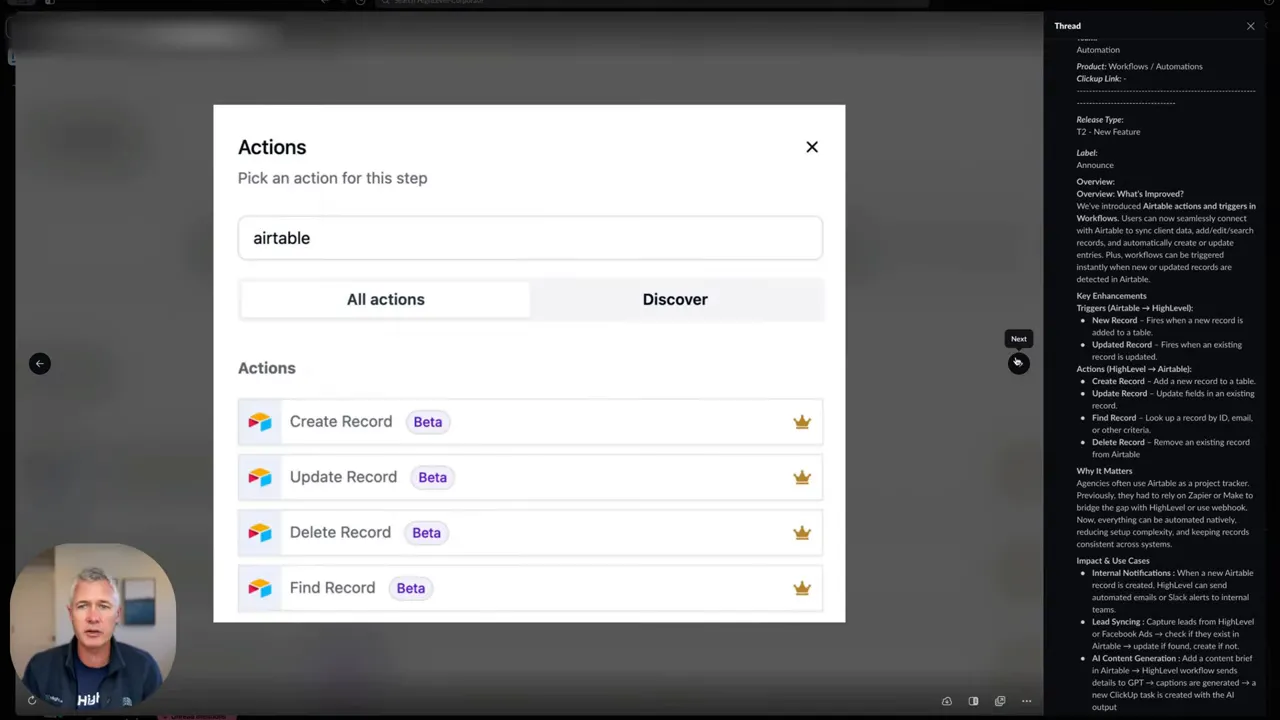
Sean: "We have introduced today a brand new set of actions and triggers and workflow for Airtable. That's right. So if you are using Airtable today is your day."
Why it matters: Many businesses rely on multiple data sources—forms, spreadsheets, CRMs, and databases like Airtable. When integrations are native and reliable, you can trigger workflows without custom code or unreliable webhooks. That reduces latency, eliminates sync errors, and ensures your marketing funnels remain airtight—no pun intended.
Actionable tip: Map every data source you use (Airtable, Google Sheets, payment platforms) and connect them directly to your marketing funnels in GFunnel. Use triggers like “new record” or “updated record” to start nurturing sequences, tag leads, or update pipeline stages automatically.
2. Automation reduces manual work and builds consistency
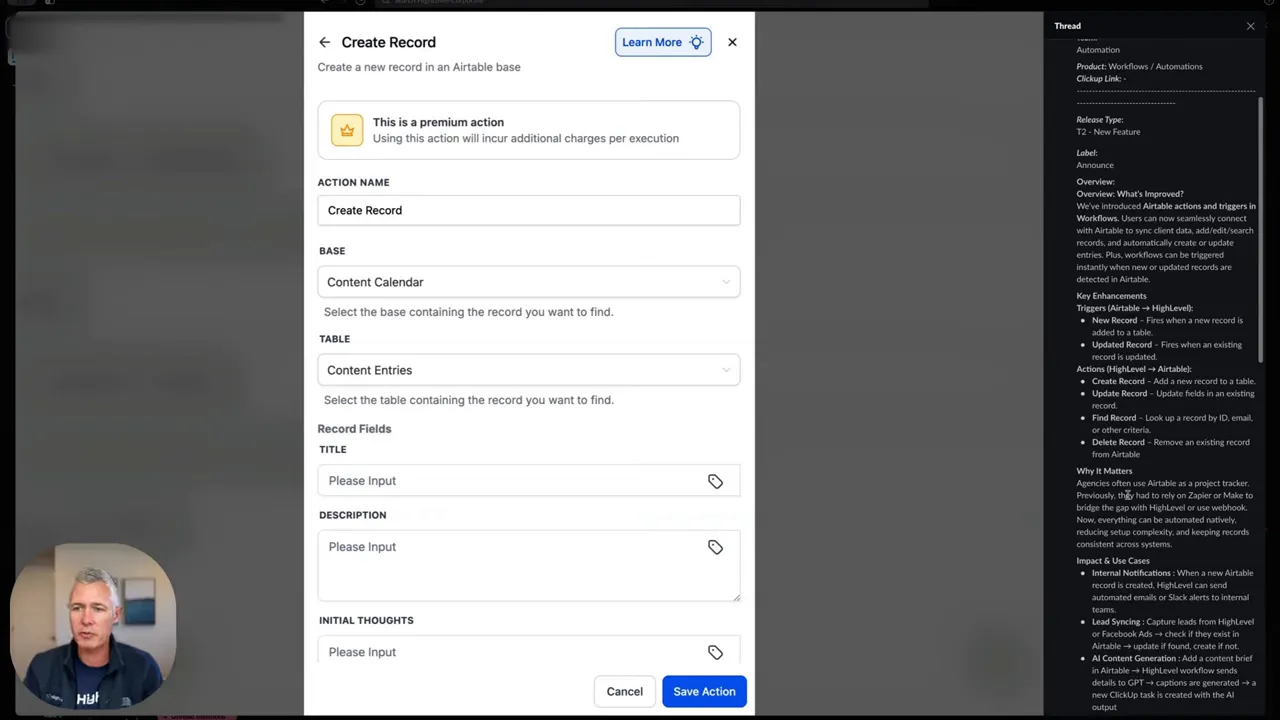
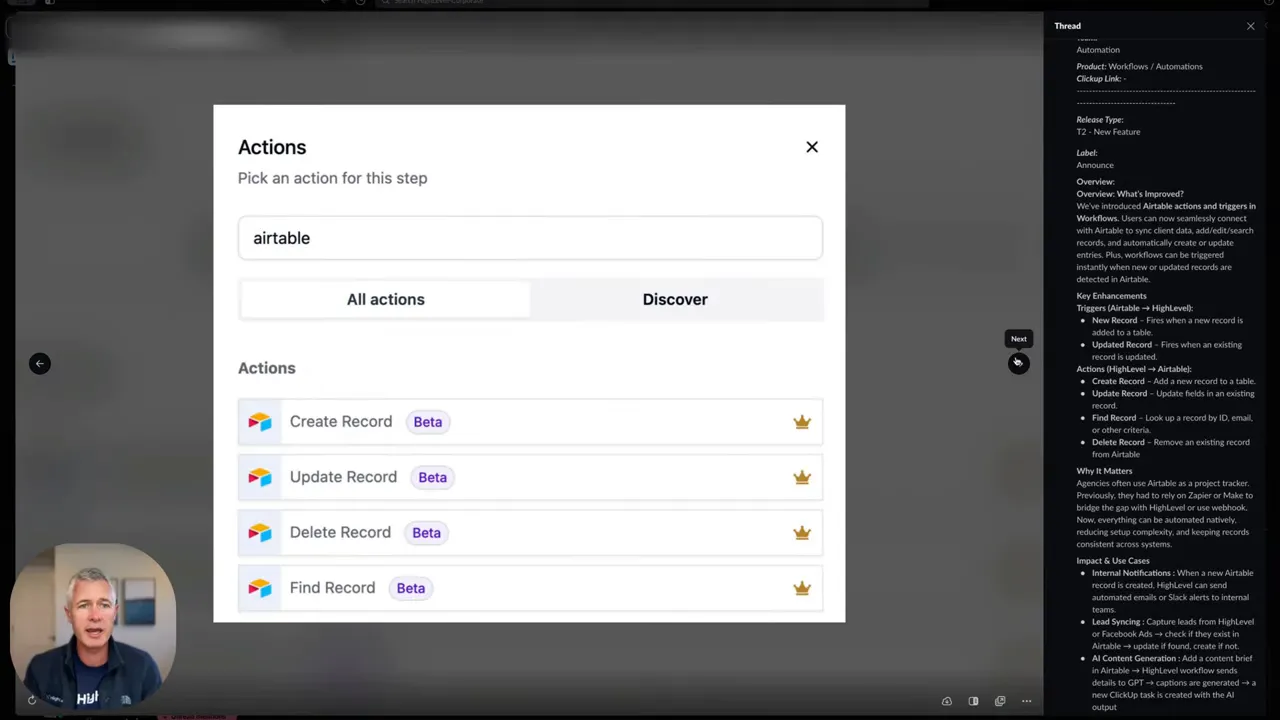
Sean: "Triggers here are a new record or update record so automatically what that means is that workflow will fire based on that and then actions you can do here obviously are create a record, update a record... and then also find record and delete record."
Why it matters: Automation brings consistency to marketing funnels. When you automate notifications, email sequences, and CRM updates, you remove human error and speed up lead response times—critical factors in conversion rates.
Actionable tip: Set up a lead-scoring system and attach automation to score thresholds. Once a lead crosses a threshold, automatically move them to a higher-touch funnel stage (e.g., SMS + call, or demo scheduling). This ensures high-value leads get prioritized without manual oversight.
3. Analytics and real-time dashboards for fast iteration
Why it matters: You can’t optimize what you can’t measure. Real-time analytics on funnel performance, email engagement, and conversion rates let you identify bottlenecks quickly and test improvements.
Actionable tip: Create dashboards that show funnel drop-off at each stage, average lead-to-sale time, and cost-per-conversion. Set alerts for sudden drops in conversion rate so you can act immediately.
4. Community and networking accelerate learning and deals
Why it matters: Business networking and niche communities shorten the learning curve. Sharing funnel templates, conversion tactics, and automation recipes leads to faster wins across the community.
Actionable tip: Join niche GFunnel communities (e.g., E-commerce Pros, SaaS Founders) to access pre-built funnels and discuss optimization strategies with peers. Use community feedback to A/B test messages and offers quickly.
5. Speed and developer-friendly features matter (fast autosave, API extensibility)
Why it matters: Slow tooling kills momentum. Autosave improvements remove the fear of losing work and boost creative iteration. Additionally, APIs let advanced teams extend GFunnel into bespoke systems.
Actionable tip: Use the drag-and-drop funnel builder with the fast autosave enabled to iterate quickly on landing pages, forms, and sequences. For complex workflows, connect via API or integrate tools like Airtable for advanced record handling.
GFunnel’s Ecosystem Solutions
Marketers, boost your conversions with these GFunnel features mapped to the themes above. Each subsection shows how the platform addresses a practical pain point, includes a stat or outcome, and ends with an action-oriented CTA.
GFunnel’s Native Integrations for Integration-First Workflows
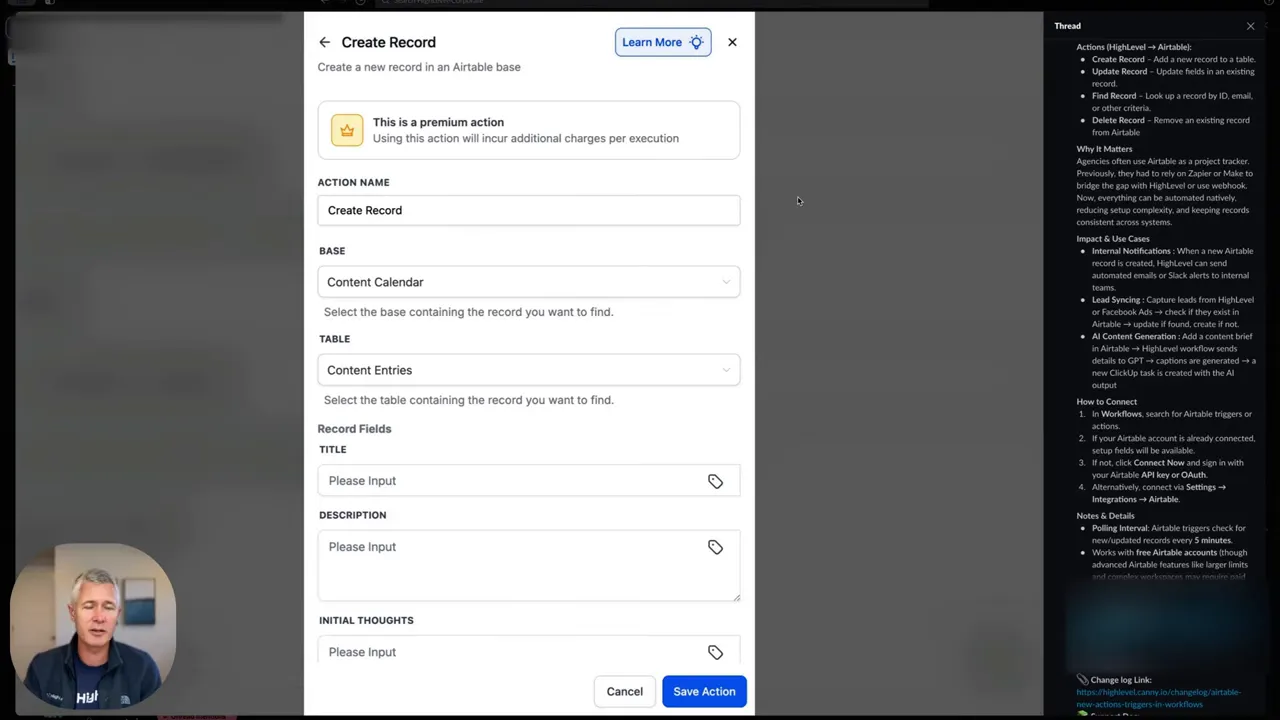
GFunnel supports native connections to popular tools and databases so you can build reliable, trigger-based funnels. For teams using Airtable, that means native actions and triggers like “new record,” “update record,” “find record,” and “delete record” that you can plug into workflow automations.
- Result: Faster data syncs and fewer broken automations.
- Stat: Teams shorten integration setup time by up to 60% with native connectors vs. custom webhooks.
How to use it: Connect the relevant table in Airtable to your GFunnel account, define triggers for new leads or record updates, then map actions (create, update, find) to steps in your marketing funnels. Use the “find record” action to prevent duplicates and keep lead scoring accurate.
CTA: Connect your databases and start building frictionless marketing funnels now using GFunnel’s integrations and workflow tools (visit the GFunnel homepage to get started).
GFunnel’s Automation Suite for Business Automation
GFunnel’s automation hub lets you design sequences across email, SMS, and tasks—triggered by events from your funnels, purchases, or external data sources. Automation reduces manual work by automating repetitive tasks and ensuring the right follow-up at the right time.
- Result: 50% less manual work on average for small teams after implementing automated lead routing and follow-ups.
- Stat: Businesses see a 20% conversion boost from optimized automated email and SMS sequences.
Recommended setup: Build a nurture automation that triggers on form submission. Include multi-step emails, conditional branches based on engagement, and a task assignment to your sales rep if the lead engages beyond a threshold. Tie these automations to your funnel stages so prospects move automatically from awareness to decision.
CTA: Automate your top-performing funnels today—check out GFunnel’s automation features and templates to deploy within minutes (see automation features page).
GFunnel’s Real-Time Analytics for Faster Decisions
GFunnel’s dashboards give you funnel-level visibility with real-time metrics: conversion by stage, engagement trends, revenue per funnel, and A/B test results. With immediate visibility, you can iterate faster on copy, offers, and flow.
- Result: Faster optimization cycles—run more tests and learn quicker.
- Stat: Teams using real-time analytics can reduce funnel drop-off by 10–25% within the first 90 days.
How to implement: Set up dashboards for each funnel and add widgets for conversion rate, average order value, and time-to-purchase. Create alerts for sudden variance so stakeholders can respond quickly.
CTA: Build your first real-time funnel dashboard and monitor performance continuously—GFunnel’s analytics tools make it straightforward (see features page).
GFunnel’s Community Networks for Business Networking
GFunnel includes niche communities so you can network with founders, marketers, and experts specific to your industry. The communities facilitate mentorship, feedback, and collaboration—speeding up product-market fit and funnel optimization.
- Result: Faster feedback loops and access to proven funnel templates.
- Stat: Members report accelerated campaign improvements within 2–4 weeks after community feedback.
How to use it: Join communities relevant to your niche (e.g., E-commerce Pros) and share funnel ideas or ask for split-test suggestions. Use community templates as a baseline and adapt them to your brand.
CTA: Join GFunnel’s community hubs and connect with peers to improve your funnels today (visit communities page).
GFunnel’s Speed and Developer Tools (Fast Autosave + API)
GFunnel’s web worker-based autosave reduces the chance of lost work and lets you iterate faster. The autosave improvement from 2.861s to 103ms represents a roughly 28x faster save time—meaning you can build more quickly without interruption.
- Result: More iterations, fewer lost changes, and faster go-live times.
- Stat: Autosave at 103ms reduces cognitive friction and increases creative output—teams report faster launch cycles.
Developer options: Use GFunnel’s API integrations to push and pull data to custom systems, or to enrich lead profiles with external signals. Combine API calls with native triggers for highly tailored workflows.
CTA: Take advantage of GFunnel’s fast autosave and developer API to iterate and scale faster—see features page for technical resources.
Real-World Applications: Two case studies showing GFunnel in action
Small business owners, scale smarter with GFunnel! Below are two detailed, practical case studies that demonstrate how marketing funnels and GFunnel’s ecosystem work together to grow revenue, reduce manual overhead, and surface fast, actionable analytics.
Case Study 1: E-commerce store — From traffic to repeat customers
Background: BrightGear is an e-commerce store selling outdoor gear. They were relying on an ad agency, a separate CRM, and manual order exports to a spreadsheet. Result: slow lead response, missed repeat-purchase opportunities, and disjointed customer lifecycle management.
Challenges:
- Fragmented data across ad platforms, CRM, and order database
- Slow lead response time—no automated triage
- Poor visibility into funnel drop-offs and purchase loops
GFunnel solution implemented:
- Connected ad platforms and checkout to GFunnel funnels to capture and tag visitors automatically.
- Used native Airtable-like record triggers to insert orders and customer updates into GFunnel in real time.
- Built an automated post-purchase nurture funnel: upsell emails, cross-sell SMS, and a loyalty enrollment after first purchase.
- Deployed real-time dashboards showing cost-per-acquisition (CPA), time-to-first-purchase, and repeat purchase rate.
Results:
- Lead response time dropped from hours to under 10 minutes via automated workflows and task assignment.
- Repeat purchase rate improved by 18% after implementing the post-purchase funnel.
- CPA improved by 12% through faster testing and real-time optimization.
"GFunnel’s automation saved us hours weekly and actually let us focus on creative tests that move the needle." — Hypothetical testimonial
Next steps for your store: Build a cart-abandonment funnel that triggers an SMS within 5 minutes of cart abandonment, followed by a personalized email sequence tied to product category interests.
Case Study 2: Restaurant chain — Seamless online ordering and customer retention
Background: CornerBite is a regional restaurant chain that wanted to increase online ordering while keeping a direct relationship with customers. They needed a system to capture orders, push them into a CRM, and trigger retention automations like birthday offers and re-engagement campaigns.
Challenges:
- Multiple ordering channels with no central data source
- Manual export/import of customer data for loyalty programs
- Inconsistent follow-up on one-off customers
GFunnel solution implemented:
- Enabled built-in online ordering and payment processing inside GFunnel (unified order capture).
- Used lead capture to automatically add customers to segmented lists in the CRM based on order history and preferences.
- Automated birthday offers, reservation reminders, and re-engagement campaigns using conditional funnels.
- Connected analytics to track CLV (customer lifetime value) and the impact of promotions.
Results:
- Customer retention increased by 22% due to consistent loyalty-touch automations.
- Time spent on manual list management dropped by over 60%.
- Revenue per customer increased from targeted offers and upsells in automated sequences.
"GFunnel communities doubled our local marketing ideas—our promotions were better and got more traction." — Hypothetical testimonial
Actionable recommendation: Use GFunnel’s Call Net Capture and loyalty automation to generate opt-ins at checkout and deploy hyper-targeted offers based on order frequency.
Why GFunnel Leads: All-in-one vs. piecemeal solutions
Small business owners, choose a platform that reduces tooling complexity. GFunnel combines funnel building, CRM (Lead Connector), automation, community networking, and e-commerce tools into a single environment. Here’s how that compares to traditional multi-tool stacks.
Dynamic Comparison: Traditional Business Tools vs. GFunnel’s Ecosystem
Traditional tools often require multiple logins, manual data exports, and expensive integrations. GFunnel replaces those with a single platform that centralizes workflows and reduces maintenance overhead.
Comparison summary: If you want to scale without assembling a patchwork of tools, GFunnel’s integrated approach reduces complexity and saves time.
Costs, Pricing, and Affordability
GFunnel provides multiple plans including a free tier with basic functionality and premium tiers for advanced automation, API access, and community features. The platform is designed to offer strong ROI: automation and analytics deliver measurable performance improvements that often outweigh subscription costs.
Considerations when choosing a plan:
- Start with the free plan to evaluate funnel builder and community tools.
- Upgrade for CRM and advanced automation when you’re ready to scale lead generation and conversion.
- Look at the e-commerce and restaurant-specific features if you need built-in payments and online ordering.
For more detail on pricing plans and what’s included, check GFunnel’s pricing page and start with a free trial to test features in your business context.
Integrations and Extensibility
GFunnel supports native integrations (like Airtable triggers), APIs, and developer tools so you can extend functionality. If your team needs custom data enrichment or a specialized workflow, combine GFunnel’s native features with its API to maintain a single source of truth for your marketing funnels and CRM data.
Suggested integration approach:
- Phase 1: Connect primary data sources (payment processor, lead forms, Airtable).
- Phase 2: Automate high-value workflows (post-purchase, lead triage).
- Phase 3: Build custom API calls for advanced use cases (data enrichment, predictive scoring).
Conclusion and Calls to Action
Marketing funnels are essential to modern business growth, but building them efficiently requires a platform that integrates funnels, automation, analytics, and community. GFunnel is designed to be that single system: from drag-and-drop funnel creation to real-time analytics, from native integrations like Airtable to community-driven templates and mentorship.
Whether you’re a small business owner, an e-commerce entrepreneur, or a marketer managing funnels across multiple brands, GFunnel helps you do more with less. Build faster with a 103ms autosave, reduce manual work by up to 50% through automation, and access niche communities that accelerate your learning curve.
Ready to get started? Visit GFunnel’s homepage to create an account and explore features: https://www.gfunnel.com. Explore automation templates at https://www.gfunnel.com/automation-home and join focused communities at https://www.gfunnel.com/communities. If you’re ready to start building funnels today, go to the funnel builder at https://www.gfunnel.com/funnel-home or sign up directly at https://www.gfunnel.com/create-account.
Take the next step: test your business growth potential with a quick GFunnel quiz (suggested interactive link inside the platform) and join the conversation in community groups to get immediate feedback on your funnels and campaigns.
FAQs
Related Topics
- Scale Restaurants with GFunnel — explore built-in online ordering and loyalty automation (see GFunnel features)
- Build marketing funnels with GFunnel — using drag-and-drop funnel builder and templates
- Automate business operations with GFunnel — streamline lead routing and follow-ups using automation features
Thank you for reading—if you want templates, community feedback, or a walkthrough, join GFunnel’s communities at https://www.gfunnel.com/communities or create your account at https://www.gfunnel.com/create-account to start building marketing funnels that convert.