

Lead Connector With GFunnel: How Marketing Funnels and Automation Power Growth
What to learn from this expert inspiration
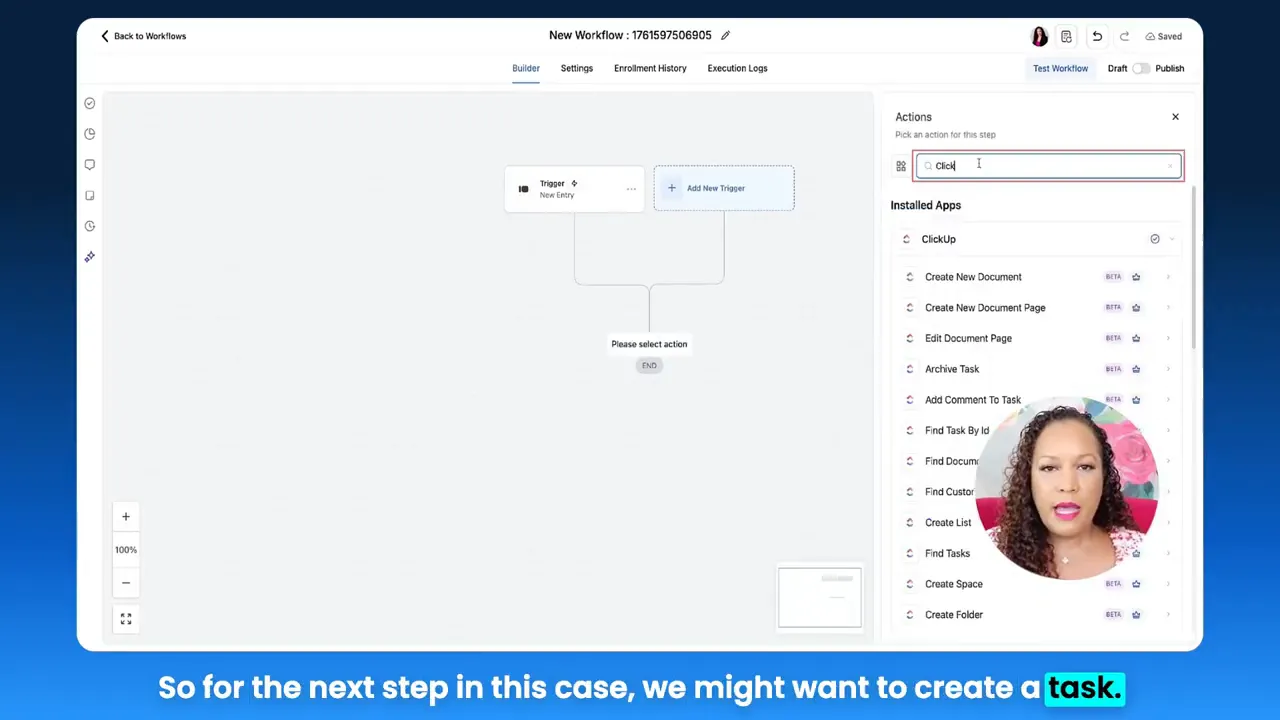
The core insight is simple: capture leads where they already submit information and instantly move that data into action. That might mean creating tasks for fulfillment teams, updating CRM contact fields, or firing off internal notifications to sales reps. Integrations between form tools and your CRM or automation platform are the backbone of efficient marketing funnels. Doing that well turns friction into speed and converts interest into revenue.

Video Insights: Strategies for Business Success
Harnessing automation for predictable growth
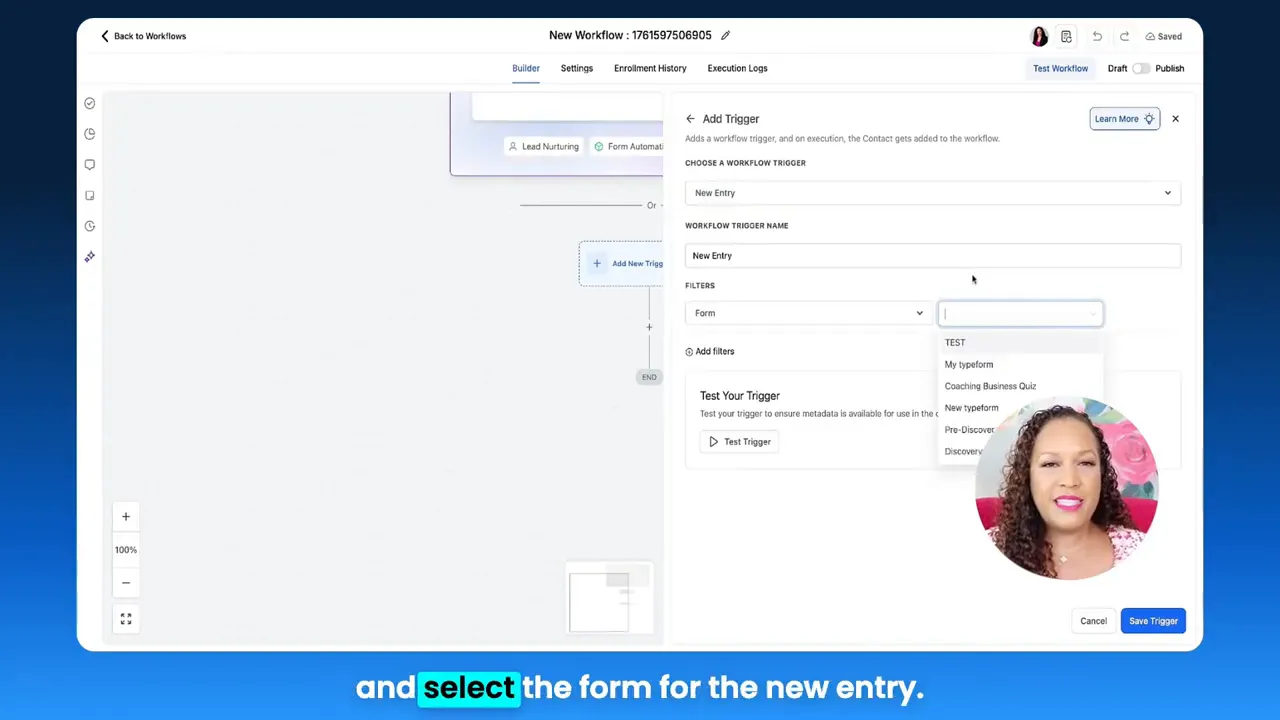
Automation removes manual handoffs and ensures every lead is handled consistently. When a new entry arrives from a form, automation can:
- Create tasks for sales, fulfillment, and onboarding teams.
- Update contact records so segmentation and personalization improve over time.
- Send internal notifications to key stakeholders via email, SMS, or messaging channels to accelerate response times.
[Star]: "So anytime someone fills out a form, it's gonna create a task in ClickUp, for example."
That direct path from lead capture to action is the essence of modern marketing funnels. The faster a lead moves into a workflow that matches their intent, the higher the likelihood of conversion. Automation converts time and effort into results by standardizing next steps and eliminating missed opportunities.
Personalization and contact field updates
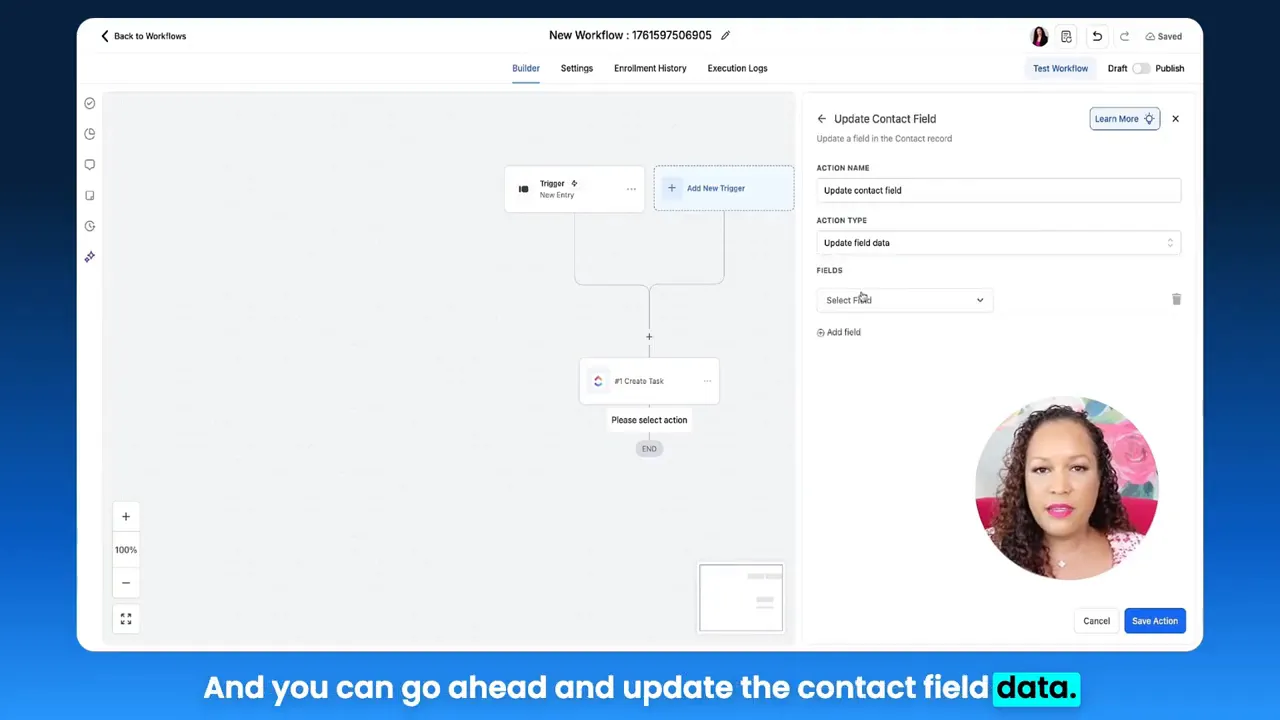
Personalization begins with accurate data. When a form collects information, writing that data back into contact fields ensures communications are relevant. For example:
- Label contacts as lead or customer.
- Tag contacts by interest, product, or campaign source.
- Use tags to trigger tailored follow-up sequences inside your marketing funnels.
Keeping contact data current is a multiplier for your marketing funnels. It powers segmentation, dynamic content, and lead scoring that prioritize high-value prospects.
Integrations and task automation across platforms
Integrations extend your capabilities beyond one tool. Examples include:
- Form to project management: Create a ClickUp task when a lead applies for a service.
- Form to CRM: Create or update contacts automatically so sales always have the latest context.
- Form to document systems: Generate internal documents for onboarding or fulfillment based on response content.
[Star]: "This is just one example of how you can actually use this workflow."
These integrations reduce manual entry and ensure the right team sees the right tasks at the right time, which shortens sales cycles and improves customer experience.
Search, duplicate, and conditional workflows
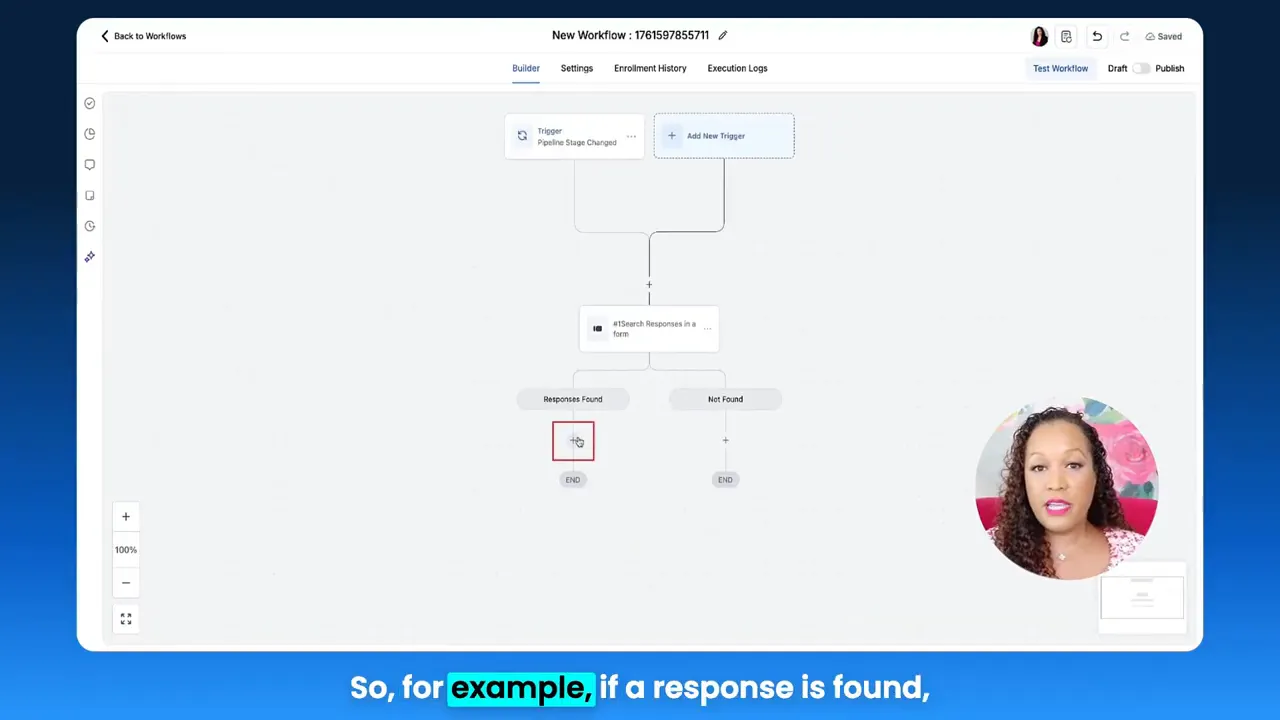
Advanced workflows often include conditional logic: search for existing form responses and branch accordingly. If a response exists, do one thing; if not, create a new asset (for example, duplicate a form or create a new document). Conditional automation allows you to:
- Prevent duplication of work
- Trigger appropriate templates based on context
- Keep internal teams informed of state changes
Notifications, pipelines, and fast response times
Pipeline stage changes should be actionable events. When a deal or application moves stages, automation can search for form responses, generate supporting content, and notify teams. Fast internal notifications ensure human follow-up occurs when necessary, keeping the momentum in the marketing funnel.
Speed matters at every step: from how fast a form submit triggers automation to how quickly content auto-saves while building funnels. Those microseconds add up into real-world improvements in productivity and customer experience.
GFunnel’s Ecosystem Solutions
Now, map these themes to GFunnel’s features. GFunnel positions itself as an all-in-one business platform that goes beyond funnel creation: it integrates CRM, community networking, e-commerce, automation, and analytics into a single environment designed to scale with your business.
GFunnel’s Automation for Reduced Manual Work
Use GFunnel’s automation features to replicate the form-to-action patterns described above. With automation, you can:
- Create automated tasks when form data is received, routing work to the right team.
- Update contact fields to keep segmentation and lead scoring current.
- Trigger internal alerts via email or in-app notifications for timely follow-up.
Stat: Automation can reduce manual work by up to 50%, helping teams focus on revenue-generating activities.
CTA: Join GFunnel’s automation features to streamline your workflows and scale faster.
GFunnel’s CRM and Lead Connector With GFunnel
GFunnel includes a CRM with a Lead Connector concept that mirrors Lead Connector With GFunnel functionality: integrate external lead capture (like Typeform or other form tools) and automatically route those leads through marketing funnels. This ensures consistency across contact records and follows best practices for lead generation and nurturing.
Stat: Businesses that centralize lead capture into a CRM see a measurable improvement in conversion rates and follow-up discipline.
CTA: Use GFunnel’s CRM to centralize lead generation and build repeatable marketing funnels.
GFunnel’s Real-Time Analytics for Continuous Optimization
Real-time analytics turn data into decisions. GFunnel provides live dashboards that let you:
- Track conversion rates across funnel stages
- Spot drop-offs and optimize landing pages instantly
- Monitor campaign performance and adjust budgets or creative quickly
Stat: Real-time analytics reduce optimization cycles by up to 30%, enabling faster iteration on marketing funnels.
CTA: Leverage GFunnel’s real-time analytics to fine-tune your marketing funnels and maximize ROI.
GFunnel’s Community Networking for Growth Opportunities
GFunnel’s networked communities connect you with peers, mentors, and niche experts—useful for collaboration, partnership, and knowledge sharing. Communities make it easy to:
- Find marketing best practices in niche groups
- Share funnels and templates for faster time to value
- Access mentorship and peer reviews for campaigns
Stat: Businesses that tap into niche communities can shorten their learning curve and accelerate growth by 20%–40%.
CTA: Connect with E-commerce Pros and niche peers inside GFunnel to grow faster.
GFunnel’s Fast Autosave and Builder Experience
Building marketing funnels should feel immediate. GFunnel’s drag-and-drop builder uses a dedicated web worker for autosave, improving responsiveness dramatically. The autosave speeds measure at 103ms, which is roughly 28x faster than many traditional editors that take seconds to save.
Stat: Fast autosave reduces lost work and increases creative throughput, enabling teams to iterate more quickly.
CTA: Try the builder to see how fast autosave improves your funnel creation workflow.
API Integrations and Flexibility
If you use other tools—project management, forms, or custom systems—GFunnel supports API-based integration so you can plug existing processes into the GFunnel ecosystem. That flexibility means you can keep best-in-class tools while centralizing automation and analytics.
Stat: Integration flexibility reduces tooling friction and can cut cross-platform manual tasks by 40%.
CTA: Connect your existing stack to GFunnel and centralize control.
Real-World Applications: Two Case Studies
E-commerce store: Convert form interest into fulfilled orders
Scenario: An online apparel brand captures custom sizing and pre-order interest via a form. Previously, submissions sat in an inbox and often required manual follow-up, which delayed shipping and lost sales.
GFunnel solution:
- Use a lead connector to capture form responses directly into GFunnel’s CRM.
- Automatically create an order task in a project list when the form indicates purchase intent.
- Update contact tags to trigger targeted abandoned-cart sequences inside marketing funnels.
- Monitor conversions and inventory in real time via GFunnel’s dashboards.
Outcome: Faster responses, automated fulfillment tasks, higher conversion from interest to purchase, and precise analytics that identify which product pages need optimization.
"GFunnel’s automation saved us hours weekly and doubled our cart recovery rates within two months."
Long-tail keywords used: build marketing funnels with GFunnel, automate business operations with GFunnel.
Restaurant: Capture orders, drive repeat visits
Scenario: A local restaurant collects online orders and reservation requests via a form and an app. Historically, phone calls and manual order entry led to errors and slow service.
GFunnel solution:
- Integrate order and reservation forms into GFunnel’s CRM and order management system.
- Create tasks for kitchen staff and delivery with clear timings and priority.
- Automatically tag customers for loyalty campaigns and follow-up offers within marketing funnels.
- Use real-time analytics to identify peak ordering times and optimize staffing.
"Our repeat business increased after implementing GFunnel’s order automation; we saw improved accuracy and happier customers."
Outcome: Reduced order errors, improved table turnover, and higher repeat visits thanks to timely automation and targeted funnels.
Long-tail keywords used: Best business platform for entrepreneurs, networking for small businesses.
Why GFunnel Leads
GFunnel is designed as a unified business platform rather than a single-purpose funnel builder. That distinction matters because businesses today need to:
- Manage leads and customers in one CRM
- Bring automation and analytics together
- Network with peers, partners, and mentors
- Process payments and manage e-commerce without patchwork tools
GFunnel’s advantages:
- All-in-one ecosystem that consolidates the funnel builder, CRM, community networking, and e-commerce tools.
- Affordability through subscription tiers that scale with needs, including a free tier and trials.
- Adaptability via API integrations and flexible automation to support unique workflows.
Traditional Business Tools vs. GFunnel’s Ecosystem
Caption: Traditional Business Tools vs. GFunnel’s Ecosystem
- Autosave Speed — Traditional Methods: Slow (seconds) / GFunnel: Fast (103ms, 28x faster)
- Automation — Traditional Methods: Manual processes / GFunnel: 50% less manual work
- Networking — Traditional Methods: Limited connections / GFunnel: Niche communities
- Analytics — Traditional Methods: Third-party tools / GFunnel: Real-time dashboards
- Flexibility — Traditional Methods: Generic tools / GFunnel: Tailored solutions
GFunnel offers benefits across the stack: faster builder performance, integrated automation, and engaged communities. That makes it easier to create marketing funnels that convert and to scale operations without a proportional increase in manual labor.
Conclusion and CTA
Marketing funnels work best when capture, action, and optimization are tightly connected. A Lead Connector With GFunnel approach ensures leads captured by forms automatically move into the right workflows—tasks, contact updates, notifications, and analytics. This reduces delays, improves personalization, and increases conversion potential.
GFunnel’s ecosystem combines a drag-and-drop funnel builder with lightning-fast autosave, a CRM with automation capabilities, real-time analytics, e-commerce processing, and niche communities for collaboration. That combination helps businesses convert interest into revenue and scale more predictably.
Small business owners, e-commerce entrepreneurs, and marketers can start by centralizing lead capture, designing clear funnel stages, and automating handoffs. For a practical next step, create a test workflow that captures form responses, updates contact fields, and triggers an internal notification. Measure the outcome in GFunnel’s real-time dashboards and iterate.
Ready to bring your marketing funnels and business automation together with GFunnel? Visit GFunnel’s homepage to explore the platform, try the builder, and join niche communities to accelerate growth.
Frequently Asked Questions
How does GFunnel support marketing funnels?
GFunnel provides a drag-and-drop funnel builder, CRM integration, automation workflows, and real-time analytics. Use GFunnel to design funnel stages, capture leads, and automate follow-ups for consistent conversions.
What makes GFunnel more than a funnel builder?
GFunnel combines marketing funnels with CRM, e-commerce tools, community networking, and automation. This all-in-one approach reduces tool fragmentation and centralizes lead generation, fulfillment, and analytics.
Can I connect external forms and tools to GFunnel?
Yes. GFunnel supports API integrations and lead connectors that pull form responses into the platform, allowing you to create tasks, update contact fields, and trigger workflows automatically.
How fast is GFunnel’s autosave and why does it matter?
GFunnel’s builder autosaves at approximately 103ms using a dedicated web worker, which is roughly 28x faster than many traditional editors. Fast autosave prevents data loss and enables quicker iteration when building marketing funnels.
What kind of support and community resources does GFunnel offer?
GFunnel hosts niche communities for e-commerce pros, SaaS founders, and more. It also provides courses, events, and discussions that help you improve funnel performance and business automation practices.
Related Topics
- Scale Restaurants with GFunnel
- Build Marketing Funnels with GFunnel
- Automate Business Operations with GFunnel
Suggested Interactive Next Step
Test your business growth potential with GFunnel’s quiz to discover where automation and community networking will have the biggest impact.