

Lead Connector With GFunnel: How Marketing Funnels and Smart Workflows Multiply ROI
Overview and Why Workflows Matter for Marketing Funnels
Marketing funnels are sequences of touchpoints designed to move a prospect from awareness to decision. Well-constructed funnels capture attention, nurture interest, and convert prospects into customers through timely messaging and targeted follow-ups. But it is workflows that bring funnels to life. A workflow is a trigger-driven system that automates the right action at the right time for the right contact.
When you combine marketing funnels with business automation, the benefits are clear: more opens, more clicks, more conversions, and far better use of staff time. Instead of manually segmenting lists, scheduling emails, and chasing down analytics, you can use a platform that orchestrates these tasks and reports on performance in real time. This is where Lead Connector With GFunnel shines as a business platform that is more than a funnel builder.
Video Insights: Strategies for Business Success
Marketers, boost your conversions with these strategies distilled from expert workflows: build trigger-based automations, split-test messaging, let AI assist content creation, and track everything with unified analytics. Below are the core themes that consistently produce impact.
1. Harnessing Automation for Growth
Automation is the engine that keeps your marketing funnels running around the clock. Rather than one-off emails, automated workflows send targeted messages when prospects take specific actions. Triggers like form submissions, purchase events, or page views kick off nurturing sequences that adapt to user behavior.
Ben: Not by sending more messages, but by automating smarter ones.
Automation reduces manual effort and increases consistency across campaigns. Typical benefits include faster follow-ups, improved lead qualification, and fewer missed opportunities. In practice, automation can reduce repetitive tasks by roughly 50%, freeing you to focus on strategy and creative testing.
2. Personalization and Smarter Targeting
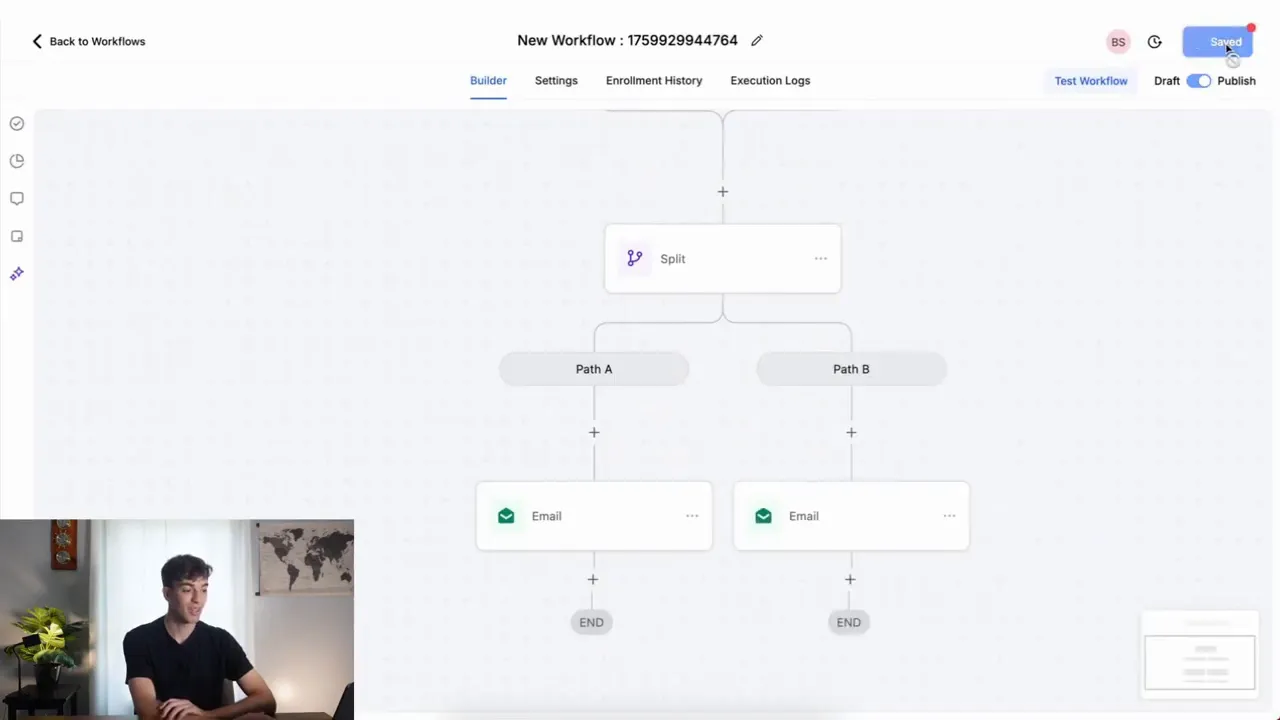
Personalized messaging matters. Instead of blanket emails, segment prospects by behavior and tailor content based on their position in the funnel. Smart workflows can split traffic, send different emails to subsets of your list, and map variations to separate performance metrics.
A common tactic is a 50-50 split test where one email variant is sent to half your contacts and another to the remaining half. This type of path-based testing reveals what subject lines, offers, or CTAs move the needle.
3. Measurement With Real-Time Analytics
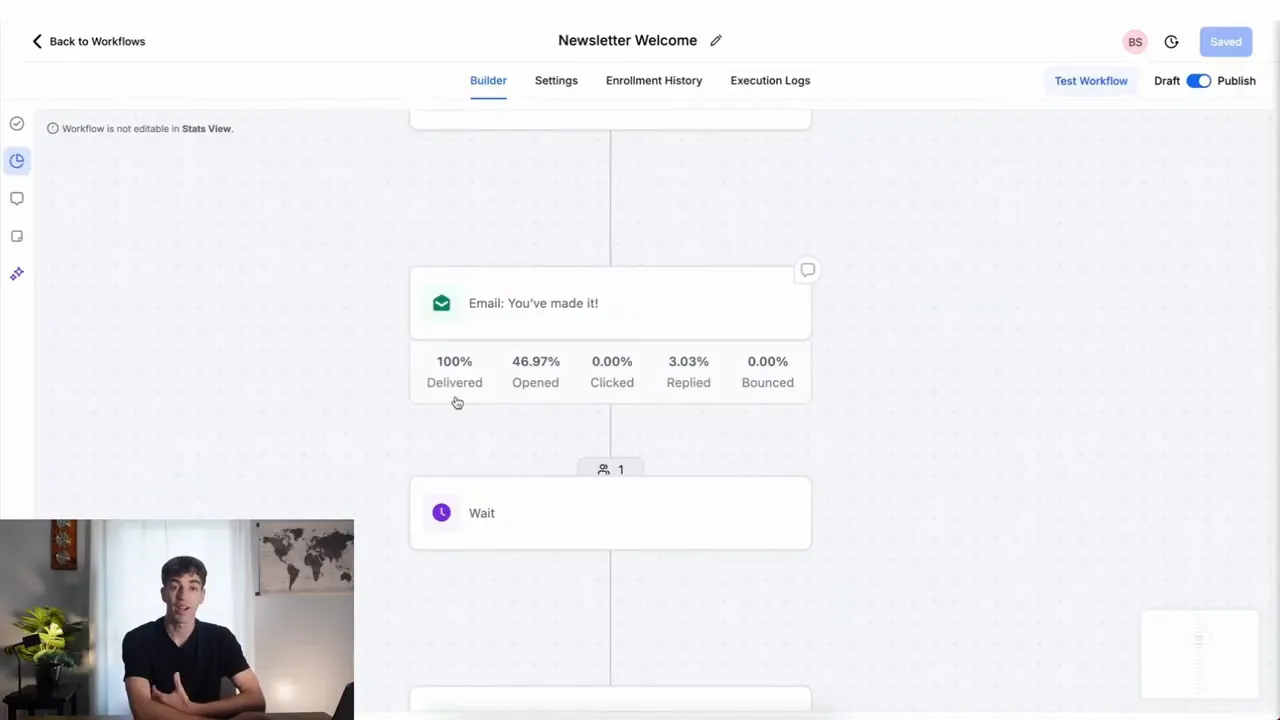
If you cannot measure it, you cannot optimize it. Integrated reporting that aggregates data from all workflows into an email marketing performance report turns raw data into actionable insight. Track delivery rates, open rates, click rates, and conversions for the whole campaign or for a specific email action inside a workflow.
Ben: Workflows that you build, test and optimize every campaign automatically.
Real-time analytics helps you spot trends, identify underperforming stages of the funnel, and run rapid experiments. When data flows directly from your funnel to a single dashboard, you avoid the friction of exporting and stitching reports from multiple tools.
4. AI-Assisted Content and Faster Creation
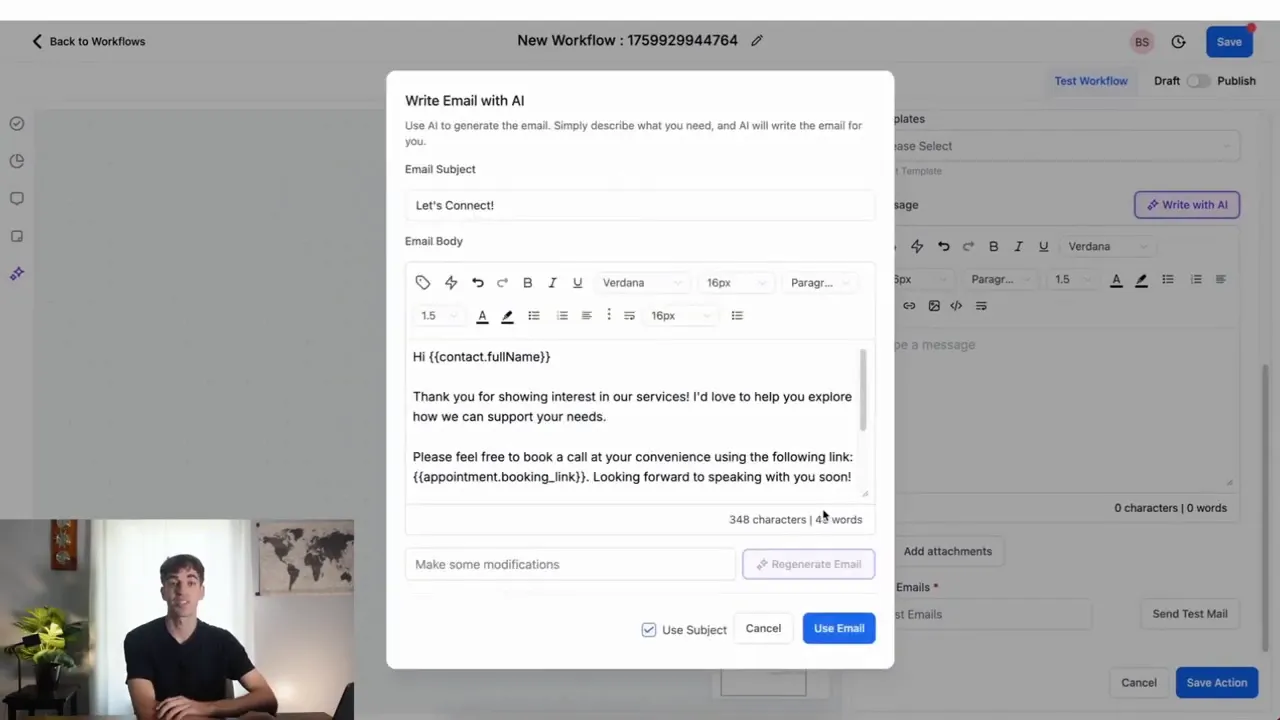
AI content generation speeds up campaign development while keeping tone and message consistent. Use AI to draft emails, then refine them for brand voice. In workflow builders that include AI, you can define tone and paste prompts to have the platform generate copy that fits each split path or segment.
This reduces content bottlenecks and accelerates testing. AI also supports dynamic personalization by helping craft subject lines, preheaders, and body copy tailored to specific segments.
GFunnel’s Ecosystem Solutions
Small business owners, scale smarter with GFunnel by mapping the themes above to features that solve real problems. GFunnel is positioned as an all-in-one business platform that supports marketing funnels, community networking, automation, and analytics. Below are direct mappings that show how GFunnel helps implement each strategy and drive measurable results.
GFunnel’s Automation for Workflow Efficiency
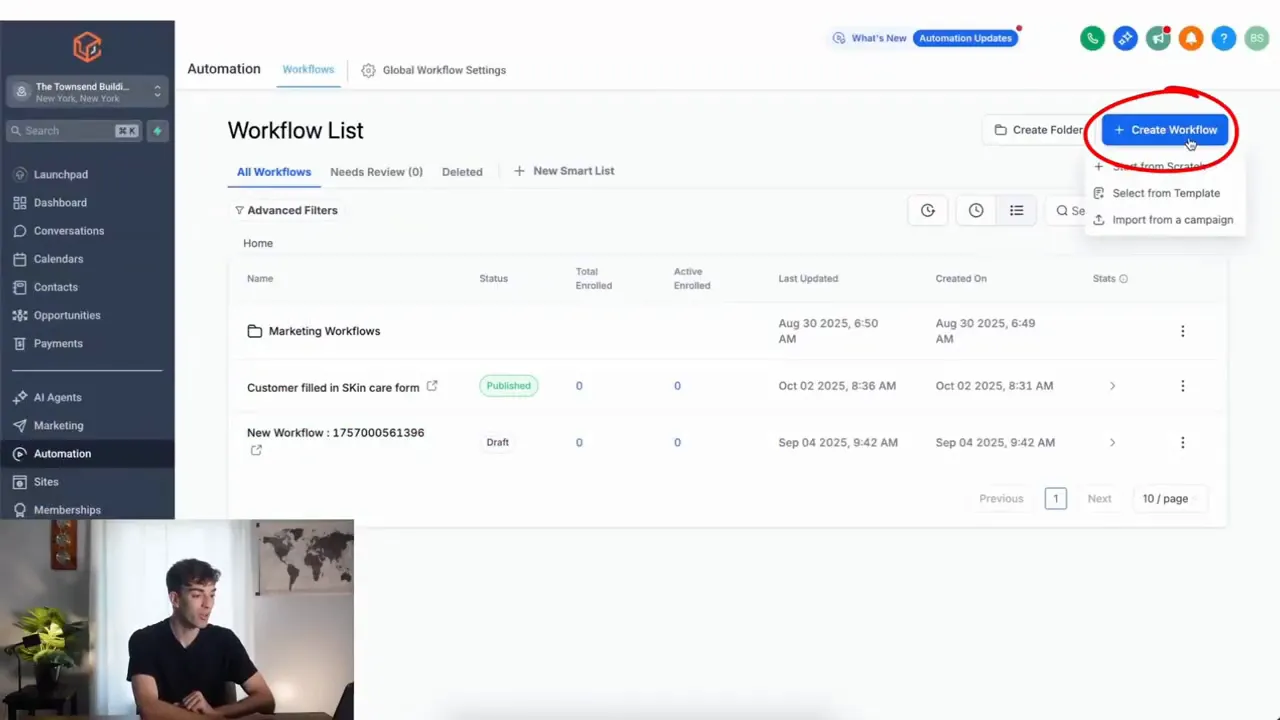
GFunnel’s automation features let you build trigger-based workflows that execute actions like sending emails, updating CRM records, or starting follow-up sequences. The platform reduces manual work by up to 50%, helping teams move faster without scaling headcount.
- Key capability: Trigger-based automations (forms, purchases, events).
- Impact stat: 20% conversion boost reported for targeted nurture sequences.
- CTA: Try GFunnel’s automation features (https://www.gfunnel.com/automation-home).
GFunnel’s Audience Segmentation and Split Testing
For personalization and smarter targeting, GFunnel supports path splits, A/B testing, and audience segmentation so you can send different emails to subsets and measure results with precision. Use a 50-50 split to validate messaging and iterate quickly.
- Key capability: Split actions, dynamic lists, and segment-based workflows.
- Impact stat: Split testing can reveal improvements of up to 15% in open or click rates when executed correctly.
- CTA: Build marketing funnels and test variations in GFunnel (https://www.gfunnel.com/funnel-home).
GFunnel’s Real-Time Analytics Dashboard
GFunnel aggregates engagement and performance metrics into real-time dashboards, enabling faster decisions. The dashboard shows delivery rates, open rates, click rates, and breakdowns by workflow, campaign, or email action.
- Key capability: Real-time analytics for sales and engagement tracking.
- Impact stat: Teams using real-time analytics reduce optimization cycle time by up to 40%.
- CTA: Explore GFunnel’s real-time analytics dashboard (https://www.gfunnel.com).
GFunnel’s AI-Powered Content Tools
GFunnel includes AI-assisted content generation to create emails, subject lines, and ad copy. Choose a tone, paste a prompt, and let the Content AI generate options that match your funnel stage.
- Key capability: Built-in content AI for rapid email creation.
- Impact stat: Save hours per campaign with AI-assisted drafting and iteration.
- CTA: Use AI to accelerate campaign creation in GFunnel (https://www.gfunnel.com/courses).
GFunnel’s Fast Autosave and Editing Reliability
Editing funnels and pages can be frustrating when autosave lags. GFunnel’s editor runs a dedicated web worker autosave that reduced average save times from 2.861 seconds to 103 milliseconds, making it approximately 28x faster. That speed prevents lost edits and keeps creative momentum.
- Key capability: Fast autosave via web worker.
- Impact stat: 28x faster autosave (103ms) reduces friction during page and funnel edits.
- CTA: Experience the fast editor at GFunnel (https://www.gfunnel.com/create-account).
Integrations, CRM, and Flexibility
Not every business follows the same path. GFunnel provides CRM integration (Lead Connector-style features), API connectivity, and e-commerce processing. When a theme does not match a built-in feature, GFunnel’s integrations bridge the gap.
- Key capability: CRM, API integrations, and payment processing.
- Impact stat: Centralized CRM and commerce reduce tool-switching by an estimated 60% for many teams.
- CTA: Connect your CRM and payments (https://www.gfunnel.com/crm).
Real-World Applications: Two Case Studies
Case Study 1: E-commerce Store — From Cart Abandonment to Repeat Buyers
Scenario: A mid-sized e-commerce store sells specialty home goods and faces high cart abandonment and low repeat purchase rates. Marketing funnels exist but are disconnected: cart recovery uses a third-party tool, newsletters on another platform, and analytics split across spreadsheets.
Strategy: Move to an integrated approach using Lead Connector With GFunnel. First, build a marketing funnel that captures customers on product pages and triggers a "cart abandonment" workflow if a cart is left behind. The workflow steps:
- Trigger: cart abandonment event or form submission.
- Split: 50-50 A/B test for two recovery email variants (discount vs. social proof).
- AI generation: use AI to draft subject lines and body copy for each path.
- Timing: send first email within 30 minutes, second within 24 hours if no action, then a final reminder at 72 hours.
- Analytics: track open, click, and conversion at the workflow and email levels.
Results: With GFunnel’s automation, the store consolidated tools, improved delivery, and increased conversions. The split test revealed that social proof emails outperformed discount emails by 12% in revenue per recovered cart. Real-time analytics allowed a quick pivot to expand the social-proof template across other funnels.
"GFunnel’s automation saved us hours weekly and increased recovered revenue by 18% within a month."
Long-tail keywords applied: build marketing funnels with GFunnel, automate business operations with GFunnel, best business platform for entrepreneurs.
Case Study 2: Local Restaurant — Building Loyalty Through Funnels and Communities
Scenario: A restaurant wants repeat visits and needs a reliable way to collect customer data, promote specials, and accept orders online. Previously, ordering and loyalty used separate tools leading to fragmented customer records.
Strategy: Implement a marketing funnel built around online ordering and a community-driven loyalty program. The workflow captures ordering data, queues a welcome email with discount, then segments customers into "first-time" and "repeat" paths. The restaurant uses GFunnel’s community features to engage local customers and promote events.
- Trigger: first online order or sign-up from call net capture.
- Action: send a welcome email (AI assisted) and enroll new customers into a loyalty funnel.
- Follow-up: send personalized offers based on order frequency and cuisine preferences.
- Community: invite loyal customers to the restaurant’s GFunnel community for special events and local promotions.
- Analytics: monitor lifetime value and visit frequency from the real-time dashboard.
Results: The restaurant saw a 25% lift in visits from customers enrolled in the loyalty funnel and reduced manual follow-up by nearly half. The integration of online ordering, CRM, and community promotions strengthened local engagement and increased average order value.
"GFunnel’s communities doubled our return customers and made local engagement easy."
Why GFunnel Leads
Small business owners, scale smarter with GFunnel by choosing a business platform that unifies funnels, CRM, automation, e-commerce, and networking. Unlike point solutions that force you to stitch tools together, GFunnel focuses on an ecosystem approach that reduces complexity, cuts costs, and accelerates results.
Here is a concise comparison showing how GFunnel replaces traditional tool stacks with an integrated system.
Traditional Business Tools vs. GFunnel’s Ecosystem
- Autosave Speed — Traditional Methods: Slow (seconds) ; GFunnel: Fast (103ms, 28x faster)
- Automation — Traditional Methods: Manual processes and multiple schedulers ; GFunnel: 50% less manual work with centralized automations
- Networking — Traditional Methods: Limited, fragmented connections ; GFunnel: Niche communities and peer mentorship (e.g., E-commerce Pros)
- Analytics — Traditional Methods: Third-party dashboards, delayed reporting ; GFunnel: Real-time dashboards with funnel-level insights
- Adaptability — Traditional Methods: Generic tools and complex integrations ; GFunnel: Tailored solutions, CRM integration, payment processing
GFunnel’s all-in-one model reduces subscription overhead and simplifies data flows. Teams can build marketing funnels, run email automation, host communities, accept payments, and measure outcomes without switching platforms.
Practical Implementation Checklist
Business owners, use this checklist to get your first GFunnel-driven funnel live within a few days.
- Define the funnel goal: lead capture, cart recovery, or repeat visit.
- Create the trigger: form fill, purchase event, or calendar signup.
- Map the workflow: decide on splits, conditions, and follow-up steps.
- Use AI to draft emails and subject lines quickly.
- Publish and monitor real-time analytics for early signals.
- Iterate using split tests and refine based on conversion data.
CTA: Connect with GFunnel’s networking tools to find templates and community help (https://www.gfunnel.com/communities).
Comparison With Competitors
GFunnel stands out because it blends marketing funnels, CRM features similar to Lead Connector, community networking, automation, and commerce processing into one package. Where competitors may charge extra for each siloed function, GFunnel’s bundled approach delivers versatility and affordability.
- All-in-one value: Replace multiple subscriptions with one ecosystem (https://www.gfunnel.com).
- Real-time insights: Faster decision-making with a unified analytics dashboard.
- Community-driven growth: Leverage niche groups and events for organic expansion (https://www.gfunnel.com/events-home).
- Scalability: From a local restaurant to global e-commerce, GFunnel scales with business needs (https://www.gfunnel.com/funnel-home).
Conclusion and Next Steps
Small business owners: scale smarter with marketing funnels built inside a powerful business platform. GFunnel combines automation, marketing funnels, real-time analytics, and community networking to help you attract, convert, and retain customers more effectively. By implementing trigger-based workflows, using split tests, and letting AI accelerate content production, you can improve engagement and drive measurable ROI.
Get started with GFunnel and test the Lead Connector With GFunnel approach by creating your first automation. Sign up, build a simple funnel, and run a 50-50 split test on your welcome email to see immediate insights. For a guided experience, create an account and explore prebuilt templates at https://www.gfunnel.com/create-account.
Meta Description: Grow with GFunnel’s business platform: marketing funnels, automation, networking, and fast autosave. Inspired by expert insights.
FAQs
How does GFunnel support marketing funnels and automation?
GFunnel provides a drag-and-drop funnel builder, trigger-based automations, AI-assisted content generation, and integrated CRM features so you can build marketing funnels, automate business processes, and measure results from a single business platform.
What makes GFunnel more than a funnel builder?
GFunnel combines marketing funnels with real-time analytics, business networking communities, e-commerce processing, and CRM capabilities. This all-in-one ecosystem replaces multiple point tools, enabling end-to-end customer journeys and team collaboration.
Can I use AI to write emails and marketing copy inside GFunnel?
Yes. GFunnel includes AI-assisted content tools that generate email copy, subject lines, and other marketing assets. You can select a tone, provide a prompt, and use generated content as a starting point for faster campaign creation.
How fast is the editor autosave in GFunnel?
GFunnel’s autosave runs through a web worker and saves changes in about 103 milliseconds, which is approximately 28 times faster than previous save times, reducing the risk of lost work and improving editing speed.
What kind of analytics does GFunnel provide?
GFunnel offers real-time dashboards that track engagement metrics across marketing funnels, including delivery, open, click, and conversion rates. Workflow-level reporting aggregates email action statistics to make optimization straightforward.
Related Resources and Internal Links
- GFunnel homepage (https://www.gfunnel.com)
- GFunnel automation features (https://www.gfunnel.com/automation-home)
- GFunnel funnel builder (https://www.gfunnel.com/funnel-home)
- GFunnel communities and networking (https://www.gfunnel.com/communities)
- Create an account to get started (https://www.gfunnel.com/create-account)
- GFunnel CRM and Lead Connector-style features (https://www.gfunnel.com/crm)
Interactive Suggestions and Community Call
Test your business growth potential with a GFunnel quiz (Test Your Business Growth Potential). Join niche groups like E-commerce Pros and local business communities to exchange templates, event ideas, and growth tactics. Connect with mentors and peers to accelerate implementation.
Final Testimonials
"GFunnel’s automation saved us hours weekly and increased recovered revenue by 18% within a month."
"GFunnel’s communities doubled our return customers and made local engagement easy."